


How to bind data source in bootstrap table


Using bootstrap table data binding
1. Recently I have been using bootstrap table, a front-end framework, for projects. The following is some summary of using bootstrap table
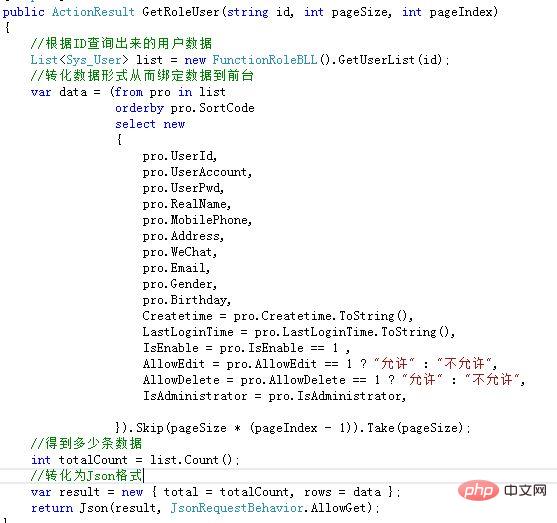
This is done using MVC in .Net:
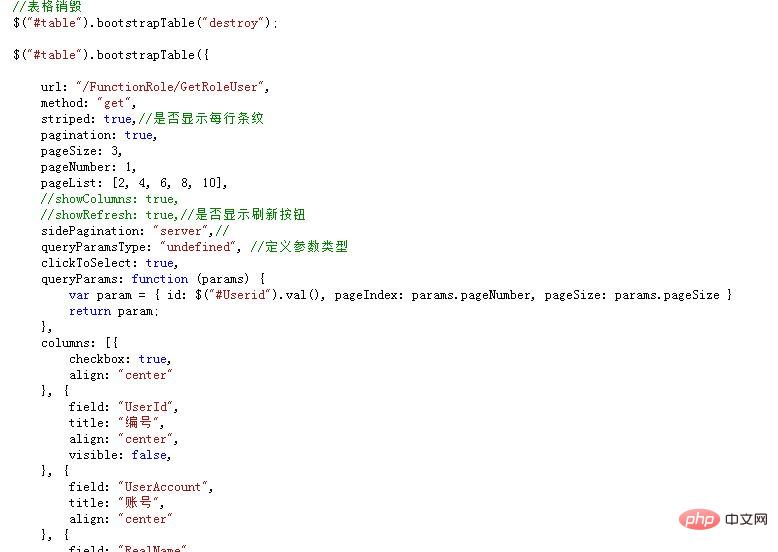
2. This is the basic boostrap table architecture, the following
【 queryParams:function (params){ } 】 is to pass the difference to the background;
bootstrap introductory tutorial 》
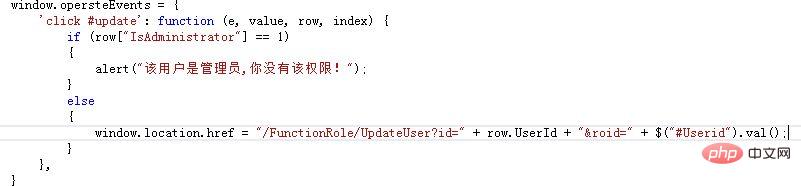
3. If you want to add buttons and some label elements after each piece of data in the table: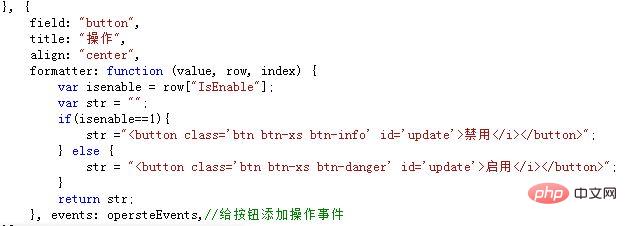
The above is the detailed content of How to bind data source in bootstrap table. For more information, please follow other related articles on the PHP Chinese website!

Hot AI Tools

Undress AI Tool
Undress images for free

AI Clothes Remover
Online AI tool for removing clothes from photos.

Undresser.AI Undress
AI-powered app for creating realistic nude photos

ArtGPT
AI image generator for creative art from text prompts.

Stock Market GPT
AI powered investment research for smarter decisions

Hot Article
Popular tool

Notepad++7.3.1
Easy-to-use and free code editor

SublimeText3 Chinese version
Chinese version, very easy to use

Zend Studio 13.0.1
Powerful PHP integrated development environment

Dreamweaver CS6
Visual web development tools

SublimeText3 Mac version
God-level code editing software (SublimeText3)
Hot Topics
 20518
20518
 7
13631
4
7
13631
4

 Power BI cannot connect, an error was encountered while trying to connect
Feb 18, 2024 pm 05:48 PM
Power BI cannot connect, an error was encountered while trying to connect
Feb 18, 2024 pm 05:48 PM
PowerBI may encounter difficulties when it cannot connect to a data source that is an XLS, SQL, or Excel file. This article will explore possible solutions to help you resolve this issue. This article will guide you on what to do if you encounter errors or connection failures during the connection process. So, if you are facing this problem, keep reading and we will provide you with some useful suggestions. What is the gateway connection error in PowerBI? Gateway errors in PowerBI are often caused by a mismatch between the data source information and the underlying dataset. To solve this problem, you need to ensure that the data source defined on the local data gateway is accurate and consistent with the data source specified in PowerBI desktop. PowerBI cannot connect
 Can two WeChat accounts be bound to the same bank card?
Aug 25, 2023 pm 03:13 PM
Can two WeChat accounts be bound to the same bank card?
Aug 25, 2023 pm 03:13 PM
Two WeChat accounts cannot be bound to the same bank card. Bind a bank card to a WeChat account: 1. Open the WeChat application, click the "Me" option, and then select the "Pay" option; 2. Select the "Add Bank Card" option and enter the bank card information as prompted; 3. Once the bank card is successfully bound, users can use the bank card to make payments and transfers in WeChat.
 How to bind a sub-account on Xiaohongshu? How does it check whether the account is normal?
Mar 21, 2024 pm 10:11 PM
How to bind a sub-account on Xiaohongshu? How does it check whether the account is normal?
Mar 21, 2024 pm 10:11 PM
In today's era of information explosion, the construction of personal brand and corporate image has become increasingly important. As the leading fashion life sharing platform in China, Xiaohongshu has attracted a large number of user attention and participation. For those users who want to expand their influence and improve the efficiency of content dissemination, binding sub-accounts has become an effective means. So, how does Xiaohongshu bind a sub-account? How to check whether the account is normal? This article will answer these questions for you in detail. 1. How to bind a sub-account on Xiaohongshu? 1. Log in to your main account: First, you need to log in to your Xiaohongshu main account. 2. Open the settings menu: click "Me" in the upper right corner, and then select "Settings". 3. Enter account management: In the settings menu, find the "Account Management" or "Account Assistant" option and click
 BTCC tutorial: How to bind and use MetaMask wallet on BTCC exchange?
Apr 26, 2024 am 09:40 AM
BTCC tutorial: How to bind and use MetaMask wallet on BTCC exchange?
Apr 26, 2024 am 09:40 AM
MetaMask (also called Little Fox Wallet in Chinese) is a free and well-received encryption wallet software. Currently, BTCC supports binding to the MetaMask wallet. After binding, you can use the MetaMask wallet to quickly log in, store value, buy coins, etc., and you can also get 20 USDT trial bonus for the first time binding. In the BTCCMetaMask wallet tutorial, we will introduce in detail how to register and use MetaMask, and how to bind and use the Little Fox wallet in BTCC. What is MetaMask wallet? With over 30 million users, MetaMask Little Fox Wallet is one of the most popular cryptocurrency wallets today. It is free to use and can be installed on the network as an extension
 How to implement editable tables in Vue
Nov 08, 2023 pm 12:51 PM
How to implement editable tables in Vue
Nov 08, 2023 pm 12:51 PM
Tables are an essential component in many web applications. Tables usually have large amounts of data, so tables require some specific features to improve user experience. One of the important features is editability. In this article, we will explore how to implement editable tables using Vue.js and provide specific code examples. Step 1: Prepare the data First, we need to prepare the data for the table. We can use a JSON object to store the table's data and store it in the data property of the Vue instance. In this case
 How to bind the Cainiao app to Pinduoduo? How to add the Cainiao Wrap to Pinduoduo platform?
Mar 19, 2024 pm 02:30 PM
How to bind the Cainiao app to Pinduoduo? How to add the Cainiao Wrap to Pinduoduo platform?
Mar 19, 2024 pm 02:30 PM
The Cainiao app is a platform that can provide you with various logistics information. The functions here are very powerful and easy to use. If you have any logistics-related problems, they can be solved here. Anyway, it can bring you a The one-stop service can solve everything in time. Checking the express delivery, picking up the express delivery, sending the express delivery, etc. are all without any problems. We have cooperated with various platforms and all the information can be queried. However, sometimes It will happen that the goods purchased on Pinduoduo cannot display the logistics information. In fact, you need to manually bind Pinduoduo to achieve this. The specific methods have been sorted out below, and everyone can take a look. . How to bind Cainiao to Pinduoduo account: 1. Open Cainiao APP and go to the main page
 Steps and methods to bind Douyin in Toutiao
Mar 22, 2024 pm 05:56 PM
Steps and methods to bind Douyin in Toutiao
Mar 22, 2024 pm 05:56 PM
1. Open Toutiao. 2. Click My in the lower right corner. 3. Click [System Settings]. 4. Click [Account and Privacy Settings]. 5. Click the button on the right side of [Douyin] to bind Douyin.
 How to bind the Cainiao APP to Pinduoduo How to bind the Cainiao APP to Pinduoduo
Mar 19, 2024 pm 05:16 PM
How to bind the Cainiao APP to Pinduoduo How to bind the Cainiao APP to Pinduoduo
Mar 19, 2024 pm 05:16 PM
Do you know how to bind Pinduoduo when using Cainiao Wrap? The official version of Cainiao Wrap App does not automatically synchronize some Pinduoduo’s logistics information on this platform. All we need to do is You can copy the order number or check your mobile phone to see if there is any express delivery information. Of course, these all need to be completed manually. If you want to know more, come and take a look with the editor. How to bind the Cainiao APP to Pinduoduo 1. Open the Cainiao APP and click "Package Guide" in the upper left corner of the main page. 2. In the interface, there are many shopping websites, and accounts can be bound. 3. Click to import other e-commerce platforms. 4. User authorization: Click Pinduoduo to go to the interface
