


How to run python on notepad++

The content of this article is about how to run python on notepad. It has certain reference value. Friends in need can refer to it. I hope it will be helpful to you.
1. First make sure the python interpreter is installed on the windows computer
2. Open notepad and write an arbitrary python program
Set the language: Notepad ->"language" Menu->"P" button->"python
#!/usr/bin/python3print("Hello, World!")
3. Set up the running environment
a."RUN"->"RUN.."
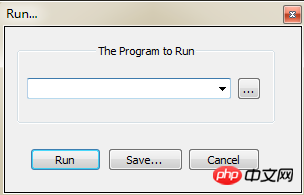
Add in the padding: cmd /k D:\"Program Files (x86)"\python\python.exe "$(FULL_CURRENT_PATH)" & ECHO. & PAUSE & EXIT
D:\Program Files (x86)\python\python.exe is the directory where python is installed. Because there are spaces in Program Files (x86), it must be enclosed in "", otherwise an error will be reported during execution
b. After setting up, you can "save..." to set the run shortcut key for future use.
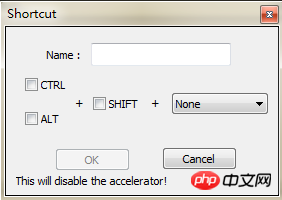
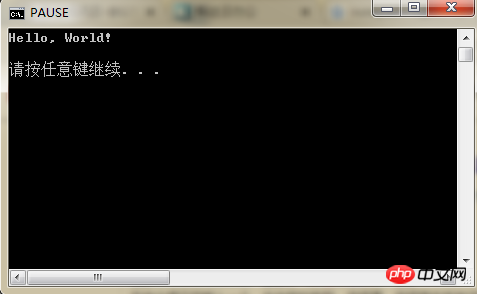
4. Run the program
Return to the following The interface is now configured
The above is the detailed content of How to run python on notepad++. For more information, please follow other related articles on the PHP Chinese website!

Hot AI Tools

Undress AI Tool
Undress images for free

AI Clothes Remover
Online AI tool for removing clothes from photos.

Undresser.AI Undress
AI-powered app for creating realistic nude photos

ArtGPT
AI image generator for creative art from text prompts.

Stock Market GPT
AI powered investment research for smarter decisions

Hot Article
Popular tool

Notepad++7.3.1
Easy-to-use and free code editor

SublimeText3 Chinese version
Chinese version, very easy to use

Zend Studio 13.0.1
Powerful PHP integrated development environment

Dreamweaver CS6
Visual web development tools

SublimeText3 Mac version
God-level code editing software (SublimeText3)
Hot Topics
 20570
20570
 7
13669
4
7
13669
4