


 Development Tools
notepad
Detailed introduction to optional character encodings in Windows Notepad
Development Tools
notepad
Detailed introduction to optional character encodings in Windows Notepad
Detailed introduction to optional character encodings in Windows Notepad

This article brings you a detailed introduction to the optional character encoding in Windows Notepad. It has certain reference value. Friends in need can refer to it. I hope it will be helpful to you.
What do the encoding options for saving files in Windows Notepad (Notepad) mean...
This article will simply test the behavior of Windows Notepad.
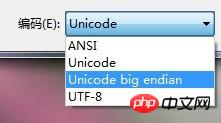
Windows Notepad encoding includes ANSI, Unicode, Unicode big endian and UTF-8.
WARNING
This article only explains the technical facts of a widely used software and does not mean that the author supports or opposes the use of the software.
In fact the author recommends never using Windows Notepad to work with computer program code at any time.
This article is only verified on a certain instance of the Simplified Chinese version of 64-bit Windows 7 and is for reference only. There is no guarantee that consistent results can be reproduced on other identical or dissimilar systems.
Note
This article strictly distinguishes between Unicode's encoding and byte serialization.
Unicode's Encoding only refers to the work of using numbers (usually written as hexadecimal numbers) to represent characters one-to-one. The range of this number is restricted only by the Unicode standard and has nothing to do with computers.
Unicode's Byte serialization refers to the work of representing a number within the Unicode standard range into N bytes in order to be able to be written into computer memory.
Test case
The test case is: "锟斤拷[line break]a[line break]". (Kun Jin Kao is a belief.)
The GBK and Unicode encodings of all characters are:
锟GBK=
EFBFUnicode=U 951FGBK=
BDEFUnicode=U 65A4CopyGBK=
BFBDUnicode=U 62F7
The GBK and Unicode encodings of the following ASCII characters are consistent with ASCII:
a=0x61 CR=0x0D LF=0x0A
(One newline character in Windows occupies two characters: CR LF)
ANSI
Under the Simplified Chinese system, ANSI is the GBK encoding defined by the national standard of the People's Republic of China.
The result of Windows Notepad using ANSI to store this file is as follows:
EF BF  BD EF  BF BD  0D  0A  61  0D  0A
-----  -----  -----  --  --  --  --  --
Simply use GBK encoding to store all characters. A single byte with the highest bit not being 1 and equivalent to ASCII, otherwise a double byte.
We should pay attention to the issue of byte order (Endian) here[Note A]. You can see that the byte order here is big-endian.
But there is no need to specifically emphasize "GBK with big endian first" - because starting from GB2312, the standard stipulates that the storage method is big endian first[Note B]. Later GBK is backward compatible with GB18030-2000.
The trouble with ANSI is that it depends on the system - ANSI of other language systems is not GBK, and files opened in GBK will inevitably be garbled. And the character set of GBK itself is too small.
(Never say "I only use Chinese" - without the symbols of Unicode, the emojis on the Internet cannot be typed)
Unicode Series
What Windows Notepad said "Unicode", "Unicode big endian" and UTF-8 are all different byte serialization storage methods of the same Unicodeencoding.
UTF-16 and BOM
Unicode here refers to UTF-16[Note C]. UTF-16 is an extremely simple and crude serialization method - most Unicode characters are in the range of U 0000 ~ U FFFF [Note D], then each character uses two bytes , write the original value of Unicode encoding to disk.
Note that ASCII characters must also waste twice the space to store the upper 8 bits of 0x00 - because if the upper 8 bits of 0 are omitted, there will be no other basis for hyphenation during parsing.
For UTF-16, there is a big-endian and little-endian problem - UTF-16 does not specify whether the byte is big-endian or little-endian first. But UTF-16 does not contain information indicating byte order. You can't manually check which parsing is not garbled...
The solution provided by Unicode is to convert a zero-width unbreakable After the character space character (U FEFF ZERO WIDTH NO-BREAK SPACE) is serialized in UTF-16, it is stuffed at the front of the file. In this way, the UTF-16 parser reads the first two bytes of the file. If it is FE FF, it means big end first, and FF FE means little end first.
This stuffed thing is called BOM (Byte Order Mark, byte order mark).
It is worth mentioning that Zero-width non-hyphenation space character is also often used as a valid character to break the word limit in various situations. Includes SegmentFault's Q&A and comments.
"Unicode" and "Unicode big endian" in Notepad
Writing "Unicode" alone is not a complete expression of a storage method at all. Because this only contains encoding and not byte serialization.
M$ I’m not surprised at all that this kind of error occurs. Just memorize the conclusion: The "Unicode" of Windows Notepad is UTF-16.
Windows Notepad使用“Unicode” = 小端在先的UTF-16,存储这个文件的结果如下:
 FF FE 1F 95 A4 65 F7 62 0D 00 0A 00 61 00 0D 00 0A 00
 -BOM- ----- ----- ----- ----- ----- ----- ----- -----
U+FEFF  951F  65A4  62F7  000D  000A  0061  000D  000A <p>Windows Notepad使用<strong>“Unicode big endian” = 大端在先的UTF-16</strong>,存储这个文件的结果如下:</p><pre class="brush:php;toolbar:false"> FE FF 95 1F 65 A4 62 F7 00 0D 00 0A 00 61 00 0D 00 0A
 -BOM- ----- ----- ----- ----- ----- ----- ----- -----
U+FEFF  951F  65A4  62F7  000D  000A  0061  000D  000A <h3>UTF-8</h3><p>UTF-8是一种用1~4个字节表示1个Unicode字符的<strong>变长的</strong>字节序列化方法。具体的实现细节看这篇文章。UTF-8的好处在于:</p><ol class=" list-paddingleft-2">
<li><p>无论是IETF的推荐,还是实际业界的执行,UTF-8都是互联网的标准。</p></li>
<li><p>向下兼容,ASCII字符UTF-8序列化后仍是原样,任何ASCII文件也是有效的UTF-8文件。</p></li>
<li><p>没有字节序问题。UTF-8的字节序是由RFC3629定死的。</p></li>
</ol><p>Windows Notepad使用UTF-8存储这个文件的结果如下:</p><pre class="brush:php;toolbar:false"> EF BB BF  E9 94 9F  E6 96 A4  E6 8B B7  0D   0A   61   0D   0A
 --BOM---  --------  --------  --------  --   --   --   --   --
U+ FEFF      951F      65A4      62F7   000D 000A 0061 000D 000A <p>注意UTF-8前边仍然塞进去了<code>U+FEFF</code>按照UTF-8序列化的结果<code>EF BB BF</code>,作为前边提到过的<strong>BOM</strong>字节顺序标记。<strong>Windows Notepad存储的UTF-8,是带有BOM标记的UTF-8</strong>。</p><p>但是如果仅仅对于UTF-8而言,字节序是没有意义的。因为UTF-8的字节序被规范写死,<code>U+FEFF</code>编码后必然得到<code>EF BB FF</code>,得不出其他的。没有二义性,BOM就失去了原本的意义。也许只有区别UTF-8文件和UTF-16文件的用处……</p><p>如何对待UTF-8文件的BOM,RFC3629的第6章有详细的规定,不加详述。</p><p>值得一提的是,BOM我想很多PHP程序员都经历过并且恨之入骨——PHP不认识文件中的BOM头并会将其作为HTTP Response的正文送出。这甚至在无缓冲的情况下,会导致<code>header()</code>等必须在Response开始前执行的函数直接失效。</p><p>所以PHP程序员总是会喜欢<strong>UTF-8 without BOM</strong>的编码方式——这基本也就宣布了Windows下的PHP开发,Windows Notepad完全的淘汰出局,哪怕是任何一星半点代码的临时修改。</p><h2>番外:Notepad++的字符编码测试</h2><p>ANSI没有区别,但Notepad++支持选择多国编码的不同ANSI编码方式(类似浏览器里选编码),可以轻松生成或读取Shift-JIS等其他字符集的文件。适合用于对付日文老游戏的<code>README</code>等文档。</p><p>UCS-2 Big Endian、UCS-2 Little Endian和前边UTF-16的两个例子一致。注意UTF-16的文件不提供“无BOM”的存储方法(提供了就坏了)。</p><p>UTF-8仍然代表“带有BOM标记的UTF-8”。但同时提供PHP程序员最爱的UTF-8 without BOM,就像:</p><pre class="brush:php;toolbar:false"> E9 94 9F  E6 96 A4  E6 8B B7  0D   0A   61   0D   0A
 --------  --------  --------  --   --   --   --   --
U+ 951F      65A4      62F7   000D 000A 0061 000D 000A <p>Simple and clean.</p><p>注解<br>[注A] 对于一个双(多)字节的数,一定会按8位截断为1字节后写盘。那么写盘时先写最低8位还是先写最高8位,就是所谓的“字节序”(Endian)问题。例如,数0x01020304写盘时,是先写最低8位的04 03 02 01,还是先写最高8位的01 02 03 04?<br>
  先写低8位的叫做小端在先(little-endian),先写高8位的叫做大端在先(big-endian)。实际采用何种字节序受系统环境、标准规范和软件实际编写的多方面控制,不一概而论。<br>[注B] 字节序如果我没弄错,是GB2312采用的EUC字符编码方法控制的。<br>[注C] 本文并不严格区分UTF-16与UCS-2。<br>[注D] Unicode的最大值实际上达到了U+10FFFF,超出了两个字节能够存储的限度。<br>
  但Unicode由于历史原因,留下了U+D800~U+DFFF这一段永久保留不用的空缺区域。<br>
  因此对U+10000及以上的字符,UTF-16借助了这部分空缺区域,对这些编码超大的字符打破2字节16位的惯例,特别的用4字节32位去表示之。<br>
  这一部分编码值太大的字符,超出了GBK的字符集范围,因此本文将完全忽略。如有机会再进一步测试。</p><p class="comments-box-content"></p>
The above is the detailed content of Detailed introduction to optional character encodings in Windows Notepad. For more information, please follow other related articles on the PHP Chinese website!

Hot AI Tools

Undress AI Tool
Undress images for free

AI Clothes Remover
Online AI tool for removing clothes from photos.

Undresser.AI Undress
AI-powered app for creating realistic nude photos

ArtGPT
AI image generator for creative art from text prompts.

Stock Market GPT
AI powered investment research for smarter decisions

Hot Article
Popular tool

Notepad++7.3.1
Easy-to-use and free code editor

SublimeText3 Chinese version
Chinese version, very easy to use

Zend Studio 13.0.1
Powerful PHP integrated development environment

Dreamweaver CS6
Visual web development tools

SublimeText3 Mac version
God-level code editing software (SublimeText3)
Hot Topics
 20570
20570
 7
13669
4
7
13669
4

![How to enable developer mode in Win11 [Tips] Essential for installing third-party applications in Win11](https://img.php.cn/upload/article/202602/09/2026020907212821802.jpg) How to enable developer mode in Win11 [Tips] Essential for installing third-party applications in Win11
Feb 09, 2026 am 07:21 AM
How to enable developer mode in Win11 [Tips] Essential for installing third-party applications in Win11
Feb 09, 2026 am 07:21 AM
Enabling developer mode can solve the problem of Windows 11 being unable to install UWP applications from non-Microsoft Store sources. The methods include: 1. Setting the graphical interface to enable; 2. Windows search quick jump; 3. Group Policy Editor (Professional Edition and above); 4. Registry Editor (compatible with Home Edition); 5. One-click activation of PowerShell commands.
![How to turn off automatic recognition of handwriting input in Win11 [Method] Disable text conversion with handwriting pad in Win11](https://img.php.cn/upload/article/202602/09/2026020908340753920.jpg) How to turn off automatic recognition of handwriting input in Win11 [Method] Disable text conversion with handwriting pad in Win11
Feb 09, 2026 am 08:34 AM
How to turn off automatic recognition of handwriting input in Win11 [Method] Disable text conversion with handwriting pad in Win11
Feb 09, 2026 am 08:34 AM
There are five ways to disable the handwriting-to-text function in Windows 11: 1. Turn off "Write with Finger" and handwriting pad-related switches; 2. Disable the TouchKeyboard and HandwritingPanel service; 3. Set PenWorkspaceDisabled and EnableSmartSend through the registry; 4. Disable the Windows Ink workspace through group policy; 5. Disable the HID pen input device driver.
![How to modify the default Bluetooth transmission location in Win11 and customize the saving path of received files in Win11 [Tip]](https://img.php.cn/upload/article/202602/09/2026020907390873918.jpg) How to modify the default Bluetooth transmission location in Win11 and customize the saving path of received files in Win11 [Tip]
Feb 09, 2026 am 07:39 AM
How to modify the default Bluetooth transmission location in Win11 and customize the saving path of received files in Win11 [Tip]
Feb 09, 2026 am 07:39 AM
The default saving path of Windows 11 Bluetooth received files can be modified through four methods: 1. Click "Browse" when receiving to temporarily specify; 2. Modify the registry {374DE290-123F-4565-9164-39C4925E467B} value to permanently change it; 3. Group Policy redirects the "Downloads" folder (Professional version); 4. Use mklink to create a symbolic link mapping path.
 How to import SQL files in mysql_mysql SQL file import method
Feb 09, 2026 pm 05:24 PM
How to import SQL files in mysql_mysql SQL file import method
Feb 09, 2026 pm 05:24 PM
The most common and reliable way to import SQL files into MySQL is the command line tool mysql, which supports cross-platform, high efficiency and stability, and is suitable for files of all sizes. It can also be executed in the client through the source command, or using graphical tools such as phpMyAdmin and MySQL Workbench.
 How to choose the version when installing mysql_mysql version selection suggestions
Feb 09, 2026 pm 05:57 PM
How to choose the version when installing mysql_mysql version selection suggestions
Feb 09, 2026 pm 05:57 PM
The key is not "latest" but "matching": the corresponding MySQL version needs to be selected according to the application framework (such as SpringBoot2.x/3.x, Django4.2) and driver version to avoid compatibility issues such as authentication plug-ins, sorting rules, and proxy tools. For production environments, the 8.0.33LTS version is preferred.
 What is a 'clipboard attack'? The importance of checking your address before transferring money
Feb 25, 2026 pm 09:21 PM
What is a 'clipboard attack'? The importance of checking your address before transferring money
Feb 25, 2026 pm 09:21 PM
Clipboard attacks, address poisoning and same-number phishing are the three major cryptocurrency transfer risks, and they need to be prevented through manual verification of addresses and enabling system clipboard permission control.
 How to set Win11 to start automatically at boot_Windows11 application startup settings
Feb 09, 2026 am 07:36 AM
How to set Win11 to start automatically at boot_Windows11 application startup settings
Feb 09, 2026 am 07:36 AM
There are five ways to implement self-starting of applications in Windows 11: 1. Through Settings → Application → Startup switch; 2. Enable/disable the Task Manager startup tab; 3. Put the shortcut into the shell:startup folder; 4. Create a new string value under the registry HKEY_CURRENT_USER...\Run; 5. Use msconfig to jump to the Task Manager startup page.
 What to do if Windows prompts '0x8007045b' error Win10/Win11 system update fault repair
Feb 09, 2026 am 08:36 AM
What to do if Windows prompts '0x8007045b' error Win10/Win11 system update fault repair
Feb 09, 2026 am 08:36 AM
The 0x8007045b error indicates that the system is shutting down/restarting but the service is forcibly called. You need to perform the following steps: disable third-party interference services, reset the firewall and BFE services, run SFC/DISM to repair system files, perform system restore in Windows RE, and modify the TrustedInstaller timeout threshold to 1800 seconds.
