


 Backend Development
XML/RSS Tutorial
Specifying axis in XPath query (reprinted from MSSQL manual)
Backend Development
XML/RSS Tutorial
Specifying axis in XPath query (reprinted from MSSQL manual)
Specifying axis in XPath query (reprinted from MSSQL manual)

The following example shows how to specify an axis in an XPath query. The XPath queries in these examples are specified on the mapping schema contained in SampleSchema1.xml. For information about this sample schema, see Sample XPath Query.
Example
A. Retrieve the child elements of the context node
This XPath queries all <Customer> child elements of the selected context node:
/child::Employee
In this query, child is the axis and Customer is the node test (this test is TRUE if Customer is an <element> node because <element> is the primary node type associated with the child axis).
child is the default axis. Therefore, the query can be written as:
/Employee
Testing the XPath query on the mapping schema
Create the following template (MyTemplate.xml) and save it in the directory associated with the template virtual name .
<ROOT xmlns:sql="urn:schemas-microsoft-com:xml-sql">
  <sql:xpath-query mapping-schema="SampleSchema2.xml">
    /Employee
  </sql:xpath-query>
</ROOT>
The following URL executes the template:
http://IISServer/VirtualRoot/template/MyTemplate.xml
XPath query can be specified directly in the URL:
http://IISServer/nwind/schema/SampleSchema1.xml/child::Customer?root=root
The virtual name schema is the schema type. Schema files are stored in the directory associated with the schema type virtual name. The root parameter specifies the top-level element for the resulting XML document (root can be any value).
The following is a partial result set of template execution:
<ROOT xmlns:sql="urn:schemas-microsoft-com:xml-sql">
  <Employee EmployeeID="1" LastName="Davolio"
            FirstName="Nancy" Title="Sales RePResentative" />
  <Employee EmployeeID="2" LastName="Fuller"
            FirstName="Andrew" Title="Vice President, Sales" />
   ...
</ROOT>
B. Retrieve the grandchild nodes of the context node
This XPath queries all < of the <Customer> child elements of the selected context node ;Order> Child elements:
/child::Customer/child::Order
In this query, child is the axis, Customer and Order are node tests (if Customer and Order are <element> nodes, then These nodes test TRUE because the <element> node is the primary node of the child axis). For each node that matches <Customer>, a node that matches <Orders> is added to the result. Only <Order> is returned in the result set.
child is the default axis. Therefore, this query can be specified as:
/Customer/Order
Testing the XPath query on the mapping schema
Create the following template (MyTemplate.xml) and save it in the in the directory.
<ROOT xmlns:sql="urn:schemas-microsoft-com:xml-sql">
  <sql:xpath-query mapping-schema="SampleSchema1.xml">
    /Customer/Order
  </sql:xpath-query>
</ROOT>
The above is the content of specifying the axis in the XPath query (reprinted from the MSSQL manual). For more related content, please pay attention to the PHP Chinese website (m.sbmmt.com)!

Hot AI Tools

Undress AI Tool
Undress images for free

AI Clothes Remover
Online AI tool for removing clothes from photos.

Undresser.AI Undress
AI-powered app for creating realistic nude photos

ArtGPT
AI image generator for creative art from text prompts.

Stock Market GPT
AI powered investment research for smarter decisions

Hot Article
Popular tool

Notepad++7.3.1
Easy-to-use and free code editor

SublimeText3 Chinese version
Chinese version, very easy to use

Zend Studio 13.0.1
Powerful PHP integrated development environment

Dreamweaver CS6
Visual web development tools

SublimeText3 Mac version
God-level code editing software (SublimeText3)
Hot Topics
 20521
20521
 7
13634
4
7
13634
4

 How to connect php to mssql database
Oct 23, 2023 pm 12:02 PM
How to connect php to mssql database
Oct 23, 2023 pm 12:02 PM
Methods for php to connect to mssql database include using PHP's MSSQL extension, using PDO, etc. Detailed introduction: 1. Use PHP's MSSQL extension method to ensure that PHP has the MSSQL extension installed. You can check whether the mssql extension is enabled in the PHP configuration file (php.ini); 2. Use the PDO method to ensure that PHP has the PDO extension installed. You can check whether the pdo_sqlsrv extension is enabled in the PHP configuration file (php.ini).
 Detailed guide to install PHP and configure MSSQL connection on Ubuntu
Feb 29, 2024 am 11:15 AM
Detailed guide to install PHP and configure MSSQL connection on Ubuntu
Feb 29, 2024 am 11:15 AM
Ubuntu is a popular open source operating system commonly used to run servers. Installing PHP and configuring MSSQL connections on Ubuntu is one of the operations that many developers and system administrators often need to do. This article will provide readers with a detailed guide, including the steps to install PHP, set up Apache, install MSSQLServer, etc., and attach specific code examples. Step 1: Install PHP and related extensions First, we need to install PHP and related extensions to support PHP connections
 Detailed steps to install PHP to support MSSQL database in Ubuntu environment
Feb 29, 2024 am 10:39 AM
Detailed steps to install PHP to support MSSQL database in Ubuntu environment
Feb 29, 2024 am 10:39 AM
Detailed steps for installing PHP to support MSSQL database in Ubuntu environment. When developing web applications, you often encounter situations where you need to connect to the Microsoft SQL Server (MSSQL) database. In the Ubuntu environment, to connect PHP to the MSSQL database, you need to install relevant software and configure appropriate settings. Next, we will introduce in detail the steps to install PHP to support MSSQL database in Ubuntu environment and provide specific code.
 PHP in action: Extracting data from XML documents using XPath
Jun 13, 2023 pm 10:03 PM
PHP in action: Extracting data from XML documents using XPath
Jun 13, 2023 pm 10:03 PM
XPath is a very useful tool when working with XML data using PHP. XPath is a language for locating elements in XML documents. It helps developers quickly and easily extract the required data from XML documents. In this article, we will introduce the basic concepts of XPath and explain in detail how to use XPath in PHP. We will demonstrate how to use XPath to extract data from an XML document and build a simple
 Complete tutorial on installing PHP and connecting to MSSQL database under Ubuntu
Feb 29, 2024 am 11:18 AM
Complete tutorial on installing PHP and connecting to MSSQL database under Ubuntu
Feb 29, 2024 am 11:18 AM
Installing PHP and connecting to MSSQL database under the Ubuntu operating system is one of the skills that many developers and system administrators need to master. This article will provide a detailed tutorial, including installing PHP, installing the MSSQL server driver, configuring PHP to connect to the MSSQL database, and providing corresponding code examples. Part One: Install PHP First, we need to install PHP and related extensions to be able to connect to the MSSQL database. Enter the following command in the terminal to install PHP and necessary extensions
 How to parse HTML content using PHP and XPath
Jun 17, 2023 am 11:17 AM
How to parse HTML content using PHP and XPath
Jun 17, 2023 am 11:17 AM
As Web technology continues to develop, the content of Web pages is becoming more and more complex. We often need to extract information from HTML pages for further processing and analysis, such as crawlers, data mining, etc. This article will introduce how to use PHP and XPath to parse HTML content and obtain the information we need quickly and easily. PHPSimpleHTMLDOMParserPHPSimpleHTMLDOMParser is an open source
 What are the basic syntaxes for xPath injection?
May 26, 2023 pm 12:01 PM
What are the basic syntaxes for xPath injection?
May 26, 2023 pm 12:01 PM
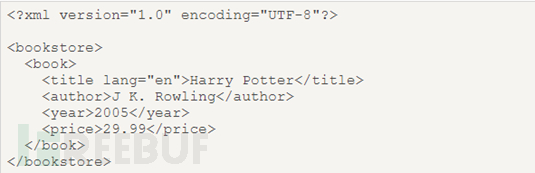
First, what is xPath: xPath is a language for finding information in xml. In xPath, there are seven elements of nodes: elements, attributes, text, namespaces, processing instructions, comments, and documents (root nodes). XML documents are parsed as document trees, and the root of the tree is called the document node or root node. This is the source code of a basic XML document. As can be seen from this XML source code, bookstore is the document node (root node), and book, title, author, year, and price are element nodes. The book node has four child element nodes: title, author, year, price, and the title node has three siblings: au
 An example analysis of mssql injection + whitelist upload to bypass 360
May 12, 2023 pm 02:37 PM
An example analysis of mssql injection + whitelist upload to bypass 360
May 12, 2023 pm 02:37 PM
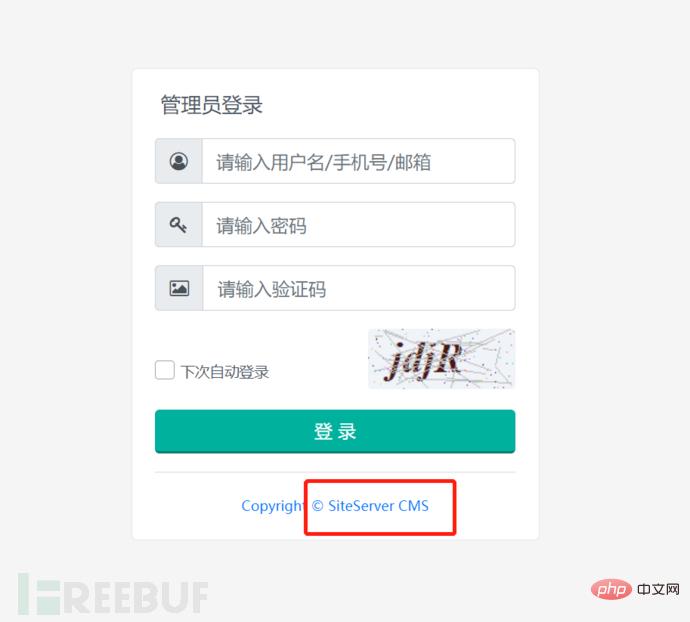
Information collection: The site is built using vue+aspx+iis8.5. The site login box has a version number and the word siteserver exists in the URL column, so it is suspected that it was built by cms, but I have not seen the cms. Using Google search, I found that the site was built with siteserver cms, the version is the latest, and the vulnerability provided on the Internet is This cannot be used. I tried injection + weak password + verification code bypass + unauthorized and other methods in the login box to no avail. Since I have a test account, I simply log in to the site directly for testing. The picture is the login picture I found online. The red box was the version number instead of the cms prompt. Functional test: After entering the background, I briefly browsed the functions, mostly for page management.
