


 Backend Development
XML/RSS Tutorial
Create an XML file with an associated XML schema && Create an XML schema from an XML file
Backend Development
XML/RSS Tutorial
Create an XML file with an associated XML schema && Create an XML schema from an XML file
Create an XML file with an associated XML schema && Create an XML schema from an XML file

1. Create an XML file with associated xml schema
1. Create a new Windows application project
First you need to create a new Windows application in Visual Basic or Visual C#. Create a new project and name it "XMLCustomerList", point to New from the File menu, and then click Project to display the New Project dialog box. Depending on the language you want to use, select Visual Basic Project or Visual C# Project in the Project Type pane, and then select Windows Application. Name the project "XMLCustomerList" and click OK to create the project.
2. Visual Studio will add the XMLCustomerList project to the Solution Explorer.
To add a new XML file item to the project, select Add New Item from the Project menu. The Add New Item dialog box will appear. Select XML File from the Templates area of the Add New Item dialog box. Name the XML file "CustomerList" and click Open.
3. Add a new XML schema item to the project
To add a new XML schema item to the project, select "Add New Item" from the "Project" menu. The Add New Item dialog box appears. Select XML Schema from the Templates area of the Add New Item dialog box. Name the schema "CustomerListSchema" and click Open.
4. Add a simple type definition to the schema
Create a simple type element representing a 5-digit postal code
From the "XML Schema" tab of the "Toolbox", Drag a "simpleType" onto the design surface. Select the default name "simpleType1" and rename the type to "postalCode". Use the TAB key to navigate to the next cell to the right and select "positiveInteger" from the drop-down list. Use the TAB key to navigate to the next line.
Click the drop-down box. The only option is facet. This is because simple types cannot contain elements or attributes as part of their content model. Only facets can be used to generate simple types. Use the TAB key to navigate to the next cell to the right and select "pattern" from the drop-down list. Use the TAB key again to navigate to the next cell to the right and type "\d{5}".
The pattern facet allows you to enter regular expressions. The regular expression \d{5} means that the postalCode type content is limited to 5 digits. Regular expressions are beyond the scope of this walkthrough, but you can see how to use pattern facets with selected data types to allow only specific data within a simple type.
If you switch the schema to XML view, you should see the following code in the root level schema tag (this means that the code sample does not include the actual declaration part of the framework, nor does it include what is called the root or document level Marked actual schema markup):
<xs:simpleType name="postalCode">
      <xs:restriction base="xs:positiveInteger">
         <xs:pattern value="\d{5}" />
      </xs:restriction>
   </xs:simpleType>
Select Save All from the File menu.
5. Add a complex type definition to the schema
Create a complex type element representing a standard US address
Switch to the "Schema" view. From the XML Schema tab of the Toolbox, drag a complexType onto the design surface. Select the default name "complexType1" and rename the type to "usAddress". Do not select a data type for this element. Use the TAB key to navigate to the next line. Click on the drop-down list box and you will see several options for elements that can be added to the complex type. The element can be selected, but for the rest of this walkthrough you will just TAB over that cell because the element is the default. Use the TAB key to navigate to the next cell to the right and type "Name."
Use the TAB key to navigate to the next cell to the right and set the data type to string. Repeat in the usAddress element to create a new row for:
Element Name
Data Type
Street
 string

City
 string

State
 string

Zip
 postalCode
Please note the assignment The data type given to the Zip element. It is the postalCode simple type you created previously.
If you switch to XML view, you should see the following code in the root-level schema tag (this means that the code example includes neither the actual declaration part of the schema nor the tag called the root or document level Actual schema markup):
<xs:simpleType name="postalCode">
      <xs:restriction base="xs:positiveInteger">
         <xs:pattern value="\d{5}" />
      </xs:restriction>
   </xs:simpleType>
   <xs:complexType name="usAddress">
      <xs:sequence>
         <xs:element name="Name" type="xs:string" />
         <xs:element name="Street" type="xs:string" />
         <xs:element name="City" type="xs:string" />
         <xs:element name="State" type="xs:string" />
         <xs:element name="Zip" type="postalCode" />
      </xs:sequence>
   </xs:complexType>
Now you have defined two separate types that can be used in element definitions as well as types. Select Save All from the File menu. Add the main element to the schema
6. After defining some data types, you can construct the actual data definition for the XML file that will be created. The XML file will contain data for the customer list, so create the actual elements that define the data that will be valid in the XML file.
Create the Customer element
Switch to Schema view. Drag an "element" from the XML Schema tab of the Toolbox onto the design surface. Select the default name "element1" and rename it to "customer". Do not select a data type for this element. Use the TAB key to navigate to the center cell of the next row and type "CompanyName". Use the TAB key to navigate to the next cell to the right and set the data type to string. Repeat to create new rows in the Customer element for:
Element Name
Data Type
ContactName
 string

Email
 string

Phone
 string

BillToAddress
 usAddress

ShipToAddress
 usAddress
请注意分配给“帐单地址”(BillToAddress) 元素以及“发货地址”(ShipToAddress) 元素的数据类型。它是以前创建的 usAddress 复杂类型。我们可能已经为“电子邮件”(Email)、“电话号码”(Phone) 元素等定义了简单类型。
如果将架构切换到 XML 视图,应在根级别架构标记中看到下列代码(这意味着该代码示例既不包括框架的实际声明部分,也不包括称为根或文档级别标记的实际架构标记):
  <xs:simpleType name="postalCode">
      <xs:restriction base="xs:positiveInteger">
         <xs:pattern value="\d{5}" />
      </xs:restriction>
   </xs:simpleType>
   <xs:complexType name="usAddress">
      <xs:sequence>
         <xs:element name="Name" type="xs:string" />
         <xs:element name="Street" type="xs:string" />
         <xs:element name="City" type="xs:string" />
         <xs:element name="State" type="xs:string" />
         <xs:element name="Zip" type="postalCode" />
      </xs:sequence>
   </xs:complexType>
   <xs:element name="Customer">
      <xs:complexType>
         <xs:sequence>
            <xs:element name="CompanyName" type="xs:string" />
            <xs:element name="ContactName" type="xs:string" />
            <xs:element name="Email" type="xs:string" />
            <xs:element name="Phone" type="xs:string" />
            <xs:element name="ShipToAddress" type="usAddress" />
            <xs:element name="BillToAddress" type="usAddress" />
         </xs:sequence>
      </xs:complexType>
   </xs:element>
从“文件”菜单中选择“全部保存”。
7、为了在 XML 文档内允许客户数据的多个实例,我们将创建名为 customerList 的元素,该元素将包含所有单独的 customer 元素。
创建 customerList 元素 从“工具箱”的“XML 架构”选项卡中将一个“element”拖到设计图面上。 选择默认名称“element1”,然后将其重命名为“customerList”。不要为此元素选择数据类型。 选择 customer 元素(以前创建的)并将其拖到 customerList 元素上。 单独的设计窗格进行绑定以表示数据的分层结构。 从“文件”菜单中选择“全部保存”。
8、将架构和 XML 文件相关联
创建 XML 文件和 XML 架构之间的关联 在“解决方案资源管理器”中,双击“CustomerList.xml”文件。该 XML 文件在设计器的 XML 视图中打开。 在“属性”窗口中,单击“targetSchema”属性右边的单元格,并选择“http://tempuri.org/CustomerListSchema.xsd”。
Visual Studio 在 CustomerList.xml 文件中添加对架构的引用,并添加 <customerList> 标记。
向 XML 文件添加数据
9、现在可以向 XML 文件添加数据了。通过将架构与 XML 文件关联,XML 编辑器现在知道可包括在 XML 文件中的有效元素,并在数据视图中提供格式化的网格。
向 customerList.xml 文件添加数据 ,在处于 XML 视图的“customerList.xml”文件中,将光标定位在开始和结束 <customerList> 标记(开始标记 = <customerList>,结束标记 = </customerList>)之间。
键入 <。选择 Customer 元素。
键入 > 以结束该标记。
键入 <,并从有效元素列表中选择 CompanyName。
键入 > 以结束该标记。
键入 Blue Yonder Airlines 作为公司名。
切换到“数据”视图。 在网格中的“联系人姓名”字段中键入 Nate Sun。 通过在网格中的其他字段中添加数据来填写记录。 切回到“XML”视图。 网格中的数据现在正确格式化为 XML。
二、从 XML 文件创建 XML 架构
基于现有 XML 文档创建新的 XML 架构
1、将一个 XML 文档(.xml 文件)加载到“XML 设计器”中。
2、从“XML”菜单单击“创建架构”。
3、将向当前项目添加一个 XML 架构(.xsd 文件),它具有与原始 XML 文件相同的名称。
4、将新创建的 XML 架构(.xsd 文件)加载到“XML 设计器”中。
5、验证和编辑创建架构时分配的数据类型。
注意 当从现有 XML 文档推导架构时,所有数据类型开始都设置为 string,因此您必须根据 XML 数据的内容要求编辑数据类型。
如果需要对架构进行更改,可以使用“XML 设计器”添加、编辑和移除元素。
以上就是创建带有关联的 XML 架构的 XML 文件 && 从 XML 文件创建 XML 架构的内容,更多相关内容请关注PHP中文网(m.sbmmt.com)!

Hot AI Tools

Undress AI Tool
Undress images for free

AI Clothes Remover
Online AI tool for removing clothes from photos.

Undresser.AI Undress
AI-powered app for creating realistic nude photos

ArtGPT
AI image generator for creative art from text prompts.

Stock Market GPT
AI powered investment research for smarter decisions

Hot Article
Popular tool

Notepad++7.3.1
Easy-to-use and free code editor

SublimeText3 Chinese version
Chinese version, very easy to use

Zend Studio 13.0.1
Powerful PHP integrated development environment

Dreamweaver CS6
Visual web development tools

SublimeText3 Mac version
God-level code editing software (SublimeText3)
Hot Topics
 20521
20521
 7
13634
4
7
13634
4

 What is the architecture and working principle of Spring Data JPA?
Apr 17, 2024 pm 02:48 PM
What is the architecture and working principle of Spring Data JPA?
Apr 17, 2024 pm 02:48 PM
SpringDataJPA is based on the JPA architecture and interacts with the database through mapping, ORM and transaction management. Its repository provides CRUD operations, and derived queries simplify database access. Additionally, it uses lazy loading to only retrieve data when necessary, thus improving performance.
 Hand-tearing Llama3 layer 1: Implementing llama3 from scratch
Jun 01, 2024 pm 05:45 PM
Hand-tearing Llama3 layer 1: Implementing llama3 from scratch
Jun 01, 2024 pm 05:45 PM
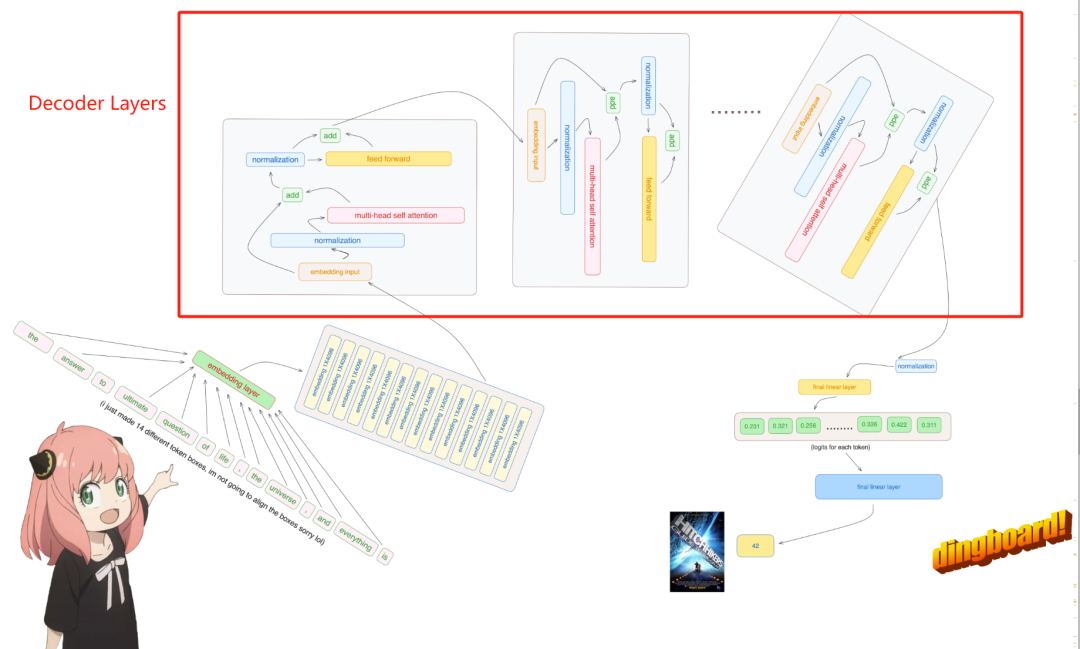
1. Architecture of Llama3 In this series of articles, we implement llama3 from scratch. The overall architecture of Llama3: Picture the model parameters of Llama3: Let's take a look at the actual values of these parameters in the Llama3 model. Picture [1] Context window (context-window) When instantiating the LlaMa class, the variable max_seq_len defines context-window. There are other parameters in the class, but this parameter is most directly related to the transformer model. The max_seq_len here is 8K. Picture [2] Vocabulary-size and AttentionL
 1.3ms takes 1.3ms! Tsinghua's latest open source mobile neural network architecture RepViT
Mar 11, 2024 pm 12:07 PM
1.3ms takes 1.3ms! Tsinghua's latest open source mobile neural network architecture RepViT
Mar 11, 2024 pm 12:07 PM
Paper address: https://arxiv.org/abs/2307.09283 Code address: https://github.com/THU-MIG/RepViTRepViT performs well in the mobile ViT architecture and shows significant advantages. Next, we explore the contributions of this study. It is mentioned in the article that lightweight ViTs generally perform better than lightweight CNNs on visual tasks, mainly due to their multi-head self-attention module (MSHA) that allows the model to learn global representations. However, the architectural differences between lightweight ViTs and lightweight CNNs have not been fully studied. In this study, the authors integrated lightweight ViTs into the effective
 Ten elements of machine learning system architecture
Apr 13, 2023 pm 11:37 PM
Ten elements of machine learning system architecture
Apr 13, 2023 pm 11:37 PM
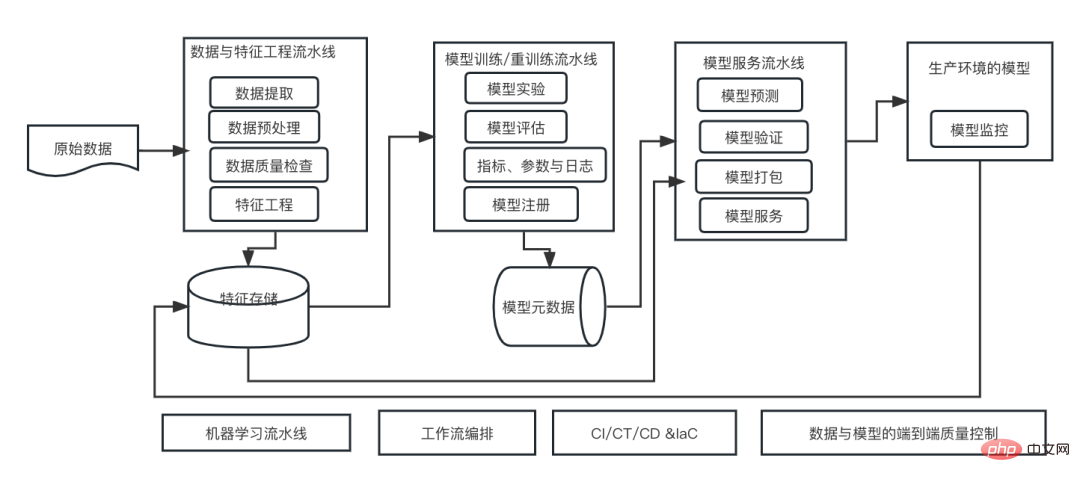
This is an era of AI empowerment, and machine learning is an important technical means to achieve AI. So, is there a universal machine learning system architecture? Within the cognitive scope of experienced programmers, Anything is nothing, especially for system architecture. However, it is possible to build a scalable and reliable machine learning system architecture if applicable to most machine learning driven systems or use cases. From a machine learning life cycle perspective, this so-called universal architecture covers key machine learning stages, from developing machine learning models, to deploying training systems and service systems to production environments. We can try to describe such a machine learning system architecture from the dimensions of 10 elements. 1.
 Multi-path, multi-domain, all-inclusive! Google AI releases multi-domain learning general model MDL
May 28, 2023 pm 02:12 PM
Multi-path, multi-domain, all-inclusive! Google AI releases multi-domain learning general model MDL
May 28, 2023 pm 02:12 PM
Deep learning models for vision tasks (such as image classification) are usually trained end-to-end with data from a single visual domain (such as natural images or computer-generated images). Generally, an application that completes vision tasks for multiple domains needs to build multiple models for each separate domain and train them independently. Data is not shared between different domains. During inference, each model will handle a specific domain. input data. Even if they are oriented to different fields, some features of the early layers between these models are similar, so joint training of these models is more efficient. This reduces latency and power consumption, and reduces the memory cost of storing each model parameter. This approach is called multi-domain learning (MDL). In addition, MDL models can also outperform single
 AI Infrastructure: The Importance of IT and Data Science Team Collaboration
May 18, 2023 pm 11:08 PM
AI Infrastructure: The Importance of IT and Data Science Team Collaboration
May 18, 2023 pm 11:08 PM
Artificial intelligence (AI) has changed the game in many industries, enabling businesses to improve efficiency, decision-making and customer experience. As AI continues to evolve and become more complex, it is critical that enterprises invest in the right infrastructure to support its development and deployment. A key aspect of this infrastructure is collaboration between IT and data science teams, as both play a critical role in ensuring the success of AI initiatives. The rapid development of artificial intelligence has led to increasing demands for computing power, storage and network capabilities. This demand puts pressure on traditional IT infrastructure, which was not designed to handle the complex and resource-intensive workloads required by AI. As a result, enterprises are now looking to build systems that can support AI workloads.
 This 'mistake' is not really a mistake: start with four classic papers to understand what is 'wrong' with the Transformer architecture diagram
Jun 14, 2023 pm 01:43 PM
This 'mistake' is not really a mistake: start with four classic papers to understand what is 'wrong' with the Transformer architecture diagram
Jun 14, 2023 pm 01:43 PM
Some time ago, a tweet pointing out the inconsistency between the Transformer architecture diagram and the code in the Google Brain team's paper "AttentionIsAllYouNeed" triggered a lot of discussion. Some people think that Sebastian's discovery was an unintentional mistake, but it is also surprising. After all, considering the popularity of the Transformer paper, this inconsistency should have been mentioned a thousand times. Sebastian Raschka said in response to netizen comments that the "most original" code was indeed consistent with the architecture diagram, but the code version submitted in 2017 was modified, but the architecture diagram was not updated at the same time. This is also the root cause of "inconsistent" discussions.
 How steep is the learning curve of golang framework architecture?
Jun 05, 2024 pm 06:59 PM
How steep is the learning curve of golang framework architecture?
Jun 05, 2024 pm 06:59 PM
The learning curve of the Go framework architecture depends on familiarity with the Go language and back-end development and the complexity of the chosen framework: a good understanding of the basics of the Go language. It helps to have backend development experience. Frameworks that differ in complexity lead to differences in learning curves.
