


 Backend Development
XML/RSS Tutorial
XML—Detailed explanation of DTD for XML document constraints
Backend Development
XML/RSS Tutorial
XML—Detailed explanation of DTD for XML document constraints
XML—Detailed explanation of DTD for XML document constraints

1. A brief introduction to XML file constraints and DTD
We write documents to constrain the writing specifications of an XML document. This Call it an XML constraint.
Commonly used constraint technologies are:
Basic concepts of DTD:
- ##XML DTD
- XML Schema
document type definitionDTD files are generally used in conjunction with XML files, mainly for constraints XML file. The XML file introduces the DTD file, so that XML can customize tags but is constrained by the DTD file. For example, in the previous section, XML was used to describe information about a class. If we defined a
tag for each student, there would be no syntax error, but it would not be semantically correct. How could students use area? To describe it? At this time we need to use a DTD file to constrain this XML.
<?xml version="1.0" encoding="gb2312"?><class>
    <stu id="001">
        <name>杨过</name>
        <sex>男</sex>
        <age>20</age>
        <面积>100</面积>
    </stu></class>
1.1 DTD constraint quick start case
Basic syntax:<!ELEMENT 元素名 类型>We also take the class as an example and write the following DTD file, myClass.dtd :
<!ELEMENT 班级 (学生+)><!ELEMENT 学生 (名字,年龄,介绍)><!ELEMENT 名字 (#PCDATA)><!ELEMENT 年龄 (#PCDATA)><!ELEMENT 介绍 (#PCDATA)>The first line indicates that the root element is class, and there is a child element called student, and the number of child elements is 1 or more.
The second line indicates that the student's sub-elements are name, age, introduction
There are no sub-elements under the name, then #PCDATA indicates that any text can be placed in the name.
The age and introduction are similar.
<?xml version="1.0" encoding="utf-8"?><!--引入dtd文件,约束这个xml--><!DOCTYPE 班级 SYSTEM "myClass.dtd"><班级>
    <学生>
        <名字>周小星</名字>
        <年龄>23</年龄>
        <介绍>学习刻苦</介绍>
    </学生>
    <学生>
        <名字>林晓</名字>
        <年龄>25</年龄>
        <介绍>是一个好学生</介绍>
    </学生>   </班级>
Write in the introduction: SYSTEM, indicating that the current DTD file is local If it is written as PUBLIC, it means The imported DTD file comes from the Internet.
, open For this XML file, the browser still does not report an error.
<?xml version="1.0" encoding="utf-8"?><!--引入dtd文件,约束这个xml--><!DOCTYPE 班级 SYSTEM "myClass.dtd"><班级>
    <学生>
        <名字>周小星</名字>
        <年龄>23</年龄>
        <介绍>学习刻苦</介绍>
        <面积>100平米</面积>
    </学生>
    <学生>
        <名字>林晓</名字>
        <年龄>25</年龄>
        <介绍>是一个好学生</介绍>
    </学生>   </班级>
We need toprogrammatically verify the correctness of the XML document.
Browsers above IE5 have a built-in XML parsing tool: Microsoft.XMLDOM. Developers can write JavaScript code, use this parsing tool to load XML files, and perform DTD verification on XML files. We write myXmlTools.html to verify this XML, as follows:<html>
<head>
<!--自己编写一个简单的解析工具,去解析XML DTD是否配套-->
<script language="javascript">
// 创建xml文档解析器对象
var xmldoc = new ActiveXObject("Microsoft.XMLDOM"); // 开启xml校验
xmldoc.validateOnParse = "true"; // 装载xml文档,即指定校验哪个XML文件
xmldoc.load("myClass.xml");
document.writeln("错误信息:"+xmldoc.parseError.reason+"<br>");
document.writeln("错误行号:"+xmldoc.parseError.line); </script>
</head>
<body>
</body></html>Open this html file with IE browser, you can see the running results: 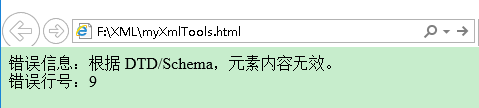
.
2.DTD details
2.1 Declaration and reference of DTD document
1.Internal DTD document
<!DOCTYPE 根元素 [定义内容]>
2. External DTD document
The imported external DTD document is divided into two types: (1) When the referenced DTD file When it is a local file, use the SYSTEM mark and write the "DTD file path" as follows:<!DOCTYPE 根元素 SYSTEM "DTD文件路径">(2) If the referenced DTD file is a public file, use the PUBLIC mark as follows :
<!DOCTYPE 根元素 PUBLIC "DTD名称" "DTD文件的URL">For example:
<!DOCTYPE web-app PUBLIC "-//Sun Microsystems,Inc.//DTD Web Application 2.3//EN" "http://java.sun.com/dtd/web-app_2_3.dtd">
2.2 Basic DTD syntax: <!ELEMENT NAME CONTENT>
Among them: - ELEMENT is a keyword and cannot The modified
- NAME represents the element name
- CONTENT is the element type and must be capitalized! There are three ways to write the content of CONTENT:
(1)EMPTY-indicates that the element cannot contain sub-elements and text, but can have attributes.(2)ANY——Indicates that the element can contain any element content defined in the
DTD (3) #PCDATA - can contain any character data, but cannot contain any sub-elements
2.3 Combination type of DTD elements:
DTD This is stipulated in:<!ELEMENT 家庭(人+,家电*)>This DTD stipulates that the family element can have 1 to more "people" sub-elements, and there can also be 0 to more "home appliances" sub-elements. The meanings of the plus sign "+" and the asterisk "*" are consistent with those in regular expressions. XML is written like this:
<家庭>
    <人 名字="张晓明" 性别="男" 年龄="25"/>
    <人 名字="李小钢" 性别="男" 年龄="36" 爱好="作个教育家和伟人"/>
    <家电 名称="彩电" 数量="3"/></家庭>
Regarding the combination type, the following modifiers can be used: | Use | Example | Example description | |||||||||||||||||||||||||||||
|---|---|---|---|---|---|---|---|---|---|---|---|---|---|---|---|---|---|---|---|---|---|---|---|---|---|---|---|---|---|---|---|
| is used to group elements | (Gu Long | Jin Yong), (Wang Shuo | Yu Jie) | is divided into two groups | |||||||||||||||||||||||||||||
| in the listed objects Select one of | (man|woman) | means that a man or a woman must appear, and at least one of the two must be selected | |||||||||||||||||||||||||||||
| The object must appear once or multiple times | (member+) | means that the member must appear, but multiple members can appear | |||||||||||||||||||||||||||||
| This object is allowed to appear 0 or more times | (Hobby*) | Hobby can appear two to multiple times | |||||||||||||||||||||||||||||
| The object must appear 0 or 1 time | (Rookie?) | The rookie can appear or not. If it appears, it can only appear at most Appear once | ##, | ||||||||||||||||||||||||||||
| (watermelon, apple, banana) | means watermelon, Apples and bananas must appear in this order |
| 符号 | 用途 | 示例 | 示例说明 |
|---|---|---|---|
| () | 用来给元素分组 | (古龙|金庸),(王朔|余杰) | 分成两组 |
| | | 在列出的对象中选择一个 | (男人|女人) | 表示男人或者女人必须出现,两者至少选其一 |
| + | 该对象必须出现一次或者多次 | (成员+) | 表示成员必须出现,而却可以出现多个成员 |
| * | 该对象允许出现0次或者多次 | (爱好*) | 爱好可以出现两次到多次 |
| ? | 该对象必须出现0次或者1次 | (菜鸟?) | 菜鸟可以出现,也可以不出现,如果出现的话,最多只能出现一次 |
| , | 对象必须按指定的顺序出现 | (西瓜,苹果,香蕉) | 表示西瓜、苹果、香蕉必须出现,并且按这个顺序出现 |
2.4 属性定义
DTD中属性的定义是这样的:
<!ATTLIST 元素名称
    属性名称 类型 属性特点
    属性名称 类型 属性特点......  >
其中,属性的类型有下面5种:
(1) CDATA
(2) ID
(3) IDREF/IDREFS
(4) Enumerated
(5) ENTITY/ENTITIES
属性的特点有如下4种:
(1) #REQUIRED,表示这个属性必须给,不给就报错
(2) #IMPLIED,表示这个属性可以给也可以不给
(3) #FIXED value,表示这个属性必须给一个固定的value值
(4) Default value,表示这个属性如果没有值,就分配一个默认的value值
比如,我们想在学生这个子元素上加上地址这个属性,而且这个属性是必须的,示例如下:
<?xml version="1.0" encoding="utf-8"?><!DOCTYPE 班级 SYSTEM "myClass.dtd"><班级>
    <学生 地址="香港">
        <名字>周小星</名字>
        <年龄>23</年龄>
        <介绍>学习刻苦</介绍>
    </学生>
    <学生 地址="澳门">
        <名字>林晓</名字>
        <年龄>25</年龄>
        <介绍>是一个好学生</介绍>
    </学生>   </班级>
这个时候相应的DTD文件也要更新,不然就会报错,如下:
<!ELEMENT 班级 (学生+)><!ELEMENT 学生 (名字,年龄,介绍)><!ATTLIST 学生
    地址 CDATA #REQUIRED><!ELEMENT 名字 (#PCDATA)><!ELEMENT 年龄 (#PCDATA)><!ELEMENT 介绍 (#PCDATA)>
2.4.1 对于属性类型的详细解释
(1)属性类型-CDATA,表示属性值可以是任何字符(包括中文和数字)
<!ATTLIST 木偶
    姓名 CDATA #REQUIRED>
<木偶 姓名="匹诺曹"/><木偶 姓名="PiNuocao"/><木偶 姓名="123"/>
(2)属性类型-ID,表明该属性的取值必须是唯一的,但是属性的值不能是以数字开头!
<!ELEMENT 公司职员 ANY><!ATTLIST 公司职员
    编号 ID #REQUIRED
    姓名 CDATA #REQUIRED>
<公司职员 编号="Z001" 姓名="张三"/><公司职员 编号="Z002" 姓名="李思"/>
(3)属性类型-IDREF/IDREFS
- IDREF属性的值指向文档中其它地方声明的ID类型的值
- IDREFS同IDREF,但是可以具有由空格分开的多个引用。
<!ELEMENT 家庭(人+)><!ELEMENT 人 EMPTY><!ATTLIST 人    relID ID #REQUIRED
    paraentID IDREFS #IMPLIED
    name CDATA #REQUIRED>
<家庭>
<人 relID="P_1" name="爸爸"/>
<人 relID="P_2" name="妈妈"/>
<人 relID="P_3" parentID="P_1 P_2" name="儿子"/></家庭>(4)属性类型-Enumerated,事先定义好一些值,属性的值必须在所列出的值的范围内。
<!ATTLIST person
    婚姻状态 (single|married|porced|widowed) #IMPLIED><!ATTLIST person
    性别 (男|女) #REQUIRED>
(5)属性类型-ENTITY,实体
实体定义:
- 实体用于为一段内容创建一个别名,以后在XML文档中就可以使用别名引用这段内容了。
- 在DTD定义中,一条!ENTITY语句用于定义一个实体。
- 实体可分为两种类型:引用实体和参数实体。引用实体是被XML文档应用的,而参数实体是被DTD文件本身应用的。
①引用实体:
引用实体主要在XML文档中被应用
语法格式如下,引用实体的定义内容最好放在DTD文件的最后。
<!ENTITY 实体名称 "实体内容">
引用方式:&实体名称; 末尾要带上分号,这个引用将直接转变成实体内容
举例如下:
<!ENTITY copyright "I am a programmer">.... ©right;
②参数实体:
参数实体被DTD文件自身使用
语法格式为:
<!ENTITY % 实体名称 "实体内容">
引用方式为:%实体名称
举例:
<!ENTITY % TAG_NAME "姓名|EMAIL|电话|地址"><!ELEMENT 个人信息 (%TAG_NAME;|生日)><!ELEMENT 客户信息 (%TAG_NAME;|公司名)>
3.DTD实际案例
学习DTD的目标在于:
(1)要求我们能够看得懂DTD文件,
(2)我们可以根据给出的DTD写出对应的XML文件
下面我们看一个案例,下述的DTD文件是从W3School在线教程中的DTD案例中拿过来的,细看每一行,我们都应该能够看得懂。
<!ENTITY AUTHOR "John Doe"><!ENTITY COMPANY "JD Power Tools, Inc."><!ENTITY EMAIL "jd@jd-tools.com"> <!ELEMENT CATALOG (PRODUCT+)> <!ELEMENT PRODUCT(SPECIFICATIONS+,OPTIONS?,PRICE+,NOTES?)> <!ATTLIST PRODUCTNAME CDATA #IMPLIEDCATEGORY (HandTool|Table|Shop-Professional) "HandTool"PARTNUM CDATA #IMPLIEDPLANT (Pittsburgh|Milwaukee|Chicago) "Chicago"INVENTORY (InStock|Backordered|Discontinued) "InStock"> <!ELEMENT SPECIFICATIONS (#PCDATA)> <!ATTLIST SPECIFICATIONSWEIGHT CDATA #IMPLIEDPOWER CDATA #IMPLIED> <!ELEMENT OPTIONS (#PCDATA)> <!ATTLIST OPTIONSFINISH (Metal|Polished|Matte) "Matte" ADAPTER (Included|Optional|NotApplicable) "Included"CASE (HardShell|Soft|NotApplicable) "HardShell"> <!ELEMENT PRICE (#PCDATA)> <!ATTLIST PRICEMSRP CDATA #IMPLIEDWHOLESALE CDATA #IMPLIEDSTREET CDATA #IMPLIEDSHIPPING CDATA #IMPLIED> <!ELEMENT NOTES (#PCDATA)>
然后我们可以根据该DTD编写如下最简单的XML文件:
<?xml version="1.0" encoding="utf-8"?><!DOCTYPE CATALOG SYSTEM "product.dtd"><CATALOG>
    <PRODUCT NAME="康帅傅矿泉水" CATEGORY="Table" PARTNUM="12" PLANT="Chicago">
        <SPECIFICATIONS WEIGHT="20" POWER="18">这里是细节</SPECIFICATIONS>
        <PRICE>25</PRICE>
        <PRICE>28</PRICE>
    </PRODUCT></CATALOG>
然后我们用Microsoft.XMLDOM校验该XML,会发现没有任何错误。但是要注意编码。
以上就是XML—XML文件约束之DTD详解的内容,更多相关内容请关注PHP中文网(m.sbmmt.com)!

Hot AI Tools

Undress AI Tool
Undress images for free

AI Clothes Remover
Online AI tool for removing clothes from photos.

Undresser.AI Undress
AI-powered app for creating realistic nude photos

ArtGPT
AI image generator for creative art from text prompts.

Stock Market GPT
AI powered investment research for smarter decisions

Hot Article
Popular tool

Notepad++7.3.1
Easy-to-use and free code editor

SublimeText3 Chinese version
Chinese version, very easy to use

Zend Studio 13.0.1
Powerful PHP integrated development environment

Dreamweaver CS6
Visual web development tools

SublimeText3 Mac version
God-level code editing software (SublimeText3)
Hot Topics
 20521
20521
 7
13634
4
7
13634
4

 JSON vs. XML: Why RSS Chose XML
May 05, 2025 am 12:01 AM
JSON vs. XML: Why RSS Chose XML
May 05, 2025 am 12:01 AM
RSS chose XML instead of JSON because: 1) XML's structure and verification capabilities are better than JSON, which is suitable for the needs of RSS complex data structures; 2) XML was supported extensively at that time; 3) Early versions of RSS were based on XML and have become a standard.
 Understanding RSS Documents: A Comprehensive Guide
May 09, 2025 am 12:15 AM
Understanding RSS Documents: A Comprehensive Guide
May 09, 2025 am 12:15 AM
RSS documents are a simple subscription mechanism to publish content updates through XML files. 1. The RSS document structure consists of and elements and contains multiple elements. 2. Use RSS readers to subscribe to the channel and extract information by parsing XML. 3. Advanced usage includes filtering and sorting using the feedparser library. 4. Common errors include XML parsing and encoding issues. XML format and encoding need to be verified during debugging. 5. Performance optimization suggestions include cache RSS documents and asynchronous parsing.
 Building XML Applications with C : Practical Examples
May 03, 2025 am 12:16 AM
Building XML Applications with C : Practical Examples
May 03, 2025 am 12:16 AM
You can use the TinyXML, Pugixml, or libxml2 libraries to process XML data in C. 1) Parse XML files: Use DOM or SAX methods, DOM is suitable for small files, and SAX is suitable for large files. 2) Generate XML file: convert the data structure into XML format and write to the file. Through these steps, XML data can be effectively managed and manipulated.
 RSS, XML and the Modern Web: A Content Syndication Deep Dive
May 08, 2025 am 12:14 AM
RSS, XML and the Modern Web: A Content Syndication Deep Dive
May 08, 2025 am 12:14 AM
RSS and XML are still important in the modern web. 1.RSS is used to publish and distribute content, and users can subscribe and get updates through the RSS reader. 2. XML is a markup language and supports data storage and exchange, and RSS files are based on XML.
 XML in C : Handling Complex Data Structures
May 02, 2025 am 12:04 AM
XML in C : Handling Complex Data Structures
May 02, 2025 am 12:04 AM
Working with XML data structures in C can use the TinyXML or pugixml library. 1) Use the pugixml library to parse and generate XML files. 2) Handle complex nested XML elements, such as book information. 3) Optimize XML processing code, and it is recommended to use efficient libraries and streaming parsing. Through these steps, XML data can be processed efficiently.
 Beyond Basics: Advanced RSS Features Enabled by XML
May 07, 2025 am 12:12 AM
Beyond Basics: Advanced RSS Features Enabled by XML
May 07, 2025 am 12:12 AM
RSS enables multimedia content embedding, conditional subscription, and performance and security optimization. 1) Embed multimedia content such as audio and video through tags. 2) Use XML namespace to implement conditional subscriptions, allowing subscribers to filter content based on specific conditions. 3) Optimize the performance and security of RSSFeed through CDATA section and XMLSchema to ensure stability and compliance with standards.
 Understanding RSS: An XML Perspective
Apr 25, 2025 am 12:14 AM
Understanding RSS: An XML Perspective
Apr 25, 2025 am 12:14 AM
RSS is an XML-based format used to publish frequently updated content. 1. RSSfeed organizes information through XML structure, including title, link, description, etc. 2. Creating RSSfeed requires writing in XML structure, adding metadata such as language and release date. 3. Advanced usage can include multimedia files and classified information. 4. Use XML verification tools during debugging to ensure that the required elements exist and are encoded correctly. 5. Optimizing RSSfeed can be achieved by paging, caching and keeping the structure simple. By understanding and applying this knowledge, content can be effectively managed and distributed.
 Inside the RSS Document: Essential XML Tags and Attributes
May 03, 2025 am 12:12 AM
Inside the RSS Document: Essential XML Tags and Attributes
May 03, 2025 am 12:12 AM
The core structure of RSS documents includes XML tags and attributes. The specific parsing and generation steps are as follows: 1. Read XML files, process and tags. 2. Extract,,, etc. tag information. 3. Handle custom tags and attributes to ensure version compatibility. 4. Use cache and asynchronous processing to optimize performance to ensure code readability.
