


xml learning (5) xml configuration gridview column

有时候我们不确定我们gridview要显示那些列,或者我们希望可以动态配置gridview那些列显示,以及宽度,这时可以通过可以把列的消息存放的数据库,通过读取数据库实现动态绑定列,也可以通过配置xml实现,当然也可以第一次通过读取xml,然后向数据库插入列消息,然后下一次判断数据库是否已经存储了列数据,如果没有存入,那么读取xml。
下面我讲解如何通过xml如何动态绑定gridview
一效果:
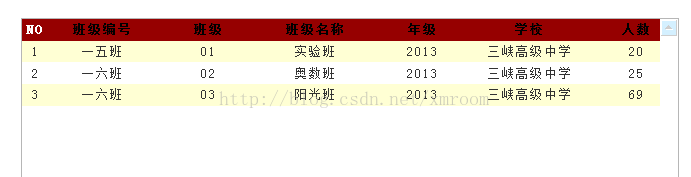
二,核心代码:
1.读取xml文件,返回datatable
    /// <summary>
        /// 获取xmltable
        /// </summary>
        /// <param name="xmlname">xml名字</param>
        /// <returns></returns>
        public DataTable getDTXML(string xmlname)
        {
            DataTable result = new DataTable();
            string fileName = HttpContext.Current.Request.PhysicalApplicationPath + "\\Xml\\" + xmlname + ".xml";//xml的物理路径
            XmlDocument xmlDoc = new XmlDocument();
            xmlDoc.Load(fileName);
            XmlNodeList xWitsTablesList = xmlDoc.SelectNodes("/config");
            foreach (XmlNode xOracleNode in xWitsTablesList)
            {
                foreach (XmlNode node2 in xOracleNode.ChildNodes)
                {
                    if (node2.Name == "Header")
                    {
                        //   //绑定表头
                        foreach (XmlNode node3 in node2.Attributes)
                        {
                            result.Columns.Add(node3.Value);
                        }
                    }
                    else
                    {
                        //数据行
                        int i = 0;//列标志
                        DataRow dr = result.NewRow();
                        foreach (XmlNode node4 in node2.Attributes)
                        {
                            dr[i] = node4.Value.ToString();
                            i++;
                        }
                        result.Rows.Add(dr);
                    }

                }
            }
            return result;
        }
2.绑定gridview列
    /// <summary>
    /// 绑定gridview列
    /// </summary>
    /// <param name="gv"></param>
    /// <param name="dt"></param>
    /// <param name="width"></param>
    /// <param name="columnNumber"></param>
    public void HtmlGridView(GridView gv,DataTable dt,int width,int columnNumber)
    {
        try
        {
            int k=0;
            if (dt.Rows.Count > 0)
            {
                foreach (DataRow dr in dt.Rows)
                {
                    BoundField bf = new BoundField();
                    bf.HeaderText = dr["name"].ToString();
                    bf.DataField = dr["field_code"].ToString();
                    bf.HeaderStyle.Width = Convert.ToInt32(dr["width"].ToString());
                    bf.HeaderStyle.HorizontalAlign = HorizontalAlign.Center;
                    bf.HeaderStyle.ForeColor = System.Drawing.Color.Black;
                    bf.SortExpression = dr["name"].ToString();
                    gv.Columns.Add(bf);
                    k+= Convert.ToInt32(dr["width"].ToString());
                    if (dr["width"].ToString()=="0")
                    {
                        gv.Columns[columnNumber].Visible = false;
                    }
                    columnNumber++;
                }
                gv.Width = k + width;
            }

        }
        catch(Exception ex)
        {
            throw new Exception(ex.Message);
        }
    }
三,下面是全部源码:
HtmlGridView.aspx源码:
<%@ Page Language="C#" AutoEventWireup="true" CodeFile="HtmlGridView.aspx.cs" Inherits="HtmlGridView" %>

<!DOCTYPE html PUBLIC "-//W3C//DTD XHTML 1.0 Transitional//EN" "http://www.w3.org/TR/xhtml1/DTD/xhtml1-transitional.dtd">

<html xmlns="http://www.w3.org/1999/xhtml">
<head id="Head1" runat="server">
    <title>读取xml</title>
    <link rel="Stylesheet" type="text/css" href="Css/xmlReadOne.css" />
    <link rel="Stylesheet" type="text/css" href="Css/Common/InputStyle.css" />
    <script type="text/javascript"  src="Scripts/jquery-1.4.1.min.js"></script>
</head>
<body>
    <form id="form1" runat="server">
    <p>
    <p class="main">
      <p class="list">
        <asp:GridView runat="server" ID="gv_class" AutoGenerateColumns="False"
              DataKeyNames="ID" Width="100%" CellPadding="4"
              ForeColor="#333333" GridLines="None"   >
            <AlternatingRowStyle BackColor="White" />
            <FooterStyle BackColor="#990000" Font-Bold="True" ForeColor="White" />
            <HeaderStyle BackColor="#990000" Font-Bold="True" ForeColor="White" />
            <PagerStyle BackColor="#FFCC66" ForeColor="#333333" HorizontalAlign="Center" />
            <RowStyle BackColor="#FFFBD6"  HorizontalAlign="Center" ForeColor="#333333" />
            <SelectedRowStyle BackColor="#FFCC66" Font-Bold="True" ForeColor="Navy" />
            <SortedAscendingCellStyle BackColor="#FDF5AC" />
            <SortedAscendingHeaderStyle BackColor="#4D0000" />
            <SortedDescendingCellStyle BackColor="#FCF6C0" />
            <SortedDescendingHeaderStyle BackColor="#820000" />
            <Columns>
              <asp:TemplateField   HeaderText="NO">
                <ItemTemplate>
                  <%#Eval("NO") %>
                </ItemTemplate>
              </asp:TemplateField>
            </Columns>
        </asp:GridView>
      </p>
     </p>
    </p>
    </form>
</body>
 <script type="text/javascript">
     function add_clear() {
         $(".button").find("input[type=text] ").each(function () {
             $(this).val('');
         });
     }
    </script>
</html>
HtmlGridView.aspx.cs源码:
using System;
using System.Collections.Generic;
using System.Linq;
using System.Web;
using System.Web.UI;
using System.Web.UI.WebControls;
using System.IO;
using System.Xml;
using System.Web.UI.HtmlControls;
using IsXMLUtility;
using System.Data;

public partial class HtmlGridView : System.Web.UI.Page
{
    XmlHelper xmlHelper = new XmlHelper();
    protected void Page_Load(object sender, EventArgs e)
    {
        if (!IsPostBack)
        {
            //gv_class绑定列
            DataTable dt = xmlHelper.getDTXML("表头");
            Functions.getInstance().HtmlGridView(gv_class, dt, 10, 1);

            InitGV();
        }
    }


    /// <summary>
    /// 绑定gridview
    /// </summary>
    private void InitGV()
    {
        DataTable dt = xmlHelper.getDTXML("内容", "NO", 1);
        this.gv_class.DataSource = dt.DefaultView;
        this.gv_class.DataBind();
    }

}
表头.xml
<?xml version="1.0" encoding="utf-8" ?>
<config>
    <Header  col1="name"      col2="field_code" col3="width" col4="dispaly"  ></Header>
    <row     col1="班级编号"  col2="ID"         col3="100"   col4="true"     ></row>
    <row     col1="班级"      col2="class"      col3="100"   col4="true"     ></row>
    <row     col1="班级名称"  col2="class_name" col3="100"   col4="true"     ></row>
    <row     col1="年级"      col2="year"       col3="100"   col4="true"     ></row>
    <row     col1="学校"      col2="school"     col3="100"   col4="true"     ></row>
    <row     col1="人数"      col2="count"     col3="100"    col4="true"     ></row>
</config>
内容.xml
<?xml version="1.0" encoding="utf-8" ?>
<config>
  <Header  col1="ID" col2="class" col3="class_name" col4="year" col5="school"  col6="count" ></Header>
  <row col1="一五班" col2="01" col3="实验班" col4="2013" col5="三峡高级中学"  col6="20" ></row>
  <row col1="一六班" col2="02" col3="奥数班" col4="2013" col5="三峡高级中学"  col6="25" ></row>
  <row col1="一六班" col2="03" col3="阳光班" col4="2013" col5="三峡高级中学"  col6="69" ></row>
</config>
xmlReadOne.css
body{
margin:0 auto;
padding:0px;
font-family:'宋体';
}
.main
{
     margin-left:20px;
     margin-top:10px;
     text-align:left;
    }

.button
{
    width:600px;
    border:#A8B7CC solid 1px;
	background-color:#FFFFFF;
    }
.content
{
    width:600px;
    border:#A8B7CC solid 1px;
	background-color:#E0EDFE;
    margin-top:20px;
 }
 .list
{
    width:600px;
    height:300px;
    overflow:auto;
    border:#A8B7CC solid 1px;
	background-color:#FFFFFF;
	overflow: scroll;
	SCROLLBAR-FACE-COLOR:#E0EDFE;
	PADDING-BOTTOM: 0px;
	SCROLLBAR-HIGHLIGHT-COLOR: #ffffff;
	SCROLLBAR-SHADOW-COLOR: #cccccc;
	SCROLLBAR-3DLIGHT-COLOR:#ffffff;
	SCROLLBAR-ARROW-COLOR:#95AFD4;
	PADDING-TOP: 0px;
	SCROLLBAR-TRACK-COLOR: #ffffff;
	SCROLLBAR-DARKSHADOW-COLOR: #ffffff;
	LETTER-SPACING: 1pt;
    margin-top:20px;
 }
.gv
{
	width:600px;
	height:400px;
	margin-top:20px;
	border:#A8B7CC solid 1px;
	background-color:#FFFFFF;
	overflow: scroll;
	SCROLLBAR-FACE-COLOR:#E0EDFE;
	PADDING-BOTTOM: 0px;
	SCROLLBAR-HIGHLIGHT-COLOR: #ffffff;
	SCROLLBAR-SHADOW-COLOR: #cccccc;
	SCROLLBAR-3DLIGHT-COLOR:#ffffff;
	SCROLLBAR-ARROW-COLOR:#95AFD4;
	PADDING-TOP: 0px;
	SCROLLBAR-TRACK-COLOR: #ffffff;
	SCROLLBAR-DARKSHADOW-COLOR: #ffffff;
	LETTER-SPACING: 1pt;
}
Functions.cs
using System;
using System.Collections.Generic;
using System.Linq;
using System.Web;
using System.Data;
using System.Web.UI.WebControls;
/// <summary>
///Server 的摘要说明
/// </summary>
public class Functions
{
private static object _synRoot=new object();
private static Functions _instance=null;
private Functions()
{
//
//TODO: 在此处添加构造函数逻辑
//
}
public static Functions getInstance()
{
lock (_synRoot)
{
if (_instance == null)
{
_instance = new Functions();
}
}
return _instance;
}
#region 业务层
/// <summary>
/// 绑定gridview列
/// </summary>
/// <param name="gv"></param>
/// <param name="dt"></param>
/// <param name="width"></param>
/// <param name="columnNumber"></param>
public void HtmlGridView(GridView gv,DataTable dt,int width,int columnNumber)
{
try
{
int k=0;
if (dt.Rows.Count > 0)
{
foreach (DataRow dr in dt.Rows)
{
BoundField bf = new BoundField();
bf.HeaderText = dr["name"].ToString();
bf.DataField = dr["field_code"].ToString();
bf.HeaderStyle.Width = Convert.ToInt32(dr["width"].ToString());
bf.HeaderStyle.HorizontalAlign = HorizontalAlign.Center;
bf.HeaderStyle.ForeColor = System.Drawing.Color.Black;
bf.SortExpression = dr["name"].ToString();
gv.Columns.Add(bf);
k+= Convert.ToInt32(dr["width"].ToString());
if (dr["width"].ToString()=="0")
{
gv.Columns[columnNumber].Visible = false;
}
columnNumber++;
}
gv.Width = k + width;
}
}
catch(Exception ex)
{
throw new Exception(ex.Message);
}
}
#endregion
}
XmlHelper.cs
using System;
using System.Collections.Generic;
using System.Linq;
using System.Web;
using System.Data;
using System.Xml;
using System.IO;
using System.Web.UI;
using System.Web.UI.WebControls;
namespace IsXMLUtility
{
/// <summary>
///XmlHelper 的摘要说明
/// </summary>
public class XmlHelper
{
private string rtnXml;
public XmlHelper()
{
//
//TODO: 在此处添加构造函数逻辑
//
rtnXml = string.Empty;
}
/// <summary>
/// 获取xmltable
/// </summary>
/// <param name="xmlname">xml名字</param>
/// <returns></returns>
public DataTable getDTXML(string xmlname)
{
DataTable result = new DataTable();
string fileName = HttpContext.Current.Request.PhysicalApplicationPath + "\\Xml\\" + xmlname + ".xml";//xml的物理路径
XmlDocument xmlDoc = new XmlDocument();
xmlDoc.Load(fileName);
XmlNodeList xWitsTablesList = xmlDoc.SelectNodes("/config");
foreach (XmlNode xOracleNode in xWitsTablesList)
{
foreach (XmlNode node2 in xOracleNode.ChildNodes)
{
if (node2.Name == "Header")
{
// //绑定表头
foreach (XmlNode node3 in node2.Attributes)
{
result.Columns.Add(node3.Value);
}
}
else
{
//数据行
int i = 0;//列标志
DataRow dr = result.NewRow();
foreach (XmlNode node4 in node2.Attributes)
{
dr[i] = node4.Value.ToString();
i++;
}
result.Rows.Add(dr);
}
}
}
return result;
}
/// <summary>
///
/// </summary>
/// <param name="xmlname">xml名字</param>
/// <param name="Header">序号列名字</param>
/// <param name="colsNumber">序号开始编号</param>
/// <returns></returns>
public DataTable getDTXML(string xmlname, string Header, int colsNumber)
{
DataTable result = new DataTable();
if (Header == "")
Header = "N0";
if (colsNumber < 0)
colsNumber = 1;
result.Columns.Add(Header);
string fileName = HttpContext.Current.Request.PhysicalApplicationPath + "\\Xml\\" + xmlname + ".xml";//xml的物理路径
XmlDocument xmlDoc = new XmlDocument();
xmlDoc.Load(fileName);
XmlNodeList xWitsTablesList = xmlDoc.SelectNodes("/config");
foreach (XmlNode xOracleNode in xWitsTablesList)
{
foreach (XmlNode node2 in xOracleNode.ChildNodes)
{
if (node2.Name == "Header")
{
//绑定表头
foreach (XmlNode node3 in node2.Attributes)
{
result.Columns.Add(node3.Value);
}
}
else
{
//数据行
int i = 1;//列标志
DataRow dr = result.NewRow();
dr[0] = colsNumber;
foreach (XmlNode node4 in node2.Attributes)
{
dr[i] = node4.Value.ToString();
i++;
}
colsNumber++;
result.Rows.Add(dr);
}
}
}
return result;
}
}
}以上就是xml学习(5)xml配置gridview列的内容,更多相关内容请关注PHP中文网(m.sbmmt.com)!

Hot AI Tools

Undress AI Tool
Undress images for free

AI Clothes Remover
Online AI tool for removing clothes from photos.

Undresser.AI Undress
AI-powered app for creating realistic nude photos

ArtGPT
AI image generator for creative art from text prompts.

Stock Market GPT
AI powered investment research for smarter decisions

Hot Article
Popular tool

Notepad++7.3.1
Easy-to-use and free code editor

SublimeText3 Chinese version
Chinese version, very easy to use

Zend Studio 13.0.1
Powerful PHP integrated development environment

Dreamweaver CS6
Visual web development tools

SublimeText3 Mac version
God-level code editing software (SublimeText3)
Hot Topics
 20522
20522
 7
13634
4
7
13634
4

 How to convert XML to YAML for DevOps? (Configuration Management)
Mar 12, 2026 am 12:11 AM
How to convert XML to YAML for DevOps? (Configuration Management)
Mar 12, 2026 am 12:11 AM
xmltodict PyYAMListhesafestcomboforDevOpsconfigfilesbecauseitpreservescomments,CDATA,namespaces,andattributesaccurately,unlikerawXML-to-YAMLtoolsorCLIutilitieslikeyqandxmllintwhichsilentlydropcriticalmetadata.
 How to parse XML data from a URL API? (Rest Services)
Mar 13, 2026 am 12:06 AM
How to parse XML data from a URL API? (Rest Services)
Mar 13, 2026 am 12:06 AM
To parse remote XML API in Python, you need to use requests to get the response and then check the status code and Content-Type. Prioritize using r.text with xml.etree.ElementTree to parse; when encountering a namespace, you need to pass the namespace dictionary; use iterparse to stream large files and clear them manually; front-end JS requires CORS support or proxy.
 How to minify XML files for faster web loading? (Performance Optimization)
Mar 08, 2026 am 12:16 AM
How to minify XML files for faster web loading? (Performance Optimization)
Mar 08, 2026 am 12:16 AM
RunningminifyonXMLwithoutunderstandingitsrulesbreaksparsingoralterssemanticsbecausewhitespacecanbemeaningful;safeminificationrequiresdata-orientedXML,controlledgeneration/consumption,andstrictparserawareness.
 How to convert an XML file to a Word document? (Reporting)
Mar 09, 2026 am 01:05 AM
How to convert an XML file to a Word document? (Reporting)
Mar 09, 2026 am 01:05 AM
python-docx does not support direct reading of XML files. You need to use xml.etree.ElementTree or lxml to parse the XML extraction fields first, and then write them into the Document object segment by segment. Explicit declaration of prefixes is required to process namespaces, and manual manipulation of the underlying XML is required for table merging and styling. Chinese paths should be avoided when saving.
 How to use Attributes vs Elements in XML? (Design Best Practices)
Mar 16, 2026 am 12:26 AM
How to use Attributes vs Elements in XML? (Design Best Practices)
Mar 16, 2026 am 12:26 AM
You should use attributes to store short metadata (such as id, type), and use elements to store scalable content data; because attributes do not support namespaces, duplication, nesting, and internationalization, their parsing is error-prone and maintenance is difficult.
 How to open and view XML files in Windows 11? (Beginner Guide)
Mar 12, 2026 am 01:02 AM
How to open and view XML files in Windows 11? (Beginner Guide)
Mar 12, 2026 am 01:02 AM
The XML file cannot be opened by double-clicking because it is associated with Notepad by default, causing confusion in the display. You should use Notepad, VSCode or Edge instead; Edge can format and report errors, while VSCode requires the installation of extensions such as RedHatXML for normal highlighting, indentation and verification.
 How to read XML data in C# using LINQ? (.NET Development)
Mar 15, 2026 am 12:43 AM
How to read XML data in C# using LINQ? (.NET Development)
Mar 15, 2026 am 12:43 AM
XDocument.Load() is the preferred method for reading local XML files and automatically handles encoding, BOM and format exceptions; absolute or correct relative paths are required; namespaces must be explicitly declared and participate in queries; Elements() and Descendants() behave differently and should be selected as needed; string parsing must capture XmlException and verify the source.
 How to read XML configuration in Spring Boot? (Java Framework)
Mar 13, 2026 am 12:17 AM
How to read XML configuration in Spring Boot? (Java Framework)
Mar 13, 2026 am 12:17 AM
SpringBoot loads XML configuration files through the @ImportResource annotation, which needs to be used with the @Configuration class. It supports classpath relative paths and multi-file arrays, but you need to manually register the PropertySourcesPlaceholderConfigurer and declare the context namespace to parse placeholders.
