


XML Programming-SAX

XMLProgramming-SAX
##Basic Overview
, full nameSimple API for XML, is both an interface and a software package. It is an alternative to XMLparsing. SAXDifferent from DOM parsing, it scans the document line by line and parses while scanning. Since the application only checks the data as it is read, there is no need to store the data in memory, which is a huge advantage when parsing large documents.
SAXis an event-driven "push" model for processing XML, although it is not W3C standard, but it is a widely recognized API. SAXThe parser does not build a complete document tree like DOM, but activates a series of events when reading the document. These events are pushed to event handlers, which then provide access to the document content.
PS:SAX cannot modify the XML file. Delete and add operations.
Why introduceSAX technology?
DOMtechnology is also a very good DOM parsing solution, why does SAX still appear? What about technology? The reason is very simple, that is, DOM saves XML in the structure of a document tree, which means that # is saved in one go ##XML is read into memory, then this is not possible in large XML files. That's why the scanning and parsing technology SAX was born.
Schematic
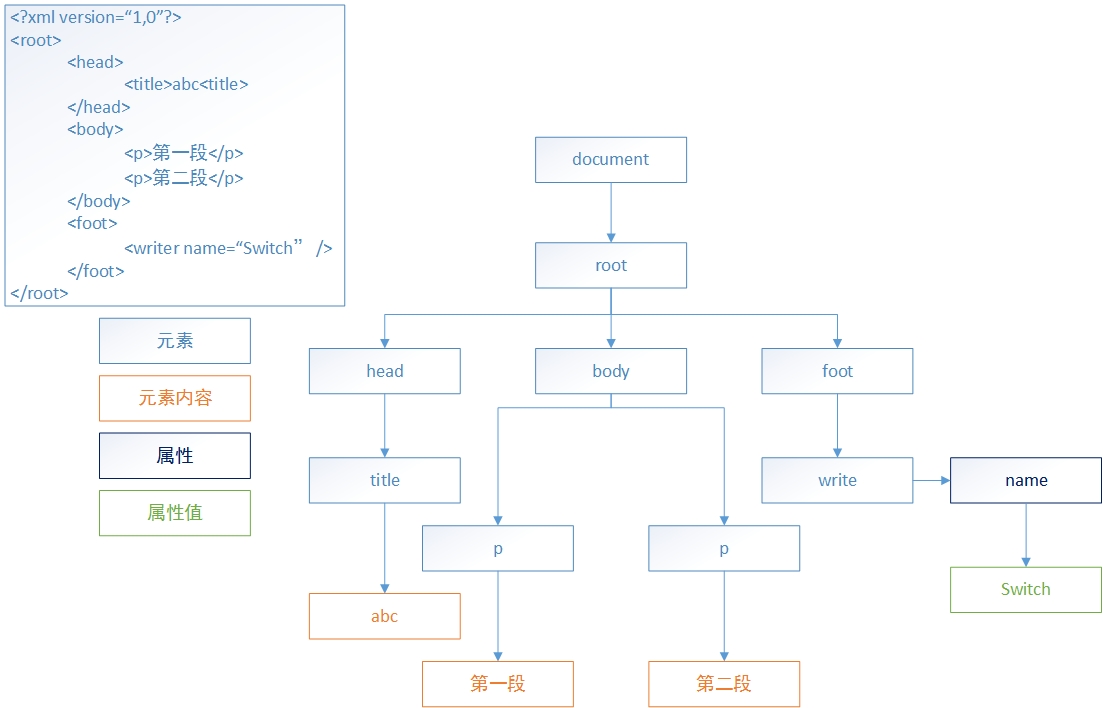
##SAXParsing mechanism
SAX
Parsing Allows the document to be processed when the document is read, without having to wait until the entire document is loaded before the document is operated.
In Java
, by inheriting the DefaultHandler interface, you can develop a SAXParser. The parsing mechanism of SAX is very similar to the event listening mechanism. They both wait for a certain event to be triggered and then call the corresponding method.
The most commonly used
5events of the SAX parser: 1,
startDocument(): This marks the SAX parser scanning to the beginning of the document.
2, endDocument(), this identifies the end position of the document scanned by the SAX parser.
3, startElement(), which indicates that the SAX parser scanned The opening tag of an element.
4, character(), this indicates that the SAX parser has scanned Some text, note that it is stored in the form of char array.
5, endElement(), this indicates that the SAX parser has scanned The closing tag of an element.
Event handler common method parameter list
public void startDocument()
public void startElement(String uri, String localName, String qName,Attributes attributes)
uri - Namespace URI, if the element does not have any namespace URI, or the empty string if no namespace processing is being performed.
localName - Local name (without prefix), or the empty string if no namespace processing is being performed.
qName - Qualified name (with prefix), or the empty string if qualified name is not available.
attributes - Attributes attached to the element. If there are no attributes, it will be an empty Attributes object.
public void characters(char[] ch, int start, int length)
ch - All characters in the document.
#start - The starting position in the character array.
#length - The number of characters to use from the character array.
public void endElement(String uri, String localName, String qName)
uri - Namespace URI, or the empty string if the element does not have any namespace URI, or if no namespace processing is being performed.
localName - Local name (without prefix), or the empty string if no namespace processing is being performed.
qName - Qualified name (with prefix), or the empty string if qualified name is not available.
##public void endDocument()Parsing method
By using the parser and event handler together, the XML document can be parsed. The parser can be created using the API of JAXP to create the SAX parser After that, you can specify the parser to parse a certain XML document. The event handler is written by the programmer. Through the parameters of the method in the event handler, the programmer can easily get the data parsed by the sax parser, so that he can decide how to process it. Data is processed.
Parsing steps
1, by calling SAXParserFactory The newInstance() method obtains the Sax parser factory object.
2, obtained by calling the newSAXParser() method through the Sax parser factory object ParserSAXParserObject
3, by calling the parse method of the parser object Associate the parser with the event handler object
Case:
XML6.xml
<?xml version="1.0" encoding="UTF-8" standalone="no"?>
<班级 班次="1班" 编号="C1">
	<学生 地址="湖南" 学号="n1" 性别="男" 授课方式="面授" 朋友="n2" 班级编号="C1">
		<名字>张三</名字>
		<年龄>20</年龄>
		<介绍>不错</介绍>
	</学生>
	<学生 学号="n2" 性别="女" 授课方式="面授" 朋友="n1 n3" 班级编号="C1">
		<名字>李四</名字>
		<年龄>18</年龄>
		<介绍>很好</介绍>
	</学生>
	<学生 学号="n3" 性别="男" 授课方式="面授" 朋友="n2" 班级编号="C1">
		<名字>王五</名字>
		<年龄>22</年龄>
		<介绍>非常好</介绍>
	</学生>
	<学生 性别="男">
		<名字>小明</名字>
		<年龄>30</年龄>
		<介绍>好</介绍>
	</学生>
</班级>
package com.pc;
import javax.xml.parsers.*;
import org.xml.sax.Attributes;
import org.xml.sax.SAXException;
import org.xml.sax.helpers.DefaultHandler;
public class XML6{
	//使用sax技术去解析xml文件
	public static void main(String[] args) throws Exception, SAXException {
		// TODO Auto-generated method stub
		//1.创建SaxParserFactory
		SAXParserFactory spf=SAXParserFactory.newInstance();
		//2.创建SaxParser 解析器
		SAXParser saxParser=spf.newSAXParser();
		//3 把xml文件和事件处理对象关联
		saxParser.parse("src/com/pc/XML6.xml",new MyDefaultHandler2() );
	}
}
// 只显示学生的名字和年龄
class MyDefaultHandler2 extends DefaultHandler{
	private boolean isName=false;
	private boolean isAge=false;
	@Override
	public void characters(char[] ch, int start, int length)
			throws SAXException {
		// TODO Auto-generated method stub
		String con=new String(ch,start,length);
		if(!con.trim().equals("")&&(isName||isAge)){
			System.out.println(con);
		}
		isName=false;
		isAge=false;
		//super.characters(ch, start, length);
	}
	@Override
	public void endDocument() throws SAXException {
		// TODO Auto-generated method stub
		super.endDocument();
	}
	@Override
	public void endElement(String uri, String localName, String name)
			throws SAXException {
		// TODO Auto-generated method stub
		super.endElement(uri, localName, name);
	}
	@Override
	public void startDocument() throws SAXException {
		// TODO Auto-generated method stub
		super.startDocument();
	}
	@Override
	public void startElement(String uri, String localName, String name,
			Attributes attributes) throws SAXException {
		// TODO Auto-generated method stub
		if(name.equals("名字")){
			this.isName=true;
		}else if(name.equals("年龄")){
			this.isAge=true;
		}
	}
}
//定义事件处理类
class MyDefaultHandler1 extends DefaultHandler{
	//发现文档开始
	@Override
	public void startDocument() throws SAXException {
		// TODO Auto-generated method stub
		System.out.println("startDocument()");
		super.startDocument();
	}
	//发现xml文件中的一个元素
	@Override
	public void startElement(String uri, String localName, String name,
			Attributes attributes) throws SAXException {
		// TODO Auto-generated method stub
		System.out.println("元素名称="+name);
	}
	//发现xml文件中的文本
	@Override
	public void characters(char[] ch, int start, int length)
			throws SAXException {
		String con=new String(ch,start,length);
		//显示文本内容:
		if(!con.trim().equals("")){
			System.out.println(new String(ch,start,length));
		}
	}
	//发现xml文件中一个元素介绍</xx>
	@Override
	public void endElement(String uri, String localName, String name)
			throws SAXException {
		// TODO Auto-generated method stub
		super.endElement(uri, localName, name);
	}
	//发现文档结束
	@Override
	public void endDocument() throws SAXException {
		// TODO Auto-generated method stub
		System.out.println("endDocument()");
		super.endDocument();
	}
}
The above is the content of XML programming-SAX. For more related content, please pay attention to the PHP Chinese website (m.sbmmt.com)!

Hot AI Tools

Undress AI Tool
Undress images for free

AI Clothes Remover
Online AI tool for removing clothes from photos.

Undresser.AI Undress
AI-powered app for creating realistic nude photos

ArtGPT
AI image generator for creative art from text prompts.

Stock Market GPT
AI powered investment research for smarter decisions

Hot Article
Popular tool

Notepad++7.3.1
Easy-to-use and free code editor

SublimeText3 Chinese version
Chinese version, very easy to use

Zend Studio 13.0.1
Powerful PHP integrated development environment

Dreamweaver CS6
Visual web development tools

SublimeText3 Mac version
God-level code editing software (SublimeText3)
Hot Topics
 20519
20519
 7
13632
4
7
13632
4

 JSON vs. XML: Why RSS Chose XML
May 05, 2025 am 12:01 AM
JSON vs. XML: Why RSS Chose XML
May 05, 2025 am 12:01 AM
RSS chose XML instead of JSON because: 1) XML's structure and verification capabilities are better than JSON, which is suitable for the needs of RSS complex data structures; 2) XML was supported extensively at that time; 3) Early versions of RSS were based on XML and have become a standard.
 Understanding RSS Documents: A Comprehensive Guide
May 09, 2025 am 12:15 AM
Understanding RSS Documents: A Comprehensive Guide
May 09, 2025 am 12:15 AM
RSS documents are a simple subscription mechanism to publish content updates through XML files. 1. The RSS document structure consists of and elements and contains multiple elements. 2. Use RSS readers to subscribe to the channel and extract information by parsing XML. 3. Advanced usage includes filtering and sorting using the feedparser library. 4. Common errors include XML parsing and encoding issues. XML format and encoding need to be verified during debugging. 5. Performance optimization suggestions include cache RSS documents and asynchronous parsing.
 Building XML Applications with C : Practical Examples
May 03, 2025 am 12:16 AM
Building XML Applications with C : Practical Examples
May 03, 2025 am 12:16 AM
You can use the TinyXML, Pugixml, or libxml2 libraries to process XML data in C. 1) Parse XML files: Use DOM or SAX methods, DOM is suitable for small files, and SAX is suitable for large files. 2) Generate XML file: convert the data structure into XML format and write to the file. Through these steps, XML data can be effectively managed and manipulated.
 RSS, XML and the Modern Web: A Content Syndication Deep Dive
May 08, 2025 am 12:14 AM
RSS, XML and the Modern Web: A Content Syndication Deep Dive
May 08, 2025 am 12:14 AM
RSS and XML are still important in the modern web. 1.RSS is used to publish and distribute content, and users can subscribe and get updates through the RSS reader. 2. XML is a markup language and supports data storage and exchange, and RSS files are based on XML.
 XML in C : Handling Complex Data Structures
May 02, 2025 am 12:04 AM
XML in C : Handling Complex Data Structures
May 02, 2025 am 12:04 AM
Working with XML data structures in C can use the TinyXML or pugixml library. 1) Use the pugixml library to parse and generate XML files. 2) Handle complex nested XML elements, such as book information. 3) Optimize XML processing code, and it is recommended to use efficient libraries and streaming parsing. Through these steps, XML data can be processed efficiently.
 Beyond Basics: Advanced RSS Features Enabled by XML
May 07, 2025 am 12:12 AM
Beyond Basics: Advanced RSS Features Enabled by XML
May 07, 2025 am 12:12 AM
RSS enables multimedia content embedding, conditional subscription, and performance and security optimization. 1) Embed multimedia content such as audio and video through tags. 2) Use XML namespace to implement conditional subscriptions, allowing subscribers to filter content based on specific conditions. 3) Optimize the performance and security of RSSFeed through CDATA section and XMLSchema to ensure stability and compliance with standards.
 Understanding RSS: An XML Perspective
Apr 25, 2025 am 12:14 AM
Understanding RSS: An XML Perspective
Apr 25, 2025 am 12:14 AM
RSS is an XML-based format used to publish frequently updated content. 1. RSSfeed organizes information through XML structure, including title, link, description, etc. 2. Creating RSSfeed requires writing in XML structure, adding metadata such as language and release date. 3. Advanced usage can include multimedia files and classified information. 4. Use XML verification tools during debugging to ensure that the required elements exist and are encoded correctly. 5. Optimizing RSSfeed can be achieved by paging, caching and keeping the structure simple. By understanding and applying this knowledge, content can be effectively managed and distributed.
 Inside the RSS Document: Essential XML Tags and Attributes
May 03, 2025 am 12:12 AM
Inside the RSS Document: Essential XML Tags and Attributes
May 03, 2025 am 12:12 AM
The core structure of RSS documents includes XML tags and attributes. The specific parsing and generation steps are as follows: 1. Read XML files, process and tags. 2. Extract,,, etc. tag information. 3. Handle custom tags and attributes to ensure version compatibility. 4. Use cache and asynchronous processing to optimize performance to ensure code readability.
