


Detailed explanation of DTD

DTDDetailed explanation
##Basic overview
(Document Type Definition) is a set of grammatical rules about tags established for data exchange between programs. It is part of the Standard Generalized Markup Language (SGML) and Extensible Markup Language (XML) version 1.0, and is documented under Some DTD syntax rule verifies that the format conforms to this rule. Document type definitions can also be used to ensure the legality of standard universal markup language and extensible markup language document formats. You can compare documents with document type definition files to check whether the document conforms to the specification and whether the elements and tags are used correctly. File instances provide applications with a format for exchanging data.
PS: In short, DTD is used to constrain XML document, so that it can be used under certain specifications. In addition to DTD technology, there is also Schema technology, which is also used For constrained XML documents.
Reference document:DTD //m.sbmmt.com/
Reference document:Schema //m.sbmmt.com/
DTDSchematic
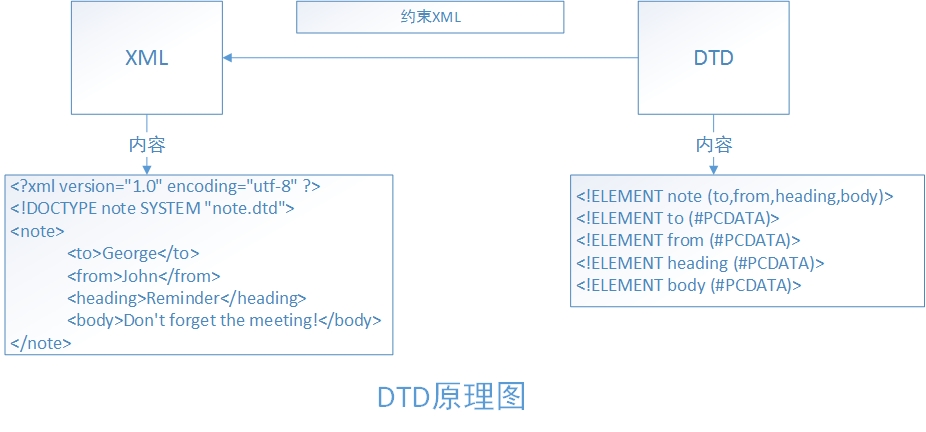
PS: Constrained by DTD, XML can be customized under the constraints of DTD, but DTD has A disadvantage is that it cannot impose range constraints such as numerical constraints on the data.
DTDDeclaration and reference of document
InternalDTDDocumentation
##<!DOCTYPE Root element [Definition content]>External
DTDDocument
<!DOCTYPE Root element SYSTEM "DTD File path">Internal and external
DTDDocument combination
<!DOCTYPE Root element SYSTEM "DTDFile path" [
Definition content
]>Note:
1
, definition keywords must be capitalized, for example:DOCTYPE, ELEMENT, ATTLIST. 2
,When the referenced file is local, the following method is used:
<!DOCTYPE Document root node SYSTEM "URL of the DTD file">
For example: <!DOCTYPE Bookshelf SYSTEM “book. dtd”>
When the referenced file is a public file, the following method is used:
<!DOCTYPE Document root node PUBLIC "DTDname" "DTDfileURL">
##For example: <!DOCTYPE web-app PUBLIC "-//Sun Microsystems, Inc.//DTD Web Application 2.3//EN" "http://java.sun.com/dtd/web-app_2_3.dtd">
DTDElement
Basic Grammar<!ELEMENT NAME CONTENT>
Explanation: ELEMENT: Keyword(must be capitalized).
NAME: Element name.
CONTENT: There are four element types, all of which must be capitalized.
1、EMPTY-This element cannot contain sub-elements and text, but it can have attributes (empty elements)
## 2、ANY-This element can contain anything in DTD## Element content defined in # 3
、#PCDATA-can contain any character data, but cannot It contains any sub-elements## 4, other types
(combination), can be a sub-element, a combination of sub-element and modifier, a combination of basic element, sub-element and modifier. Case:
<!ELEMENT
Class (Student+,Author)><!ELEMENT Student
(Name,Age,Introduction)>< ;!ELEMENT Author
(#PCDATA)><!ELEMENT Name
(#PCDATA)><!ELEMENT Age
(#PCDATA)><!ELEMENT Introduction
(#PCDATA)>Modifier
Use |
Example |
Example description |
|
( ) |
Used to group elements |
(古龙|Jin Yong|Liang Yusheng),(Wang Shuo|Yu Jie) |
Divided into two groups |
| | Select one of the listed objects |
(Men|Women) |
means that a man or a woman must appear, and you can only choose one |
| ##+ | The object appears at least once and can appear multiple times (1 or multiple times) |
(Member +) |
indicates that the member must appear, and multiple members can appear Member |
| * | ##This object is allowed to appear zero to any number of times (0 to many times) | (Hobby* ) | Hobby can appear zero to multiple times|
| This object can appear, But it can only appear once | (0 to 1 times) | (Rookie? ) ##The rookie can appear or not. If it appears, Can only appear once at most | |
| Objects must appear in the specified order |
(Watermelon | ,
Apple,banana) ## means watermelon, apple, banana must appear, and appear in this order |
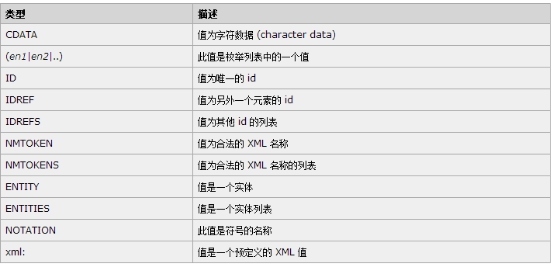
# # ##DTD AttributesBasic SyntaxElement name ##Attribute name Type Attribute attribute Attribute name Type Attribute characteristics......> Explanation: ATTLIST : attribute list, (must be capitalized ).Element name: The name of the corresponding element. Attribute: There can be multiple attributes, and the format is name type attribute property Type:
##PS : Commonly used ones areCDATA(Character type), enumeration (The enumeration format is (value1| Value2|Value3...)),ID(ID cannot be repeated and cannot start with a number ), IDREF( refers to another IDValue),IDREFS(can reference multiple ID Values, separated by spaces ) Attribute characteristics are:
Case: <!ELEMENT 班级 (学生+,作者)> <!ATTLIST 班级 班次 CDATA "1班" 编号 ID #REQUIRED > <!ELEMENT 学生 (名字,年龄,介绍)> <!ELEMENT 作者 (#PCDATA)> <!ATTLIST 学生 地址 CDATA #IMPLIED 授课方式 CDATA #FIXED "面授" 学号 ID #REQUIRED 班级编号 IDREF #REQUIRED 朋友 IDREFS #IMPLIED > <!ELEMENT 名字 (#PCDATA)> <!ELEMENT 年龄 (#PCDATA)> <!ELEMENT 介绍 (#PCDATA)> Entity XML, and parameter entities are generally used in DTD. Basic syntax ##<!ENTITYEntity name"Entity content"> // Reference entity##<!ENTITY % Entity name "Entity content" > // Parameter entityExplanation: 1, the reference entity can be referenced DTD XML file, use &entity name; to use entity content. 2. I don’t know if it’s because of my computer. You can’t use reference entities in external DTD . If you use it, put the reference entity definition in In the internal DTD, it can be used. 3, parameter entity is used in DTD , use %entity name;use 4、可以将那些重复使用的值定义成实体,这样能减少代码的冗余度。 5、在外部DTD中,引用实体最好放在DTD底部,参数实体最好放在DTD顶部。
案例: <!ENTITY % sex "男|女"> <!ELEMENT 班级 (学生+,作者)> <!ELEMENT 学生 (名字,年龄,介绍)> <!ELEMENT 作者 (#PCDATA)> <!ATTLIST 学生 性别 (%sex;) #REQUIRED > <!ELEMENT 名字 (#PCDATA)> <!ELEMENT 年龄 (#PCDATA)> <!ELEMENT 介绍 (#PCDATA)> <!ENTITY writer "Switch"> 综合案例1: XML3.dtd <!ENTITY % sex "男|女"> <!ELEMENT 班级 (学生+,作者)> <!ATTLIST 班级 班次 CDATA "1班" 编号 ID #REQUIRED > <!ELEMENT 学生 (名字,年龄,介绍)> <!ELEMENT 作者 (#PCDATA)> <!ATTLIST 学生 地址 CDATA #IMPLIED 授课方式 CDATA #FIXED "面授" 学号 ID #REQUIRED 班级编号 IDREF #REQUIRED 朋友 IDREFS #IMPLIED 性别 (%sex;) #REQUIRED > <!ELEMENT 名字 (#PCDATA)> <!ELEMENT 年龄 (#PCDATA)> <!ELEMENT 介绍 (#PCDATA)> XML3.xml <?xml version="1.0" encoding="UTF-8"?> <!-- 引入DTD --> <!DOCTYPE 班级 SYSTEM "XML3.dtd" [<!ENTITY writer "Switch">]> <班级 编号="C1" 班次="1班"> <学生 地址="湖南" 授课方式="面授" 学号="n1" 班级编号="C1" 朋友="n2" 性别="男"> <名字>张三</名字> <年龄>20</年龄> <介绍>不错</介绍> </学生> <学生 授课方式="面授" 学号="n2" 班级编号="C1" 朋友="n1 n3" 性别="女"> <名字>李四</名字> <年龄>18</年龄> <介绍>很好</介绍> </学生> <学生 授课方式="面授" 学号="n3" 班级编号="C1" 朋友="n2" 性别="男"> <名字>王五</名字> <年龄>22</年龄> <介绍>非常好</介绍> </学生> <作者>&writer;</作者> </班级> 综合案例2: XML4.dtd <!ENTITY AUTHOR "John Doe"> <!ENTITY COMPANY "JD Power Tools, Inc."> <!ENTITY EMAIL "jd@jd-tools.com"> <!ELEMENT CATALOG (PRODUCT+)> <!ELEMENT PRODUCT (SPECIFICATIONS+,OPTIONS?,PRICE+,NOTES?)> <!ATTLIST PRODUCT NAME CDATA #IMPLIED CATEGORY (HandTool|Table|Shop-Professional) "HandTool" PARTNUM CDATA #IMPLIED PLANT (Pittsburgh|Milwaukee|Chicago) "Chicago" INVENTORY (InStock|Backordered|Discontinued) "InStock"> <!ELEMENT SPECIFICATIONS (#PCDATA)> <!ATTLIST SPECIFICATIONS WEIGHT CDATA #IMPLIED POWER CDATA #IMPLIED> <!ELEMENT OPTIONS (#PCDATA)> <!ATTLIST OPTIONS FINISH (Metal|Polished|Matte) "Matte" ADAPTER (Included|Optional|NotApplicable) "Included" CASE (HardShell|Soft|NotApplicable) "HardShell"> <!ELEMENT PRICE (#PCDATA)> <!ATTLIST PRICE MSRP CDATA #IMPLIED WHOLESALE CDATA #IMPLIED STREET CDATA #IMPLIED SHIPPING CDATA #IMPLIED> <!ELEMENT NOTES (#PCDATA)> XML4.xml <?xml version="1.0" encoding="UTF-8"?> <!DOCTYPE CATALOG SYSTEM "XML4.dtd"> <CATALOG> <PRODUCT NAME="C'estbon" CATEGORY="Shop-Professional" INVENTORY="Backordered" PARTNUM="10" PLANT="Chicago"> <SPECIFICATIONS POWER="0" WEIGHT="555ml">SPECIFICATIONS</SPECIFICATIONS> <OPTIONS>OPTIONS</OPTIONS> <PRICE>2</PRICE> <NOTES>NOTES</NOTES> </PRODUCT> </CATALOG> 以上就是DTD详解的内容,更多相关内容请关注PHP中文网(m.sbmmt.com)! |


Hot AI Tools

Undress AI Tool
Undress images for free

AI Clothes Remover
Online AI tool for removing clothes from photos.

Undresser.AI Undress
AI-powered app for creating realistic nude photos

ArtGPT
AI image generator for creative art from text prompts.

Stock Market GPT
AI powered investment research for smarter decisions

Hot Article
Popular tool

Notepad++7.3.1
Easy-to-use and free code editor

SublimeText3 Chinese version
Chinese version, very easy to use

Zend Studio 13.0.1
Powerful PHP integrated development environment

Dreamweaver CS6
Visual web development tools

SublimeText3 Mac version
God-level code editing software (SublimeText3)
Hot Topics
 20519
20519
 7
13632
4
7
13632
4

 How to format and beautify XML code in Notepad ? (Pretty Print)
Mar 07, 2026 am 12:20 AM
How to format and beautify XML code in Notepad ? (Pretty Print)
Mar 07, 2026 am 12:20 AM
Notepad needs to manually install and enable the XMLTools plug-in to format XML; if the tags are messed up or the content is lost after formatting, it means that the XML itself is illegal, and there are problems such as unclosed tags or illegal characters.
 How to convert XML to YAML for DevOps? (Configuration Management)
Mar 12, 2026 am 12:11 AM
How to convert XML to YAML for DevOps? (Configuration Management)
Mar 12, 2026 am 12:11 AM
xmltodict PyYAMListhesafestcomboforDevOpsconfigfilesbecauseitpreservescomments,CDATA,namespaces,andattributesaccurately,unlikerawXML-to-YAMLtoolsorCLIutilitieslikeyqandxmllintwhichsilentlydropcriticalmetadata.
 How to minify XML files for faster web loading? (Performance Optimization)
Mar 08, 2026 am 12:16 AM
How to minify XML files for faster web loading? (Performance Optimization)
Mar 08, 2026 am 12:16 AM
RunningminifyonXMLwithoutunderstandingitsrulesbreaksparsingoralterssemanticsbecausewhitespacecanbemeaningful;safeminificationrequiresdata-orientedXML,controlledgeneration/consumption,andstrictparserawareness.
 How to convert an XML file to a Word document? (Reporting)
Mar 09, 2026 am 01:05 AM
How to convert an XML file to a Word document? (Reporting)
Mar 09, 2026 am 01:05 AM
python-docx does not support direct reading of XML files. You need to use xml.etree.ElementTree or lxml to parse the XML extraction fields first, and then write them into the Document object segment by segment. Explicit declaration of prefixes is required to process namespaces, and manual manipulation of the underlying XML is required for table merging and styling. Chinese paths should be avoided when saving.
 How to parse XML data from a URL API? (Rest Services)
Mar 13, 2026 am 12:06 AM
How to parse XML data from a URL API? (Rest Services)
Mar 13, 2026 am 12:06 AM
To parse remote XML API in Python, you need to use requests to get the response and then check the status code and Content-Type. Prioritize using r.text with xml.etree.ElementTree to parse; when encountering a namespace, you need to pass the namespace dictionary; use iterparse to stream large files and clear them manually; front-end JS requires CORS support or proxy.
 How to use Attributes vs Elements in XML? (Design Best Practices)
Mar 16, 2026 am 12:26 AM
How to use Attributes vs Elements in XML? (Design Best Practices)
Mar 16, 2026 am 12:26 AM
You should use attributes to store short metadata (such as id, type), and use elements to store scalable content data; because attributes do not support namespaces, duplication, nesting, and internationalization, their parsing is error-prone and maintenance is difficult.
 How to open and view XML files in Windows 11? (Beginner Guide)
Mar 12, 2026 am 01:02 AM
How to open and view XML files in Windows 11? (Beginner Guide)
Mar 12, 2026 am 01:02 AM
The XML file cannot be opened by double-clicking because it is associated with Notepad by default, causing confusion in the display. You should use Notepad, VSCode or Edge instead; Edge can format and report errors, while VSCode requires the installation of extensions such as RedHatXML for normal highlighting, indentation and verification.
 How to read XML data in C# using LINQ? (.NET Development)
Mar 15, 2026 am 12:43 AM
How to read XML data in C# using LINQ? (.NET Development)
Mar 15, 2026 am 12:43 AM
XDocument.Load() is the preferred method for reading local XML files and automatically handles encoding, BOM and format exceptions; absolute or correct relative paths are required; namespaces must be explicitly declared and participate in queries; Elements() and Descendants() behave differently and should be selected as needed; string parsing must capture XmlException and verify the source.
