


Getting Started with XML

XMLGetting started
# Basic overview
## Extensible Markup Language, a subset of Standard Universal Markup Language, is a markup language used to mark electronic files to make them structural. In electronic computers, tags refer to information symbols that computers can understand. Through such tags, computers can process various information such as articles, etc. It can be used to mark data and define data types. It is a source language that allows users to define their own markup language. It is ideally suited for World Wide Web transport, providing a unified approach to describing and exchanging structured data independent of applications or vendors. It is a cross-platform, content-dependent technology in the
environment, and it is also an effective tool for processing distributed structured information today. As early as 1998, W3C released the XML1.0 specification, Use it to simplify the transmission of document information on the Internet.
The historical origin of XML
In 1969
,GML(Generalized Markup Language Generalized Markup Language)---->In 1985,SGML(Standard Generalized Markup LanguageStandard Generalized Markup Language)---> ;1993年,HTML(Hypertext Markup LanguageHypertext Markup Language)--->1998 Year, XML(Extensible Markup LanguageExtensible Markup Language)
What is extensible markup language?
1
, Extensible Markup Language is a markup language that is very similar to Hypertext Markup Language.2
, It is designed to transmit data, not display data.3
, its label is not predefined. You need to define the labels yourself.4
, It is designed to be self-descriptive.5
, it is the recommended standard ofW3C.
What is the difference between Extensible Markup Language and Hypertext Markup Language?
1
, it is not a replacement for Hypertext Markup Language.2
, it is a supplement to Hypertext Markup Language.3
, It is designed for different purposes from Hypertext Markup Language:4
, It is designed to transmit and store data , whose focus is the content of the data.5
, Hypertext Markup Language is designed to display data, with the focus being on the appearance of the data.6
, Hypertext Markup Language is designed to display information, while it is designed to transmit information.7
. The best description of it is: it is an information transmission tool independent of software and hardware.
Why do you need
XML? 1
, solves the problem of non-standard data transmission.2
, can describe things in a tree structure very well.3
, can be used as a configuration file.PS
: Nowadays, many languages and technologies are using XML as data transmission standard, so a deep understanding of XML is equivalent to mastering a general data transmission protocol. Reference document:
//m.sbmmt.com/
Case:
<?xml version="1.0" encoding="UTF-8"?>
<class>
	<stu id="a001">
		<name>张三</name>
		<sex>男</sex>
		<age>20</age>
	</stu>
	<stu id="a002">
		<name>李四</name>
		<sex>女</sex>
		<age>18</age>
	</stu>
</class>
XML基本语法
一个XML文件可分为如下几部分内容:
文档声明 、元素、属性、注释 、CDATA区 ,特殊字符 、处理指令(processing instruction)
基本语法:
<?xml version="1.0" encoding="UTF-8"?>
<!-- 上面是文档声明 - ->
<?xml-stylesheet type="text/css" href=”XML2.css”?>
<!-- 上面是处理指令 - ->
<根元素>
    <!-- 注释 - ->
    <![CDATA[     CDATA区,可以是任意字符    ]]>
	<元素 属性=”属性值”>
		<元素>元素内容</元素>
		<空元素/>>
	</元素>
</class>
文档声明
<?xml version="1.0" encoding=“编码方式" standalone="yes|no"?>
XML声明放在XML文档的第一行
XML声明由以下几个部分组成:
version - -文档符合XML1.0规范
encoding - -文档字符编码,比如”utf-8”
standalone - -文档定义是否独立使用
standalone="yes“
standalone=“no” 默认
PS:虽说现在XML出了2.0版了,但是现在大多还是用1.0版。
元素
基本语法:
<元素>元素内容</元素>
<元素/>
注意事项:
1、每个XML文档必须有且只有一个根元素。
2、根元素是一个完全包括文档中其他所有元素的元素。
3、根元素的起始标记要放在所有其他元素的起始标记之前。
4、根元素的结束标记要放在所有其他元素的结束标记之后。
5、XML元素指XML文件中出现的标签,一个标签分为开始标签和结束标签,一个标签有如下几种书写形式,例如:
包含标签体:<a>123</a>
不含标签体的:<a></a>, 简写为:<a/>
6、一个标签中也可以嵌套若干子标签。但所有标签必须合理的嵌套,绝对不允许交叉嵌套 ,例如:
<a>hello <b>world</a></b>
7、对于XML标签中出现的所有空格和换行,XML解析程序都会当作标签内容进行处理。
例如:
<a>123</a>和<a> 123 </a>意义是完全不同的。
8、一个XML元素可以包含字母、数字以及其它一些可见字符,但必须遵守下面的一些规范:
1---区分大小写,例如,<P>和<p>是两个不同的标记。
2---不能以数字或"_" (下划线)开头。
3---不能包含空格。
4---名称中间不能包含冒号(:)。
9、元素、标签、节点意义都是一样的。
属性
基本语法
<元素 属性1=”属性值” 属性2=”属性值”>元素内容</元素>
注意事项:
1、属性值用双引号(")或单引号(')分隔(如果属性值中有',用"分隔;有",用'分隔)
2、一个元素可以有多个属性,它的基本格式为:
3、属性名称在同一个元素标记中只能出现一次
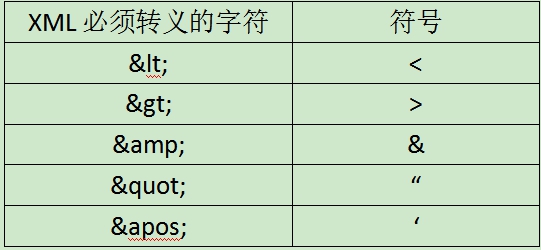
4、属性值不能包括<, >, &之类的特殊字符,否则需要使用转义字符。
注释
这个和HTML一样,都是<!-- 注释 - ->,同样也不能注释嵌套,不能放在元素名中间。
CDATA区
有些内容可能不想让解析引擎解析执行,而是当作原始内容处理,用于把整段文本解释为纯字符数据而不是标记的情况。包含大量<、>、&或者"字符。CDATA区中的所有字符都会被当作元素字符数据的常量部分,而不是XML标记。
PS:CDATA区可以用于传递特殊字符,传递文件数据。可以通过将图片这类二进制文件以byte[]的形式放入CDATA区中,需要使用时在以byte[]的方式读出。
处理指令
处理指令,简称PI (Processing Instruction)。处理指令用来指挥解析引擎如何解析XML文档内容。
处理指令必须以“<?”作为开头,以“?>”作为结尾,XML声明语句就是最常见的一种处理指令。 例如,在XML文档中可以使用xml-stylesheet指令,通知XML解析引擎,应用css文件显示xml文档内容。
案例:
<?xml version="1.0" encoding="utf-8"?>
<?xml-stylesheet href="XML2.css" type="text/css"?>
<class>
	<student>
		<name>张三</name>
		<sex>男</sex>
		<age>20</age>
	</student>
	<student>
		<name>李四</name>
		<sex>女</sex>
		<age>18</age>
	</student>
</class>
XML2.css
name {
	font-size: 20px;
	font-weight: bold;
	color: red;
}

sex{
	font-size: 30px;
	font-weight: bolder;
	color: blue;
}

age{
	font-size: 25px;
	font-weight: bolder;
	color: blue;
}
小结
1、XML必须有且仅有一个根元素
2、元素大小写敏感
3、元素不能以数字,下划线开头
4、属性值用引号
5、属性值如果有特殊字符要用实体表示
6、同一元素的属性必须唯一,属性值可以不唯一
7、非空元素标记必须成对
8、空标记要写关闭符号
9、元素必须正确嵌套
10、元素中可以包含字母、数字或者其它字符(支持中文)
11、元素中不能含空格
12、元素中不能含冒号(注:冒号留给命名空间使用)
以上就是XML入门的内容,更多相关内容请关注PHP中文网(m.sbmmt.com)!

Hot AI Tools

Undress AI Tool
Undress images for free

AI Clothes Remover
Online AI tool for removing clothes from photos.

Undresser.AI Undress
AI-powered app for creating realistic nude photos

ArtGPT
AI image generator for creative art from text prompts.

Stock Market GPT
AI powered investment research for smarter decisions

Hot Article
Popular tool

Notepad++7.3.1
Easy-to-use and free code editor

SublimeText3 Chinese version
Chinese version, very easy to use

Zend Studio 13.0.1
Powerful PHP integrated development environment

Dreamweaver CS6
Visual web development tools

SublimeText3 Mac version
God-level code editing software (SublimeText3)
Hot Topics
 20519
20519
 7
13632
4
7
13632
4

 How to format and beautify XML code in Notepad ? (Pretty Print)
Mar 07, 2026 am 12:20 AM
How to format and beautify XML code in Notepad ? (Pretty Print)
Mar 07, 2026 am 12:20 AM
Notepad needs to manually install and enable the XMLTools plug-in to format XML; if the tags are messed up or the content is lost after formatting, it means that the XML itself is illegal, and there are problems such as unclosed tags or illegal characters.
 How to convert XML to YAML for DevOps? (Configuration Management)
Mar 12, 2026 am 12:11 AM
How to convert XML to YAML for DevOps? (Configuration Management)
Mar 12, 2026 am 12:11 AM
xmltodict PyYAMListhesafestcomboforDevOpsconfigfilesbecauseitpreservescomments,CDATA,namespaces,andattributesaccurately,unlikerawXML-to-YAMLtoolsorCLIutilitieslikeyqandxmllintwhichsilentlydropcriticalmetadata.
 How to minify XML files for faster web loading? (Performance Optimization)
Mar 08, 2026 am 12:16 AM
How to minify XML files for faster web loading? (Performance Optimization)
Mar 08, 2026 am 12:16 AM
RunningminifyonXMLwithoutunderstandingitsrulesbreaksparsingoralterssemanticsbecausewhitespacecanbemeaningful;safeminificationrequiresdata-orientedXML,controlledgeneration/consumption,andstrictparserawareness.
 How to convert an XML file to a Word document? (Reporting)
Mar 09, 2026 am 01:05 AM
How to convert an XML file to a Word document? (Reporting)
Mar 09, 2026 am 01:05 AM
python-docx does not support direct reading of XML files. You need to use xml.etree.ElementTree or lxml to parse the XML extraction fields first, and then write them into the Document object segment by segment. Explicit declaration of prefixes is required to process namespaces, and manual manipulation of the underlying XML is required for table merging and styling. Chinese paths should be avoided when saving.
 How to parse XML data from a URL API? (Rest Services)
Mar 13, 2026 am 12:06 AM
How to parse XML data from a URL API? (Rest Services)
Mar 13, 2026 am 12:06 AM
To parse remote XML API in Python, you need to use requests to get the response and then check the status code and Content-Type. Prioritize using r.text with xml.etree.ElementTree to parse; when encountering a namespace, you need to pass the namespace dictionary; use iterparse to stream large files and clear them manually; front-end JS requires CORS support or proxy.
 How to use Attributes vs Elements in XML? (Design Best Practices)
Mar 16, 2026 am 12:26 AM
How to use Attributes vs Elements in XML? (Design Best Practices)
Mar 16, 2026 am 12:26 AM
You should use attributes to store short metadata (such as id, type), and use elements to store scalable content data; because attributes do not support namespaces, duplication, nesting, and internationalization, their parsing is error-prone and maintenance is difficult.
 How to open and view XML files in Windows 11? (Beginner Guide)
Mar 12, 2026 am 01:02 AM
How to open and view XML files in Windows 11? (Beginner Guide)
Mar 12, 2026 am 01:02 AM
The XML file cannot be opened by double-clicking because it is associated with Notepad by default, causing confusion in the display. You should use Notepad, VSCode or Edge instead; Edge can format and report errors, while VSCode requires the installation of extensions such as RedHatXML for normal highlighting, indentation and verification.
 How to read XML data in C# using LINQ? (.NET Development)
Mar 15, 2026 am 12:43 AM
How to read XML data in C# using LINQ? (.NET Development)
Mar 15, 2026 am 12:43 AM
XDocument.Load() is the preferred method for reading local XML files and automatically handles encoding, BOM and format exceptions; absolute or correct relative paths are required; namespaces must be explicitly declared and participate in queries; Elements() and Descendants() behave differently and should be selected as needed; string parsing must capture XmlException and verify the source.
