


 Backend Development
XML/RSS Tutorial
Introduction to php operating xml - attribute analysis of xml tags
Backend Development
XML/RSS Tutorial
Introduction to php operating xml - attribute analysis of xml tags
Introduction to php operating xml - attribute analysis of xml tags

The example in this article describes the attributes of xml tags for getting started with php operating xml. Share it with everyone for your reference. The specific analysis is as follows:
<?xml version="1.0" encoding="utf-8" standalone="yes" ?>
<class>
 <student id="No001" haha="美女">
  <name>小乔</name>
  <sex>女</sex>
  <age>23</age>
 </student>
 <student>
  <name>周瑜</name>
  <sex>男</sex>
  <age>26</age>
 </student>
</class>
How to write attributes, such as id="No001" in the case.
Note:
(1) Attribute values must be separated by single quotes or double quotes;
(2) An xml tag can have multiple attributes;
(3) Attribute values cannot contain and & symbol; if present, a predefined entity reference in xml is used. There are 5:
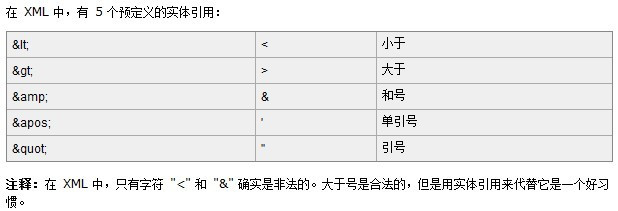
(4) The same attribute name cannot appear in the same tag: if there is already id="No001", there cannot be another id="No002".
(5) Comment method:
I hope this article will be helpful to everyone’s PHP operation XML programming.
For more articles related to the attribute analysis of xml tags for getting started with PHP operation xml, please pay attention to the PHP Chinese website!

Hot AI Tools

Undress AI Tool
Undress images for free

AI Clothes Remover
Online AI tool for removing clothes from photos.

Undresser.AI Undress
AI-powered app for creating realistic nude photos

ArtGPT
AI image generator for creative art from text prompts.

Stock Market GPT
AI powered investment research for smarter decisions

Hot Article
Popular tool

Notepad++7.3.1
Easy-to-use and free code editor

SublimeText3 Chinese version
Chinese version, very easy to use

Zend Studio 13.0.1
Powerful PHP integrated development environment

Dreamweaver CS6
Visual web development tools

SublimeText3 Mac version
God-level code editing software (SublimeText3)
Hot Topics
 20518
20518
 7
13631
4
7
13631
4

 How to install the XML Tools plugin in Notepad ? (Plugin Manager)
Mar 05, 2026 am 12:37 AM
How to install the XML Tools plugin in Notepad ? (Plugin Manager)
Mar 05, 2026 am 12:37 AM
Notepad v8.6.1 has completely removed the PluginManager. XMLTools cannot be installed because it has not been migrated to the new plug-in system and the author has stopped updating it. Manual installation is only applicable to v8.5.7 and earlier versions. It is recommended to use built-in functions or alternatives such as VSCode.
 How to convert XML to YAML for DevOps? (Configuration Management)
Mar 12, 2026 am 12:11 AM
How to convert XML to YAML for DevOps? (Configuration Management)
Mar 12, 2026 am 12:11 AM
xmltodict PyYAMListhesafestcomboforDevOpsconfigfilesbecauseitpreservescomments,CDATA,namespaces,andattributesaccurately,unlikerawXML-to-YAMLtoolsorCLIutilitieslikeyqandxmllintwhichsilentlydropcriticalmetadata.
 How to format and beautify XML code in Notepad ? (Pretty Print)
Mar 07, 2026 am 12:20 AM
How to format and beautify XML code in Notepad ? (Pretty Print)
Mar 07, 2026 am 12:20 AM
Notepad needs to manually install and enable the XMLTools plug-in to format XML; if the tags are messed up or the content is lost after formatting, it means that the XML itself is illegal, and there are problems such as unclosed tags or illegal characters.
 How to convert an XML file to a Word document? (Reporting)
Mar 09, 2026 am 01:05 AM
How to convert an XML file to a Word document? (Reporting)
Mar 09, 2026 am 01:05 AM
python-docx does not support direct reading of XML files. You need to use xml.etree.ElementTree or lxml to parse the XML extraction fields first, and then write them into the Document object segment by segment. Explicit declaration of prefixes is required to process namespaces, and manual manipulation of the underlying XML is required for table merging and styling. Chinese paths should be avoided when saving.
 How to minify XML files for faster web loading? (Performance Optimization)
Mar 08, 2026 am 12:16 AM
How to minify XML files for faster web loading? (Performance Optimization)
Mar 08, 2026 am 12:16 AM
RunningminifyonXMLwithoutunderstandingitsrulesbreaksparsingoralterssemanticsbecausewhitespacecanbemeaningful;safeminificationrequiresdata-orientedXML,controlledgeneration/consumption,andstrictparserawareness.
 How to parse XML data from a URL API? (Rest Services)
Mar 13, 2026 am 12:06 AM
How to parse XML data from a URL API? (Rest Services)
Mar 13, 2026 am 12:06 AM
To parse remote XML API in Python, you need to use requests to get the response and then check the status code and Content-Type. Prioritize using r.text with xml.etree.ElementTree to parse; when encountering a namespace, you need to pass the namespace dictionary; use iterparse to stream large files and clear them manually; front-end JS requires CORS support or proxy.
 How to use Attributes vs Elements in XML? (Design Best Practices)
Mar 16, 2026 am 12:26 AM
How to use Attributes vs Elements in XML? (Design Best Practices)
Mar 16, 2026 am 12:26 AM
You should use attributes to store short metadata (such as id, type), and use elements to store scalable content data; because attributes do not support namespaces, duplication, nesting, and internationalization, their parsing is error-prone and maintenance is difficult.
 How to open and view XML files in Windows 11? (Beginner Guide)
Mar 12, 2026 am 01:02 AM
How to open and view XML files in Windows 11? (Beginner Guide)
Mar 12, 2026 am 01:02 AM
The XML file cannot be opened by double-clicking because it is associated with Notepad by default, causing confusion in the display. You should use Notepad, VSCode or Edge instead; Edge can format and report errors, while VSCode requires the installation of extensions such as RedHatXML for normal highlighting, indentation and verification.
