


How to Scrape Website Content to Create an RSS Feed

Check the website’s robots.txt and Terms of Service to ensure scraping is allowed, avoid overloading servers by adding delays between requests, and use data responsibly without republishing content without permission. 2. Use Python with libraries like requests for fetching web pages, BeautifulSoup for parsing HTML, and feedgen for generating valid RSS XML. 3. Identify the target site’s URL pattern and HTML structure using browser DevTools, then scrape article titles and links using appropriate CSS selectors. 4. Optionally, visit each article page to extract additional details like publication date, author, and excerpt by customizing selectors for each site. 5. Generate a valid RSS feed using feedgen by setting the feed title, link, description, and adding entries with title, link, description, and publication date for each article. 6. Automate the scraping process using cron or Task Scheduler to run the script periodically and host the generated XML file on a web-accessible server via GitHub Pages, VPS, or cloud functions so it can be subscribed to in RSS readers.

Creating an RSS feed from a website that doesn’t offer one is a great way to stay updated on new content. Web scraping allows you to extract articles, titles, links, and publication dates, then format them into a valid RSS feed. Here’s how to do it step by step.

1. Understand the Basics of RSS and Legal/Ethical Considerations
Before scraping, make sure you:
-
Check the site’s
robots.txt(e.g.,https://example.com/robots.txt) to see if scraping is allowed. - Review the Terms of Service — some sites prohibit automated access.
- Don’t overload the server — use delays between requests (e.g., 1–2 seconds).
- Use the data responsibly — don’t republish content without permission.
RSS (Really Simple Syndication) is an XML format that includes:
- Feed title
- Link to the website
- Description
- List of items (each with title, link, description, and publication date)
2. Choose the Right Tools and Libraries
For scraping and generating RSS, here are common tools:
-
Python (recommended for flexibility)
-
requests– to fetch web pages -
BeautifulSouporlxml– to parse HTML -
feedgen– to generate RSS XML
-
- Alternatives: Node.js with
puppeteerorcheerio, or tools likescrapy
Install required packages:
pip install requests beautifulsoup4 feedgen
3. Scrape the Website Content
Identify a target site (e.g., a blog or news page). Look for:
- A consistent URL pattern (e.g.,
/blog/page/1) - HTML structure using browser DevTools (F12)
Example: Scrape blog post links and titles
import requests
from bs4 import BeautifulSoup
from urllib.parse import urljoin

def scrape_articles(url):
    headers = {'User-Agent': 'RSS Bot'}
    response = requests.get(url, headers=headers)
    soup = BeautifulSoup(response.content, 'html.parser')

    articles = []
    # Adjust selector based on site (e.g., 'h2 a', '.post-title a', etc.)
    for link in soup.select('h2 a'):  # Example selector
        title = link.get_text()
        href = link['href']
        full_url = urljoin(url, href)
        articles.append({'title': title, 'url': full_url})
return articlesTip: Use CSS selectors or XPath to target article titles, dates, and excerpts. If content is loaded via JavaScript, consider
SeleniumorPlaywright.
4. Extract Full Content (Optional)
If the homepage only shows summaries, you may need to visit each article page to get:
- Publication date
- Article body or excerpt
- Author
Example:
def scrape_article_details(url):
    response = requests.get(url)
    soup = BeautifulSoup(response.content, 'html.parser')

    # Customize these selectors
    date_elem = soup.select_one('.date') or soup.select_one('time')
    date = date_elem['datetime'] if date_elem and date_elem.get('datetime') else None

    content_elem = soup.select_one('.content')
    description = content_elem.get_text()[:500] + "..." if content_elem else ""

    return {'date': date, 'description': description}
5. Generate the RSS Feed
Use feedgen to build a valid RSS file:
from feedgen.feed import FeedGenerator

def create_rss(articles, site_title, site_url, feed_description):
    fg = FeedGenerator()
    fg.title(site_title)
    fg.link(href=site_url)
    fg.description(feed_description)

    for article in articles:
        fe = fg.add_entry()
        fe.title(article['title'])
        fe.link(href=article['url'])
        fe.description(article.get('description', ''))
        fe.pubDate(article.get('date'))

    # Write to file or serve over HTTP
    fg.rss_file('rss_feed.xml')
Call it:
articles = scrape_articles("https://example-blog.com")
for article in articles:
    details = scrape_article_details(article['url'])
    article.update(details)

create_rss(articles, "Example Blog RSS", "https://example-blog.com", "Scraped RSS feed")
6. Automate and Host the Feed
- Schedule updates using
cron(Linux/Mac) or Task Scheduler (Windows):# Run every 6 hours 0 */6 * * * python /path/to/rss_scraper.py
- Host the XML file on a web-accessible server so you can subscribe via RSS readers.
- Use services like GitHub Pages, VPS, or cloud functions (e.g., AWS Lambda + API Gateway).
- Websites change their layout — your scraper may break. Monitor and update selectors.
- Some sites block scrapers — consider rotating User-Agent or using proxies.
- For dynamic sites (React, Vue), use headless browsers.
- Respect rate limits and avoid aggressive scraping.
Final Notes
Basically, it’s a mix of careful scraping, smart parsing, and proper RSS formatting. Once set up, you’ll have a working feed for any site.
The above is the detailed content of How to Scrape Website Content to Create an RSS Feed. For more information, please follow other related articles on the PHP Chinese website!

Hot AI Tools

Undress AI Tool
Undress images for free

AI Clothes Remover
Online AI tool for removing clothes from photos.

Undresser.AI Undress
AI-powered app for creating realistic nude photos

ArtGPT
AI image generator for creative art from text prompts.

Stock Market GPT
AI powered investment research for smarter decisions

Hot Article
Popular tool

Notepad++7.3.1
Easy-to-use and free code editor

SublimeText3 Chinese version
Chinese version, very easy to use

Zend Studio 13.0.1
Powerful PHP integrated development environment

Dreamweaver CS6
Visual web development tools

SublimeText3 Mac version
God-level code editing software (SublimeText3)
Hot Topics
 20519
20519
 7
13632
4
7
13632
4

 How to implement RSS subscription using ThinkPHP6
Jun 21, 2023 am 09:18 AM
How to implement RSS subscription using ThinkPHP6
Jun 21, 2023 am 09:18 AM
With the continuous development of Internet technology, more and more websites are beginning to provide RSS subscription services so that readers can obtain their content more conveniently. In this article, we will learn how to use the ThinkPHP6 framework to implement a simple RSS subscription function. 1. What is RSS? RSS (ReallySimpleSyndication) is an XML format used for publishing and subscribing to web content. Using RSS, users can browse updated information from multiple websites in one place, and
 How to use the concurrent function in Go language to crawl multiple web pages in parallel?
Jul 29, 2023 pm 07:13 PM
How to use the concurrent function in Go language to crawl multiple web pages in parallel?
Jul 29, 2023 pm 07:13 PM
How to use the concurrent function in Go language to crawl multiple web pages in parallel? In modern web development, it is often necessary to scrape data from multiple web pages. The general approach is to initiate network requests one by one and wait for responses, which is less efficient. The Go language provides powerful concurrency functions that can improve efficiency by crawling multiple web pages in parallel. This article will introduce how to use the concurrent function of Go language to achieve parallel crawling of multiple web pages, as well as some precautions. First, we need to create concurrent tasks using the go keyword built into the Go language. Pass
 How does PHP perform web scraping and data scraping?
Jun 29, 2023 am 08:42 AM
How does PHP perform web scraping and data scraping?
Jun 29, 2023 am 08:42 AM
PHP is a server-side scripting language that is widely used in fields such as website development and data processing. Among them, web crawling and data crawling are one of the important application scenarios of PHP. This article will introduce the basic principles and common methods of how to crawl web pages and data with PHP. 1. The principles of web crawling and data crawling Web crawling and data crawling refer to automatically accessing web pages through programs and obtaining the required information. The basic principle is to obtain the HTML source code of the target web page through the HTTP protocol, and then parse the HTML source code
 Web scraping and data extraction techniques in Python
Sep 16, 2023 pm 02:37 PM
Web scraping and data extraction techniques in Python
Sep 16, 2023 pm 02:37 PM
Python has become the programming language of choice for a variety of applications, and its versatility extends to the world of web scraping. With its rich ecosystem of libraries and frameworks, Python provides a powerful toolkit for extracting data from websites and unlocking valuable insights. Whether you are a data enthusiast, researcher, or industry professional, web scraping in Python can be a valuable skill for leveraging the vast amounts of information available online. In this tutorial, we will delve into the world of web scraping and explore the various techniques and tools in Python that can be used to extract data from websites. We'll uncover the basics of web scraping, understand the legal and ethical considerations surrounding the practice, and delve into the practical aspects of data extraction. In the next part of this article
 Learn how to batch download images from web pages using win10
Jan 03, 2024 pm 02:04 PM
Learn how to batch download images from web pages using win10
Jan 03, 2024 pm 02:04 PM
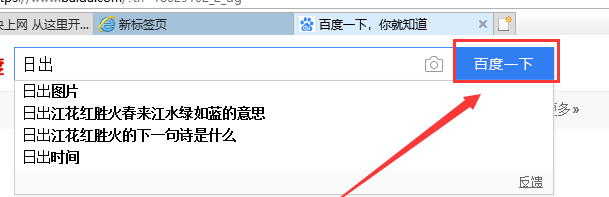
When using win10 to download pictures and videos, a single download is very inconvenient for users who need to download pictures in large batches. So how can I batch download pictures from web pages in win10. Let me tell you now. Hope this helps. How to batch download pictures from web pages in win10 1. First, install Thunder on the computer. 2. Turn on the computer and open the built-in Edge browser. Enter the search keywords in the input box, and then Baidu. 3. Click, as shown in the figure below. 4. In the new interface, click the three small dots icon in the upper right corner, and then select. IE is included with the computer itself. No installation is required. 5. In the IE interface that jumps to, right-click the increasingly blank space and select 6. In the Thunder download interface, click on the top
 How to process and render RSS feeds with PHP and XML
Jul 28, 2023 pm 02:07 PM
How to process and render RSS feeds with PHP and XML
Jul 28, 2023 pm 02:07 PM
How to process and render RSS subscriptions with PHP and XML Introduction: RSS (ReallySimpleSyndication) is a commonly used protocol for subscribing and publishing content. By using RSS, users can get the latest updates from multiple websites in one place. In this article, we will learn how to use PHP and XML to process and render RSS feeds. 1. The basic concept of RSS RSS provides us with a way to aggregate updates from multiple sources into one place. It uses XML
 How to Scrape Website Data and Create an RSS Feed from It
Sep 19, 2025 am 02:16 AM
How to Scrape Website Data and Create an RSS Feed from It
Sep 19, 2025 am 02:16 AM
Checklegalconsiderationsbyreviewingrobots.txtandTermsofService,avoidserveroverload,andusedataresponsibly.2.UsetoolslikePython’srequests,BeautifulSoup,andfeedgentofetch,parse,andgenerateRSSfeeds.3.ScrapearticledatabyidentifyingHTMLelementswithDevTools
 How to scrape a website with Python
Jul 13, 2025 am 02:12 AM
How to scrape a website with Python
Jul 13, 2025 am 02:12 AM
Want to use Python to crawl website content? The answer is: choose the right tool, understand the web structure, and deal with common problems. 1. Install the requests library and send requests, use headers and time.sleep() to avoid backcrawling; 2. Use BeautifulSoup to parse HTML to extract data, such as links and titles; 3. Pagination construct URL loop crawl, and dynamic content is controlled by Selenium; 4. Pay attention to setting User-Agent, controlling request frequency, complying with robots protocol, and adding exception handling. By mastering these key points, you can quickly get started with Python crawlers.
