


HTML布局
大多的网页布局要配合css来完成;css用于对元素进行定位或者为页面创建背景以及色彩丰富的外观。由于这里我们涉及到HTML的基础知识,我们就用我们现有的知识来进行布局。
网页布局可以通过< table>元素,或者< div>元素实现。 先来个简单的< table>布局网页 我们在上一章中学习了表格,那么下面我们就来将一个网页的一个板块用没有边框的表格来布局(添加背景颜色和布置文本内容)
<html>
<body bgcolor="gray">
<table width="1000">
    <tr>
        <td colspan="2" style="background-color: royalblue">
            <h1 align="center">php中文网</h1>
        </td>
    </tr>
    <tr valign="top">
        <td style="background-color: darkorange;width:300px">
          <dl>
              <dt>list of book</dt>
              <dd>
                  <ol>
                      <li>hadoop</li>
                      <li>linux</li>
                      <li>c</li>
                  </ol>
              </dd>
          </dl>
        </td>
        <td style="background-color: forestgreen;height:500px;width:700px;">
            <h1 style="font-size: 20px;text-align: center">the summary of the book</h1>
        i will lead you to travel in the season of linux
        </td>
    </tr>
    <tr>
        <td colspan="2" style="background-color: powderblue;text-align:center;height: 100px">
            good good study day day up</td>
    </tr>
</table>
</body>
</html>
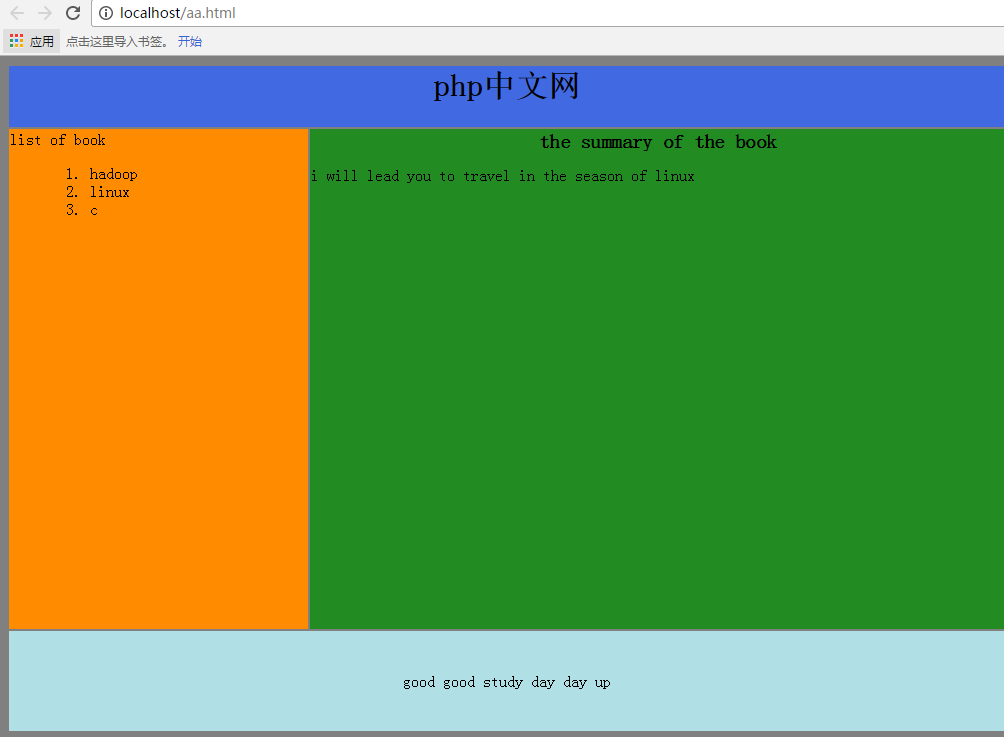
下面我们再使用< div>元素进行布局(尽量达到上面的页面效果): 一般的div元素结构就如下图(思路也是用table的思路):
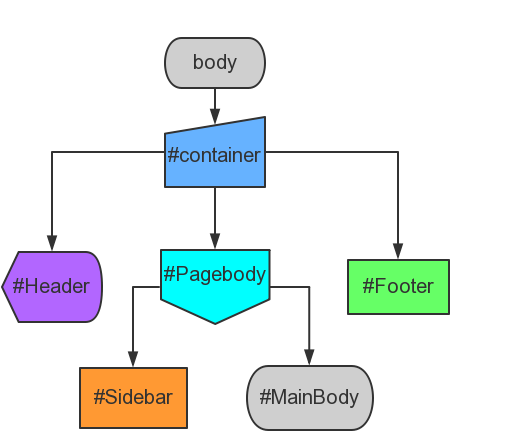
这里是具体实现内容:
<html>
<head>
    <style>
        div#container{width:1000px}
        div#header {background-color: royalblue ;height: 100px;text-align:center;font-size: 20px}
        div#sidebar{background-color: darkorange;height:400px;width:300px;float:left;}
        div#mainbody {background-color: forestgreen;height:400px;width:700px;float:left;}
        div#footer {background-color: powderblue;height: 100px;clear:both;text-align:center;}
    </style>
</head>
<body>
<div id="container">
    <div id="header">
        <h1>php中文网</h1>
    </div>
    <div id="sidebar">
       <dl>
           <dt>list of book</dt>
            <dd>
                <ol>
                    <li>hadoop</li>
                    <li>linux</li>
                    <li>c</li>
                </ol>
            </dd>
       </dl>
    </div>
    <div id="mainbody">
        <h1>the summary of the book</h1>
        <p>i will lead you to travel in the season of linux</p>
    </div>
    <div id="footer">good good study day day up</div>
</div>
</body>
</html>
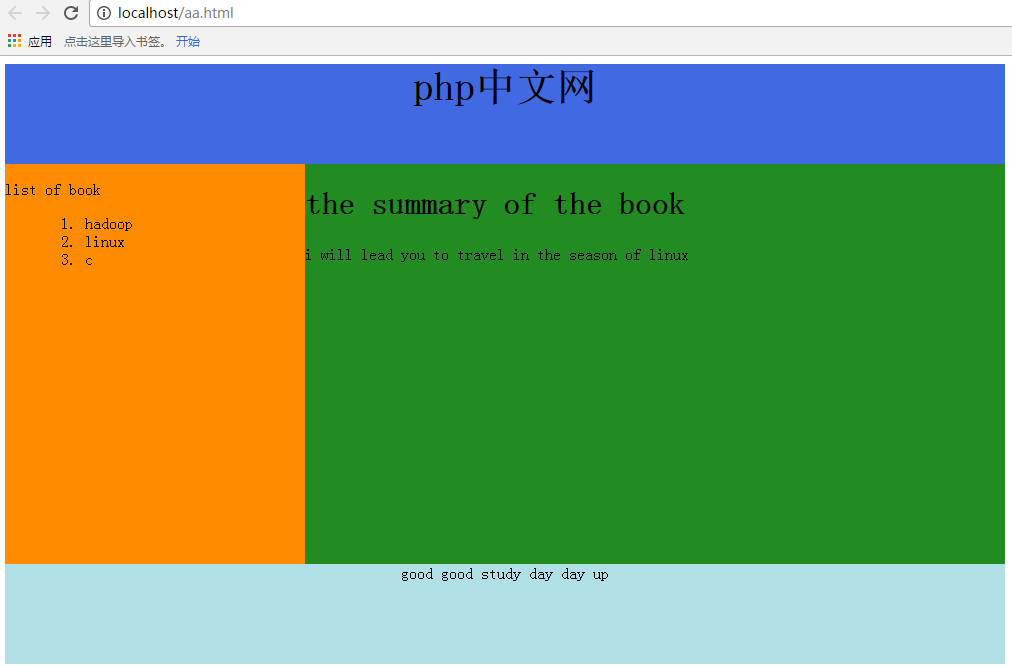
只要将上面的style里的div定义和下面的div块对应就很好理解,这里的逻辑表达的很清晰,就不再赘述。直接来看看效果截图吧
neue Datei
<html>
<head>
<style>
div#container{width:1000px}
div#header {background-color: royalblue ;height: 100px;text-align:center;font-size: 20px}
div#sidebar{background-color: darkorange;height:400px;width:300px;float:left;}
div#mainbody {background-color: forestgreen;height:400px;width:700px;float:left;}
div#footer {background-color: powderblue;height: 100px;clear:both;text-align:center;}
</style>
</head>
<body>
<div id="container">
<div id="header">
<h1>php中文网</h1>
</div>
<div id="sidebar">
<dl>
<dt>list of book</dt>
<dd>
<ol>
<li>hadoop</li>
<li>linux</li>
<li>c</li>
</ol>
</dd>
</dl>
</div>
<div id="mainbody">
<h1>the summary of the book</h1>
<p>i will lead you to travel in the season of linux</p>
</div>
<div id="footer">good good study day day up</div>
</div>
</body>
</html>
Vorschau
Clear
- Kursempfehlungen
- Kursunterlagen herunterladen














 Die Kursunterlagen stehen derzeit nicht zum Download zur Verfügung. Die Mitarbeiter organisieren es derzeit. Bitte schenken Sie diesem Kurs in Zukunft mehr Aufmerksamkeit
Auch Studierende, die diesen Kurs gesehen haben, lernen

Lassen Sie uns kurz über die Gründung eines Unternehmens in PHP sprechen
Kurze Einführung in die Web-Frontend-Entwicklung
Umfangreiche, praktische Tianlongbabu-Entwicklung eines Mini-Version-MVC-Frameworks, das die Enzyklopädie-Website mit peinlichen Dingen imitiert
Erste Schritte mit der praktischen PHP-Entwicklung: Schnelle PHP-Erstellung [Small Business Forum]
Anmeldebestätigung und klassisches Message Board
Wissenssammlung über Computernetzwerke
Schnellstart-Node.JS-Vollversion
Der Frontend-Kurs, der Sie am besten versteht: HTML5/CSS3/ES6/NPM/Vue/...[Original]
Schreiben Sie Ihr eigenes PHP-MVC-Framework (40 Kapitel ausführlich/große Details/Muss gelesen werden, damit Neulinge vorankommen)