


PHP开发 留言板教程之留言板发布与展示
创建“ressage.php”文件
我们将页面分成了三个部分,一部分是放入了我们的背景图,一部分是展示我们的留言,一部分是我们发布留言的页面
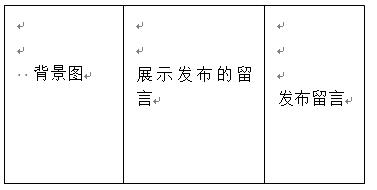
我们对三个div分别进行了CSS布局,对form表单内容今天了JS 判断,在展示留言版块做了分页,在发布留言版块我们使用了JQ的隐藏域效果
代码如下
<?php
session_start();
header("content-type:text/html;charset=utf-8");
$page=isset($_GET['page']) ?$_GET['page'] :1 ;//接收页码
$page=!empty($page) ? $page :1;
$conn=mysqli_connect("localhost","root","root","Ressage");
mysqli_set_charset($conn,'utf8'); //设定字符集
$table_name="ressage_user";//查取表名设置
$perpage=5;//每页显示的数据个数
//最大页数和总记录数
$total_sql="select count(*) from $table_name";
$total_result =mysqli_query($conn,$total_sql);
$total_row=mysqli_fetch_row($total_result);
$total = $total_row[0];//获取最大页码数
$total_page = ceil($total/$perpage);//向上整数
//临界点
$page=$page>$total_page ? $total_page:$page;//当下一页数大于最大页数时的情况
//分页设置初始化
$start=($page-1)*$perpage;
$sql= "select * from ressage_user order by id desc limit $start ,$perpage";
$result=mysqli_query($conn,$sql);
?>
<!DOCTYPE html>
<html>
<head>
    <meta charset="UTF-8">
    <title>留言板</title>
    <script src="http://libs.baidu.com/jquery/1.10.2/jquery.min.js">
    </script>
    <meta name="viewport" content="width=device-width, initial-scale=1.0, minimum-scale=1.0, maximum-scale=1.0, user-scalable=no">
    <meta name="format-detection" content="telephone=no" />
    <style>
        /*#left{*/
            /*width: 25%;*/
            /*float: left;*/
        /*}*/
        /*#center{*/
            /*width: 42%;*/
            /*float: left;*/
        /*}*/
        /*#right{*/
            /*width: 32%;*/
            /*float: left;*/
        /*}*/
 .right{
             margin-left: 140px;
         }
        .button{
            background-color: rgba(230, 228, 236, 0.93); /* Green */
 border: none;
            color: #110c0f;
            padding: 10px 70px;
            text-align: center;
            display: inline-block;
            font-size: 16px;
            margin-left: 20px;
            cursor: pointer;
        }
        form{
            font-size: 17px;
        }
        button{
            background-color: rgba(249, 247, 255, 0);
            border: none;
            font-size: 16px;
            color: #551a8b;
            cursor: pointer;
        }
        a{
            text-decoration:none;
        }
        table{
            width: 360px;
            height: 100px;
        }
    </style>
    <script>
        $(document).ready(function(){
            $("button").click(function(){
                $("form").toggle();
            });
        });
        function foo(){
            if(myform.name.value=="")
            {
                alert("请输入你的姓名");
                myform.name.focus();
                return false;
            }
            if (myform.content.value=="")
            {
                alert("留言内容不能为空");
                myform.content.focus();
                return false;
            }
            if(myform.vcode.value==""){
            alert('验证码不能为空');
            myform.vcode.focus();
            return false;
            }
        }
    </script>
</head>
<body>
    <div id="left">
         <img src="https://img.php.cn/upload/image/460/147/285/1477727203382106.jpg" width="370px">
    </div>
    <div id="center">
        <h1>留言内容</h1>
        <p>
            <?
            if($result==null){
 echo"暂时没有留言";
            }  ?>
 </p>
        <?php
        while($row=mysqli_fetch_array($result)){
 ?>
 <table border="1" cellspacing="0">
        <tr>
            <td>姓名:<?php  echo $row['name']?></td>
 <td style="text-align: center">留言时间:<?php echo $row['ressage_time']?></td>
            <td><a href="ressage_delete.php?id=<?php echo $row['id']?>" >删除</a> </td>
        </tr>
        <tr>
            <td colspan="3">你的留言:<?php echo $row['content']?></td>
        </tr>
            </table>
<?php
 }?>
 <div id="baner" style="margin-top: 20px">
            <a href="<?php
            echo "$_SERVER[PHP_SELF]?page=1"
 ?>">首页</a>
              <a href="<?php
            echo "$_SERVER[PHP_SELF]?page=".($page-1)
 ?>">上一页</a>
            <!--        显示123456等页码按钮-->
 <?php
            for($i=1;$i<=$total_page;$i++){
 if($i==$page){//当前页为显示页时加背景颜色
 echo "<a  style='padding: 5px 5px;background: #000;color: #FFF' href='$_SERVER[PHP_SELF]?page=$i'>$i</a>";
                }else{
 echo "<a  style='padding: 5px 5px' href='$_SERVER[PHP_SELF]?page=$i'>$i</a>";
                }
            }
 ?>
   <a href="<?php
            echo "$_SERVER[PHP_SELF]?page=".($page+1)
 ?>">下一页</a>
              <a href="<?php
            echo "$_SERVER[PHP_SELF]?page={$total_page}"
 ?>">末页</a>
              <span>共<?php echo $total?>条</span>
        </div>
    </div>
    <div id="right" >
        <h2>留言板</h2>
        <div > <a href="">首页</a> | <button>留言</button> <a href="">管理员登录</a>
              <form method="post" action="ressage_post.php" style="display:none;" onsubmit="return foo();" name="myform" ">
                  <div>
                  <p>
                      姓名:<input type="text" name="name">
                  </p>
                  <p>
                      邮箱:<input type="email" name="email">
                  </p>
                  <p>
                      留言内容:<br/>
                      <textarea cols="30" rows="7" name="content"></textarea>
                  </p>
                      <p>
                          验证码:<input type="text" name="vcode"><img src="yanzhengma.php" onClick="this.src='yanzhengma.php?nocache='+Math.random()" style="cursor:hand">
                      </p>
                      <p>
                          <button>提交留言</button>
                      </p>
                  </div>
              </form>
    </div>
</body>
</html>
neue Datei
<?php
session_start();
header("content-type:text/html;charset=utf-8");
$page=isset($_GET['page']) ?$_GET['page'] :1 ;//接收页码
$page=!empty($page) ? $page :1;
$conn=mysqli_connect("localhost","root","root","Ressage");
mysqli_set_charset($conn,'utf8'); //设定字符集
$table_name="ressage_user";//查取表名设置
$perpage=5;//每页显示的数据个数
//最大页数和总记录数
$total_sql="select count(*) from $table_name";
$total_result =mysqli_query($conn,$total_sql);
$total_row=mysqli_fetch_row($total_result);
$total = $total_row[0];//获取最大页码数
$total_page = ceil($total/$perpage);//向上整数
//临界点
$page=$page>$total_page ? $total_page:$page;//当下一页数大于最大页数时的情况
//分页设置初始化
$start=($page-1)*$perpage;
$sql= "select * from ressage_user order by id desc limit $start ,$perpage";
$result=mysqli_query($conn,$sql);
?>
<!DOCTYPE html>
<html lang="en">
<head>
<meta charset="UTF-8">
<title>留言板</title>
<script src="http://libs.baidu.com/jquery/1.10.2/jquery.min.js">
</script>
<meta name="viewport" content="width=device-width, initial-scale=1.0, minimum-scale=1.0, maximum-scale=1.0, user-scalable=no">
<meta name="format-detection" content="telephone=no" />
<style>
/*#left{*/
/*width: 25%;*/
/*float: left;*/
/*}*/
/*#center{*/
/*width: 42%;*/
/*float: left;*/
/*}*/
/*#right{*/
/*width: 32%;*/
/*float: left;*/
/*}*/
.right{
margin-left: 140px;
}
.button{
background-color: rgba(230, 228, 236, 0.93); /* Green */
border: none;
color: #110c0f;
padding: 10px 70px;
text-align: center;
display: inline-block;
font-size: 16px;
margin-left: 20px;
cursor: pointer;
}
form{
font-size: 17px;
}
button{
background-color: rgba(249, 247, 255, 0);
border: none;
font-size: 16px;
color: #551a8b;
cursor: pointer;
}
a{
text-decoration:none;
}
table{
width: 360px;
height: 100px;
}
</style>
<script>
$(document).ready(function(){
$("button").click(function(){
$("form").toggle();
});
});
function foo(){
if(myform.name.value=="")
{
alert("请输入你的姓名");
myform.name.focus();
return false;
}
if (myform.content.value=="")
{
alert("留言内容不能为空");
myform.content.focus();
return false;
}
if(myform.vcode.value==""){
alert('验证码不能为空');
myform.vcode.focus();
return false;
}
}
</script>
</head>
<body>
<div id="left">
<img src="https://img.php.cn//upload/image/460/147/285/1477727203382106.jpg" width="370px">
</div>
<div id="center">
<h1>留言内容</h1>
<p>
<?
if($result==null){
echo"暂时没有留言";
} ?>
</p>
<?php
while($row=mysqli_fetch_array($result)){
?>
<table border="1" cellspacing="0">
<tr>
<td>姓名:<?php echo $row['name']?></td>
<td style="text-align: center">留言时间:<?php echo $row['ressage_time']?></td>
<td><a href="ressage_delete.php?id=<?php echo $row['id']?>" >删除</a> </td>
</tr>
<tr>
<td colspan="3">你的留言:<?php echo $row['content']?></td>
</tr>
</table>
<?php
}?>
<div id="baner" style="margin-top: 20px">
<a href="<?php
echo "$_SERVER[PHP_SELF]?page=1"
?>">首页</a>
<a href="<?php
echo "$_SERVER[PHP_SELF]?page=".($page-1)
?>">上一页</a>
<!-- 显示123456等页码按钮-->
<?php
for($i=1;$i<=$total_page;$i++){
if($i==$page){//当前页为显示页时加背景颜色
echo "<a style='padding: 5px 5px;background: #000;color: #FFF' href='$_SERVER[PHP_SELF]?page=$i'>$i</a>";
}else{
echo "<a style='padding: 5px 5px' href='$_SERVER[PHP_SELF]?page=$i'>$i</a>";
}
}
?>
<a href="<?php
echo "$_SERVER[PHP_SELF]?page=".($page+1)
?>">下一页</a>
<a href="<?php
echo "$_SERVER[PHP_SELF]?page={$total_page}"
?>">末页</a>
<span>共<?php echo $total?>条</span>
</div>
</div>
<div id="right" >
<h2>留言板</h2>
<div > <a href="">首页</a> | <button>留言</button> <a href="" class="right">管理员登录</a>
<form method="post" action="ressage_post.php" style="display:none;" onsubmit="return foo();" name="myform" ">
<div class="form">
<p>
姓名:<input type="text" name="name">
</p>
<p>
邮箱:<input type="email" name="email">
</p>
<p>
留言内容:<br/>
<textarea cols="30" rows="7" name="content"></textarea>
</p>
<p>
验证码:<input type="text" name="vcode"><img src="yanzhengma.php" onClick="this.src='yanzhengma.php?nocache='+Math.random()" style="cursor:hand">
</p>
<p>
<button class="button">提交留言</button>
</p>
</div>
</form>
</div>
</body>
</html>
Vorschau
Clear
- Kursempfehlungen
- Kursunterlagen herunterladen














 Die Kursunterlagen stehen derzeit nicht zum Download zur Verfügung. Die Mitarbeiter organisieren es derzeit. Bitte schenken Sie diesem Kurs in Zukunft mehr Aufmerksamkeit
Auch Studierende, die diesen Kurs gesehen haben, lernen

Lassen Sie uns kurz über die Gründung eines Unternehmens in PHP sprechen
Kurze Einführung in die Web-Frontend-Entwicklung
Umfangreiche, praktische Tianlongbabu-Entwicklung eines Mini-Version-MVC-Frameworks, das die Enzyklopädie-Website mit peinlichen Dingen imitiert
Erste Schritte mit der praktischen PHP-Entwicklung: Schnelle PHP-Erstellung [Small Business Forum]
Anmeldebestätigung und klassisches Message Board
Wissenssammlung über Computernetzwerke
Schnellstart-Node.JS-Vollversion
Der Frontend-Kurs, der Sie am besten versteht: HTML5/CSS3/ES6/NPM/Vue/...[Original]
Schreiben Sie Ihr eigenes PHP-MVC-Framework (40 Kapitel ausführlich/große Details/Muss gelesen werden, damit Neulinge vorankommen)