


PHP开发之注册成功后跳转登录页面
上一节在登录页面的HTML中加入<a>链接增加一些简单的CSS样式即可实现页面跳转到注册页。
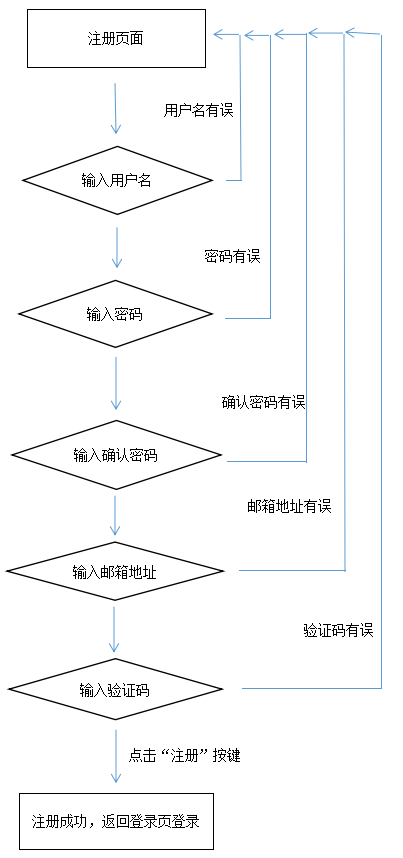
本节只需要在注册的PHP代码中添加一段JavaScript跳转语句,就可以实现注册成功后跳转到登录页面进行登录。
<?php
//插入数据库
if(!(mysqli_query($link,$sql))){
  echo "<script>alert('数据插入失败');window.location.href='zhuce.html'</script>";
}else{
  echo "<script>alert('注册成功!去登陆');window.location.href='login.html'</script>";
}
?>
前面章节注册PHP代码中在alert('注册成功')后面加一段window.location.href='login.html'即可实现。
当然把 alert('注册成功') 改成 alert('注册成功!去登陆')也是不可缺少的。
合理的登录页面为 login.html
完整代码:
<?php
  session_start();
  header("Content-type:text/html;charset=utf-8");
  $link = mysqli_connect('localhost','root','root','test');
  if (!$link) {
    die("连接失败:".mysqli_connect_error());
  }
  $username = $_POST['username'];
  $password = $_POST['password'];
  $confirm = $_POST['confirm'];
  $email = $_POST['email'];
  $code = $_POST['code'];
  if($username == "" || $password == "" || $confirm == "" || $email == "" || $code == "")
  {
    echo "<script>alert('信息不能为空!重新填写');window.location.href='zhuce.html'</script>";
  } elseif ((strlen($username) < 3)||(!preg_match('/^\w+$/i', $username))) {
    echo "<script>alert('用户名至少3位且不含非法字符!重新填写');window.location.href='zhuce'</script>";
    //判断用户名长度
  }elseif(strlen($password) < 5){
      echo "<script>alert('密码至少5位!重新填写');window.location.href='zhuce.html'</script>";
      //判断密码长度
  }elseif($password != $confirm) {
      echo "<script>alert('两次密码不相同!重新填写');window.location.href='zhuce.html'</script>";
      //检测两次输入密码是否相同
  } elseif (!preg_match('/^[\w\.]+@\w+\.\w+$/i', $email)) {
      echo "<script>alert('邮箱不合法!重新填写');window.location.href='zhuce.html'</script>";
      //判断邮箱格式是否合法
  } elseif($code != $_SESSION['authcode']) {
    echo "<script>alert('验证码错误!重新填写');window.location.href='zhuce.html'</script>";
    //判断验证码是否填写正确
  } elseif(mysqli_fetch_array(mysqli_query($link,"select * from login where username = '$username'"))){
    echo "<script>alert('用户名已存在');window.location.href='zhuce.html'</script>";
  } else{
    $sql= "insert into login(username, password, confirm, email)values('$username','$password','$confirm','$email')";
    //插入数据库
    if(!(mysqli_query($link,$sql))){
      echo "<script>alert('数据插入失败');window.location.href='zhuce.html'</script>";
    }else{
      echo "<script>alert('注册成功!去登陆');window.location.href='login.html'</script>";
    }
  }
?>
这样,与前面的登录注册的代码联合使用,我们就实现了完整的用户登录注册功能模块。
neue Datei
<?php
session_start();
header("Content-type:text/html;charset=utf-8");
$link = mysqli_connect('localhost','root','root','test');
if (!$link) {
die("连接失败:".mysqli_connect_error());
}
$username = $_POST['username'];
$password = $_POST['password'];
$confirm = $_POST['confirm'];
$email = $_POST['email'];
$code = $_POST['code'];
if($username == "" || $password == "" || $confirm == "" || $email == "" || $code == "")
{
echo "<script>alert('信息不能为空!重新填写');window.location.href='zhuce.html'</script>";
} elseif ((strlen($username) < 3)||(!preg_match('/^\w+$/i', $username))) {
echo "<script>alert('用户名至少3位且不含非法字符!重新填写');window.location.href='zhuce'</script>";
//判断用户名长度
}elseif(strlen($password) < 5){
echo "<script>alert('密码至少5位!重新填写');window.location.href='zhuce.html'</script>";
//判断密码长度
}elseif($password != $confirm) {
echo "<script>alert('两次密码不相同!重新填写');window.location.href='zhuce.html'</script>";
//检测两次输入密码是否相同
} elseif (!preg_match('/^[\w\.]+@\w+\.\w+$/i', $email)) {
echo "<script>alert('邮箱不合法!重新填写');window.location.href='zhuce.html'</script>";
//判断邮箱格式是否合法
} elseif($code != $_SESSION['authcode']) {
echo "<script>alert('验证码错误!重新填写');window.location.href='zhuce.html'</script>";
//判断验证码是否填写正确
} elseif(mysqli_fetch_array(mysqli_query($link,"select * from login where username = '$username'"))){
echo "<script>alert('用户名已存在');window.location.href='zhuce.html'</script>";
} else{
$sql= "insert into login(username, password, confirm, email)values('$username','$password','$confirm','$email')";
//插入数据库
if(!(mysqli_query($link,$sql))){
echo "<script>alert('数据插入失败');window.location.href='zhuce.html'</script>";
}else{
echo "<script>alert('注册成功!去登陆');window.location.href='login.html'</script>";
}
}
?>
Vorschau
Clear
- Kursempfehlungen
- Kursunterlagen herunterladen














 Die Kursunterlagen stehen derzeit nicht zum Download zur Verfügung. Die Mitarbeiter organisieren es derzeit. Bitte schenken Sie diesem Kurs in Zukunft mehr Aufmerksamkeit
Auch Studierende, die diesen Kurs gesehen haben, lernen

Lassen Sie uns kurz über die Gründung eines Unternehmens in PHP sprechen
Kurze Einführung in die Web-Frontend-Entwicklung
Umfangreiche, praktische Tianlongbabu-Entwicklung eines Mini-Version-MVC-Frameworks, das die Enzyklopädie-Website mit peinlichen Dingen imitiert
Erste Schritte mit der praktischen PHP-Entwicklung: Schnelle PHP-Erstellung [Small Business Forum]
Anmeldebestätigung und klassisches Message Board
Wissenssammlung über Computernetzwerke
Schnellstart-Node.JS-Vollversion
Der Frontend-Kurs, der Sie am besten versteht: HTML5/CSS3/ES6/NPM/Vue/...[Original]
Schreiben Sie Ihr eigenes PHP-MVC-Framework (40 Kapitel ausführlich/große Details/Muss gelesen werden, damit Neulinge vorankommen)