


品牌的增加和操作缩略图
品牌的增加和操作缩略图
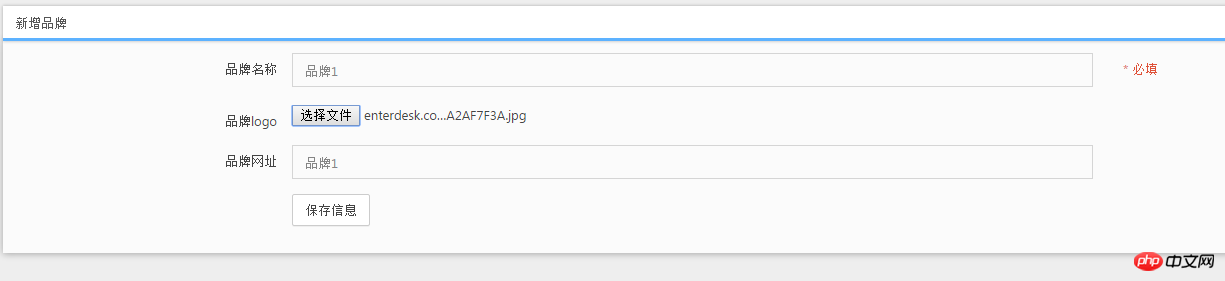
添加页面搭建
<!DOCTYPE html>
<html><head>
	    <meta charset="utf-8">
    <title>PHP中文网</title>

    <meta name="description" content="Dashboard">
    <meta name="viewport" content="width=device-width, initial-scale=1.0">
    <meta http-equiv="X-UA-Compatible" content="IE=edge">
    <meta http-equiv="Content-Type" content="text/html; charset=UTF-8">
    <!--Basic Styles-->
    <link href="__PUBLIC__/style/bootstrap.css" rel="stylesheet">
    <link href="__PUBLIC__/style/font-awesome.css" rel="stylesheet">
    <link href="__PUBLIC__/style/weather-icons.css" rel="stylesheet">

    <!--Beyond styles-->
    <link id="beyond-link" href="__PUBLIC__/style/beyond.css" rel="stylesheet" type="text/css">
    <link href="__PUBLIC__/style/demo.css" rel="stylesheet">
    <link href="__PUBLIC__/style/typicons.css" rel="stylesheet">
    <link href="__PUBLIC__/style/animate.css" rel="stylesheet">

</head>
<body>
	<!-- 头部 -->
	 <include file="Common/header" />

	<!-- /头部 -->

	<div class="main-container container-fluid">
		<div class="page-container">
			            <!-- Page Sidebar -->
             <include file="Common/left" />
            <!-- /Page Sidebar -->
            <!-- Page Content -->
            <div class="page-content">
                <!-- Page Breadcrumb -->
                <div class="page-breadcrumbs">
                    <ul class="breadcrumb">
                                        <li>
                        <a href="__MODULE__/Index/index">系统</a>
                    </li>
                                        <li>
                        <a href="__CONTROLLER__/index">品牌列表</a>
                    </li>
                    <li class="active">添加品牌</li>
                    </ul>
                </div>
                <!-- /Page Breadcrumb -->

                <!-- Page Body -->
                <div class="page-body">

<div class="row">
    <div class="col-lg-12 col-sm-12 col-xs-12">
        <div class="widget">
            <div class="widget-header bordered-bottom bordered-blue">
                <span class="widget-caption">新增品牌</span>
            </div>
            <div class="widget-body">
                <div id="horizontal-form">
                    <form class="form-horizontal" role="form" action="" method="post" enctype="multipart/form-data" >
                        <div class="form-group">
                            <label for="username" class="col-sm-2 control-label no-padding-right">品牌名称</label>
                            <div class="col-sm-6">
                                <input class="form-control" id="brand_name" placeholder="" name="brand_name" required="" type="text">
                            </div>
                            <p class="help-block col-sm-4 red">* 必填</p>
                        </div>
                        <div class="form-group">
                            <label for="username" class="col-sm-2 control-label no-padding-right">品牌logo</label>
                            <div class="col-sm-6">
                                <input  id="brand_logo" name="brand_logo" type="file">
                            </div>
                        </div>
                        <div class="form-group">
                            <label for="username" class="col-sm-2 control-label no-padding-right">品牌网址</label>
                            <div class="col-sm-6">
                                <input class="form-control" id="brand_url" placeholder="" name="brand_url" required="" type="text">
                            </div>
                        </div>
                        <div class="form-group">
                            <div class="col-sm-offset-2 col-sm-10">
                                <button type="submit" class="btn btn-default">保存信息</button>
                            </div>
                        </div>
                    </form>
                </div>
            </div>
        </div>
    </div>
</div>

                </div>
                <!-- /Page Body -->
            </div>
            <!-- /Page Content -->
		</div>
	</div>

	    <!--Basic Scripts-->
    <script src="__PUBLIC__/style/jquery_002.js"></script>
    <script src="__PUBLIC__/style/bootstrap.js"></script>
    <script src="__PUBLIC__/style/jquery.js"></script>
    <!--Beyond Scripts-->
    <script src="__PUBLIC__/style/beyond.js"></script>


</body>
</html>
编写新增控制器
 public function add(){
        $brand=D('brand');
        if(IS_POST){
            if($brand->create()){
                if($brand->add()){
                    $this->success('添加品牌成功!',U('index'));
                }else{
                     $this->error('添加品牌失败!');
                }
            }else{
               $this->error($brand->getError());
            }
            return;
        }
        $this->display();
    }
编写品牌的model文件
<?php
namespace Admin\Model;
use Think\Model;
class BrandModel extends Model {

    protected $_validate = array(
        array('brand_name','require','品牌名称不得为空!',1),

    );


    public function _before_insert(&$data,$option){
        if($_FILES['brand_logo']['tmp_name']){
            $upload = new \Think\Upload();// 实例化上传类
            $upload->maxSize   =     3145728 ;// 设置附件上传大小
            $upload->exts      =     array('jpg', 'gif', 'png', 'jpeg');// 设置附件上传类型
            $upload->autoSub = false;
            $upload->savePath  =      './Public/Uploads/Brand/'; // 设置附件上传目录
            $upload->rootPath  =      './';
            $info   =   $upload->uploadOne($_FILES['brand_logo']);
            $logo=$info['savepath'].$info['savename'];
            $image = new \Think\Image();
            $image->open($logo);
            $image->thumb(100, 30)->save($logo);
            $data['brand_logo']=$logo;
        }
    }

}
这里要着重讲解.
_before_insert是thinkphp框架中的前置操作,他的意思是当我们在执行当前操作的时候会检测有没有前置操作,如果存在则优先执行。
这里执行前置操作添加品牌的时候先上传图片
  if($_FILES['brand_logo']['tmp_name']){
            $upload = new \Think\Upload();// 实例化上传类
            $upload->maxSize   =     3145728 ;// 设置附件上传大小
            $upload->exts      =     array('jpg', 'gif', 'png', 'jpeg');// 设置附件上传类型
            $upload->autoSub = false;
            $upload->savePath  =      './Public/Uploads/Brand/'; // 设置附件上传目录
            $upload->rootPath  =      './';
            $info   =   $upload->uploadOne($_FILES['brand_logo']);
$info = $upload->uploadOne($_FILES['brand_logo']);
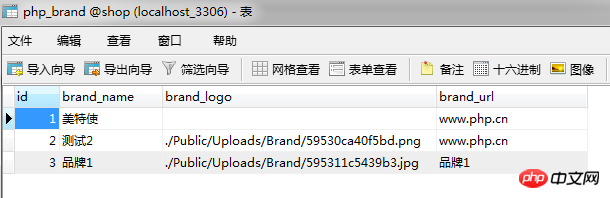
获得图片的路径和名称
 $image = new \Think\Image();
            $image->open($logo);
            $image->thumb(100, 30)->save($logo);
            $data['brand_logo']=$logo;
生成缩略图

新增品牌完成
neue Datei
Vorschau
Clear
- Kursempfehlungen
- Kursunterlagen herunterladen














 Die Kursunterlagen stehen derzeit nicht zum Download zur Verfügung. Die Mitarbeiter organisieren es derzeit. Bitte schenken Sie diesem Kurs in Zukunft mehr Aufmerksamkeit
Auch Studierende, die diesen Kurs gesehen haben, lernen

Lassen Sie uns kurz über die Gründung eines Unternehmens in PHP sprechen
Kurze Einführung in die Web-Frontend-Entwicklung
Umfangreiche, praktische Tianlongbabu-Entwicklung eines Mini-Version-MVC-Frameworks, das die Enzyklopädie-Website mit peinlichen Dingen imitiert
Erste Schritte mit der praktischen PHP-Entwicklung: Schnelle PHP-Erstellung [Small Business Forum]
Anmeldebestätigung und klassisches Message Board
Wissenssammlung über Computernetzwerke
Schnellstart-Node.JS-Vollversion
Der Frontend-Kurs, der Sie am besten versteht: HTML5/CSS3/ES6/NPM/Vue/...[Original]
Schreiben Sie Ihr eigenes PHP-MVC-Framework (40 Kapitel ausführlich/große Details/Muss gelesen werden, damit Neulinge vorankommen)