


Use the submit button to submit data
There are two kinds of buttons that can be used in the form: submit button and reset. This section explains the submit button: When the user needs to submit form information to the server, he needs to use the submit button.
grammar:
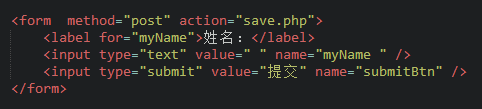
<input type="submit" value="提交">
type: Only when the type value is set to submit, the button can submit.
value: The text displayed on the button
Example:
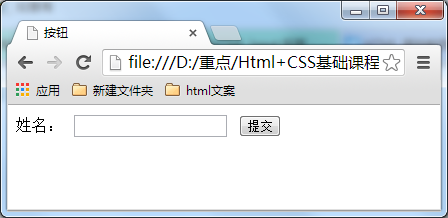
Results displayed in browser:
new file
<!DOCTYPE HTML>
<html>
<head>
<meta http-equiv="Content-Type" content="text/html; charset=utf-8">
<title>提交按钮</title>
<style>
h1 {text-align:center;}
div {margin-left: auto;
margin-right: auto; width:500px;}
</style>
</head>
<body>
<div id="top">
<img src="https://www.baidu.com/img/bdlogo.png" title="sorry图片来源出问题">
</div>
<div id="banner">
<h1>公开调查问卷</h1>
</div>
<div id="reserch">
<form method="post" action="save.php">
<label for="myName">姓 名:</label>
<input type="text" value="" name="myName " /><br />
<label for="id">身份证号:</label>
<input type="text" value="" name="id" /> <br />
<hr />
<label for="gender">性别:</label>
<label>男</label>
<input type="radio" value="1" name="gender" />
<labe >女</label>
<input type="radio" value="2" name="gender" /><br>
<hr />
<label>爱好:</label>
<label>运动</label>
<input type="checkbox" value="sport" name="运动" />
<label>唱歌</label>
<input type="checkbox" value="singing" name="唱歌" />
<label>跳舞</label>
<input type="checkbox" value="dacing" name="跳舞" />
<label>看书</label>
<input type="checkbox" value="book" name="看书" /><br />
<hr />
<label>年龄段</label>
<select>
<option value="20"><20</option>
<option value="30">20-40</option>
<option value="40">>40</option>
</select><br />
<hr />
<label>喜欢的课程:</label>
<select multiple="multiple">
<option value="math">数学</option>
<option value="language">语言</option>
<option value="history">历史</option>
</select>
<br /> <hr />
<input type="submit" value="提交" name="submitBtn" />
</form>
</div>
</body>
</html>
Preview
Clear
- Course Recommendations
- Courseware download














 The courseware is not available for download at the moment. The staff is currently organizing it. Please pay more attention to this course in the future~
Students who have watched this course are also learning

Let's briefly talk about starting a business in PHP
Quick introduction to web front-end development
Large-scale practical Tianlongbabu development of Mini version MVC framework imitating the encyclopedia website of embarrassing things
Getting Started with PHP Practical Development: PHP Quick Creation [Small Business Forum]
Login verification and classic message board
Computer network knowledge collection
Quick Start Node.JS Full Version
The front-end course that understands you best: HTML5/CSS3/ES6/NPM/Vue/...[Original]
Write your own PHP MVC framework (40 chapters in depth/big details/must read for newbies to advance)