


PHP develops simple book background management system book query page
In this section, there is a book statistics column "book query" function page in the menu management column.
Use this page to select the book name, serial number, price, storage time, book category,
Then fill in the various books in the query management system and display them on the page, so the
administrator can perform operations. As shown in the figure:
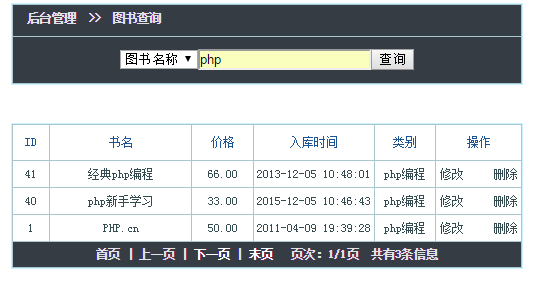
To query the content of the text box, use <form> form
Use <table> form outside and <tr>< inside td>Layout.
Add<select><option>select box.
The display page also uses a <table> table layout.
<body> <table width="100%" border="0" align="center" cellpadding="2" cellspacing="1" class="table"> <tr> <td width="100%" height="27" valign="top" bgcolor="#FFFFFF" class="bg_tr"> 后台管理 >> 图书查询</td> <tr> <td height="27" valign="top" bgcolor="#FFFFFF" class="bg_tr"> <form id="form1" name="form1" method="post" action="" style="margin:0px; padding:0px;"> <table width="45%" height="42" border="0" align="center" cellpadding="0" cellspacing="0" class="bk"> <tr> <td width="36%" align="center"> <select name="seltype" id="seltype"> <option value="id">图书序号</option> <option value="name">图书名称</option> <option value="price">图书价格</option> <option value="time">入库时间</option> <option value="type">图书类别</option> </select> </td> <td width="31%" align="center"> <input type="text" name="coun" id="coun" /> </td> <td width="33%" align="center"> <input type="submit" name="button" id="button" value="查询" /> </td> </tr> </table> </form> </td> </tr> </table> <table width="100%" border="0" align="center" cellpadding="0" cellspacing="1" bgcolor="#CCCCCC" class="table" > <tr> <td width="7%" height="35" align="center" bgcolor="#FFFFFF">ID</td> <td width="28%" align="center" bgcolor="#FFFFFF">书名</td> <td width="12%" align="center" bgcolor="#FFFFFF">价格</td> <td width="24%" align="center" bgcolor="#FFFFFF">入库时间</td> <td width="12%" align="center" bgcolor="#FFFFFF">类别</td> <td width="24%" align="center" bgcolor="#FFFFFF">操作</td> </tr> <tr align="center"> <td class="td_bg" width="7%"></td> <td class="td_bg" width="28%" height="26"></td> <td class="td_bg" width="12%" height="26"></td> <td class="td_bg" width="24%" height="26"></td> <td class="td_bg" width="12%" height="26"></td> <td class="td_bg" width="24%"> <a href="#">修改</a> <a href="#" class="trlink">删除</a> </td> </tr> <tr> <th height="25" colspan="6" align="center" class="bg_tr"> 首页 | 上一页 | 下一页 | 末页 页次:/页 共有/条信息 </th> </tr> </table> </body>
new file
<html>
<head>
<meta http-equiv="Content-Type" content="text/html; charset=utf-8" />
<title>PHP图书管理系统图书查询</title>
<style>
.table{
border: 1px solid #CAF2FF;/*边框颜色*/
margin-top: 5px;
margin-bottom: 5px;
background:#a8c7ce;
}
.td_bgf {
background:#d3eaef;
color:#000000;
}
.td_bg {
background:#ffffff;
color:#344b50;
}
.bg_tr {
font-family: "微软雅黑,Verdana, 新宋体";
color:#e1e2e3;/*标题字体色*/
font-size:12px;
font-weight:bolder;
background:#353c44;/*标题背景色*/
line-height: 22px;
}
td {
color:#1E5494;
font-size:12px;
line-height: 18px;
}
</style>
</head>
<body>
<table width="100%" border="0" align="center" cellpadding="2" cellspacing="1" class="table">
<tr>
<td width="100%" height="27" valign="top" bgcolor="#FFFFFF" class="bg_tr"> 后台管理 >> 图书查询</td>
<tr>
<td height="27" valign="top" bgcolor="#FFFFFF" class="bg_tr">
<form id="form1" name="form1" method="post" action="" style="margin:0px; padding:0px;">
<table width="45%" height="42" border="0" align="center" cellpadding="0" cellspacing="0" class="bk">
<tr>
<td width="36%" align="center">
<select name="seltype" id="seltype">
<option value="id">图书序号</option>
<option value="name">图书名称</option>
<option value="price">图书价格</option>
<option value="time">入库时间</option>
<option value="type">图书类别</option>
</select>
</td>
<td width="31%" align="center">
<input type="text" name="coun" id="coun" />
</td>
<td width="33%" align="center">
<input type="submit" name="button" id="button" value="查询" />
</td>
</tr>
</table>
</form>
</td>
</tr>
</table>
<table width="100%" border="0" align="center" cellpadding="0" cellspacing="1" bgcolor="#CCCCCC" class="table" >
<tr>
<td width="7%" height="35" align="center" bgcolor="#FFFFFF">ID</td>
<td width="28%" align="center" bgcolor="#FFFFFF">书名</td>
<td width="12%" align="center" bgcolor="#FFFFFF">价格</td>
<td width="24%" align="center" bgcolor="#FFFFFF">入库时间</td>
<td width="12%" align="center" bgcolor="#FFFFFF">类别</td>
<td width="24%" align="center" bgcolor="#FFFFFF">操作</td>
</tr>
<tr align="center">
<td class="td_bg" width="7%"></td>
<td class="td_bg" width="28%" height="26"></td>
<td class="td_bg" width="12%" height="26"></td>
<td class="td_bg" width="24%" height="26"></td>
<td class="td_bg" width="12%" height="26"></td>
<td class="td_bg" width="24%">
<a href="#">修改</a>
<a href="#" class="trlink">删除</a>
</td>
</tr>
<tr>
<th height="25" colspan="6" align="center" class="bg_tr">
首页 | 上一页 | 下一页 | 末页
页次:/页 共有/条信息
</th>
</tr>
</table>
</body>
</html>
Preview
Clear
- Course Recommendations
- Courseware download














 The courseware is not available for download at the moment. The staff is currently organizing it. Please pay more attention to this course in the future~
Students who have watched this course are also learning

Let's briefly talk about starting a business in PHP
Quick introduction to web front-end development
Large-scale practical Tianlongbabu development of Mini version MVC framework imitating the encyclopedia website of embarrassing things
Getting Started with PHP Practical Development: PHP Quick Creation [Small Business Forum]
Login verification and classic message board
Computer network knowledge collection
Quick Start Node.JS Full Version
The front-end course that understands you best: HTML5/CSS3/ES6/NPM/Vue/...[Original]
Write your own PHP MVC framework (40 chapters in depth/big details/must read for newbies to advance)