


PHP develops simple book background management system new book management page
This section creates the "New Book Management" page in the left navigation bar
As shown:
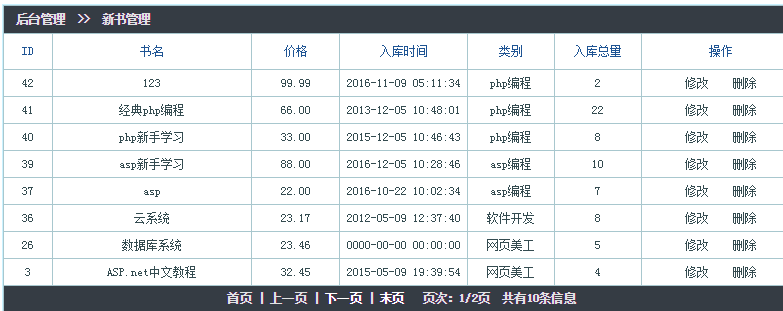
<table width="95%" border="0" align="center" cellpadding="0" cellspacing="1" bgcolor="#CCCCCC" class="table" > <tr> <td height="27" colspan="7" align="left" bgcolor="#FFFFFF" class="bg_tr"> 后台管理 >> 新书管理</td> </tr> <tr> <td width="6%" height="35" align="center" bgcolor="#FFFFFF">ID</td> <td width="25%" align="center" bgcolor="#FFFFFF">书名</td> <td width="11%" align="center" bgcolor="#FFFFFF">价格</td> <td width="16%" align="center" bgcolor="#FFFFFF">入库时间</td> <td width="11%" align="center" bgcolor="#FFFFFF">类别</td> <td width="11%" align="center" bgcolor="#FFFFFF">入库总量</td> <td width="20%" align="center" bgcolor="#FFFFFF">操作</td> </tr> <tr align="center"> <td class="td_bg" width="6%"><?php echo $rows["id"]?></td> <td class="td_bg" width="25%" height="26"></td> <td class="td_bg" width="11%" height="26"></td> <td class="td_bg" width="16%" height="26"></td> <td width="11%" height="26" class="td_bg"></td> <td width="11%" height="26" class="td_bg"></td> <td class="td_bg" width="20%"> <a href="#" class="trlink">修改</a> <a href="#" class="trlink">删除</a></td> </tr> <tr> <th height="25" colspan="7" align="center" class="bg_tr"> 首页 | 上一页 | 下一页 | 末页 页次:/页 共有?条信息 </th> </tr> </table>After giving the CSS style, it can be completed.
new file
<html>
<head>
<meta http-equiv="Content-Type" content="text/html; charset=utf-8" />
<title>PHP图书管理系统</title>
<style>
.table{
border: 1px solid #CAF2FF;/*边框颜色*/
margin-top: 5px;
margin-bottom: 5px;
background:#a8c7ce;
}
.td_bgf {
background:#d3eaef;
color:#000000;
}
.td_bg {
background:#ffffff;
color:#344b50;
}
.bg_tr {
font-family: "微软雅黑,Verdana, 新宋体";
color:#e1e2e3;/*标题字体色*/
font-size:12px;
font-weight:bolder;
background:#353c44;/*标题背景色*/
line-height: 22px;
}td {
color:#1E5494;
font-size:12px;
line-height: 18px;
}
</style>
</head>
<body>
<table width="" border="0" align="center" cellpadding="0" cellspacing="1" bgcolor="#CCCCCC" class="table" >
<tr>
<td height="27" colspan="7" align="left" bgcolor="#FFFFFF" class="bg_tr"> 后台管理 >> 新书管理</td>
</tr>
<tr>
<td width="6%" height="35" align="center" bgcolor="#FFFFFF">ID</td>
<td width="25%" align="center" bgcolor="#FFFFFF">书名</td>
<td width="11%" align="center" bgcolor="#FFFFFF">价格</td>
<td width="16%" align="center" bgcolor="#FFFFFF">入库时间</td>
<td width="11%" align="center" bgcolor="#FFFFFF">类别</td>
<td width="11%" align="center" bgcolor="#FFFFFF">入库总量</td>
<td width="20%" align="center" bgcolor="#FFFFFF">操作</td>
</tr>
<tr align="center">
<td class="td_bg" width="6%"></td>
<td class="td_bg" width="25%" height="26"></td>
<td class="td_bg" width="11%" height="26"></td>
<td class="td_bg" width="16%" height="26"></td>
<td width="11%" height="26" class="td_bg"></td>
<td width="11%" height="26" class="td_bg"></td>
<td class="td_bg" width="20%">
<a href="#" class="trlink">修改</a> <a href="#" class="trlink">删除</a></td>
</tr>
<tr>
<th height="25" colspan="7" align="center" class="bg_tr">
首页 | 上一页 | 下一页 | 末页
页次:/页 共有?条信息
</th>
</tr>
</table>
</body>
</html>
Preview
Clear
- Course Recommendations
- Courseware download














 The courseware is not available for download at the moment. The staff is currently organizing it. Please pay more attention to this course in the future~
Students who have watched this course are also learning

Let's briefly talk about starting a business in PHP
Quick introduction to web front-end development
Large-scale practical Tianlongbabu development of Mini version MVC framework imitating the encyclopedia website of embarrassing things
Getting Started with PHP Practical Development: PHP Quick Creation [Small Business Forum]
Login verification and classic message board
Computer network knowledge collection
Quick Start Node.JS Full Version
The front-end course that understands you best: HTML5/CSS3/ES6/NPM/Vue/...[Original]
Write your own PHP MVC framework (40 chapters in depth/big details/must read for newbies to advance)