


PHP develops simple voting system administrator function module (2)
In this section we introduce the administrator to modify voting items and delete voting items.
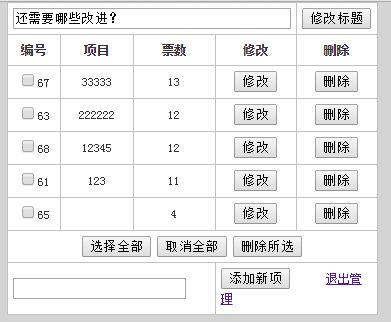
Query the database through the SQL statement SELECT and loop out all voting items
<?php
$SQL="SELECT * FROM vote order by count desc";
$rs=mysqli_query($link,$sql);
while($rows=mysqli_fetch_assoc($rs))
{
?>
  <tr>
    <td align="center" bgcolor="#FFFFFF"><input type="checkbox" name="itm" value="<?php echo $rows["id"]?>" /><?php echo $rows["id"]?></td>
    <td align="center" bgcolor="#FFFFFF"><?php echo $rows["item"]?></td>
    <td align="center" bgcolor="#FFFFFF"><?php echo $rows["count"]?></td>
    <td align="center" bgcolor="#FFFFFF"><input type="button" value="修改" onclick="location.href='?type=modify&id=<?php echo $rows["id"]?>'" /></td>
    <td align="center" bgcolor="#FFFFFF"><input type="button" value="删除" onclick="location.href='?type=del&id=<?php echo $rows["id"]?>'"  /></td>
  </tr>
<?php
}
?>
Use <input type="checkbox"/> to select the required The one that was modified and deleted.
<input type="checkbox" name="itm" value="<?php echo $rows["id"]?>" />
The modification and deletion here are given to the id, and the current content is modified through the obtained id, and the data in the database is modified.
<?php
$type = isset($_GET["type"])?$_GET["type"]:"";
if($type =="modify"){

$id=$_GET["id"];

  $item=$_POST["itm"];
  $count=$_POST["count"];
  $SQL="UPDATE vote SET item='$item',count=$count WHERE id=$id";
  mysqli_query($link,$sql);
  echo "<script language=javascript>alert('修改成功!');window.location='admin.php'</script>";
}
?>
Delete the current project and delete the data in the database by obtaining the id value.
<?php
$type = isset($_GET["type"])?$_GET["type"]:"";
if($type =="del"){
  $id=$_GET["id"];
  $SQL="DELECT FROM vote WHERE id in ($id)";
  mysqli_query($link,$sql);
  echo "<script language=javascript>alert('删除成功!');window.location='admin.php'</script>";
}
?>
new file
<?php
$sql="select * from vote order by count desc";
$rs=mysqli_query($link,$sql);
while($rows=mysqli_fetch_assoc($rs))
{
?>
<tr>
<td align="center" bgcolor="#FFFFFF"><input type="checkbox" name="itm" value="<?php echo $rows["id"]?>" /><?php echo $rows["id"]?></td>
<td align="center" bgcolor="#FFFFFF"><?php echo $rows["item"]?></td>
<td align="center" bgcolor="#FFFFFF"><?php echo $rows["count"]?></td>
<td align="center" bgcolor="#FFFFFF"><input type="button" value="修改" onclick="location.href='?type=modify&id=<?php echo $rows["id"]?>'" /></td>
<td align="center" bgcolor="#FFFFFF"><input type="button" value="删除" onclick="location.href='?type=del&id=<?php echo $rows["id"]?>'" /></td>
</tr>
<?php
}
?>
Preview
Clear
- Course Recommendations
- Courseware download














 The courseware is not available for download at the moment. The staff is currently organizing it. Please pay more attention to this course in the future~
Students who have watched this course are also learning

Let's briefly talk about starting a business in PHP
Quick introduction to web front-end development
Large-scale practical Tianlongbabu development of Mini version MVC framework imitating the encyclopedia website of embarrassing things
Getting Started with PHP Practical Development: PHP Quick Creation [Small Business Forum]
Login verification and classic message board
Computer network knowledge collection
Quick Start Node.JS Full Version
The front-end course that understands you best: HTML5/CSS3/ES6/NPM/Vue/...[Original]
Write your own PHP MVC framework (40 chapters in depth/big details/must read for newbies to advance)