


PHP development to create a simple calendar front-end page
This section mainly introduces the front-end page of a simple calendar
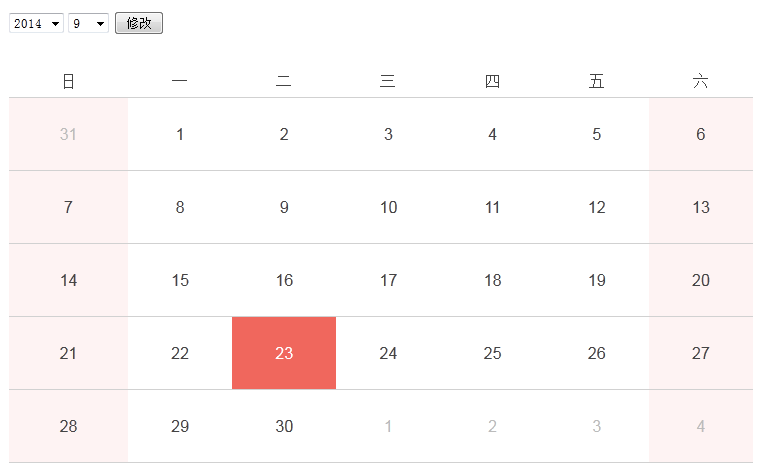
The drop-down menu and search function are used in the upper left corner, and you need to use the <form> form
The entire calendar is displayed in a table format. The upper part of the main content is the week, the leftmost is Sunday, and the rightmost is Saturday. It is matched with different colors. The lower part of the main content is the month and date, ranging from 1 to 31.
<!DOCTYPE HTML>
<html>
  <head>
    <meta charset="UTF-8"/>
    <title>PHP日历</title>
    <link rel="stylesheet" href="style.css" type="text/css"/>
  </head>
  <body>
    <form method="post">
        <div style="padding:20px">
        <select name="ddlYear">
             <option value= ""></option>
        </select>
        <select name="ddlMonth">
           <option value =""></option>
        </select>
        <input type="submit" value="修改"/>
        <span style="margin-left: 5%; font-size: 16px; font-weight: bold;color: #002DFF">当前时间:</span>
        <span></span>
        </div>
        <table width="80%" cellspacing="0" class="table_calendar">
            <thead class="f14">
                <tr>
                    <td width="5%">日</td>
                    <td width="5%">一</td>
                    <td width="5%">二</td>
                    <td width="5%">三</td>
                    <td width="5%">四</td>
                    <td width="5%">五</td>
                    <td width="5%">六</td>
                </tr>
            </thead>
            <tbody class="f14">
                <tr>
                    <td>
                    <p></p>
                    </td>
                 </tr>
             </tbody>
        </table>
    </form>
  </body>
</html>
We encapsulate CSS styles into a style.css file.
Referenced by<link rel="stylesheet" href="style.css" type="text/css"/>
<style>
    .table_calendar {padding:10px 20px}
    .table_calendar  thead{line-height:30px;color:#444;text-align:center}
    .table_calendar  thead td{border-bottom:3px solid #d1d1d1}
    .table_calendar  tbody{text-align:center;color:#444}
    .table_calendar  tbody td{border-bottom:2px solid #d1d1d1;padding:10px 2px;cursor:pointer}
    .table_calendar  tbody td.rest{background:#fef3f3}
    .table_calendar  tbody td .holiday{color:#aa160d}
    .table_calendar  tbody td .outter{color:#bbbbbb}
    .table_calendar  tbody td.cur{background:#f0675d}
    .table_calendar  tbody td.cur p{color:#fff}
    .table_calendar  tbody td:hover{background:#f0675d}
    .table_calendar  tbody td:hover p{color:#fff}
</style>
new file
<!DOCTYPE HTML>
<html>
<head>
<meta charset="UTF-8"/>
<title>PHP日历</title>
<style>
.table_calendar {padding:10px 20px}
.table_calendar thead{line-height:30px;color:#444;text-align:center}
.table_calendar thead td{border-bottom:3px solid #d1d1d1}
.table_calendar tbody{text-align:center;color:#444}
.table_calendar tbody td{border-bottom:2px solid #d1d1d1;padding:10px 2px;cursor:pointer}
.table_calendar tbody td.rest{background:#fef3f3}
.table_calendar tbody td .holiday{color:#aa160d}
.table_calendar tbody td .outter{color:#bbbbbb}
.table_calendar tbody td.cur{background:#f0675d}
.table_calendar tbody td.cur p{color:#fff}
.table_calendar tbody td:hover{background:#f0675d}
.table_calendar tbody td:hover p{color:#fff}
</style>
</head>
<body>
<form method="post">
<div style="padding:20px">
<select name="ddlYear">
<option value= ""></option>
</select>
<select name="ddlMonth">
<option value =""></option>
</select>
<input type="submit" value="修改"/>
<span style="margin-left: 5%; font-size: 16px; font-weight: bold;color: #002DFF">当前时间:</span>
<span></span>
</div>
<table width="80%" cellspacing="0" class="table_calendar">
<thead class="f14">
<tr>
<td width="5%">日</td>
<td width="5%">一</td>
<td width="5%">二</td>
<td width="5%">三</td>
<td width="5%">四</td>
<td width="5%">五</td>
<td width="5%">六</td>
</tr>
</thead>
<tbody class="f14">
<tr>
<td>
<p>1</p>
</td>
</tr>
</tbody>
</table>
</form>
</body>
</html>
Preview
Clear
- Course Recommendations
- Courseware download














 The courseware is not available for download at the moment. The staff is currently organizing it. Please pay more attention to this course in the future~
Students who have watched this course are also learning

Let's briefly talk about starting a business in PHP
Quick introduction to web front-end development
Large-scale practical Tianlongbabu development of Mini version MVC framework imitating the encyclopedia website of embarrassing things
Getting Started with PHP Practical Development: PHP Quick Creation [Small Business Forum]
Login verification and classic message board
Computer network knowledge collection
Quick Start Node.JS Full Version
The front-end course that understands you best: HTML5/CSS3/ES6/NPM/Vue/...[Original]
Write your own PHP MVC framework (40 chapters in depth/big details/must read for newbies to advance)