


PHP development basic tutorial AJAX and MySQL
AJAX database instance
AJAX can be used to communicate interactively with the database
The following The example will demonstrate how a web page reads information from the database via AJAX
Please select a customer in the drop-down list on the left:
This example consists of four elements:
MySQL database
Simple HTML form
JavaScript
PHP Page
Database
This example requires the following data tables to be created in the database:
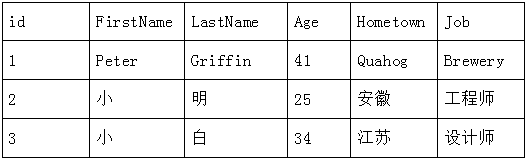
##HTML form and JavaScript
<!DOCTYPE html>
<html>
<head>
<meta charset="utf-8">
<script>
function showUser(str){
	var xmlhttp;
	//检查是否有用户被选择
	if(str==""){
		document.getElementById("txt").innerHTML="";
		return;
	}
	//创建 XMLHttpRequest 对象
	if(window.XMLHttpRequest){
		// IE7+, Firefox, Chrome, Opera, Safari 浏览器执行代码
		xmlhttp=new XMLHttpRequest();
	}
	else{
		//IE6,IE5浏览器执行代码
		xmlhttp= new ActiveXObject("Microsoft.XMLHTTP");
	}
	//创建在服务器响应就绪时执行的函数
	xmlhttp.onreadystatechange=function(){

		if(xmlhttp.readyState==4 && xmlhttp.status==200){
			document.getElementById("txt").innerHTML=xmlhttp.responseText;
		}
	}
	//向服务器上的文件发送请求
	xmlhttp.open("GET","2.php?q="+str,true);
	xmlhttp.send();
}
</script>
</head>
<body>
<from>
	<!-- onchange 事件会在域的内容改变时触发
		当用户在上面的下拉列表中选择某位用户时,会执行名为 "showUser()" 的函数
	 -->
	<select name="users" onchange="showUser(this.value)">
		<option value="">选择一个人:</option>
		<option value="1">Peter Griffin</option>
		<option value="2">小 明</option>
		<option value="3">小 白</option>
	</select>
</from>
<br/>
<br/>
<div id="txt"><b>选择相应用户,用户信息将在这里展示出来</b></div>
</body>
</html>
## for the source code #Source code explanationAfter the user selects through the drop-down list, the showUser() function is executed through the onchange event
The showUser() function will perform the following steps:
- Check if a user is selected
- Create an XMLHttpRequest object
- Create a function to be executed when the server response is ready
- Send a request to a file on the server
- Please note the parameter (q) added to the end of the URL (contains the contents of the drop-down list)
##PHP page
The above The server page called via JavaScript is a PHP file named "2.php". The source code in
<?php
header("Content-type: text/html; charset=utf-8");
$q=$_GET["q"];
//连接数据库
$con = mysqli_connect('localhost','root','root','test');
//判断是否连接成功
if(!$con){
	die('连接数据库失败:'.mysqli_error($con));
}
//选择数据库
mysqli_select_db($con,"test");
//设定字符集
mysqli_query($con,'set names utf8');
//从数据库中查出id对应的相应用户信息
$sql="SELECT * FROM customer WHERE id='".$q."'";
$result=mysqli_query($con,$sql);
echo "<table border='1' cellspacing='0' cellpadding='0'>
<tr>
<th>姓</th>
<th>名</th>
<th>年龄</th>
<th>家乡</th>
<th>工作</th>
</tr>
";
//循环显示出用信息
while($row = mysqli_fetch_array($result)){
	echo "<tr>";
	echo "<td>".$row['FirstName']."</td>";
	echo "<td>".$row['LastName']."</td>";
	echo "<td>".$row['Age']."</td>";
	echo "<td>".$row['Hometown']."</td>";
	echo "<td>".$row['Job']."</td>";
	echo "</tr>";
}
echo "</table>";


?>
Learning experience
This example mainly includes the following knowledge points:
表 Form Basis: Pulling option## On onchange Event: When the content of the domain changes,
Series can be called, function transfer value
# Ajax xmlhttprequest objects, when the server responds The function of executing, sending requests to the file on the server: See 1-5 Learning Experience
# steal Dom GetelementByid () Method: Return to quoting the first object of the designated ID
Create the database, connect to the database, select the database, set the character set, query from the database based on id, and loop out the contents of the database
Functions related to the database:
mysqli_connect(): Open a new connection to the MySQL server
mysqli_error(): Return to the previous A text error message generated by a MySQL operation.
mysqli_select_db(): used to change the default database for the connection
mysqli_query(): execute a query against the database
mysqli_fetch_array(): Get a row from the result set as an associative array, a numeric array, or both
- Course Recommendations
- Courseware download













 The courseware is not available for download at the moment. The staff is currently organizing it. Please pay more attention to this course in the future~