


Shopping cart deletion and emptying function
1. The function of canceling the product is as follows:
a Tag add link:
<a href="shoppingcart. php?a=delone&key=<?php echo $key ?>" onclick="">Cancel</a>
if judgement, add one more :
<?php
//取消购物车里的一件商品
elseif($a=="delone"){
    $key=$_GET["key"];
    $shoppingcart=unserialize($_COOKIE["shoppingcart"]);
    unset($shoppingcart[$key]);
    if(empty($_COOKIE)){
        setcookie($shoppingcart,"",time()-3600);
    }else{
        setcookie("shoppingcart",serialize($shoppingcart));
    }
    header("location:shoppingcart.php");
    exit();
}
To cancel an item, you only need to unset the corresponding key value
2, clear shopping cart function
Add a tag to send get request:
<a href="shoppingcart.php?a=empty">Clear Shopping cart</a>
If add one more to the judgment:
<?php
//清空购物车
elseif($a=="empty"){
    //清除整个cookie保存的商品信息
    unset($_COOKIE["shoppingcart"]);
    setcookie("shoppingcart","",time()-3600);
    echo "<div class='shoppingcartempty'>您的购物车目前没有商品!3秒后跳回首页......</div>";
    header("Refresh:3;url=goods.php");
}
3, the effect is shown below
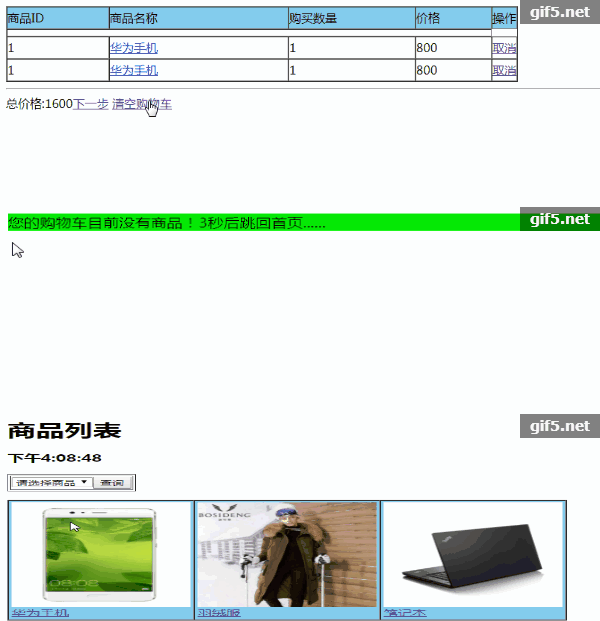
new file
<?php
echo "购物车删除和清空功能";
Preview
Clear
- Course Recommendations
- Courseware download














 The courseware is not available for download at the moment. The staff is currently organizing it. Please pay more attention to this course in the future~
Students who have watched this course are also learning

Let's briefly talk about starting a business in PHP
Quick introduction to web front-end development
Large-scale practical Tianlongbabu development of Mini version MVC framework imitating the encyclopedia website of embarrassing things
Getting Started with PHP Practical Development: PHP Quick Creation [Small Business Forum]
Login verification and classic message board
Computer network knowledge collection
Quick Start Node.JS Full Version
The front-end course that understands you best: HTML5/CSS3/ES6/NPM/Vue/...[Original]
Write your own PHP MVC framework (40 chapters in depth/big details/must read for newbies to advance)