


Add shopping cart and purchase product functions
1, introduce jquery file
<script src="./jquery-1.11.0.js"></script>
2, Add to cart function
Add click event in a tag
<a href= "javascript:;" onclick="buynow()">Buy Now</a> <a href="javascript:;" onclick="addshoppingcart ()">Add to shopping cart</a>
To add to the shopping cart, you only need to know two attributes of the product: one is the product ID, and the other is the purchase quantity
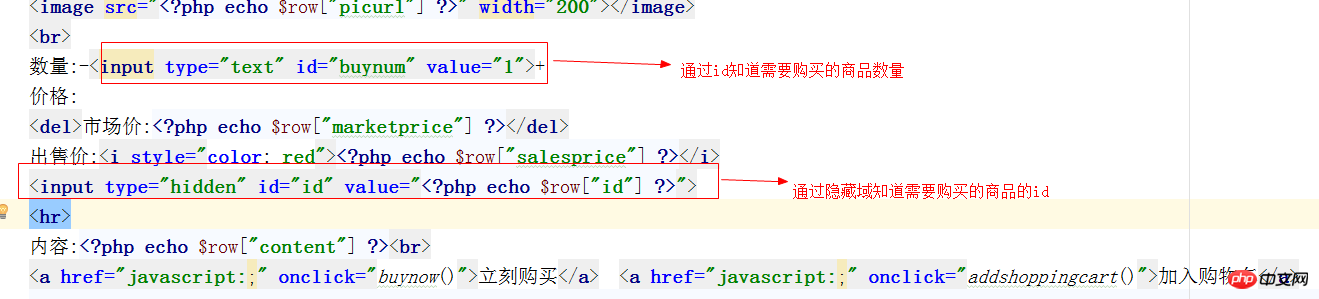
3, add ajax implementation method for shopping
<?php
//添加到购物车
function addshoppingcart(){
    $.ajax({
        url:"shoppingcart.php?a=addshoppingcart",
        type:"post",
        data:{'buynum':$("#buynum").val(),'id':$("#id").val()},
        dataType:"html",
        success:function (data) {
                location.href="shoppingcart.php?a=buynow";
                if(data){
                    alert("添加购物车成功!");
            }
        }
    })
}
4, based on cookie Implementation of adding shopping cart
New shoppingcart.php file
The code is as follows:
<?php
header("Content-type:text/html;charset=utf-8");
include "mysqli.php";
$a=isset($_GET["a"])?$_GET["a"]:"";
//添加购物车
if($a=="addshoppingcart"){
    $buynum=$_POST["buynum"];
    $id=$_POST["id"];
//    echo "<script>alert($buynum+$id)</script>";
    if(!empty($_COOKIE["shoppingcart"]))
        $shoppingcart=unserialize($_COOKIE["shoppingcart"]);
    else
        $shoppingcart=array();
    if(isset($id) && isset($buynum)){
        $id=intval($id);
        $buynum=intval($buynum);
        $shoppingcart[]=array($id,$buynum);
    }
    setcookie('shoppingcart',serialize($shoppingcart));//商品属性进行序列化保存到cookie中
    return"true";
}
5, shopping cart purchase implementation
click When purchasing, you need to add it to the shopping cart first and then jump to the purchase page. Modify the goodsshow.php code as follows:
<?php
<script>
    //立即购买
    function buynow(){
        //先添加到购物车再进行跳转到购买页面
        addshoppingcart("buy");
    }
    //添加到购物车
    function addshoppingcart(a){
        $.ajax({
            url:"shoppingcart.php?a=addshoppingcart",
            type:"post",
            data:{'buynum':$("#buynum").val(),'id':$("#id").val()},
            dataType:"html",
            success:function (data) {
                if(a=="buy"){
                    location.href="shoppingcart.php?a=buynow";
                }else{
                    if(data){
                        alert("添加购物车成功!");
                    }
                }
            }
        })
    }
</script>
Add the code in shoppingcart.php:
<?php
elseif($a=="buynow") {
    //下面写购物车页面

}- Course Recommendations
- Courseware download














 The courseware is not available for download at the moment. The staff is currently organizing it. Please pay more attention to this course in the future~