


::before与::after两个伪元素其实是CSS3中的内容,然而实际上在CSS2中就已经有了这两者的身影,只不过CSS2中是前面加一个冒号来表示(:before和:after)。今天主要讲讲这两个伪元素该如何使用。
比如说我想在文字前面添加一个图标,如果我用普通元素写的话我可以这样写:
/*CSS*/.del{ font-size: 20px;}.del i{ display: inline-block; width: 20px; height: 25px; margin-right: 2px; vertical-align: middle; background: url("imgs/delete.png") no-repeat center; background-size: 100%;}.del span{ vertical-align: middle;}
/*HTML*/删除
但是放个空的 i 标签总感觉很不爽,直接把它去掉吧!
/*CSS*/.del{ font-size: 20px;}.del::before{ content: ""; display: inline-block; width: 20px; height: 25px; margin-right: 2px; vertical-align: middle; background: url("imgs/delete.png") no-repeat center; background-size: 100%;}.del span{ vertical-align: middle;}
/*HTML*/删除
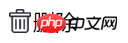
这里就直接用::before伪元素代替了空的 i 标签,两者效果相同:
同样利用这一点,我们可以使用::after伪元素解决经典清除浮动的问题:
.clearfix::after{ display:block; clear:both; content:""; overflow:hidden; height:0; }
当然,如果你网站还需要兼容IE8,那还是用:after吧,::after不兼容。
有时候我可能需要在许多元素中同时加入相同的文字,那么可以考虑用这两个伪元素。例如:
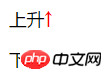
/*CSS*/.up:after{ content: '↑'; color: #f00;}.down:after{ content: '↓'; color: #0f0;}
/*HTML*/上升
下降
实现效果如下:
实现类似本文第一个例子中的图片加文字效果,也可以使用伪元素直接插入图片而不需要使用背景图,就像这样:
/*CSS*/.del{ font-size: 20px;}.del::before{ content: url("imgs/delete.png"); display: inline-block; margin-right: 2px; vertical-align: middle; }.del span{ vertical-align: middle;}
但是需要非常注意的是,使用这种方式插入的图片并不能通过控制伪元素的大小来改变图片的大小,只能引入固定大小的图片(这个略坑啊...),所以个人觉得最好还是老老实实用背景图片比较好。
可能你会说,加入连续项目编号还不简单吗?直接用有序列表ol不就行了嘛!
是,确实是可以实现,就像这样:
我的爱好:
- 吃饭
- 睡觉
- 打豆豆
这是Chrome下的效果:
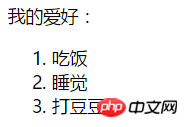
看起来挺好,没啥问题,那我若想给前面的序号加粗呢?一脸懵逼了...
这时候你说,那我直接在每条文字前手动加标签和数字,然后给标签加上样式不就行了么?
/*CSS*/ul li{ list-style: none;}ul li span{ font-weight: bold;}
/*HTML*/我的爱好:
没错,现在是三条,要是是三十条,三百条,怎么办?一条条加?(很傻很天真...)
这时候若用纯CSS的方式,还得用到伪元素:
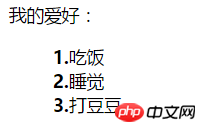
/*CSS*/ul li{ list-style: none; counter-increment: number;} //number相当于是个变量,随便取名就好,在伪元素中调用ul li::before{ content: counter(number)"."; font-weight: bold;} //注意这里不同于JS,counter(number)与"."之间不需要加任何东西,直接连接就好
/*HTML*/我的爱好:
效果如下:
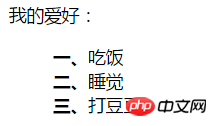
那我如果不想要阿拉伯数字,我就想用中文数字可以么?
可以!伪元素很好很强大!
ul li{ list-style: none; counter-increment: number;} ul li::before{ content: counter(number,cjk-ideographic)"、"; font-weight: bold;}
效果如下:
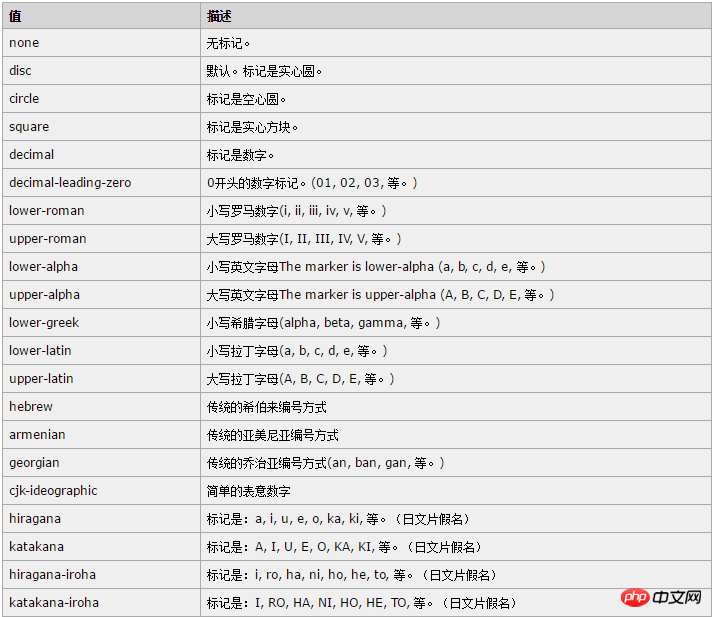
除了这个cjk-ideographic,你还可以使用更多CSS中 list-style-type 属性:(直接贴上w3cshool里面的表格)
Ce qui précède est le contenu détaillé de. pour plus d'informations, suivez d'autres articles connexes sur le site Web de PHP en chinois!
 Comment trouver la valeur maximale et minimale d'un élément de tableau en Java
 La différence entre insérer avant et avant
 Quelles sont les nouvelles fonctionnalités de Hongmeng OS 3.0 ?
 Comment ouvrir l'Explorateur Windows 7
 git annuler le commit soumis
 Algorithme du complément négatif
 Pourquoi mon téléphone portable ne peut-il pas passer d'appels mais ne peut pas surfer sur Internet ?
 chaîne en entier




















![[Web front-end] Démarrage rapide de Node.js](https://img.php.cn/upload/course/000/000/067/662b5d34ba7c0227.png)



