


 Software Tutorial
Computer Software
A simple way to set up automatic line wrapping with Beyond Compare
Software Tutorial
Computer Software
A simple way to set up automatic line wrapping with Beyond Compare
A simple way to set up automatic line wrapping with Beyond Compare

When using Beyond Compare to compare files, if the file content is long, line breaks will affect the clarity of the comparison. PHP editor Xinyi introduces you to a simple method that can automatically set line breaks to make comparison easier. The following details will guide you on how to operate, help you solve the line wrapping problem and improve comparison efficiency.
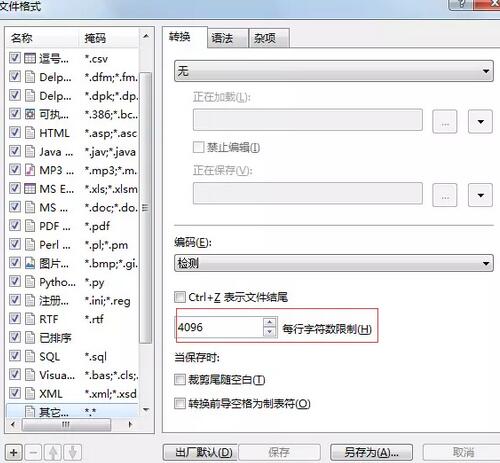
In fact, Beyond Compare does not support automatic line wrapping. In the new version Beyond Compare 4, the characters in each line of the file can be limited to achieve the purpose of automatic line wrapping for easy modification.
You can follow the steps below: Click: Tools (T) in the menu bar, then select: File Format (F) in the pop-up list; click the [Convert] tab on the right side of the pop-up box Find the words 'Character limit per line', modify the previous value (the default is 4096), and save it. Generally, it can be set to 80 to 90 or more.
Of course, in Beyond Compare, you can also consider other ways to slightly improve it. The solution is as follows:
Option 1
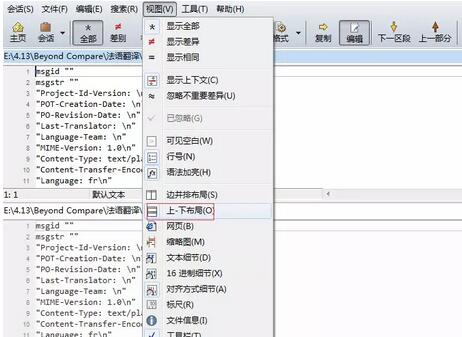
Temporarily switch to up and down layout. Select [Top-Bottom Layout] under the [View] menu, and then the comparison layout becomes a top-down arrangement.
Option 2
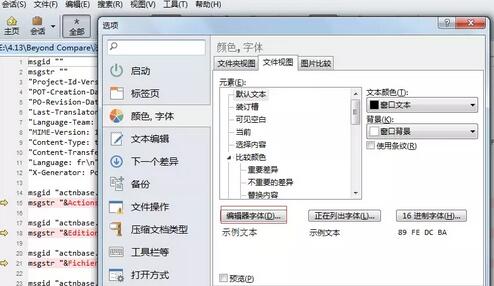
Temporarily reduce the font size. Select [Options] under the [Tools] menu, select [Color, Font] on the left side of the pop-up dialog box, click [Editor Font] under the [File View] tab on the right, and reduce the font size in the pop-up font dialog box.
Option 3
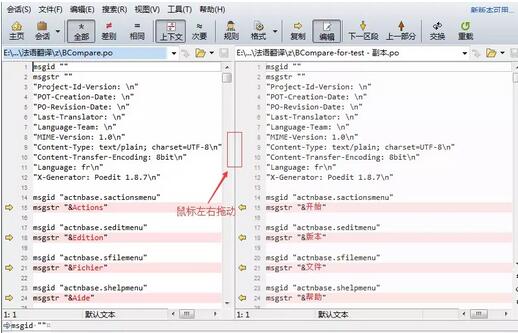
Enlarge one pane as needed (you can set a shortcut key). Place the mouse on the middle dividing bar. When the mouse turns into vertical parallel bars, drag the mouse left and right to enlarge the pane on one side.
Option 4
Enlarge the entire window. When there is not a lot of content, we can click Maximize in the upper right corner to maximize the entire window so that it fills the computer screen for easier viewing.
Tip: The details bar below is also very useful (can be set to [Alignment]). Select [Alignment Details] under the [View] menu so that the text details displayed below can be aligned so that you can see what letters are missing.
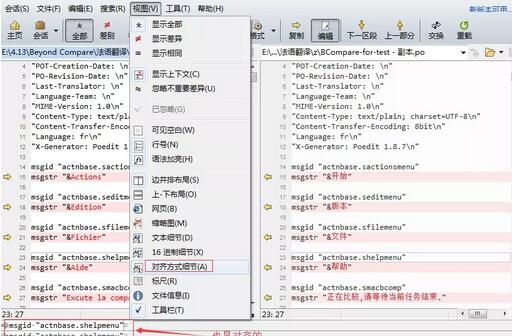
The above is the detailed content of A simple way to set up automatic line wrapping with Beyond Compare. For more information, please follow other related articles on the PHP Chinese website!

Hot AI Tools

Undresser.AI Undress
AI-powered app for creating realistic nude photos

AI Clothes Remover
Online AI tool for removing clothes from photos.

Undress AI Tool
Undress images for free

Clothoff.io
AI clothes remover

AI Hentai Generator
Generate AI Hentai for free.

Hot Article
Hot Tools

Notepad++7.3.1
Easy-to-use and free code editor

SublimeText3 Chinese version
Chinese version, very easy to use

Zend Studio 13.0.1
Powerful PHP integrated development environment

Dreamweaver CS6
Visual web development tools

SublimeText3 Mac version
God-level code editing software (SublimeText3)
Hot Topics
 1378
1378
 52
52

 What are the top ten virtual currency trading platforms? Ranking of the top ten virtual currency trading platforms in the world
Feb 20, 2025 pm 02:15 PM
What are the top ten virtual currency trading platforms? Ranking of the top ten virtual currency trading platforms in the world
Feb 20, 2025 pm 02:15 PM
With the popularity of cryptocurrencies, virtual currency trading platforms have emerged. The top ten virtual currency trading platforms in the world are ranked as follows according to transaction volume and market share: Binance, Coinbase, FTX, KuCoin, Crypto.com, Kraken, Huobi, Gate.io, Bitfinex, Gemini. These platforms offer a wide range of services, ranging from a wide range of cryptocurrency choices to derivatives trading, suitable for traders of varying levels.
 How to adjust Sesame Open Exchange into Chinese
Mar 04, 2025 pm 11:51 PM
How to adjust Sesame Open Exchange into Chinese
Mar 04, 2025 pm 11:51 PM
How to adjust Sesame Open Exchange to Chinese? This tutorial covers detailed steps on computers and Android mobile phones, from preliminary preparation to operational processes, and then to solving common problems, helping you easily switch the Sesame Open Exchange interface to Chinese and quickly get started with the trading platform.
 Do I need to use flexbox in the center of the Bootstrap picture?
Apr 07, 2025 am 09:06 AM
Do I need to use flexbox in the center of the Bootstrap picture?
Apr 07, 2025 am 09:06 AM
There are many ways to center Bootstrap pictures, and you don’t have to use Flexbox. If you only need to center horizontally, the text-center class is enough; if you need to center vertically or multiple elements, Flexbox or Grid is more suitable. Flexbox is less compatible and may increase complexity, while Grid is more powerful and has a higher learning cost. When choosing a method, you should weigh the pros and cons and choose the most suitable method according to your needs and preferences.
 How to calculate c-subscript 3 subscript 5 c-subscript 3 subscript 5 algorithm tutorial
Apr 03, 2025 pm 10:33 PM
How to calculate c-subscript 3 subscript 5 c-subscript 3 subscript 5 algorithm tutorial
Apr 03, 2025 pm 10:33 PM
The calculation of C35 is essentially combinatorial mathematics, representing the number of combinations selected from 3 of 5 elements. The calculation formula is C53 = 5! / (3! * 2!), which can be directly calculated by loops to improve efficiency and avoid overflow. In addition, understanding the nature of combinations and mastering efficient calculation methods is crucial to solving many problems in the fields of probability statistics, cryptography, algorithm design, etc.
 Top 10 cryptocurrency trading platforms, top ten recommended currency trading platform apps
Mar 17, 2025 pm 06:03 PM
Top 10 cryptocurrency trading platforms, top ten recommended currency trading platform apps
Mar 17, 2025 pm 06:03 PM
The top ten cryptocurrency trading platforms include: 1. OKX, 2. Binance, 3. Gate.io, 4. Kraken, 5. Huobi, 6. Coinbase, 7. KuCoin, 8. Crypto.com, 9. Bitfinex, 10. Gemini. Security, liquidity, handling fees, currency selection, user interface and customer support should be considered when choosing a platform.
 Top 10 virtual currency trading platforms 2025 cryptocurrency trading apps ranking top ten
Mar 17, 2025 pm 05:54 PM
Top 10 virtual currency trading platforms 2025 cryptocurrency trading apps ranking top ten
Mar 17, 2025 pm 05:54 PM
Top Ten Virtual Currency Trading Platforms 2025: 1. OKX, 2. Binance, 3. Gate.io, 4. Kraken, 5. Huobi, 6. Coinbase, 7. KuCoin, 8. Crypto.com, 9. Bitfinex, 10. Gemini. Security, liquidity, handling fees, currency selection, user interface and customer support should be considered when choosing a platform.
 What are the safe and reliable digital currency platforms?
Mar 17, 2025 pm 05:42 PM
What are the safe and reliable digital currency platforms?
Mar 17, 2025 pm 05:42 PM
A safe and reliable digital currency platform: 1. OKX, 2. Binance, 3. Gate.io, 4. Kraken, 5. Huobi, 6. Coinbase, 7. KuCoin, 8. Crypto.com, 9. Bitfinex, 10. Gemini. Security, liquidity, handling fees, currency selection, user interface and customer support should be considered when choosing a platform.
 distinct function usage distance function c usage tutorial
Apr 03, 2025 pm 10:27 PM
distinct function usage distance function c usage tutorial
Apr 03, 2025 pm 10:27 PM
std::unique removes adjacent duplicate elements in the container and moves them to the end, returning an iterator pointing to the first duplicate element. std::distance calculates the distance between two iterators, that is, the number of elements they point to. These two functions are useful for optimizing code and improving efficiency, but there are also some pitfalls to be paid attention to, such as: std::unique only deals with adjacent duplicate elements. std::distance is less efficient when dealing with non-random access iterators. By mastering these features and best practices, you can fully utilize the power of these two functions.
