


How to disable ipv6 in Linux

IPv6 (Internet Protocol version 6) is a new generation network protocol on the Internet. It aims to solve the challenge of IPv4 address exhaustion and provide a broader address space for the rapid growth of the Internet in the future. IPv6 uses a 128-bit address length. Compared with the 32-bit IPv4, IPv6 has far more assignable addresses, providing more sufficient IP address resources for connecting IoT devices, smart homes, mobile devices, etc. This transformation will not only allow more devices to access the Internet, but also improve the efficiency and security of the network. The gradual rollout of IPv6 will facilitate
However, in some cases, disabling IPv6 may also be necessary, such as when IPv6 is unavailable or unsafe in a specific network environment.
This article will introduce how to disable IPv6 in Linux systems.

Method 1: Disable IPv6 through sysctl configuration
In Linux systems, we can dynamically configure kernel parameters through the sysctl tool.
If you want to disable IPv6, you can do so by modifying the sysctl configuration.
1. Open the terminal and log in with root privileges.
2. Use a text editor to open the /etc/sysctl.conf file.
sudo nano /etc/sysctl.conf
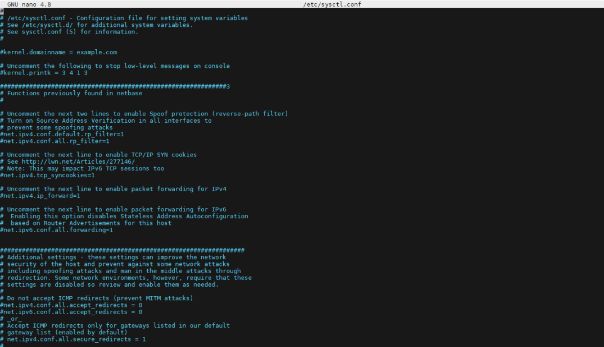
3. Add the following content at the end of the file:
# 禁用IPv6
net.ipv6.conf.all.disable_ipv6 = 1
net.ipv6.conf.default.disable_ipv6 = 1
4. Save and close the file. Then run the following command for the changes to take effect:
sudo sysctl -p
5. Check whether IPv6 is disabled. Run the following command:
cat /proc/sys/net/ipv6/conf/all/disable_ipv6
If the output is 1, it means IPv6 has been successfully disabled.
Method 2: Temporarily disable IPv6
In addition to permanently disabling IPv6 via sysctl, IPv6 can also be temporarily disabled without affecting the permanent configuration.
1. Open the terminal and log in with root privileges.
2. Run the following command to temporarily disable IPv6:
sudo sysctl -w net.ipv6.conf.all.disable_ipv6=1
sudo sysctl -w net.ipv6.conf.default.disable_ipv6=1
3. To re-enable IPv6, you can run the following command:
sudo sysctl -w net.ipv6.conf.all.disable_ipv6=0
sudo sysctl -w net.ipv6.conf.default.disable_ipv6=0
This will disable IPv6 immediately, but will restore it to the default configuration after rebooting the system.
Method 3: Disable IPv6 module
Another method is to directly disable the IPv6 module in the Linux kernel. This method completely disables IPv6 regardless of how the system is configured.
1. Open the terminal and log in with root privileges.
2. Run the following command to disable the IPv6 module:
sudo echo "blacklist ipv6" >> /etc/modprobe.d/blacklist.conf
3. Restart the system for the changes to take effect.
in conclusion
Through the methods introduced above, I believe you can easily disable IPv6 in your Linux system.
You can choose to permanently disable IPv6, temporarily disable IPv6 or disable the IPv6 module according to your own needs.
However, you must operate with caution to avoid unnecessary network problems.
- Method 1: Disabling IPv6 through sysctl configuration is a permanent disabling method, suitable for situations where IPv6 needs to be disabled at the system level.
- Method 2: Temporarily disabling IPv6 allows you to temporarily disable IPv6 without affecting the permanent configuration, which is suitable for temporary needs in specific scenarios.
- Method 3: Disabling the IPv6 module can completely disable the IPv6 function, but it may affect the normal operation of applications or services that rely on IPv6, so you need to consider it carefully when using it.
The above is the detailed content of How to disable ipv6 in Linux. For more information, please follow other related articles on the PHP Chinese website!

Hot AI Tools

Undresser.AI Undress
AI-powered app for creating realistic nude photos

AI Clothes Remover
Online AI tool for removing clothes from photos.

Undress AI Tool
Undress images for free

Clothoff.io
AI clothes remover

AI Hentai Generator
Generate AI Hentai for free.

Hot Article
Hot Tools

Notepad++7.3.1
Easy-to-use and free code editor

SublimeText3 Chinese version
Chinese version, very easy to use

Zend Studio 13.0.1
Powerful PHP integrated development environment

Dreamweaver CS6
Visual web development tools

SublimeText3 Mac version
God-level code editing software (SublimeText3)
Hot Topics
 1384
1384
 52
52

 Why can't I register at the Bitget Wallet exchange?
Sep 06, 2024 pm 03:34 PM
Why can't I register at the Bitget Wallet exchange?
Sep 06, 2024 pm 03:34 PM
There are various reasons for being unable to register for the BitgetWallet exchange, including account restrictions, unsupported regions, network issues, system maintenance and technical failures. To register for the BitgetWallet exchange, please visit the official website, fill in the information, agree to the terms, complete registration and verify your identity.
 What to do if there is a network error on Eureka Exchange
Jul 17, 2024 pm 04:25 PM
What to do if there is a network error on Eureka Exchange
Jul 17, 2024 pm 04:25 PM
When encountering an EEX exchange network error, you can take the following steps to resolve it: Check your Internet connection. Clear browser cache. Try another browser. Disable browser plug-ins. Contact Ouyi customer service.
 Why can't I log in to the MEXC (Matcha) official website?
Dec 07, 2024 am 10:50 AM
Why can't I log in to the MEXC (Matcha) official website?
Dec 07, 2024 am 10:50 AM
The reason for being unable to log in to the MEXC (Matcha) website may be network problems, website maintenance, browser problems, account problems or other reasons. Resolution steps include checking your network connection, checking website announcements, updating your browser, checking your login credentials, and contacting customer service.
 Cannot receive verification code when logging in with okx
Jul 23, 2024 pm 10:43 PM
Cannot receive verification code when logging in with okx
Jul 23, 2024 pm 10:43 PM
The reasons why you cannot receive the verification code when logging into OKX include: network problems, mobile phone settings problems, SMS service interruption, busy server and verification code request restrictions. The solutions are: wait to try again, switch networks, and contact customer service.
 Cannot receive verification code when logging in Ouyiokex
Jul 25, 2024 pm 02:43 PM
Cannot receive verification code when logging in Ouyiokex
Jul 25, 2024 pm 02:43 PM
Reasons and solutions for failing to receive the OKEx login verification code: 1. Network problems: check the network connection or switch networks; 2. Mobile phone settings: enable SMS reception or whitelist OKEx; 3. Verification code sending Restrictions: Try again later or contact customer service; 4. Server congestion: Try again later or use other login methods during peak periods; 5. Account freeze: Contact customer service to resolve. Other methods: 1. Voice verification code; 2. Third-party verification code platform; 3. Contact customer service.
 Why can't I log in to the official website of gate.io?
Aug 19, 2024 pm 04:58 PM
Why can't I log in to the official website of gate.io?
Aug 19, 2024 pm 04:58 PM
Reasons why Gate.io cannot log in to its official website include: network problems, website maintenance, browser problems, security settings, etc. The solutions are: check the network connection, wait for the maintenance to end, clear the browser cache, disable plug-ins, check the security settings, and contact customer service.
 Ouyiokex trading platform cannot be opened
Jul 24, 2024 pm 01:30 PM
Ouyiokex trading platform cannot be opened
Jul 24, 2024 pm 01:30 PM
The reasons why the Okex trading platform cannot be accessed include: network problems, website failures, browser problems, platform failures, and other factors. Solutions include: check the network, clear the browser cache, update the browser, disable plug-ins, change devices, and contact customer service.
 How to solve the problem of 'Undefined array key 'sign'' error when calling Alipay EasySDK using PHP?
Mar 31, 2025 pm 11:51 PM
How to solve the problem of 'Undefined array key 'sign'' error when calling Alipay EasySDK using PHP?
Mar 31, 2025 pm 11:51 PM
Problem Description When calling Alipay EasySDK using PHP, after filling in the parameters according to the official code, an error message was reported during operation: "Undefined...
