


Practical hard disk operation viewing tool iotop

If you know that a program is grinding your hard drive, but you are not sure which program is grinding your hard drive, then use iotop to help you.
The installation command in Ubuntu is:
sudo apt-get install iotop
After installation, enter: iotop in the terminal
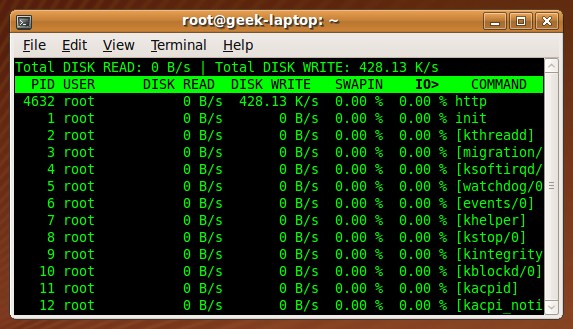
Let’s talk about the specific application:
You can use the left and right arrows to operate, press r to reverse the direction, press o to switch dynamically
Usage iotop -parameters
–version
to view version information-h, –help
to view help information-o, –only show only programs that are scratching the hard disk
-b, –batch batch processing
used to record logs-n NUM sets the number of times to loop
-d SEC, –delay=SEC Set display time interval
The above is the detailed content of Practical hard disk operation viewing tool iotop. For more information, please follow other related articles on the PHP Chinese website!

Hot AI Tools

Undresser.AI Undress
AI-powered app for creating realistic nude photos

AI Clothes Remover
Online AI tool for removing clothes from photos.

Undress AI Tool
Undress images for free

Clothoff.io
AI clothes remover

AI Hentai Generator
Generate AI Hentai for free.

Hot Article
Hot Tools

Notepad++7.3.1
Easy-to-use and free code editor

SublimeText3 Chinese version
Chinese version, very easy to use

Zend Studio 13.0.1
Powerful PHP integrated development environment

Dreamweaver CS6
Visual web development tools

SublimeText3 Mac version
God-level code editing software (SublimeText3)
Hot Topics
 1377
1377
 52
52

 How to start the server with redis
Apr 10, 2025 pm 08:12 PM
How to start the server with redis
Apr 10, 2025 pm 08:12 PM
The steps to start a Redis server include: Install Redis according to the operating system. Start the Redis service via redis-server (Linux/macOS) or redis-server.exe (Windows). Use the redis-cli ping (Linux/macOS) or redis-cli.exe ping (Windows) command to check the service status. Use a Redis client, such as redis-cli, Python, or Node.js, to access the server.
 The 5 Pillars of Linux: Understanding Their Roles
Apr 11, 2025 am 12:07 AM
The 5 Pillars of Linux: Understanding Their Roles
Apr 11, 2025 am 12:07 AM
The five pillars of the Linux system are: 1. Kernel, 2. System library, 3. Shell, 4. File system, 5. System tools. The kernel manages hardware resources and provides basic services; the system library provides precompiled functions for applications; the shell is the interface for users to interact with the system; the file system organizes and stores data; and system tools are used for system management and maintenance.
 How to view instance name of oracle
Apr 11, 2025 pm 08:18 PM
How to view instance name of oracle
Apr 11, 2025 pm 08:18 PM
There are three ways to view instance names in Oracle: use the "sqlplus" and "select instance_name from v$instance;" commands on the command line. Use the "show instance_name;" command in SQL*Plus. Check environment variables (ORACLE_SID on Linux) through the operating system's Task Manager, Oracle Enterprise Manager, or through the operating system.
 What is Linux actually good for?
Apr 12, 2025 am 12:20 AM
What is Linux actually good for?
Apr 12, 2025 am 12:20 AM
Linux is suitable for servers, development environments, and embedded systems. 1. As a server operating system, Linux is stable and efficient, and is often used to deploy high-concurrency applications. 2. As a development environment, Linux provides efficient command line tools and package management systems to improve development efficiency. 3. In embedded systems, Linux is lightweight and customizable, suitable for environments with limited resources.
 How to start linux with redis
Apr 10, 2025 pm 08:00 PM
How to start linux with redis
Apr 10, 2025 pm 08:00 PM
To start Redis on a Linux system: Install the Redis package. Enable and start the Redis service. Verify that Redis is running. Connect to the Redis server. Advanced options: Configure the Redis server. Set password. Use the systemd unit file.
 Oracle database uninstall tutorial
Apr 11, 2025 pm 06:24 PM
Oracle database uninstall tutorial
Apr 11, 2025 pm 06:24 PM
To uninstall an Oracle database: stop the Oracle service, remove the Oracle instance, delete the Oracle home directory, clear the registry key (Windows only), and delete the environment variables (Windows only). Please back up the data before uninstalling.
 Using Docker with Linux: A Comprehensive Guide
Apr 12, 2025 am 12:07 AM
Using Docker with Linux: A Comprehensive Guide
Apr 12, 2025 am 12:07 AM
Using Docker on Linux can improve development and deployment efficiency. 1. Install Docker: Use scripts to install Docker on Ubuntu. 2. Verify the installation: Run sudodockerrunhello-world. 3. Basic usage: Create an Nginx container dockerrun-namemy-nginx-p8080:80-dnginx. 4. Advanced usage: Create a custom image, build and run using Dockerfile. 5. Optimization and Best Practices: Follow best practices for writing Dockerfiles using multi-stage builds and DockerCompose.
 How to use oracle after installation
Apr 11, 2025 pm 07:51 PM
How to use oracle after installation
Apr 11, 2025 pm 07:51 PM
After Oracle is installed, you can use the following steps: Create a database instance. Connect to the database. Create a user. Create a table. Insert data. Query data. Export data. Import data.
