


Online ads/page hijacking: In fact, DNS is 'polluted”!

Since entering the Internet age, everyone’s life has become more colorful, but there are also many more worries. For example, the large groups of garbage and abyss that appear from time to time in the ocean of information are hard to guard against.

What I’m talking about here is when I encounter inexplicable web page jumps while surfing the Internet. A perfectly good web page suddenly turns into a screen full of advertisements; or a page that can be accessed normally suddenly cannot be opened, but QQ and the like The software can log in normally. What is the cause of this? In fact, the occurrence of these disturbing anomalies means that you may be a victim of DNS hijacking and poisoning.
Although we often surf the Internet, not everyone understands the mechanism behind opening a web page. With a click of the mouse, the web page appears in front of you. It is a familiar operation, but behind this familiar operation, there is a set of interlocking processes.
From when the user clicks the mouse, presses Enter, to the web page display, the information will first be sent through the browser, and then transferred through routing. Then DNS will resolve the domain name into IP. After finding the server, the server will send the content to the user, and then The data is forwarded by the router, and finally the browser presents the content to the user. Depending on the actual situation, there may be more levels in this process, such as firewalls, proxy servers, etc.
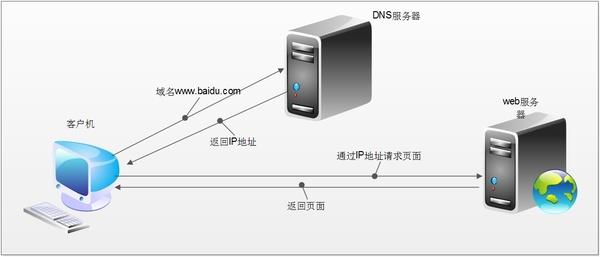
In this process, no matter if there is a traitor in any link such as browser, routing, DNS, server, etc., the web page may become inaccessible. Perhaps the one that has been tampered with the most is DNS.
The full name of DNS is Domain Name System. Its function is to resolve domain names into IP addresses. We can access a certain website by relying on the IP address connected to the website server. The role of DNS here is to resolve "www.baidu.com" into an IP address such as "123.125.114.144", so that You can connect to the server at this address to access the website.
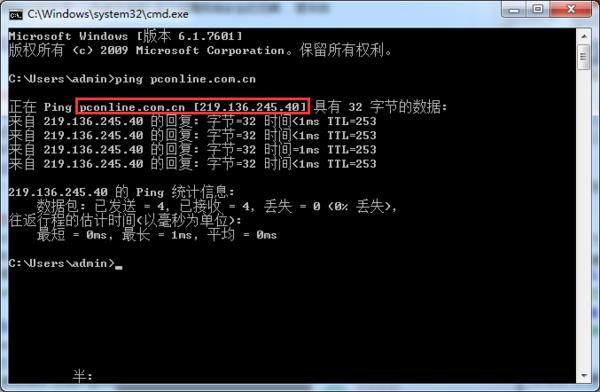
Resolving the URL into an IP address is the role of DNS
In the process of surfing the Internet, there are too many factors that can affect DNS, such as your PC settings, router settings, operator settings, etc. Once an error occurs in DNS, it will be unable to resolve the domain name into Without the correct IP address, we naturally cannot access the correct page. Therefore, if you find that you cannot open a web page, but network software such as QQ that directly connects to IP can serve normally, then DNS is a very questionable reason.
DNS can be affected by too many factors, so many stakeholders will manipulate it. For example, DNS hijacking is a very common means of advertising.
Generally, if you do not set up a DNS server specifically, the DNS server will be provided by the operator. Logically speaking, the DNS server provided by the operator should be used to correctly provide you with IP jumps, but the quality of many operators' DNS servers is unsightly.
You can often see that the operator will jump you to a page for activating an Internet package. You may even enter shopping website A but be redirected to competitor B. This is what is called DNS hijacking.

Open Baidu, and the entire webpage is forced to jump to XX Entertainment City. This is a typical DNS hijacking
To deal with the operator's DNS hijacking, setting up a reliable DNS server can often solve the problem. However, many friends still cannot resolve the correct IP address after setting up a reliable DNS server. For example, the IP address of a website can obviously be pinged, but it cannot be accessed. This situation is usually caused by DNS pollution.
Although the DNS server can work normally, when we send a domain name resolution request to the DNS server, it is sent through a UDP connection. UDP is not a reliable connection, so domain name resolution requests can be intercepted halfway, and then pretend to be a DNS server and send you a wrong IP address. If the IP address is wrong, we will naturally not be able to access the website normally. We may see advertisements, phishing pages, or nothing at all.
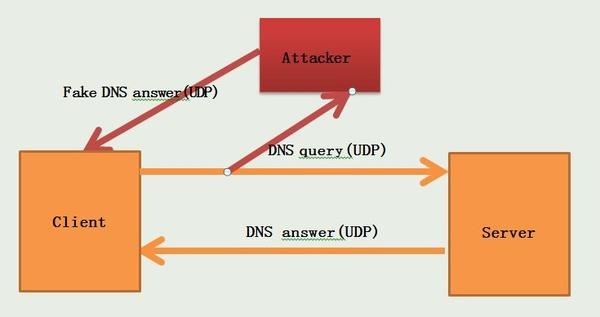
DNS uses UDP connection by default and is not encrypted, so it is easy to be contaminated and poisoned
No matter what the situation is, a DNS error means that you cannot access the website correctly. In the entire process of surfing the Internet, the DNS link is undoubtedly fragile and beyond the control of the user. If someone must use DNS to prevent you from accessing the Internet normally, most people will be unable to do anything about it. So is there any solution to the frequent DNS errors?
As mentioned earlier, to deal with the operator's DNS hijacking, we can set up a reliable DNS server for domain name resolution. Currently, many security vendors, Internet companies and even public welfare organizations provide DNS resolution services.
For example, companies such as Qihoo 360, Norton, Comodo, Baidu, Alibaba, and Google all provide DNS resolution services. You can also choose established free DNS services such as Open DNS.
The specific IP addresses of these DNS services can be easily searched online, so I won’t list them one by one here. Of course, this does not mean that if you use these DNS services, there will be no DNS hijacking. What if the character of these companies is not good? As for who is reliable, you have to screen it yourself.
In addition, if DNS is not provided by the operator, the speed performance may not be ideal. Here we recommend a software called "DNS jumper", which can comprehensively test the DNS connection speed and set up DNS.
Using DNS jumper, it is easy to find the DNS that suits your network conditions. In addition, if the operator's DNS hijacking behavior is too rampant, you can also complain to the Ministry of Industry and Information Technology about the operator's hijacking of web pages. This is indeed a very effective method, so effective that some operators have directly blocked the Ministry of Industry and Information Technology's complaint webpage. So how to file a complaint against the operator to the Ministry of Industry and Information Technology?
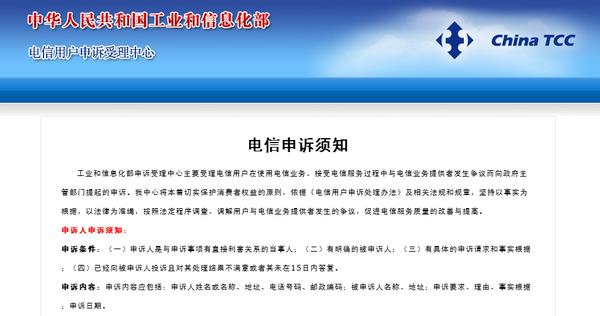
First of all, if you encounter web page hijacking, do not complain directly to the Ministry of Industry and Information Technology. According to the process, you must first file a complaint with the operator. If it is invalid, the complaint will be submitted to the Ministry of Industry and Information Technology before it will be accepted. The complaint conditions posted by the Ministry of Industry and Information Technology also include the clause "You have complained to the respondent and are not satisfied with the handling result or the respondent has not responded within 15 days." Therefore, it is necessary to go through the process first in case you complain to the operator. Does this solve the problem?
However, things are often not so beautiful. The operators' answers are usually very perfunctory, and customer service staff who are unfamiliar with technology do not even understand what web hijacking means. After it is invalid, you can complain to the operator to the Ministry of Industry and Information Technology! If there are no accidents, the problem will be solved after the complaint.
But even so, if someone manipulates the UDP connection process of the DNS request, it is still impossible to prevent it. Some companies will take advantage of this principle to prevent employees from accessing the network at will. If you want to circumvent this process, the idea is to avoid DNS queries using unreliable connections like UDP. You can use some means to set DNS for TCP connection query, or you can use encryption to let other servers forward DNS requests.
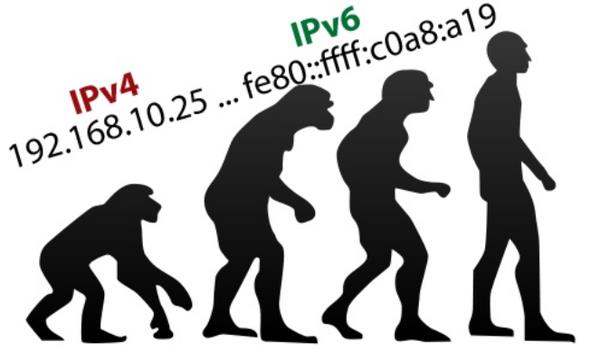
IPV6 forces the deployment of IPSec, which can also make DNS more secure
Of course, these methods require a lot of effort to implement and are not suitable for general users. Perhaps when IPV6 is fully rolled out in the future, DNS security will be further improved.
In general, the current DNS mechanism obviously did not fully consider security at the beginning of its design, resulting in people with ulterior motives frequently using this link to affect users' normal network access. How can the current situation of DNS being frequently hijacked and poisoned be changed? It is technically difficult. I hope there will be more complete supervision methods in the future to allow users to have a better online experience.
The above is the detailed content of Online ads/page hijacking: In fact, DNS is 'polluted”!. For more information, please follow other related articles on the PHP Chinese website!

Hot AI Tools

Undresser.AI Undress
AI-powered app for creating realistic nude photos

AI Clothes Remover
Online AI tool for removing clothes from photos.

Undress AI Tool
Undress images for free

Clothoff.io
AI clothes remover

AI Hentai Generator
Generate AI Hentai for free.

Hot Article
Hot Tools

Notepad++7.3.1
Easy-to-use and free code editor

SublimeText3 Chinese version
Chinese version, very easy to use

Zend Studio 13.0.1
Powerful PHP integrated development environment

Dreamweaver CS6
Visual web development tools

SublimeText3 Mac version
God-level code editing software (SublimeText3)
Hot Topics
 1385
1385
 52
52

 Difference between centos and ubuntu
Apr 14, 2025 pm 09:09 PM
Difference between centos and ubuntu
Apr 14, 2025 pm 09:09 PM
The key differences between CentOS and Ubuntu are: origin (CentOS originates from Red Hat, for enterprises; Ubuntu originates from Debian, for individuals), package management (CentOS uses yum, focusing on stability; Ubuntu uses apt, for high update frequency), support cycle (CentOS provides 10 years of support, Ubuntu provides 5 years of LTS support), community support (CentOS focuses on stability, Ubuntu provides a wide range of tutorials and documents), uses (CentOS is biased towards servers, Ubuntu is suitable for servers and desktops), other differences include installation simplicity (CentOS is thin)
 Centos options after stopping maintenance
Apr 14, 2025 pm 08:51 PM
Centos options after stopping maintenance
Apr 14, 2025 pm 08:51 PM
CentOS has been discontinued, alternatives include: 1. Rocky Linux (best compatibility); 2. AlmaLinux (compatible with CentOS); 3. Ubuntu Server (configuration required); 4. Red Hat Enterprise Linux (commercial version, paid license); 5. Oracle Linux (compatible with CentOS and RHEL). When migrating, considerations are: compatibility, availability, support, cost, and community support.
 How to install centos
Apr 14, 2025 pm 09:03 PM
How to install centos
Apr 14, 2025 pm 09:03 PM
CentOS installation steps: Download the ISO image and burn bootable media; boot and select the installation source; select the language and keyboard layout; configure the network; partition the hard disk; set the system clock; create the root user; select the software package; start the installation; restart and boot from the hard disk after the installation is completed.
 How to use docker desktop
Apr 15, 2025 am 11:45 AM
How to use docker desktop
Apr 15, 2025 am 11:45 AM
How to use Docker Desktop? Docker Desktop is a tool for running Docker containers on local machines. The steps to use include: 1. Install Docker Desktop; 2. Start Docker Desktop; 3. Create Docker image (using Dockerfile); 4. Build Docker image (using docker build); 5. Run Docker container (using docker run).
 Detailed explanation of docker principle
Apr 14, 2025 pm 11:57 PM
Detailed explanation of docker principle
Apr 14, 2025 pm 11:57 PM
Docker uses Linux kernel features to provide an efficient and isolated application running environment. Its working principle is as follows: 1. The mirror is used as a read-only template, which contains everything you need to run the application; 2. The Union File System (UnionFS) stacks multiple file systems, only storing the differences, saving space and speeding up; 3. The daemon manages the mirrors and containers, and the client uses them for interaction; 4. Namespaces and cgroups implement container isolation and resource limitations; 5. Multiple network modes support container interconnection. Only by understanding these core concepts can you better utilize Docker.
 What computer configuration is required for vscode
Apr 15, 2025 pm 09:48 PM
What computer configuration is required for vscode
Apr 15, 2025 pm 09:48 PM
VS Code system requirements: Operating system: Windows 10 and above, macOS 10.12 and above, Linux distribution processor: minimum 1.6 GHz, recommended 2.0 GHz and above memory: minimum 512 MB, recommended 4 GB and above storage space: minimum 250 MB, recommended 1 GB and above other requirements: stable network connection, Xorg/Wayland (Linux)
 How to view the docker process
Apr 15, 2025 am 11:48 AM
How to view the docker process
Apr 15, 2025 am 11:48 AM
Docker process viewing method: 1. Docker CLI command: docker ps; 2. Systemd CLI command: systemctl status docker; 3. Docker Compose CLI command: docker-compose ps; 4. Process Explorer (Windows); 5. /proc directory (Linux).
 What to do if the docker image fails
Apr 15, 2025 am 11:21 AM
What to do if the docker image fails
Apr 15, 2025 am 11:21 AM
Troubleshooting steps for failed Docker image build: Check Dockerfile syntax and dependency version. Check if the build context contains the required source code and dependencies. View the build log for error details. Use the --target option to build a hierarchical phase to identify failure points. Make sure to use the latest version of Docker engine. Build the image with --t [image-name]:debug mode to debug the problem. Check disk space and make sure it is sufficient. Disable SELinux to prevent interference with the build process. Ask community platforms for help, provide Dockerfiles and build log descriptions for more specific suggestions.
