


In-depth understanding of Linux's standard file system (Ext2/Ext3/Ext4)

Ext
The full name is Linux extended file system, extfs, which is the Linux extended file system. Ext2 represents the second generation file extension system, Ext3/Ext4 and so on. They are all upgraded versions of Ext2, but with the addition of log function, and They are backward compatible with each other, so Ext2 is called an indexed file system, and Ext3/Ext4 is called a journaled file system.
Note: Linux supports many file systems, including Network File System (NFS) and Windows’ Fat file system.
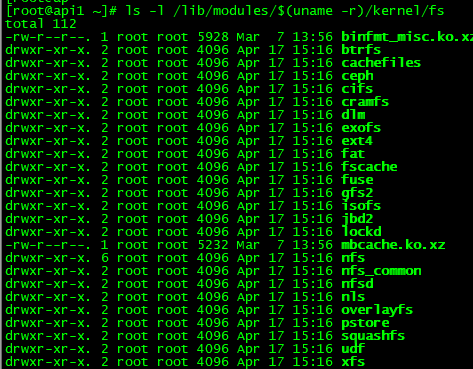
Check the file systems supported by Linux: ls -l /lib/modules/$(uname -r)/kernel/fs
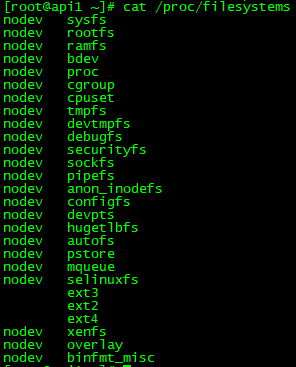
View the file systems supported by Linux (loaded into memory): cat /proc/filesystems
Core Design
Data area
These elements are relatively stable and will be fixed after the disk is formatted.
1, inode (index node)
Record the permissions, attributes of the file and the number of the block where the data is located. Each file has one and only one inode. Each inode has its own number. The inode can be simply understood as a document index.
2. block(data block)
The stored file content is also called a data block. Each block has its own number. The unit block capacity supported by Ext2 is only 1k, 2k, and 4k.
Note: In order to facilitate inode recording, the block size has been fixed after the disk is formatted. Each block can only store the data of one file. If the file is too large, it will occupy multiple blocks; if the file is too small, the remaining space of the block cannot be used, which will cause a waste of disk space. Therefore, after the disk is partitioned, the file Before formatting your system, think carefully about the expected usage of the file system.
Metadata
These elements are designed to maintain the file system status. They mainly represent the dynamic configuration information of the file system and are descriptive information.
1. superblock(superblock)
Record the overall information of the file system (filesystem), including the total amount, usage, remaining amount, size of inode/block, as well as the format and related information of the file system.
Note: All basic information of the entire file system is recorded in the superblock. Its size is generally 1024Bytes. If it dies, it will take a lot of time to remedy it! ! !
2. block group
Just imagine, if our disk capacity reaches hundreds of G, when we format it, the inode and block will be very large. In order to facilitate management, the Ext file system introduces block groups when formatting. The concept is that each block group maintains an independent inode/block/superblock and has a fixed number of blocks, which is divided into a group of basic sub-file systems.
Note: superblock is too important for the file system, but there is only one superblock in the file system, so in addition to the first block group containing the superblock, subsequent block groups may contain backup superblocks. The purpose is to avoid the single superblock. Point cannot be rescued.
3. block bitmap (block comparison table)
A block can only be used by one file. When we add a new file, we must use a new block to record the file data. So how to quickly know which blocks are new? Which blocks are already used? The block bitmap is designed in this way to record all used and unused block numbers. Similarly, when we delete a file, we first find the corresponding block number from the block bitmap, then update the flag to unused, and finally release the block.
inode bitmap(inode comparison table)
The same design concept as block bitmap, except that it records used and unused inode numbers, which will not be described here.
group descriptor
Describe the block numbers at the beginning and end of each section (block group), and explain which block numbers each section (inodemap, blockmap, inode table) is between.
List all formatted devices in the current system: blkid

Select a formatted device and view the detailed information of the file system: dumpe2fs /dev/vda1
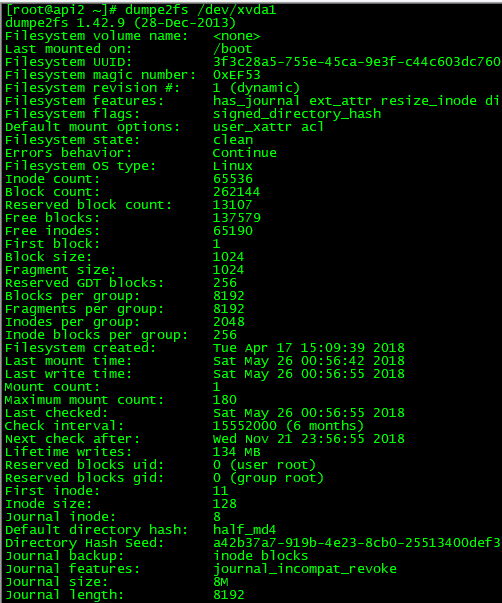
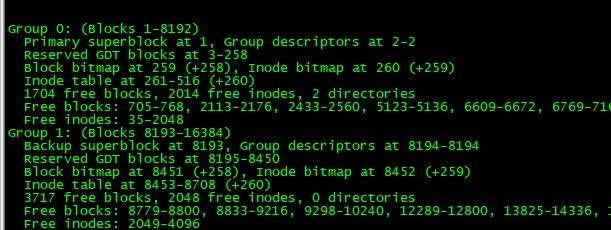
Note: The above Magic signature is 0xEF53, indicating that our disk partition is an ext2 and ext3 file system. Similar to the Magic at the beginning of the file, you can determine the file type.
Summarize
The Ext family is the most widely supported and complete file system in Linux. After we format the disk, all inode/block/metadate and other data have been planned for us, so that the system can be used directly without any Dynamic configuration is also its best feature, but this is also its most significant shortcoming. The larger the disk capacity, the slower the formatting. Centos7.x has chosen xfs as the default file system.
The above is the detailed content of In-depth understanding of Linux's standard file system (Ext2/Ext3/Ext4). For more information, please follow other related articles on the PHP Chinese website!

Hot AI Tools

Undresser.AI Undress
AI-powered app for creating realistic nude photos

AI Clothes Remover
Online AI tool for removing clothes from photos.

Undress AI Tool
Undress images for free

Clothoff.io
AI clothes remover

AI Hentai Generator
Generate AI Hentai for free.

Hot Article
Hot Tools

Notepad++7.3.1
Easy-to-use and free code editor

SublimeText3 Chinese version
Chinese version, very easy to use

Zend Studio 13.0.1
Powerful PHP integrated development environment

Dreamweaver CS6
Visual web development tools

SublimeText3 Mac version
God-level code editing software (SublimeText3)
Hot Topics
 1378
1378
 52
52

 Difference between centos and ubuntu
Apr 14, 2025 pm 09:09 PM
Difference between centos and ubuntu
Apr 14, 2025 pm 09:09 PM
The key differences between CentOS and Ubuntu are: origin (CentOS originates from Red Hat, for enterprises; Ubuntu originates from Debian, for individuals), package management (CentOS uses yum, focusing on stability; Ubuntu uses apt, for high update frequency), support cycle (CentOS provides 10 years of support, Ubuntu provides 5 years of LTS support), community support (CentOS focuses on stability, Ubuntu provides a wide range of tutorials and documents), uses (CentOS is biased towards servers, Ubuntu is suitable for servers and desktops), other differences include installation simplicity (CentOS is thin)
 Centos stops maintenance 2024
Apr 14, 2025 pm 08:39 PM
Centos stops maintenance 2024
Apr 14, 2025 pm 08:39 PM
CentOS will be shut down in 2024 because its upstream distribution, RHEL 8, has been shut down. This shutdown will affect the CentOS 8 system, preventing it from continuing to receive updates. Users should plan for migration, and recommended options include CentOS Stream, AlmaLinux, and Rocky Linux to keep the system safe and stable.
 Detailed explanation of docker principle
Apr 14, 2025 pm 11:57 PM
Detailed explanation of docker principle
Apr 14, 2025 pm 11:57 PM
Docker uses Linux kernel features to provide an efficient and isolated application running environment. Its working principle is as follows: 1. The mirror is used as a read-only template, which contains everything you need to run the application; 2. The Union File System (UnionFS) stacks multiple file systems, only storing the differences, saving space and speeding up; 3. The daemon manages the mirrors and containers, and the client uses them for interaction; 4. Namespaces and cgroups implement container isolation and resource limitations; 5. Multiple network modes support container interconnection. Only by understanding these core concepts can you better utilize Docker.
 How to install centos
Apr 14, 2025 pm 09:03 PM
How to install centos
Apr 14, 2025 pm 09:03 PM
CentOS installation steps: Download the ISO image and burn bootable media; boot and select the installation source; select the language and keyboard layout; configure the network; partition the hard disk; set the system clock; create the root user; select the software package; start the installation; restart and boot from the hard disk after the installation is completed.
 How to use docker desktop
Apr 15, 2025 am 11:45 AM
How to use docker desktop
Apr 15, 2025 am 11:45 AM
How to use Docker Desktop? Docker Desktop is a tool for running Docker containers on local machines. The steps to use include: 1. Install Docker Desktop; 2. Start Docker Desktop; 3. Create Docker image (using Dockerfile); 4. Build Docker image (using docker build); 5. Run Docker container (using docker run).
 What are the backup methods for GitLab on CentOS
Apr 14, 2025 pm 05:33 PM
What are the backup methods for GitLab on CentOS
Apr 14, 2025 pm 05:33 PM
Backup and Recovery Policy of GitLab under CentOS System In order to ensure data security and recoverability, GitLab on CentOS provides a variety of backup methods. This article will introduce several common backup methods, configuration parameters and recovery processes in detail to help you establish a complete GitLab backup and recovery strategy. 1. Manual backup Use the gitlab-rakegitlab:backup:create command to execute manual backup. This command backs up key information such as GitLab repository, database, users, user groups, keys, and permissions. The default backup file is stored in the /var/opt/gitlab/backups directory. You can modify /etc/gitlab
 What to do after centos stops maintenance
Apr 14, 2025 pm 08:48 PM
What to do after centos stops maintenance
Apr 14, 2025 pm 08:48 PM
After CentOS is stopped, users can take the following measures to deal with it: Select a compatible distribution: such as AlmaLinux, Rocky Linux, and CentOS Stream. Migrate to commercial distributions: such as Red Hat Enterprise Linux, Oracle Linux. Upgrade to CentOS 9 Stream: Rolling distribution, providing the latest technology. Select other Linux distributions: such as Ubuntu, Debian. Evaluate other options such as containers, virtual machines, or cloud platforms.
 How to mount hard disk in centos
Apr 14, 2025 pm 08:15 PM
How to mount hard disk in centos
Apr 14, 2025 pm 08:15 PM
CentOS hard disk mount is divided into the following steps: determine the hard disk device name (/dev/sdX); create a mount point (it is recommended to use /mnt/newdisk); execute the mount command (mount /dev/sdX1 /mnt/newdisk); edit the /etc/fstab file to add a permanent mount configuration; use the umount command to uninstall the device to ensure that no process uses the device.
