


Windows 24H2 spotted as Windows 12 rumored to launch in 2024

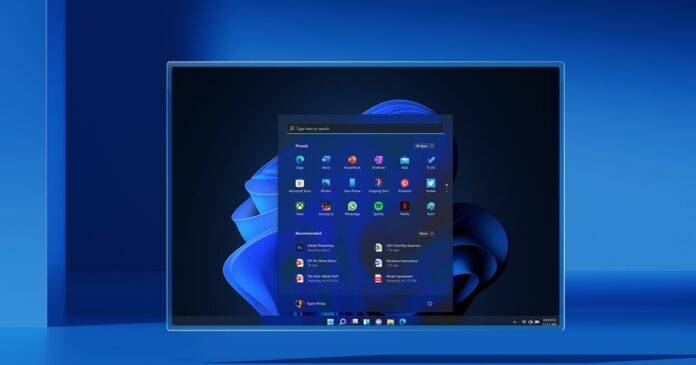
Microsoft is developing a new version of its flagship operating system. This update may be an upgrade to Windows 11 (24H2), or it may be introduced as a completely new operating system called Windows 12.
The name of this upcoming update, with its platform version 24H2, will be determined by the marketing team.
For example, Windows 11 21H2 was initially called Windows 10 Sun Valley in its early stages. Leaks and job listings previously confirmed that "Valley of the Sun" was a Windows 10 update. However, things changed later and Windows 10 Sun Valley finally debuted as Windows 11.
While it’s unclear whether the next version of Windows will be Windows 11 24H2 or Windows 12, multiple sources and Microsoft’s partners have confirmed that major Windows updates are planned for 2024.
Before launching Windows 24H2 or Windows 12, Microsoft also plans to release another moment update called "Windows 11 Moment 5" at the end of February. This will be the first update in Europe to separate Microsoft Edge and Bing from Windows.
Excellent Microsoft watcher PhantomOcean has discovered a reference to the February Moment 4 update.
Reference to Windows 11 24H2
Microsoft has started removing reminders in preview builds that a new Windows version is in development.
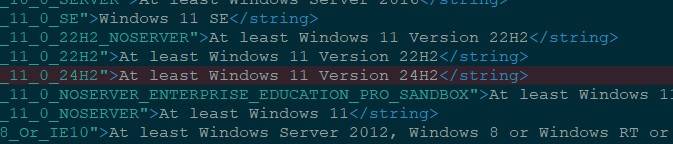
According to Microsoft watcher Xeno, "Windows 11 24H2" recently appeared in PolicyDefinitions\en-US\Windows.adml, confirming the platform version for the next Windows iteration.

As shown in the screenshot above, the new DMSA (Delegated Management Service Account Logon) Group Policy points to "Windows 11 version 24H2". This version is required to manage delegated managed service account policies linked to Azure directories.
But, is this reference a placeholder or confirmation that the next version of Windows will be "Windows 11 24H2"? Well, it's hard to say. It's important to remember that final branding decisions rest with Microsoft's marketing team and are subject to change.
The reference only confirms that the next platform version is "24H2", which is already known.
Windows 24H2 or Windows 12 release date
Microsoft partners say the next generation of Windows could debut with new Snapdragon X hardware as early as May or June.
Whether it’s the Windows 11 24H2 update or the debut of Windows 12, the next version of Windows will likely be released to manufacturers (RTM) around April. That's because various PC manufacturers have hinted at "Windows announcements" coming in the summer.
Theoretically, the next version of Windows with new features won’t be in production until fall 2024 (September-October).
If Microsoft follows the same trend as Windows 11, we may see a Moment 2 update for Windows 1H24. In other words, Windows 24H2 or Windows 12 may launch without certain features that are advertised or expected. The "Moment 1" update for Windows 24H2 will add additional features later in 2024.
However, you can join the Windows Insider Program and test new features shortly after release.
More PC makers hint at Windows 2024 launch
Previously, Intel CFO David Zinser said that a "Windows update" could come as early as next year release. In a press release, Intel confirmed that 2024 is a big year for client systems because of expected Windows updates. Taiwanese media reports, including statements from Acer and Quanta executives, have further fueled the speculation, indicating that Microsoft's Windows 12 is scheduled to be released in June 2024.
It is worth noting that these reports from the "Business Times", Taiwan's most famous financial newspaper, do not specifically confirm "Windows 12". Media in the country believe the executive was referring to "Windows 12."
Either way, it’s now confirmed that Windows is getting a major update in 2024.
The above is the detailed content of Windows 24H2 spotted as Windows 12 rumored to launch in 2024. For more information, please follow other related articles on the PHP Chinese website!

Hot AI Tools

Undresser.AI Undress
AI-powered app for creating realistic nude photos

AI Clothes Remover
Online AI tool for removing clothes from photos.

Undress AI Tool
Undress images for free

Clothoff.io
AI clothes remover

AI Hentai Generator
Generate AI Hentai for free.

Hot Article
Hot Tools

Notepad++7.3.1
Easy-to-use and free code editor

SublimeText3 Chinese version
Chinese version, very easy to use

Zend Studio 13.0.1
Powerful PHP integrated development environment

Dreamweaver CS6
Visual web development tools

SublimeText3 Mac version
God-level code editing software (SublimeText3)
Hot Topics
 1379
1379
 52
52

 Can I install mysql on Windows 7
Apr 08, 2025 pm 03:21 PM
Can I install mysql on Windows 7
Apr 08, 2025 pm 03:21 PM
Yes, MySQL can be installed on Windows 7, and although Microsoft has stopped supporting Windows 7, MySQL is still compatible with it. However, the following points should be noted during the installation process: Download the MySQL installer for Windows. Select the appropriate version of MySQL (community or enterprise). Select the appropriate installation directory and character set during the installation process. Set the root user password and keep it properly. Connect to the database for testing. Note the compatibility and security issues on Windows 7, and it is recommended to upgrade to a supported operating system.
 How to speed up the loading speed of PS?
Apr 06, 2025 pm 06:27 PM
How to speed up the loading speed of PS?
Apr 06, 2025 pm 06:27 PM
Solving the problem of slow Photoshop startup requires a multi-pronged approach, including: upgrading hardware (memory, solid-state drive, CPU); uninstalling outdated or incompatible plug-ins; cleaning up system garbage and excessive background programs regularly; closing irrelevant programs with caution; avoiding opening a large number of files during startup.
 In front-end development, how to use CSS and JavaScript to achieve searchlight effects similar to Windows 10 settings interface?
Apr 05, 2025 pm 10:21 PM
In front-end development, how to use CSS and JavaScript to achieve searchlight effects similar to Windows 10 settings interface?
Apr 05, 2025 pm 10:21 PM
How to implement Windows-like in front-end development...
 How to distinguish between closing a browser tab and closing the entire browser using JavaScript?
Apr 04, 2025 pm 10:21 PM
How to distinguish between closing a browser tab and closing the entire browser using JavaScript?
Apr 04, 2025 pm 10:21 PM
How to distinguish between closing tabs and closing entire browser using JavaScript on your browser? During the daily use of the browser, users may...
 How to pull the vertical reference line of PS
Apr 06, 2025 pm 08:18 PM
How to pull the vertical reference line of PS
Apr 06, 2025 pm 08:18 PM
Pull vertical guides in Photoshop: Enable ruler view (View > ruler). Hover the mouse over the vertical edge of the ruler, and then the cursor becomes a vertical line with double arrows and hold and drag the mouse to pull out the reference line. Click Delete by dragging the guide, or hovering it into a cross.
 Solutions to the errors reported by MySQL on a specific system version
Apr 08, 2025 am 11:54 AM
Solutions to the errors reported by MySQL on a specific system version
Apr 08, 2025 am 11:54 AM
The solution to MySQL installation error is: 1. Carefully check the system environment to ensure that the MySQL dependency library requirements are met. Different operating systems and version requirements are different; 2. Carefully read the error message and take corresponding measures according to prompts (such as missing library files or insufficient permissions), such as installing dependencies or using sudo commands; 3. If necessary, try to install the source code and carefully check the compilation log, but this requires a certain amount of Linux knowledge and experience. The key to ultimately solving the problem is to carefully check the system environment and error information, and refer to the official documents.
 MySQL can't be installed after downloading
Apr 08, 2025 am 11:24 AM
MySQL can't be installed after downloading
Apr 08, 2025 am 11:24 AM
The main reasons for MySQL installation failure are: 1. Permission issues, you need to run as an administrator or use the sudo command; 2. Dependencies are missing, and you need to install relevant development packages; 3. Port conflicts, you need to close the program that occupies port 3306 or modify the configuration file; 4. The installation package is corrupt, you need to download and verify the integrity; 5. The environment variable is incorrectly configured, and the environment variables must be correctly configured according to the operating system. Solve these problems and carefully check each step to successfully install MySQL.
 Unable to access mysql from terminal
Apr 08, 2025 pm 04:57 PM
Unable to access mysql from terminal
Apr 08, 2025 pm 04:57 PM
Unable to access MySQL from the terminal may be due to: MySQL service not running; connection command error; insufficient permissions; firewall blocks connection; MySQL configuration file error.