


 Backend Development
Python Tutorial
How to write an algorithm for solving permutations and combinations in Python?
Backend Development
Python Tutorial
How to write an algorithm for solving permutations and combinations in Python?
How to write an algorithm for solving permutations and combinations in Python?


How to write an algorithm for solving permutations and combinations in Python?
Introduction:
In mathematics and computer science, permutation and combination is a common mathematical concept that can help us solve many practical problems. In this article, I will introduce how to use Python to write algorithms to solve permutation and combination problems, and provide specific code examples.
1. The definition of permutation and combination
Before starting to write the algorithm, let’s first understand the definition of permutation and combination.
- Arrangement: Arrangement is to select some elements from a given set of elements and arrange them to form different sequences. The elements in the arrangement are ordered, and the number of elements is the same as the number of elements in the original set.
For example, given the set {1, 2, 3}, its arrangement is: - 2 3
- 3 2
- 1 3
- 3 1
- 1 2
- 2 1
- Combination: Combination is to select some elements from a given set of elements to form a subset, regardless of the order of the elements. The elements in the combination are unordered, and the number of elements is less than or equal to the number of elements in the original set.
For example, given the set {1, 2, 3}, the combination is: - 2
- 3
- 3
2. Algorithm for solving permutations and combinations
Now we start to write the algorithm for solving permutations and combinations. We'll cover how to solve for permutations and combinations separately.
- Solving the arrangement
We can use recursion to solve the arrangement.
def permute(nums):
    res = []
    backtrack(nums, [], res)
    return res

def backtrack(nums, path, res):
    if not nums:
        res.append(path)
    for i in range(len(nums)):
        backtrack(nums[:i] + nums[i+1:], path + [nums[i]], res)
The following is an example of using the permute function written above to solve for a permutation:
print(permute([1, 2, 3]))
# 输出:
# [[1, 2, 3], [1, 3, 2], [2, 1, 3], [2, 3, 1], [3, 1, 2], [3, 2, 1]]
- Solving combinations
Similarly, we also Combinations can be solved recursively.
def combine(n, k):
    res = []
    backtrack(n, k, [], res, 1)
    return res

def backtrack(n, k, path, res, start):
    if k == 0:
        res.append(path)
        return
    for i in range(start, n + 1):
        backtrack(n, k - 1, path + [i], res, i + 1)
The following is an example of using the combine function written above to solve a combination:
print(combine(4, 2))
# 输出:
# [[1, 2], [1, 3], [1, 4], [2, 3], [2, 4], [3, 4]]
Summary:
This article introduces how to use Python to write a solver Algorithms for permutations and combinations, and specific code examples are provided. I hope that by studying this article, readers can have an understanding of how to solve permutations and combinations, and be able to skillfully use Python to write corresponding algorithms.
The above is the detailed content of How to write an algorithm for solving permutations and combinations in Python?. For more information, please follow other related articles on the PHP Chinese website!

Hot AI Tools

Undress AI Tool
Undress images for free

Undresser.AI Undress
AI-powered app for creating realistic nude photos

AI Clothes Remover
Online AI tool for removing clothes from photos.

Clothoff.io
AI clothes remover

Video Face Swap
Swap faces in any video effortlessly with our completely free AI face swap tool!

Hot Article
Hot Tools

Notepad++7.3.1
Easy-to-use and free code editor

SublimeText3 Chinese version
Chinese version, very easy to use

Zend Studio 13.0.1
Powerful PHP integrated development environment

Dreamweaver CS6
Visual web development tools

SublimeText3 Mac version
God-level code editing software (SublimeText3)


 How to adjust the wordpress article list
Apr 20, 2025 am 10:48 AM
How to adjust the wordpress article list
Apr 20, 2025 am 10:48 AM
There are four ways to adjust the WordPress article list: use theme options, use plugins (such as Post Types Order, WP Post List, Boxy Stuff), use code (add settings in the functions.php file), or modify the WordPress database directly.
 Do I need to use flexbox in the center of the Bootstrap picture?
Apr 07, 2025 am 09:06 AM
Do I need to use flexbox in the center of the Bootstrap picture?
Apr 07, 2025 am 09:06 AM
There are many ways to center Bootstrap pictures, and you don’t have to use Flexbox. If you only need to center horizontally, the text-center class is enough; if you need to center vertically or multiple elements, Flexbox or Grid is more suitable. Flexbox is less compatible and may increase complexity, while Grid is more powerful and has a higher learning cost. When choosing a method, you should weigh the pros and cons and choose the most suitable method according to your needs and preferences.
 How to understand ABI compatibility in C?
Apr 28, 2025 pm 10:12 PM
How to understand ABI compatibility in C?
Apr 28, 2025 pm 10:12 PM
ABI compatibility in C refers to whether binary code generated by different compilers or versions can be compatible without recompilation. 1. Function calling conventions, 2. Name modification, 3. Virtual function table layout, 4. Structure and class layout are the main aspects involved.
 How to elegantly solve the problem of too small spacing of Span tags after a line break?
Apr 05, 2025 pm 06:00 PM
How to elegantly solve the problem of too small spacing of Span tags after a line break?
Apr 05, 2025 pm 06:00 PM
How to elegantly handle the spacing of Span tags after a new line In web page layout, you often encounter the need to arrange multiple spans horizontally...
 How to center images in containers for Bootstrap
Apr 07, 2025 am 09:12 AM
How to center images in containers for Bootstrap
Apr 07, 2025 am 09:12 AM
Overview: There are many ways to center images using Bootstrap. Basic method: Use the mx-auto class to center horizontally. Use the img-fluid class to adapt to the parent container. Use the d-block class to set the image to a block-level element (vertical centering). Advanced method: Flexbox layout: Use the justify-content-center and align-items-center properties. Grid layout: Use the place-items: center property. Best practice: Avoid unnecessary nesting and styles. Choose the best method for the project. Pay attention to the maintainability of the code and avoid sacrificing code quality to pursue the excitement
 How to change the size of a Bootstrap list?
Apr 07, 2025 am 10:45 AM
How to change the size of a Bootstrap list?
Apr 07, 2025 am 10:45 AM
The size of a Bootstrap list depends on the size of the container that contains the list, not the list itself. Using Bootstrap's grid system or Flexbox can control the size of the container, thereby indirectly resizing the list items.
 The latest updates to the oldest virtual currency rankings
Apr 22, 2025 am 07:18 AM
The latest updates to the oldest virtual currency rankings
Apr 22, 2025 am 07:18 AM
The ranking of virtual currencies’ “oldest” is as follows: 1. Bitcoin (BTC), issued on January 3, 2009, is the first decentralized digital currency. 2. Litecoin (LTC), released on October 7, 2011, is known as the "lightweight version of Bitcoin". 3. Ripple (XRP), issued in 2011, is designed for cross-border payments. 4. Dogecoin (DOGE), issued on December 6, 2013, is a "meme coin" based on the Litecoin code. 5. Ethereum (ETH), released on July 30, 2015, is the first platform to support smart contracts. 6. Tether (USDT), issued in 2014, is the first stablecoin to be anchored to the US dollar 1:1. 7. ADA,
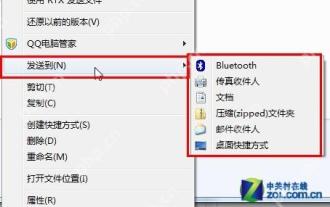 14 common shortcut keys that must be remembered in Win7 system
May 07, 2025 pm 04:39 PM
14 common shortcut keys that must be remembered in Win7 system
May 07, 2025 pm 04:39 PM
When using computers on a daily basis, the application of shortcut keys can significantly improve our productivity, especially when gaming or using specific software. Shortcut keys are not only convenient to operate, but also play an important role in Windows 7 system, helping us complete tasks more efficiently. Ctrl Shift N: Create a new folder. Press Ctrl Shift N in File Explorer to quickly create a new folder. If you use this shortcut key in IE9 browser, the current tab page will be opened in a new window. Ctrl Shift Double-click the left mouse button: Run the program as an administrator In Windows 7, some programs need to be run as an administrator to operate normally. The traditional method is to right-click the program icon and select
