


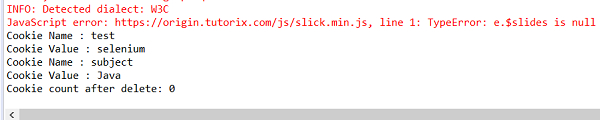
We can clear browser cookies in Selenium. Method deleteCookieNamed will delete cookies with a specific name. The name of the cookie to be deleted is passed as a parameter to this method. First we will add a cookie, then get it, and finally delete it.
driver.manage().deleteCookieNamed("foo");Another method called deleteAllCookies deletes all cookies in an existing domain. First we will add cookies, then get and delete them. The Chinese translation of
driver.manage().deleteAllCookies();
import java.util.Set;
import org.openqa.selenium.WebDriver;
import org.openqa.selenium.WebElement;
import org.openqa.selenium.chrome.ChromeDriver;
import java.util.concurrent.TimeUnit;
public class DeleteCookiesViaName{
   public static void main(String[] args) {
      System.setProperty("webdriver.chrome.driver",
      "C:\Users\ghs6kor\Desktop\Java\chromedriver.exe");
      WebDriver driver = new ChromeDriver();
      driver.get("https://www.tutorialspoint.com/index.htm");
      // wait of 4 seconds
      driver.manage().timeouts().implicitlyWait(4, TimeUnit.SECONDS);
      // setting name and value for cookie
      Cookie c = new Cookie("test", "selenium");
      Cookie r = new Cookie("subject", "Java");
      // cookie addition
      driver.manage().addCookie(c);
      driver.manage().addCookie(r);
      // obtain the cookies
      Set<Cookie> ck = driver.manage().getCookies();
      //iterate through the cookies
      for (Cookie cookie : ck) {
         System.out.println("Cookie Name : "+cookie.getName());
         System.out.println("Cookie Value : "+cookie.getValue());
         // delete cookies by name
         driver.manage().deleteCookieNamed(cookie.getName());
      }
      // obtain the cookies after delete
      Set ch = driver.manage().getCookies();
      System.out.println("Cookie count after delete: "+ch.size());
   }
}Code Implementation with deleteAllCookies.
import java.util.Set;
import org.openqa.selenium.WebDriver;
import org.openqa.selenium.WebElement;
import org.openqa.selenium.chrome.ChromeDriver;
import java.util.concurrent.TimeUnit;
public class DeleteCookiesAll{
   public static void main(String[] args) {
      System.setProperty("webdriver.chrome.driver",
      "C:\Users\ghs6kor\Desktop\Java\chromedriver.exe");
      WebDriver driver = new ChromeDriver();
      driver.get("https://www.tutorialspoint.com/index.htm");
      // wait of 4 seconds
      driver.manage().timeouts().implicitlyWait(4, TimeUnit.SECONDS);
      // setting name and value for cookie
      Cookie c = new Cookie("test", "selenium");
      Cookie r = new Cookie("subject", "Java");
      // cookie addition
      driver.manage().addCookie(c);
      driver.manage().addCookie(r);
      // obtain the cookies
      Set<Cookie> ck = driver.manage().getCookies();
      //iterate through the cookies
      for (Cookie cookie : ck) {
         System.out.println("Cookie Name : "+cookie.getName());
         System.out.println("Cookie Value : "+cookie.getValue());
      }
      // delete cookies
      driver.manage().deleteAllCookies();
      // obtain the cookies after delete
      Set ch = driver.manage().getCookies();
      System.out.println("Cookie count after delete: "+ch.size());
   }
}
The above is the detailed content of Clear browser cookies using Selenium WebDriver Java binding. For more information, please follow other related articles on the PHP Chinese website!




























![[Web front-end] Node.js quick start](https://img.php.cn/upload/course/000/000/067/662b5d34ba7c0227.png)



