


 Java
javaTutorial
Solution to solve Java database update error exception (DatabaseUpdateErrorExceotion)
Java
javaTutorial
Solution to solve Java database update error exception (DatabaseUpdateErrorExceotion)
Solution to solve Java database update error exception (DatabaseUpdateErrorExceotion)

Solution to Java database update error exception (DatabaseUpdateErrorException)
When using Java for database operations, we often encounter database update error exception (DatabaseUpdateErrorException) . This exception usually occurs when performing update operations, such as inserting, updating, or deleting data. This article describes the cause and solution of this exception, and provides corresponding code examples.
- Exception reason
Database update error exception usually occurs under the following circumstances:
(1) Data type mismatch: when we try to insert or When updating data, if the data type does not match the column type of the target table, a database update error exception will occur.
(2) Data violation of constraints: When we violate the constraints of the table, such as unique constraints or foreign key constraints, a database update error exception will occur.
(3) Insufficient permissions: If we do not have enough permissions to perform an update operation, a database update error exception will occur.
- Solution
The method to resolve the database update error exception depends on the specific cause. Here are some common solutions:
(1) Data type mismatch: Before performing an update operation, ensure that the data type to be inserted or updated matches the column type of the target table. You can use Java's type conversion functions to convert data types.
Sample code:
String sql = "INSERT INTO my_table (column1, column2) VALUES (?, ?)";
PreparedStatement statement = connection.prepareStatement(sql);
statement.setString(1, String.valueOf(value1));
statement.setInt(2, value2);
statement.executeUpdate();
In this example, we use PreparedStatement to perform the insertion operation and use the appropriate set method to set the parameters. String.valueOf() is used here to convert value1 to String.
(2) Data violates constraints: Before performing insert, update, or delete operations, ensure that the constraints of the table, such as unique constraints or foreign key constraints, are adhered to.
Sample code:
String sql = "INSERT INTO my_table (column1) VALUES (?)";
PreparedStatement statement = connection.prepaedStatement(sql);
statement.setString(1, value);
try {
    statement.executeUpdate();
} catch (SQLException e) {
    if (e.getSQLState().startsWith("23")) {
        // Handle constraint violation
    } else {
        // Other error handling
    }
}In this example, we used PreparedStatement to perform the insert operation and checked the SQL status code in the exception handling code. If the SQL status code begins with "23", a constraint violation has occurred and the error can be handled or logged in the appropriate handling code.
(3) Insufficient permissions: Ensure that the current user has sufficient permissions to perform update operations. You can contact your database administrator (DBA) to obtain relevant permissions.
In addition, you can use Java's try-catch statement to capture and handle database update error exceptions to provide a better user experience.
Sample code:
try {
    // Database update operation
} catch (DatabaseUpdateErrorException e) {
    // Handle the exception, e.g., display an error message to the user
}In this example, we use the try-catch statement to capture the database update error exception and handle the exception in the catch block, such as displaying an error message to the user.
Summary
To solve the Java database update error exception, you need to take corresponding solutions according to the specific reasons. This article provides some common solutions and corresponding code examples, hoping to help readers better handle and resolve database update error exceptions. In actual development, we should also debug and optimize the code according to specific situations to ensure the stability and security of database operations.
The above is the detailed content of Solution to solve Java database update error exception (DatabaseUpdateErrorExceotion). For more information, please follow other related articles on the PHP Chinese website!

Hot AI Tools

Undresser.AI Undress
AI-powered app for creating realistic nude photos

AI Clothes Remover
Online AI tool for removing clothes from photos.

Undress AI Tool
Undress images for free

Clothoff.io
AI clothes remover

AI Hentai Generator
Generate AI Hentai for free.

Hot Article
Hot Tools

Notepad++7.3.1
Easy-to-use and free code editor

SublimeText3 Chinese version
Chinese version, very easy to use

Zend Studio 13.0.1
Powerful PHP integrated development environment

Dreamweaver CS6
Visual web development tools

SublimeText3 Mac version
God-level code editing software (SublimeText3)
Hot Topics
 1378
1378
 52
52

 Java Spring Interview Questions
Aug 30, 2024 pm 04:29 PM
Java Spring Interview Questions
Aug 30, 2024 pm 04:29 PM
In this article, we have kept the most asked Java Spring Interview Questions with their detailed answers. So that you can crack the interview.
 Break or return from Java 8 stream forEach?
Feb 07, 2025 pm 12:09 PM
Break or return from Java 8 stream forEach?
Feb 07, 2025 pm 12:09 PM
Java 8 introduces the Stream API, providing a powerful and expressive way to process data collections. However, a common question when using Stream is: How to break or return from a forEach operation? Traditional loops allow for early interruption or return, but Stream's forEach method does not directly support this method. This article will explain the reasons and explore alternative methods for implementing premature termination in Stream processing systems. Further reading: Java Stream API improvements Understand Stream forEach The forEach method is a terminal operation that performs one operation on each element in the Stream. Its design intention is
 TimeStamp to Date in Java
Aug 30, 2024 pm 04:28 PM
TimeStamp to Date in Java
Aug 30, 2024 pm 04:28 PM
Guide to TimeStamp to Date in Java. Here we also discuss the introduction and how to convert timestamp to date in java along with examples.
 Java Program to Find the Volume of Capsule
Feb 07, 2025 am 11:37 AM
Java Program to Find the Volume of Capsule
Feb 07, 2025 am 11:37 AM
Capsules are three-dimensional geometric figures, composed of a cylinder and a hemisphere at both ends. The volume of the capsule can be calculated by adding the volume of the cylinder and the volume of the hemisphere at both ends. This tutorial will discuss how to calculate the volume of a given capsule in Java using different methods. Capsule volume formula The formula for capsule volume is as follows: Capsule volume = Cylindrical volume Volume Two hemisphere volume in, r: The radius of the hemisphere. h: The height of the cylinder (excluding the hemisphere). Example 1 enter Radius = 5 units Height = 10 units Output Volume = 1570.8 cubic units explain Calculate volume using formula: Volume = π × r2 × h (4
 Create the Future: Java Programming for Absolute Beginners
Oct 13, 2024 pm 01:32 PM
Create the Future: Java Programming for Absolute Beginners
Oct 13, 2024 pm 01:32 PM
Java is a popular programming language that can be learned by both beginners and experienced developers. This tutorial starts with basic concepts and progresses through advanced topics. After installing the Java Development Kit, you can practice programming by creating a simple "Hello, World!" program. After you understand the code, use the command prompt to compile and run the program, and "Hello, World!" will be output on the console. Learning Java starts your programming journey, and as your mastery deepens, you can create more complex applications.
 How to Run Your First Spring Boot Application in Spring Tool Suite?
Feb 07, 2025 pm 12:11 PM
How to Run Your First Spring Boot Application in Spring Tool Suite?
Feb 07, 2025 pm 12:11 PM
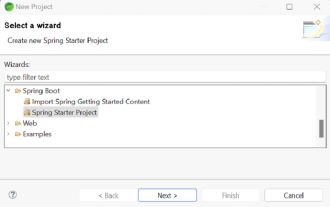
Spring Boot simplifies the creation of robust, scalable, and production-ready Java applications, revolutionizing Java development. Its "convention over configuration" approach, inherent to the Spring ecosystem, minimizes manual setup, allo
 Java Made Simple: A Beginner's Guide to Programming Power
Oct 11, 2024 pm 06:30 PM
Java Made Simple: A Beginner's Guide to Programming Power
Oct 11, 2024 pm 06:30 PM
Java Made Simple: A Beginner's Guide to Programming Power Introduction Java is a powerful programming language used in everything from mobile applications to enterprise-level systems. For beginners, Java's syntax is simple and easy to understand, making it an ideal choice for learning programming. Basic Syntax Java uses a class-based object-oriented programming paradigm. Classes are templates that organize related data and behavior together. Here is a simple Java class example: publicclassPerson{privateStringname;privateintage;
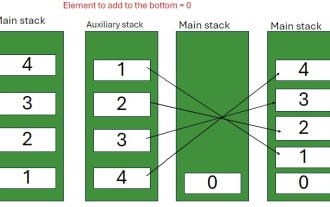 Java Program to insert an element at the Bottom of a Stack
Feb 07, 2025 am 11:59 AM
Java Program to insert an element at the Bottom of a Stack
Feb 07, 2025 am 11:59 AM
A stack is a data structure that follows the LIFO (Last In, First Out) principle. In other words, The last element we add to a stack is the first one to be removed. When we add (or push) elements to a stack, they are placed on top; i.e. above all the
