


Teach you how to disconnect from the Internet in win10 system

Nowadays, many software installations often choose to disconnect from the Internet because they need to log in. The following editor will tell you how to disconnect the Windows 10 system from the Internet. Let’s take a look.
1. We can see the network icon in the lower right corner of the desktop.
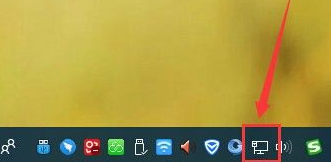
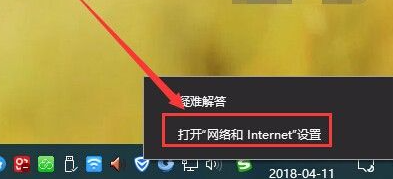
#2. Right-click the icon and select - Open the Network and Internet Settings option.
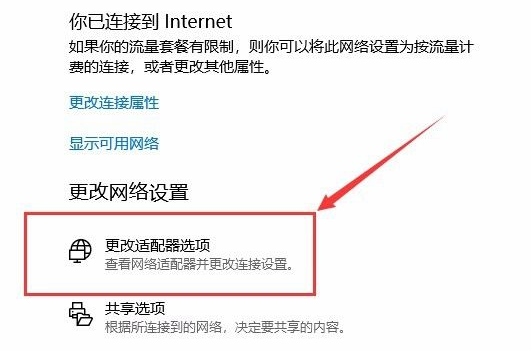
#3. Enter the network settings page, in the Change Network Settings column, select - Change Adapter Options Settings.
4. You can see that the current computer network is connected by Ethernet, that is, by a network cable (if yours is connected by WiFi or other methods , the operation methods are the same).
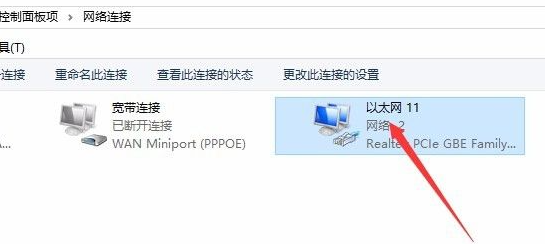
#5. Select the network connection method, right-click and select the Disable option.
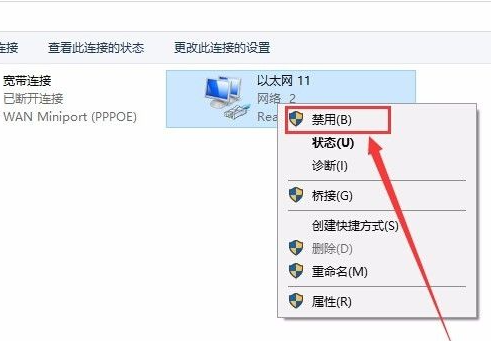
#6. At this time, you can see that the network has been disconnected.

#The above is how to disconnect the network on a win10 computer. I hope it will be helpful to everyone.
The above is the detailed content of Teach you how to disconnect from the Internet in win10 system. For more information, please follow other related articles on the PHP Chinese website!

Hot AI Tools

Undresser.AI Undress
AI-powered app for creating realistic nude photos

AI Clothes Remover
Online AI tool for removing clothes from photos.

Undress AI Tool
Undress images for free

Clothoff.io
AI clothes remover

Video Face Swap
Swap faces in any video effortlessly with our completely free AI face swap tool!

Hot Article
Hot Tools

Notepad++7.3.1
Easy-to-use and free code editor

SublimeText3 Chinese version
Chinese version, very easy to use

Zend Studio 13.0.1
Powerful PHP integrated development environment

Dreamweaver CS6
Visual web development tools

SublimeText3 Mac version
God-level code editing software (SublimeText3)
Hot Topics
 1386
1386
 52
52