


What should I do if windows update automatically recovers after it is disabled?

What should I do if windows update automatically recovers after it is disabled? windows update is the automatic update function of Windows system. Many friends found that after turning it off, it automatically restored it. What should I do? You often encounter this problem when using your computer. In fact, this is because the Windows system update will start automatically. If you want to completely turn it off, you need to go to the settings to turn it on and off automatically. The following is The editor brings you windows Solution to automatically restore after update is disabled.

Automatic recovery solution after windows update is disabled
1. Press WIn R to bring up run, enter [services.msc] or right-click this computer--Manage--Services and Applications--Services.
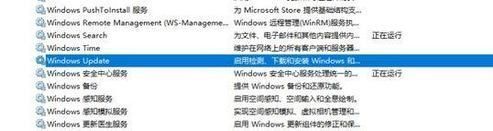
2. Find the WIndows Update service on the right side.
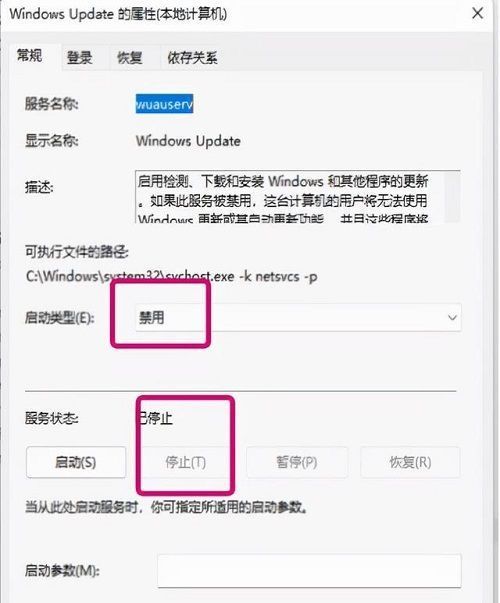
3. Right-click--Properties--General. Change the service status to "Stop" and the startup type to "Disabled".
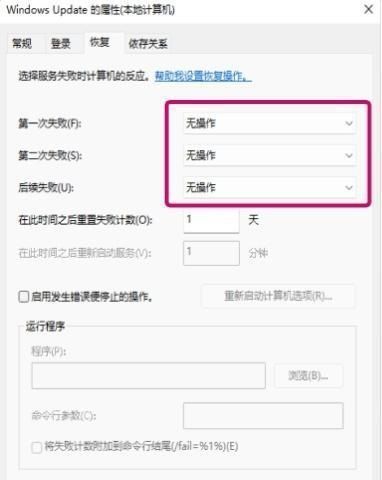
Click the "Restore" button, the first failed operation will be marked as "No Operation", and the second and subsequent failed operations will also be marked as "No Operation". This step is the most critical. If you don't set it like this, it will automatically resume startup.
The above isWhat should I do if windows update automatically recovers after it is disabled? The entire content of the solution for automatic recovery after windows update is disabled, please pay attention to this site for more related information.
The above is the detailed content of What should I do if windows update automatically recovers after it is disabled?. For more information, please follow other related articles on the PHP Chinese website!

Hot AI Tools

Undresser.AI Undress
AI-powered app for creating realistic nude photos

AI Clothes Remover
Online AI tool for removing clothes from photos.

Undress AI Tool
Undress images for free

Clothoff.io
AI clothes remover

AI Hentai Generator
Generate AI Hentai for free.

Hot Article
Hot Tools

Notepad++7.3.1
Easy-to-use and free code editor

SublimeText3 Chinese version
Chinese version, very easy to use

Zend Studio 13.0.1
Powerful PHP integrated development environment

Dreamweaver CS6
Visual web development tools

SublimeText3 Mac version
God-level code editing software (SublimeText3)
Hot Topics
 1378
1378
 52
52