


How does Python's import work?

Hello, I am somenzz, you can call me Brother Zheng.
Python’s import is very intuitive, but even so, sometimes you will find that even though the package is there, we will still encounter ModuleNotFoundError. Even though the relative path is very correct, an error is reported
ImportError: attempted relative import with no known parent package
Importing modules in the same directory and modules in different directories are completely different. This article analyzes some problems often encountered when using import to help you easily handle import. Based on this, you can easily create your own package.
1. What is a module (module) and what is a package (package)
Module (module)
The relationship between modules and packages can be compared to files and directories. Modules Just files.
As described in the Python documentation, a Python file is a module, and the Python file name (without the suffix .py) is the module name.
A module can contain variables, functions and classes, which are part of the namespace defined by the module, so the naming of variables is not a problem because two different modules can have variables, functions and classes with the same name. .
Package
The relationship between modules and packages can be compared to files and directories. A package is a directory.
Package can have modules or sub-packages. A module defines a namespace so that variables, functions and classes can have the same name in two different modules. Similarly, a package does the same for its component packages and modules. The main package can be accessed through the dot. modules and packages in .
A basic package can include sub-package, modules, __init__.py (not required after Python 3.3), setup.py. A possible package structure looks like this:
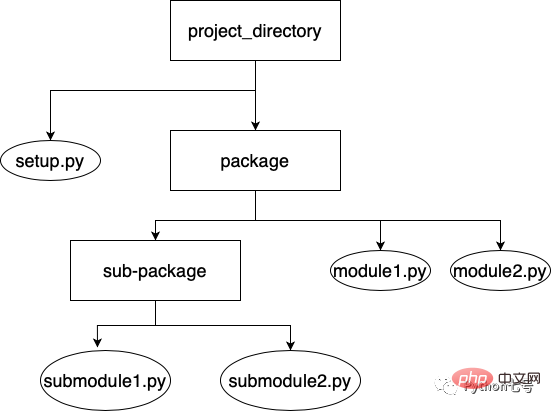
And setup.py exists in the home directory where your package is located, containing configuration information such as required dependencies, Scripts and subpackages. You can also specify metadata about the package, such as the package's name, author, description, etc.
setup.py is the file pip uses to install your package.
2.What happened during import
Let’s take a simple example first. For example, there are two files in the same directory, file1.py and file2.py. The content is very simple, just print The difference between their respective file names is that file1 is imported in file2.py:
#file1.py
print("This is file1.py")
#file2.py
print("This is file2.py")
import file1When you run file2.py, you can get the following results:
❯ python file2.py
This is file2.py
This is file1.py
You can see:
- import is very intuitive, whoever uses it can import it.
- The import statement is an ordinary statement and can be placed anywhere.
- When a file is imported, it will be executed, and its internal classes or objects will be added to its namespace.
We also need to know the search order of import. We only need to remember one thing, that is, import will search in sys.path.
For example, if I add a line of code at the end of file2.py: import sys; print(sys.path), I can print the import search path:
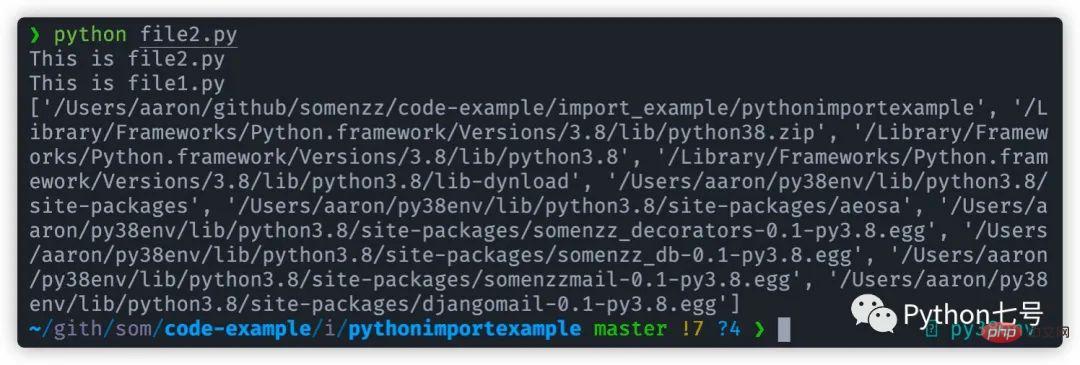
You can see the order of sys.path:
- The path where the execution script is located will be searched first
- Standard library
- Third-party library site-packages
What you need to pay attention to about sys.path is:
- In the interpreter environment, sys.path[0] is the path where the interpreter is started''
- sys.path does not depend on the working path of the current program - os.getcwd(), but only depends on the path of the first script:
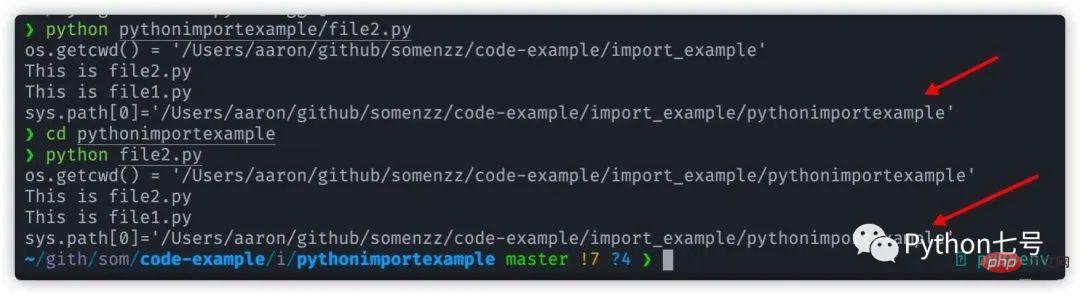
- If one module imports another module, which in turn imports another module, the sys.path of the first module is where the interpreter searches for the second import statement.
Once a module or package is found, it will be executed. If there is an initialization file __init__.py in the package, __init__.py will be executed first when importing.
Then the project to be imported is added to its namespace, and we can use it through xx.yy.
3. When to use relative import and when to use absolute import
Let’s first look at what absolute import is. The so-called absolute import is in the form:
import aa
import aa.bb
from aa import bb
like this The method is very intuitive. Import will search in sys.path. If you encounter a ModuleNotFoundError, think about why sys.path does not have the package we want to import, or manually insert the path of the package into sys.path.
Let’s take a look at what relative import is. The so-called relative import is in the form:
from . import aa
from .aa import bb
from .. import yy
That is to say, there is a . sign in the relative path to indicate the module to be imported or the current module. The relative position of the package.
For example, we create a new directory subpackage1 under the pythonimportexample directory, and create two new files file3.py and file4.py in subpackage1.
The content is as follows:
file3.py :
print("This is file3.py")file4.py:
from . import file3
print("This is file4.py")只要我们直接运行 file4.py,那是一定会报错的: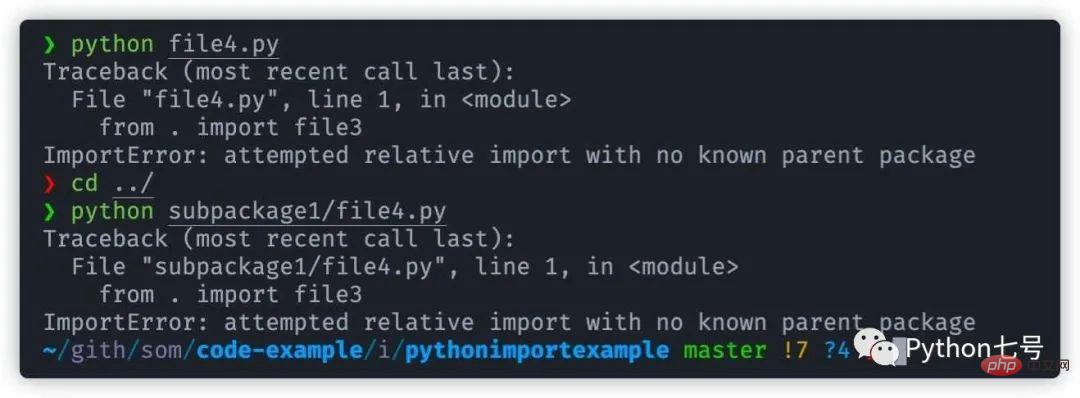
Python 提示我们:
ImportError: attempted relative import with no known parent package
也就是说相对导入不知道父包是谁,换句话说,这是一个子包,必须让父包来调用它,直接运行这个文件是不行的,即使你在 file4.py 的目录 subpackage1 同级的目录执行该文件也是不行的,见上图。
但是在 file4.py 的目录 subpackage1 同级的目录作为一个 module 来执行是可以的,如下图:
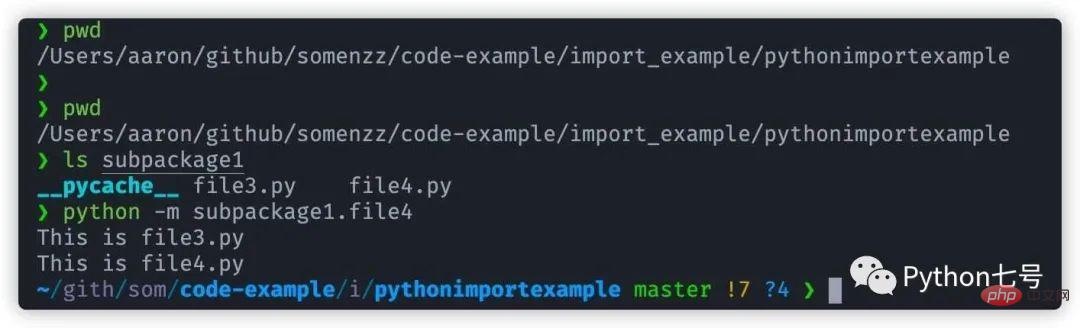
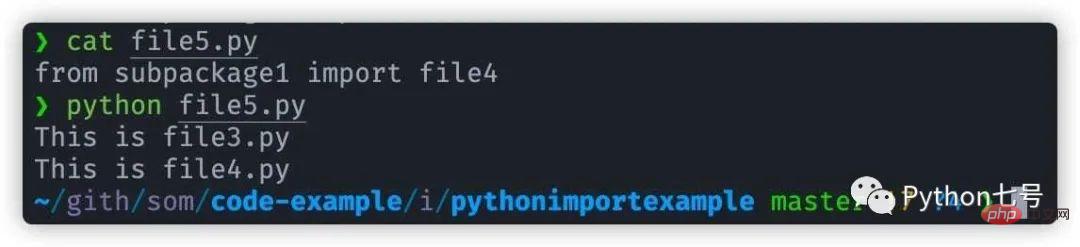
换句话说,我们把 subpackage1 作为一个包来让别人用,相对导入是可以的,比如说我们在目录 subpackage1 同级的目录新建一个 file5.py 的文件,内容如下:
file5.py:
from subpackage1 import file4。
然后,执行 python file5.py 可以看出,相对导入已经正常工作:
结论
- 如果是当做脚本文件直接运行的,使用绝对导入。
- 如果是当做模块供其他文件导入,使用相对导入。
4.一个自定义包的例子
先上一个图来看下目录及引用结构,方块的是目录,椭圆的是文件,曲线是引用:
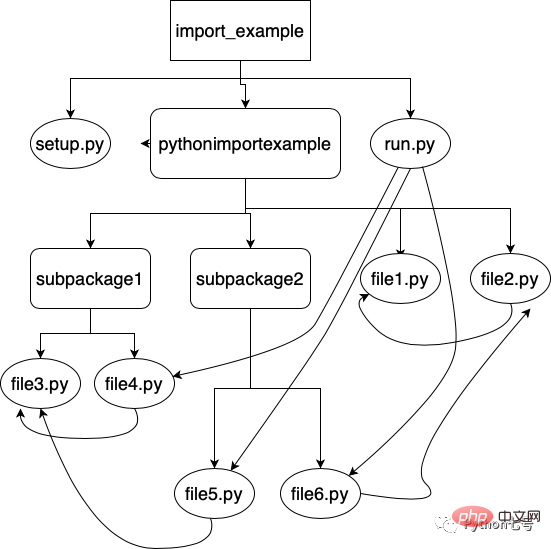
其中 import_example 目录下有 setup.py 和 run.py
run.py 导入了 file4、file5、file6。
file4 导入了 file3,file5 导入了 file3。
file6 导入了 file2,file2 导入了 file1。
现在我们来执行一下 run.py 看下效果:
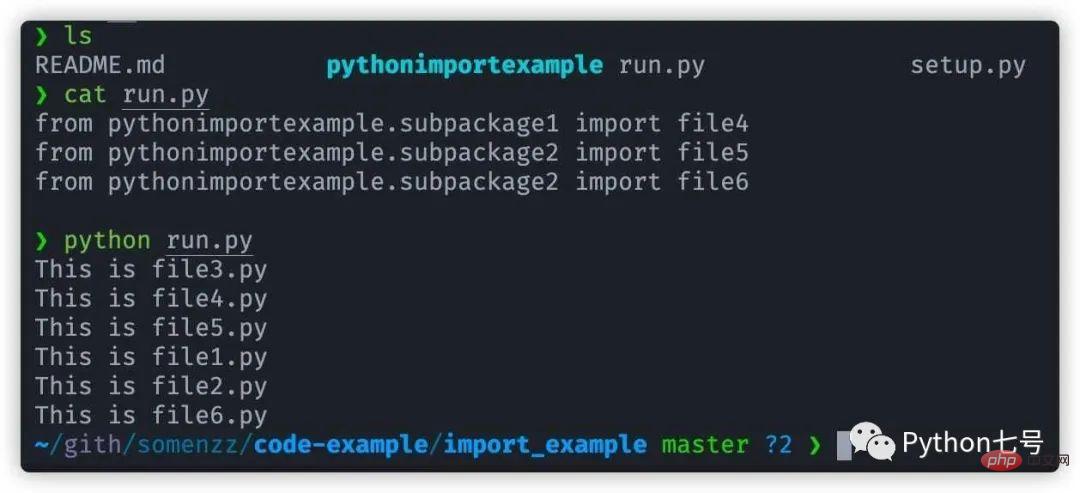
可以看出所有相对导入都已正常工作,虽然 file3 被导入了两次,但只执行了一次,说明 Python 内部已经考虑了同一个包的多重导入问题。
自定义包就是让其他文件导入使用的,因此 pythonimportexample目录下都使用相对导入,源代码见:
https://gitee.com/somenzz/code-example/tree/master/import_example
点阅读原文也可以直接访问。
这里还有一些自定义包的例子:
- dbinterface[1]
- transferfile[2]
最后的话
本文分享了什么是模块(module),什么是包(package),import 的搜索路径,也分享了相对导入和绝对导入的区别,最后举了一个非常实用的 import 例子,方便你构建自己的包。
The above is the detailed content of How does Python's import work?. For more information, please follow other related articles on the PHP Chinese website!

Hot AI Tools

Undresser.AI Undress
AI-powered app for creating realistic nude photos

AI Clothes Remover
Online AI tool for removing clothes from photos.

Undress AI Tool
Undress images for free

Clothoff.io
AI clothes remover

AI Hentai Generator
Generate AI Hentai for free.

Hot Article
Hot Tools

Notepad++7.3.1
Easy-to-use and free code editor

SublimeText3 Chinese version
Chinese version, very easy to use

Zend Studio 13.0.1
Powerful PHP integrated development environment

Dreamweaver CS6
Visual web development tools

SublimeText3 Mac version
God-level code editing software (SublimeText3)
Hot Topics
 1378
1378
 52
52

 How to use Debian Apache logs to improve website performance
Apr 12, 2025 pm 11:36 PM
How to use Debian Apache logs to improve website performance
Apr 12, 2025 pm 11:36 PM
This article will explain how to improve website performance by analyzing Apache logs under the Debian system. 1. Log Analysis Basics Apache log records the detailed information of all HTTP requests, including IP address, timestamp, request URL, HTTP method and response code. In Debian systems, these logs are usually located in the /var/log/apache2/access.log and /var/log/apache2/error.log directories. Understanding the log structure is the first step in effective analysis. 2. Log analysis tool You can use a variety of tools to analyze Apache logs: Command line tools: grep, awk, sed and other command line tools.
 Python: Games, GUIs, and More
Apr 13, 2025 am 12:14 AM
Python: Games, GUIs, and More
Apr 13, 2025 am 12:14 AM
Python excels in gaming and GUI development. 1) Game development uses Pygame, providing drawing, audio and other functions, which are suitable for creating 2D games. 2) GUI development can choose Tkinter or PyQt. Tkinter is simple and easy to use, PyQt has rich functions and is suitable for professional development.
 PHP and Python: Comparing Two Popular Programming Languages
Apr 14, 2025 am 12:13 AM
PHP and Python: Comparing Two Popular Programming Languages
Apr 14, 2025 am 12:13 AM
PHP and Python each have their own advantages, and choose according to project requirements. 1.PHP is suitable for web development, especially for rapid development and maintenance of websites. 2. Python is suitable for data science, machine learning and artificial intelligence, with concise syntax and suitable for beginners.
 The role of Debian Sniffer in DDoS attack detection
Apr 12, 2025 pm 10:42 PM
The role of Debian Sniffer in DDoS attack detection
Apr 12, 2025 pm 10:42 PM
This article discusses the DDoS attack detection method. Although no direct application case of "DebianSniffer" was found, the following methods can be used for DDoS attack detection: Effective DDoS attack detection technology: Detection based on traffic analysis: identifying DDoS attacks by monitoring abnormal patterns of network traffic, such as sudden traffic growth, surge in connections on specific ports, etc. This can be achieved using a variety of tools, including but not limited to professional network monitoring systems and custom scripts. For example, Python scripts combined with pyshark and colorama libraries can monitor network traffic in real time and issue alerts. Detection based on statistical analysis: By analyzing statistical characteristics of network traffic, such as data
 How debian readdir integrates with other tools
Apr 13, 2025 am 09:42 AM
How debian readdir integrates with other tools
Apr 13, 2025 am 09:42 AM
The readdir function in the Debian system is a system call used to read directory contents and is often used in C programming. This article will explain how to integrate readdir with other tools to enhance its functionality. Method 1: Combining C language program and pipeline First, write a C program to call the readdir function and output the result: #include#include#include#includeintmain(intargc,char*argv[]){DIR*dir;structdirent*entry;if(argc!=2){
 Python and Time: Making the Most of Your Study Time
Apr 14, 2025 am 12:02 AM
Python and Time: Making the Most of Your Study Time
Apr 14, 2025 am 12:02 AM
To maximize the efficiency of learning Python in a limited time, you can use Python's datetime, time, and schedule modules. 1. The datetime module is used to record and plan learning time. 2. The time module helps to set study and rest time. 3. The schedule module automatically arranges weekly learning tasks.
 Nginx SSL Certificate Update Debian Tutorial
Apr 13, 2025 am 07:21 AM
Nginx SSL Certificate Update Debian Tutorial
Apr 13, 2025 am 07:21 AM
This article will guide you on how to update your NginxSSL certificate on your Debian system. Step 1: Install Certbot First, make sure your system has certbot and python3-certbot-nginx packages installed. If not installed, please execute the following command: sudoapt-getupdatesudoapt-getinstallcertbotpython3-certbot-nginx Step 2: Obtain and configure the certificate Use the certbot command to obtain the Let'sEncrypt certificate and configure Nginx: sudocertbot--nginx Follow the prompts to select
 How to configure HTTPS server in Debian OpenSSL
Apr 13, 2025 am 11:03 AM
How to configure HTTPS server in Debian OpenSSL
Apr 13, 2025 am 11:03 AM
Configuring an HTTPS server on a Debian system involves several steps, including installing the necessary software, generating an SSL certificate, and configuring a web server (such as Apache or Nginx) to use an SSL certificate. Here is a basic guide, assuming you are using an ApacheWeb server. 1. Install the necessary software First, make sure your system is up to date and install Apache and OpenSSL: sudoaptupdatesudoaptupgradesudoaptinsta
