


How to use Java annotation Annotaton

1. Three basic Annotaton
@Override: To limit a method, it is to override the parent class method. This annotation can only be used for methods
@Deprecated: Used to represent a certain program Elements (classes, methods, etc.) are obsolete
@SuppressWarnings: Suppress compiler warnings
@Override
class father{
   public void fly(){}
}
class son extends father{
    @Override
    public void fly() {
        super.fly();
    }
}Interpretation
@Override means that son overrides the fly method
Details
If there is no @Override, the fly method will still be rewritten
class father{
   public void fly(){}
}
class son extends father{
    public void fly() {
        super.fly();
    }
}If the @Override annotation is written, the compiler will check whether the method overrides the parent class method , if rewritten, the compilation will pass. If it is not rewritten, a compilation error occurs.
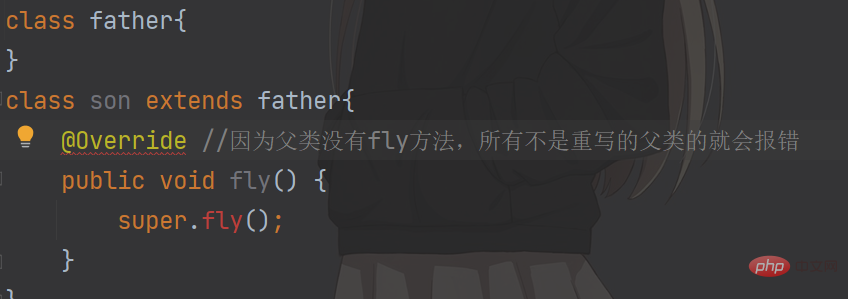
@Override can only modify methods, not other classes, packages, properties, etc.
//@Override底层代码
@Target(ElementType.METHOD)//ElementType.METHOD说明@Override只能修饰方法
@Retention(RetentionPolicy.SOURCE)
public @interface Override {
}@Deprecated
public class Deprecatedtext {
    public static void main(String[] args) {
        father father1 = new father();
        father1.fly();
    }
}
@Deprecated
class father{
    @Deprecated
   public void fly(){}
}Interpretation
@Deprecated means that a certain program element (class, method, etc.) is obsolete, and will be reminded by a horizontal line in the middle of the word. Indicates that use is not recommended.
Effect
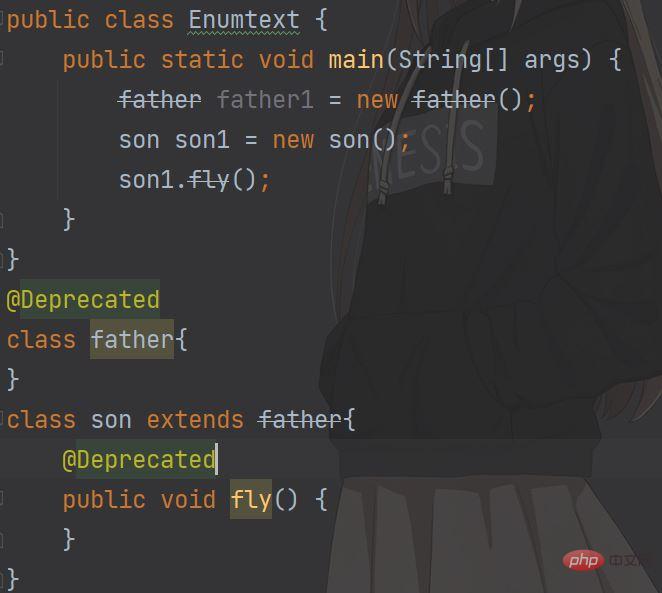
Details can modify methods, classes, packages, parameters, etc.
//@Deprecated底层代码
@Documented
@Retention(RetentionPolicy.RUNTIME)
@Target(value={CONSTRUCTOR, FIELD, LOCAL_VARIABLE, METHOD, PACKAGE, PARAMETER, TYPE})//说明Deprecated能修饰方法,类,包,参数等等
public @interface Deprecated {
}2.@Deprecated can play the role Make the compatibility transition between old and new versions
@SuppressWarnings
@SuppressWarnings("all")
class father{
   public void fly(){}
}Interpretation
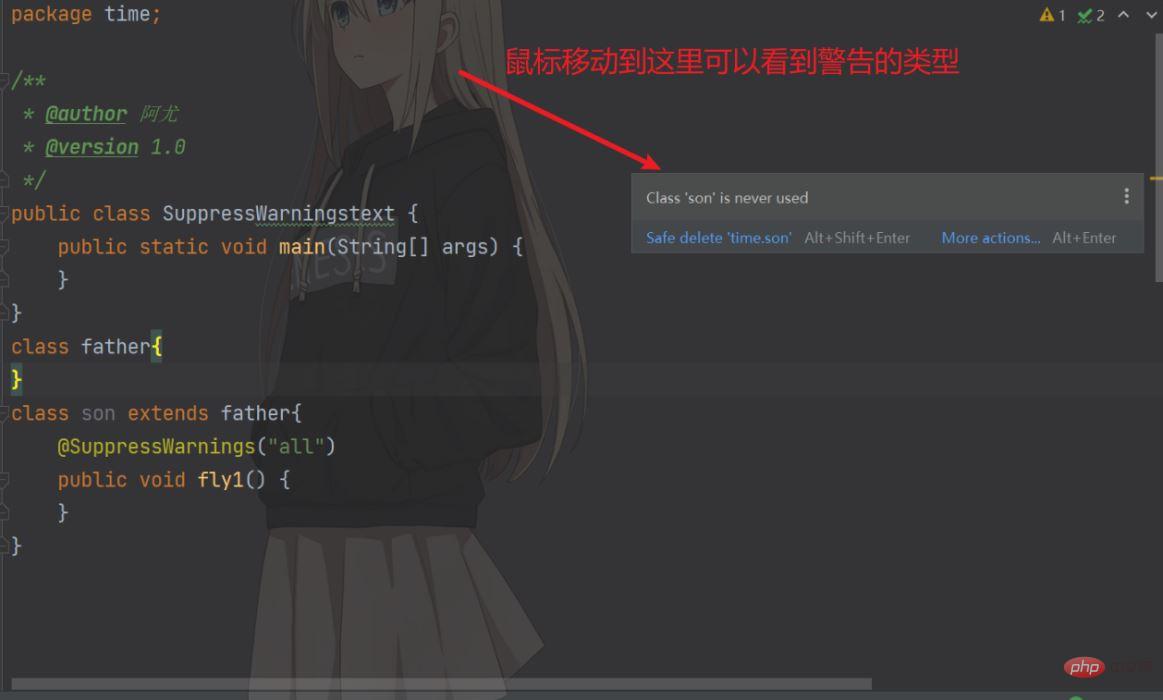
@SuppressWarnings annotation can be used to suppress warning information{""}Write the warning information you want to suppress
Effect
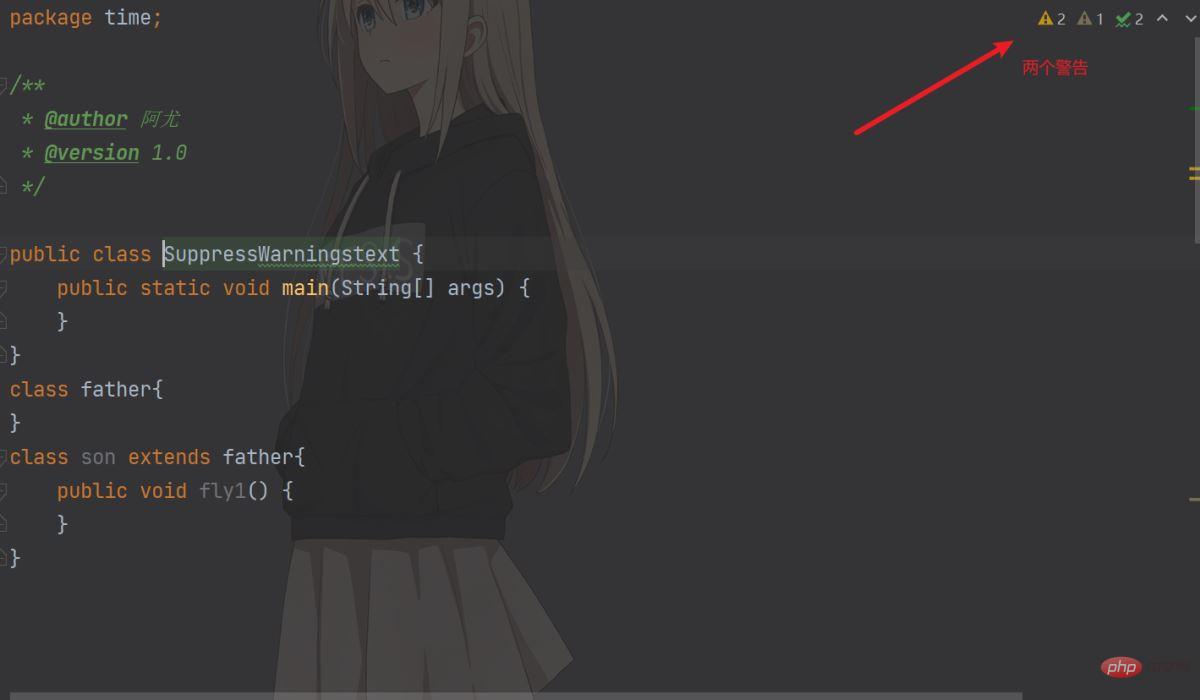
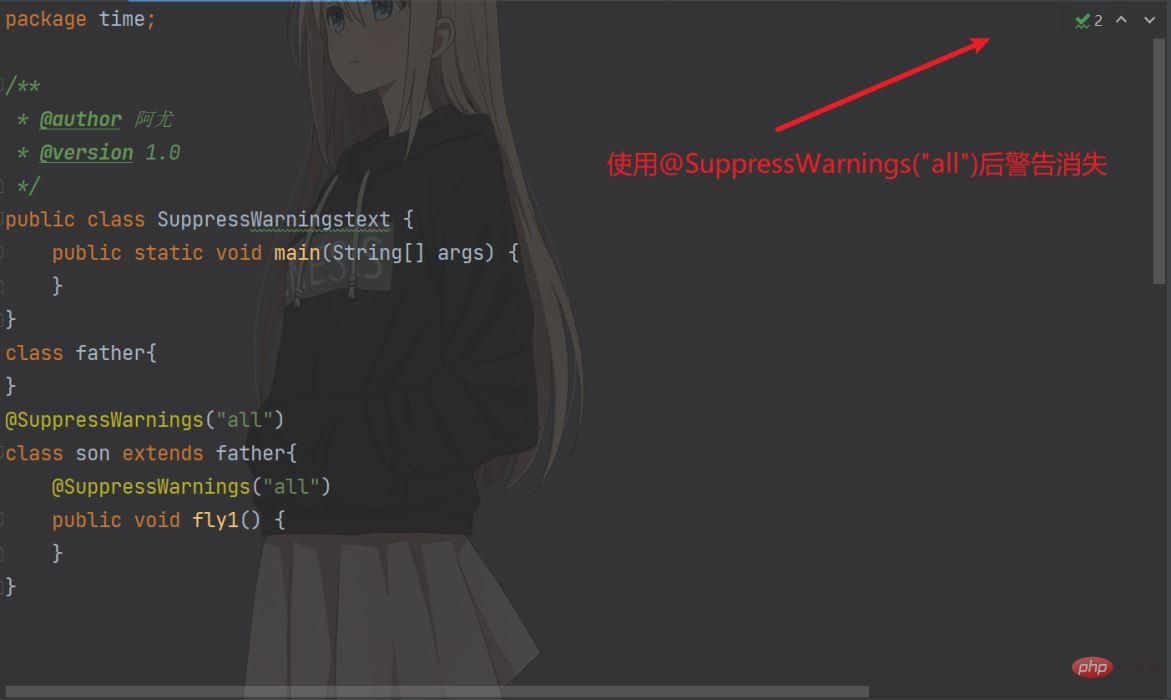
Details
1. The scope of @SuppressWarnings is related to the location where you place it
public class Enumtext {
    @SuppressWarnings("all")//作用范围在main方法
    public static void main(String[] args) {
        father father1 = new father();
        father1.fly();
    }
}
@SuppressWarnings("all")//作用范围在father类
class father{
   public void fly(){}
}The specified warning type is
all, suppress all warnings
boxing, suppress warnings related to packaging/disassembly operations
cast, suppress warnings related to forced transformation operations
dep-ann, suppress warnings related to elimination comments
deprecation, suppress warnings related to elimination
fallthrough, suppress warnings related to omission of break in switch statements
finally, suppress and not returned Warnings related to finally blocks
hiding, suppressing warnings related to local variables that hide variables
incomplete-switch, suppressing warnings related to missing items in switch statements (enum case)
javadoc, suppressing warnings related to javadoc related warnings
nls, suppress warnings related to non-nls string literals
null, suppress warnings related to null value analysis
rawtypes, suppress warnings related to the use of raw types
resource, Suppress warnings related to the use of resources of type Closeable
restriction, suppress warnings related to the use of deprecated or forbidden references
serial, suppress warnings related to the omission of the serialVersionUID field in serializable classes
static- access, suppress warnings related to incorrect static access
static-method, suppress warnings related to methods that may be declared static
super, suppress warnings related to replacement methods that do not contain super calls
synthetic-access, suppresses warnings related to unoptimized access to internal classes
sync-override, suppresses warnings related to missed synchronization due to overriding synchronization methods
unchecked, suppresses warnings related to unchecked operations
unqualified-field-access, suppress warnings related to unqualified field access
unused, suppress warnings related to unused code and disabled code
Meta-annotation
Retention specifies the scope of the annotation, three types of SOURCE, CLASS, RUNTIME
Target specifies the annotation. Where to use
Documented to specify whether the annotation will be reflected in javadoc
Inherited The subclass will inherit the parent class annotation
Retention
RetentionPolicy.SOURCE: After the compiler uses it, discard the comment directly
RetentionPolicy.CLASS: Compiler Record the annotations in the class file, and the JVM will not retain the annotations when running java
RetentionPolicy.PUNTIME: The compiler records the annotations in the class file, and the JVM will retain the annotations when running java
Retention case
@Override the bottom layer (the shortcut key for IDEA to enter the bottom layer is Ctrl B)
@Target(ElementType.METHOD)
@Retention(RetentionPolicy.SOURCE)//表示@Override在编译器使用后,直接丢弃注释
public @interface Override {
}Target
The value of Target
@Target(value={CONSTRUCTOR, FIELD, LOCAL_VARIABLE, METHOD, PACKAGE, PARAMETER, TYPE})
//   1.CONSTRUCTOR:用于描述构造器
    2.FIELD:用于描述域
    3.LOCAL_VARIABLE:用于描述局部变量
    4.METHOD:用于描述方法
    5.PACKAGE:用于描述包
    6.PARAMETER:用于描述参数
7.TYPE:用于描述类、接口(包括注解类型) 或enum声明Target case
@Deprecated underlying
@Documented
@Retention(RetentionPolicy.RUNTIME)
@Target(value={CONSTRUCTOR, FIELD, LOCAL_VARIABLE, METHOD, PACKAGE, PARAMETER, TYPE})//表示@Documented在这些地方可以写注解
public @interface Deprecated {
}Documented
Documented case
@Deprecated bottom layer
@Documented//@Deprecated代码会被保存到生产的文档中
@Retention(RetentionPolicy.RUNTIME)
@Target(value={CONSTRUCTOR, FIELD, LOCAL_VARIABLE, METHOD, PACKAGE, PARAMETER, TYPE})
public @interface Deprecated {
}Inherited
The Annotation modified by it will have inheritance. If a class uses an Annotation modified by @Inherited, its subclasses will automatically have this annotation
The above is the detailed content of How to use Java annotation Annotaton. For more information, please follow other related articles on the PHP Chinese website!

Hot AI Tools

Undresser.AI Undress
AI-powered app for creating realistic nude photos

AI Clothes Remover
Online AI tool for removing clothes from photos.

Undress AI Tool
Undress images for free

Clothoff.io
AI clothes remover

AI Hentai Generator
Generate AI Hentai for free.

Hot Article
Hot Tools

Notepad++7.3.1
Easy-to-use and free code editor

SublimeText3 Chinese version
Chinese version, very easy to use

Zend Studio 13.0.1
Powerful PHP integrated development environment

Dreamweaver CS6
Visual web development tools

SublimeText3 Mac version
God-level code editing software (SublimeText3)
Hot Topics
 1378
1378
 52
52

 Perfect Number in Java
Aug 30, 2024 pm 04:28 PM
Perfect Number in Java
Aug 30, 2024 pm 04:28 PM
Guide to Perfect Number in Java. Here we discuss the Definition, How to check Perfect number in Java?, examples with code implementation.
 Random Number Generator in Java
Aug 30, 2024 pm 04:27 PM
Random Number Generator in Java
Aug 30, 2024 pm 04:27 PM
Guide to Random Number Generator in Java. Here we discuss Functions in Java with examples and two different Generators with ther examples.
 Weka in Java
Aug 30, 2024 pm 04:28 PM
Weka in Java
Aug 30, 2024 pm 04:28 PM
Guide to Weka in Java. Here we discuss the Introduction, how to use weka java, the type of platform, and advantages with examples.
 Smith Number in Java
Aug 30, 2024 pm 04:28 PM
Smith Number in Java
Aug 30, 2024 pm 04:28 PM
Guide to Smith Number in Java. Here we discuss the Definition, How to check smith number in Java? example with code implementation.
 Java Spring Interview Questions
Aug 30, 2024 pm 04:29 PM
Java Spring Interview Questions
Aug 30, 2024 pm 04:29 PM
In this article, we have kept the most asked Java Spring Interview Questions with their detailed answers. So that you can crack the interview.
 Break or return from Java 8 stream forEach?
Feb 07, 2025 pm 12:09 PM
Break or return from Java 8 stream forEach?
Feb 07, 2025 pm 12:09 PM
Java 8 introduces the Stream API, providing a powerful and expressive way to process data collections. However, a common question when using Stream is: How to break or return from a forEach operation? Traditional loops allow for early interruption or return, but Stream's forEach method does not directly support this method. This article will explain the reasons and explore alternative methods for implementing premature termination in Stream processing systems. Further reading: Java Stream API improvements Understand Stream forEach The forEach method is a terminal operation that performs one operation on each element in the Stream. Its design intention is
 TimeStamp to Date in Java
Aug 30, 2024 pm 04:28 PM
TimeStamp to Date in Java
Aug 30, 2024 pm 04:28 PM
Guide to TimeStamp to Date in Java. Here we also discuss the introduction and how to convert timestamp to date in java along with examples.
 Java Program to Find the Volume of Capsule
Feb 07, 2025 am 11:37 AM
Java Program to Find the Volume of Capsule
Feb 07, 2025 am 11:37 AM
Capsules are three-dimensional geometric figures, composed of a cylinder and a hemisphere at both ends. The volume of the capsule can be calculated by adding the volume of the cylinder and the volume of the hemisphere at both ends. This tutorial will discuss how to calculate the volume of a given capsule in Java using different methods. Capsule volume formula The formula for capsule volume is as follows: Capsule volume = Cylindrical volume Volume Two hemisphere volume in, r: The radius of the hemisphere. h: The height of the cylinder (excluding the hemisphere). Example 1 enter Radius = 5 units Height = 10 units Output Volume = 1570.8 cubic units explain Calculate volume using formula: Volume = π × r2 × h (4
