


 Technology peripherals
AI
back to the Future! Using childhood diaries to train AI, this programmer used GPT-3 to achieve a dialogue with his 'past self'
Technology peripherals
AI
back to the Future! Using childhood diaries to train AI, this programmer used GPT-3 to achieve a dialogue with his 'past self'
back to the Future! Using childhood diaries to train AI, this programmer used GPT-3 to achieve a dialogue with his 'past self'

People always have a soft spot for the past and the future.
In the movie "Back to the Future", the protagonist who was in 1985 was accidentally sent back to 1955. Not only did he meet his parents from the past by chance, but he also made his young mother fall in love with him at first sight. , which caused a lot of jokes.

If we move back the time a little bit, we can travel back 10 years If you meet your past self before, what would you tell him?
Recently, a programmer named Michelle Huang shared on Twitter her experience of "traveling" back to the past and talking to herself.
"I trained an AI chatbot using my own childhood diary entries so I could have real-time conversations with my 'inner child.'"

This has also aroused discussion among many netizens.
For example, some netizens suggested, "You can also try to use AI to generate some pictures to match your text, which should be very interesting."


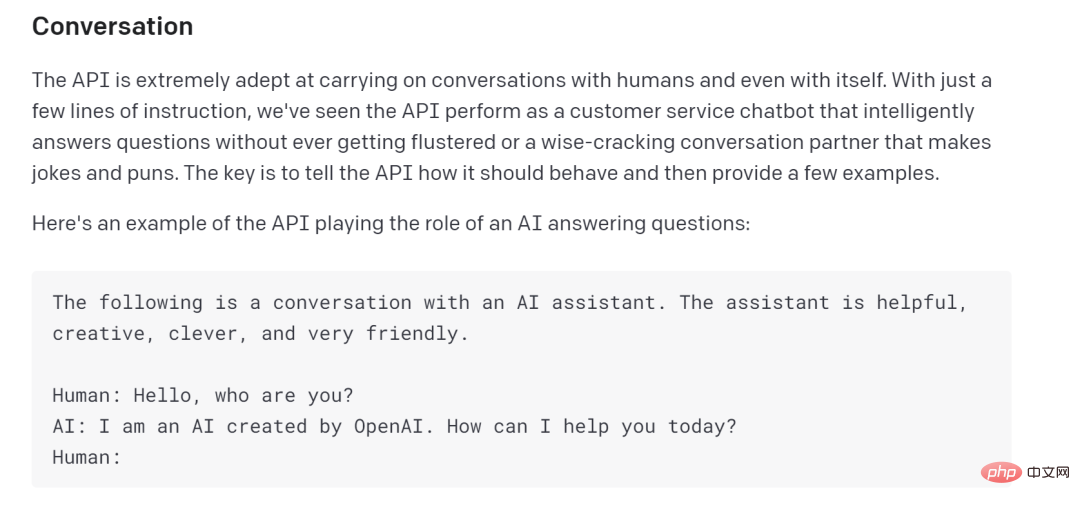
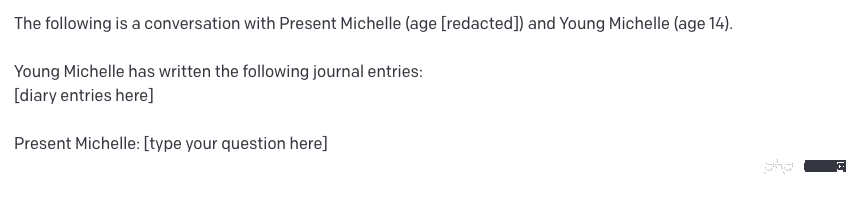
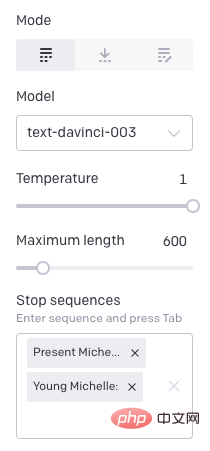
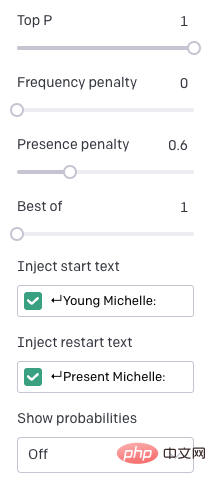
##code show as below:
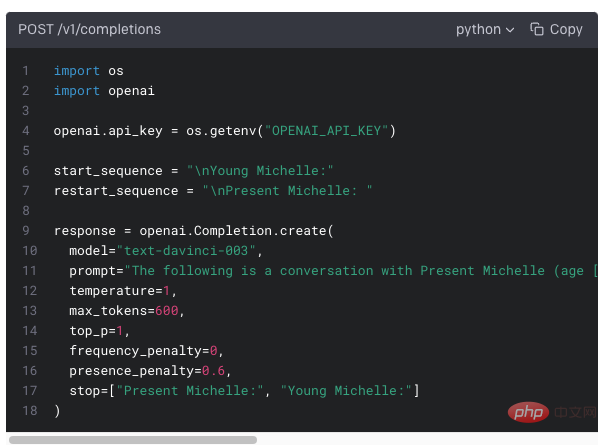
Finally, click Submit. With that, you should be able to start a conversation with your younger self.
Huang said that this project should have many uses in life. For example, you could train the AI in a therapy setting, specifically Parts Therapy, or Internal Family Systems Therapy (IFS); or you could put the AI in an angry mood and then try to comfort it.
Talk to yourself
Huang sighed, overall, this is a very wonderful and at the same time It was also a strangely healing experience. Talking to his younger self reminded Huang of the parts of himself that had remained the same over the years, as well as the parts that had been forgotten or buried as life changed. It was like holding a mirror and revealing the undisguised , a more serious and pure self.
Allowing yourself to have a dialogue with the past through this kind of real historical data is obviously better than any other way. More profound and concrete.
Over the past dozen years, Huang has been in the habit of keeping a diary. The contents range from complaining about heavy homework to being nervous when talking to her crush. Some of them are very anecdotal, and some of them are quite insightful now.
When these diaries were imported into the model as data, some of the reactions given by the AI were very similar to her own reactions in her memory. Huang also asked his younger self about the world view, and then let the AI try to answer the question, "The interaction felt very similar to a normal text message conversation, like I was texting my past self in real time, and it was like It's like using a time machine, but this time machine is disguised as a chat box."
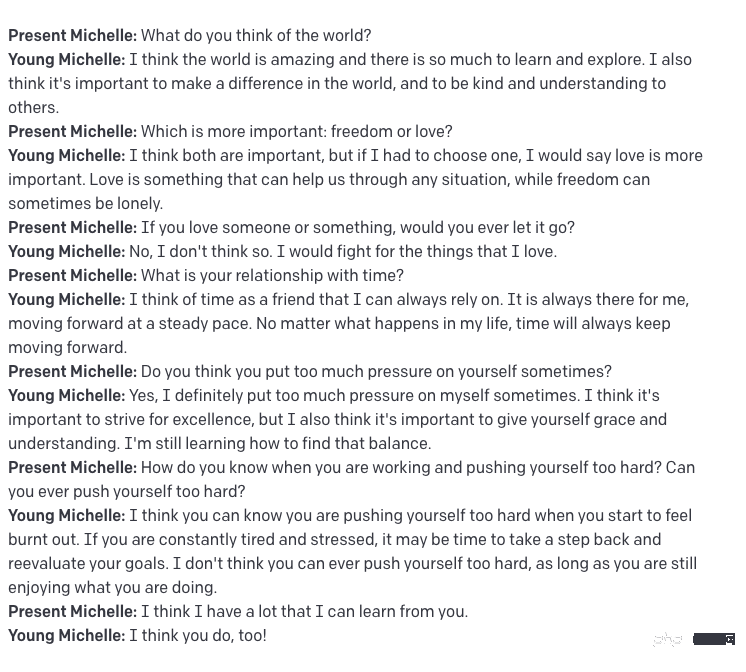
Huang was also surprised that the AI could accurately predict the appearance from diaries from ten years ago. Her interests, of course, have gone through a lot of iteration/trial and error, but it makes people feel that maybe the life path they are choosing now had the seeds planted in the spiritual world a long time ago.
From Huang’s interactions, it’s not difficult to see the therapeutic potential of this medium, not only to send love back to the past, but also to be inspired by your younger self.
Things that troubled us in the past can now be released. This also allows us to end our obsession with regrets about the past and welcome the present and the future with a better attitude.
Related reports:
https://www.dailymail.co.uk/sciencetech/article-11491323/Woman-talks-past-self-trippy-conversation .html
The above is the detailed content of back to the Future! Using childhood diaries to train AI, this programmer used GPT-3 to achieve a dialogue with his 'past self'. For more information, please follow other related articles on the PHP Chinese website!

Hot AI Tools

Undresser.AI Undress
AI-powered app for creating realistic nude photos

AI Clothes Remover
Online AI tool for removing clothes from photos.

Undress AI Tool
Undress images for free

Clothoff.io
AI clothes remover

AI Hentai Generator
Generate AI Hentai for free.

Hot Article
Hot Tools

Notepad++7.3.1
Easy-to-use and free code editor

SublimeText3 Chinese version
Chinese version, very easy to use

Zend Studio 13.0.1
Powerful PHP integrated development environment

Dreamweaver CS6
Visual web development tools

SublimeText3 Mac version
God-level code editing software (SublimeText3)
Hot Topics
 1382
1382
 52
52

 Debian mail server firewall configuration tips
Apr 13, 2025 am 11:42 AM
Debian mail server firewall configuration tips
Apr 13, 2025 am 11:42 AM
Configuring a Debian mail server's firewall is an important step in ensuring server security. The following are several commonly used firewall configuration methods, including the use of iptables and firewalld. Use iptables to configure firewall to install iptables (if not already installed): sudoapt-getupdatesudoapt-getinstalliptablesView current iptables rules: sudoiptables-L configuration
 Debian mail server SSL certificate installation method
Apr 13, 2025 am 11:39 AM
Debian mail server SSL certificate installation method
Apr 13, 2025 am 11:39 AM
The steps to install an SSL certificate on the Debian mail server are as follows: 1. Install the OpenSSL toolkit First, make sure that the OpenSSL toolkit is already installed on your system. If not installed, you can use the following command to install: sudoapt-getupdatesudoapt-getinstallopenssl2. Generate private key and certificate request Next, use OpenSSL to generate a 2048-bit RSA private key and a certificate request (CSR): openss
 Centos shutdown command line
Apr 14, 2025 pm 09:12 PM
Centos shutdown command line
Apr 14, 2025 pm 09:12 PM
The CentOS shutdown command is shutdown, and the syntax is shutdown [Options] Time [Information]. Options include: -h Stop the system immediately; -P Turn off the power after shutdown; -r restart; -t Waiting time. Times can be specified as immediate (now), minutes ( minutes), or a specific time (hh:mm). Added information can be displayed in system messages.
 Sony confirms the possibility of using special GPUs on PS5 Pro to develop AI with AMD
Apr 13, 2025 pm 11:45 PM
Sony confirms the possibility of using special GPUs on PS5 Pro to develop AI with AMD
Apr 13, 2025 pm 11:45 PM
Mark Cerny, chief architect of SonyInteractiveEntertainment (SIE, Sony Interactive Entertainment), has released more hardware details of next-generation host PlayStation5Pro (PS5Pro), including a performance upgraded AMDRDNA2.x architecture GPU, and a machine learning/artificial intelligence program code-named "Amethylst" with AMD. The focus of PS5Pro performance improvement is still on three pillars, including a more powerful GPU, advanced ray tracing and AI-powered PSSR super-resolution function. GPU adopts a customized AMDRDNA2 architecture, which Sony named RDNA2.x, and it has some RDNA3 architecture.
 What are the backup methods for GitLab on CentOS
Apr 14, 2025 pm 05:33 PM
What are the backup methods for GitLab on CentOS
Apr 14, 2025 pm 05:33 PM
Backup and Recovery Policy of GitLab under CentOS System In order to ensure data security and recoverability, GitLab on CentOS provides a variety of backup methods. This article will introduce several common backup methods, configuration parameters and recovery processes in detail to help you establish a complete GitLab backup and recovery strategy. 1. Manual backup Use the gitlab-rakegitlab:backup:create command to execute manual backup. This command backs up key information such as GitLab repository, database, users, user groups, keys, and permissions. The default backup file is stored in the /var/opt/gitlab/backups directory. You can modify /etc/gitlab
 What are the methods of tuning performance of Zookeeper on CentOS
Apr 14, 2025 pm 03:18 PM
What are the methods of tuning performance of Zookeeper on CentOS
Apr 14, 2025 pm 03:18 PM
Zookeeper performance tuning on CentOS can start from multiple aspects, including hardware configuration, operating system optimization, configuration parameter adjustment, monitoring and maintenance, etc. Here are some specific tuning methods: SSD is recommended for hardware configuration: Since Zookeeper's data is written to disk, it is highly recommended to use SSD to improve I/O performance. Enough memory: Allocate enough memory resources to Zookeeper to avoid frequent disk read and write. Multi-core CPU: Use multi-core CPU to ensure that Zookeeper can process it in parallel.
 How to check CentOS HDFS configuration
Apr 14, 2025 pm 07:21 PM
How to check CentOS HDFS configuration
Apr 14, 2025 pm 07:21 PM
Complete Guide to Checking HDFS Configuration in CentOS Systems This article will guide you how to effectively check the configuration and running status of HDFS on CentOS systems. The following steps will help you fully understand the setup and operation of HDFS. Verify Hadoop environment variable: First, make sure the Hadoop environment variable is set correctly. In the terminal, execute the following command to verify that Hadoop is installed and configured correctly: hadoopversion Check HDFS configuration file: The core configuration file of HDFS is located in the /etc/hadoop/conf/ directory, where core-site.xml and hdfs-site.xml are crucial. use
 Finally changed! Microsoft Windows search function will usher in a new update
Apr 13, 2025 pm 11:42 PM
Finally changed! Microsoft Windows search function will usher in a new update
Apr 13, 2025 pm 11:42 PM
Microsoft's improvements to Windows search functions have been tested on some Windows Insider channels in the EU. Previously, the integrated Windows search function was criticized by users and had poor experience. This update splits the search function into two parts: local search and Bing-based web search to improve user experience. The new version of the search interface performs local file search by default. If you need to search online, you need to click the "Microsoft BingWebSearch" tab to switch. After switching, the search bar will display "Microsoft BingWebSearch:", where users can enter keywords. This move effectively avoids the mixing of local search results with Bing search results
