


 Operation and Maintenance
Linux Operation and Maintenance
Linux command collection: understanding system load (organized and shared)
Operation and Maintenance
Linux Operation and Maintenance
Linux command collection: understanding system load (organized and shared)
Linux command collection: understanding system load (organized and shared)

本篇文章给大家带来了Linux中负载的概念与问题诊断方法相关知识,其中包括了负载是什么以及线程状态等,希望对大家有帮助。

一般在类unix系统上,都会有系统负载(load average)这个指标,用来形容系统的繁忙程度,值越大则代表系统越繁忙。
查看负载
$ uptime
19:59:57 up 29 days,  7:08,  1 user,  load average: 0.57, 0.26, 0.18
我们关注load average后的3个值,分别代表1分钟、5分钟、15分钟的系统平均负载,如果1分钟值>5分钟值>15分钟值,则代表近15分钟内系统压力越来越大,反之亦然。
同样,在top命令的第一行,也能看到系统负载,它的含义和uptime是一样的。
负载是什么
一般来说,系统线程基本都在这3个状态上:运行中,可运行,阻塞等待,其中,运行中的线程正在CPU上跑,可运行的线程等待CPU调度,而阻塞的线程等待锁释放或io完成。
在传统unix系统上(如BSD),系统负载由正在运行的线程以及可运行的线程这2个部分组成。
它能很好的说明CPU的饱和情况,比如4核的CPU,如果负载一直高于4,那说明CPU资源饱和了。
而Linux扩大了负载的定义,如下:
Linux负载由正在运行的线程和可运行的线程,以及D状态的线程(一般是等待io完成)这3个部分组成。
因为Linux认为,虽然D状态的线程并不消耗CPU资源,但是它会消耗磁盘、网卡等硬件资源以及锁这样的软件资源,因此它也应该被用来计算系统负载,想来也合理,毕竟系统负载是用来描述整个系统的繁忙程度的,而不仅仅是CPU的。
线程状态D
在Linux里面,线程有如下常见状态:
R: 正在运行或可运行状态
S: 睡眠状态,被阻塞等待唤醒
D: 不可中断睡眠状态,一般是等待io完成
这里面的R与D状态的线程会影响系统负载,因此,当系统负载较高时,可以通过如下命令了解是哪些线程导致的:
ps -eLo pid,tid,stat,comm | grep -E " R|D"
小实验:将系统负载升到100
# 使用vfork函数创建一个子进程,子进程如果不调用exec系统调用,它的状态会一直是D。
$ cat uninterruptible.c
int main() {
    vfork();
    sleep(600);
    return 0;
}
# 编译成可执行程序
$ gcc -o uninterruptible uninterruptible.c
# 运行100个程序
$ for i in {1..100}; do ./uninterruptible &; done
等待1分钟,就会发现系统负载升到了快100,如下:
$ uptime
20:24:42 up 29 days,  7:32,  1 user,  load average: 99.94, 74.82, 35.87
# 可以看到很多D状态的进程
$ ps -eLo pid,tid,stat,pcpu,wchan:32,comm | grep " D"
3774195 3774195 D     0.0 do_fork                          uninterruptible
3774196 3774196 D     0.0 do_fork                          uninterruptible
3774197 3774197 D     0.0 do_fork                          uninterruptible
3774198 3774198 D     0.0 do_fork                          uninterruptible
如上,通过ps命令可以看到线程状态,还有一个wchan字段,它显示的是线程当前被阻塞在什么内核函数上,这能看出一些蛛丝马迹。
另外,通过/proc/sysrq-trigger可以看到D线程阻塞时的代码路径,如下:
# 写入一个w即可,需要root权限执行
$ echo w > /proc/sysrq-trigger
# 然后内核会把D状态线程调用栈输出到内核日志,这可以通过dmesg查看
$ dmesg
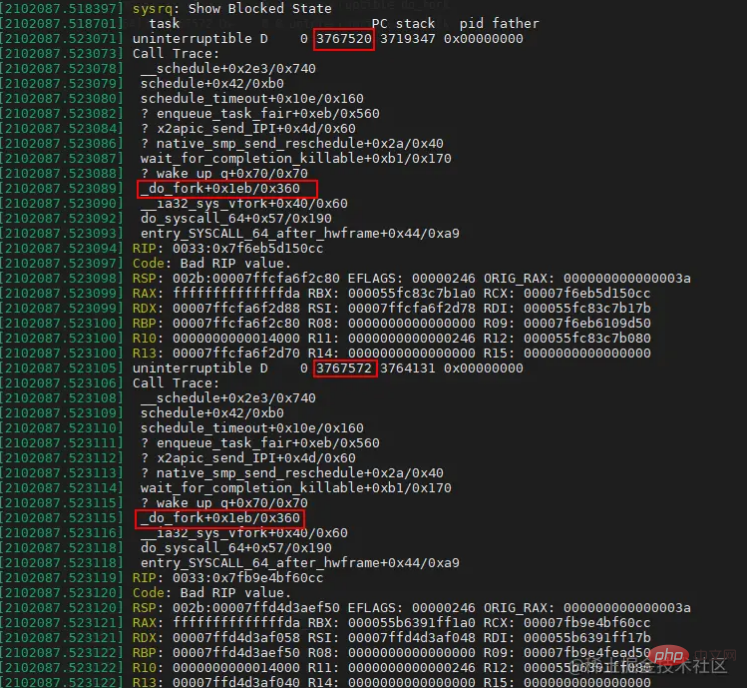
这里就能很清楚的看到,是由于vfork系统调用引起的负载上升。
之前介绍过bcc工具集里的offcputime工具,它可以用来绘制offcpu火焰图,同样的,诊断高负载问题时,也可以用这个工具,传一个参数,让其只关注D状态线程的offcpu行为即可,如下:
# ubuntu安装bcc工具集
$ sudo apt install bpfcc-tools
# 使用root身份进入bash
$ sudo bash
# --state 2用于指定抓取TASK_UNINTERRUPTIBLE即D状态线程的offcpu栈
$ offcputime-bpfcc -K --state 2 -f 60  > d_state_offcpu_stack.out
# 绘制为offcpu火焰图
$ awk '{ print $1, $2 / 1000 }' d_state_offcpu_stack.out | ./FlameGraph/flamegraph.pl --color=io --countname=ms > d_state_offcpu.svg
相关推荐:《Linux视频教程》
The above is the detailed content of Linux command collection: understanding system load (organized and shared). For more information, please follow other related articles on the PHP Chinese website!

Hot AI Tools

Undress AI Tool
Undress images for free

Undresser.AI Undress
AI-powered app for creating realistic nude photos

AI Clothes Remover
Online AI tool for removing clothes from photos.

Clothoff.io
AI clothes remover

Video Face Swap
Swap faces in any video effortlessly with our completely free AI face swap tool!

Hot Article
Hot Tools

Notepad++7.3.1
Easy-to-use and free code editor

SublimeText3 Chinese version
Chinese version, very easy to use

Zend Studio 13.0.1
Powerful PHP integrated development environment

Dreamweaver CS6
Visual web development tools

SublimeText3 Mac version
God-level code editing software (SublimeText3)
Hot Topics


 Postman Integrated Application on CentOS
May 19, 2025 pm 08:00 PM
Postman Integrated Application on CentOS
May 19, 2025 pm 08:00 PM
Integrating Postman applications on CentOS can be achieved through a variety of methods. The following are the detailed steps and suggestions: Install Postman by downloading the installation package to download Postman's Linux version installation package: Visit Postman's official website and select the version suitable for Linux to download. Unzip the installation package: Use the following command to unzip the installation package to the specified directory, for example /opt: sudotar-xzfpostman-linux-x64-xx.xx.xx.tar.gz-C/opt Please note that "postman-linux-x64-xx.xx.xx.tar.gz" is replaced by the file name you actually downloaded. Create symbols
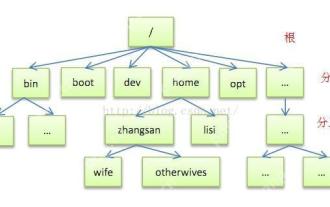 Detailed introduction to each directory of Linux and each directory (reprinted)
May 22, 2025 pm 07:54 PM
Detailed introduction to each directory of Linux and each directory (reprinted)
May 22, 2025 pm 07:54 PM
[Common Directory Description] Directory/bin stores binary executable files (ls, cat, mkdir, etc.), and common commands are generally here. /etc stores system management and configuration files/home stores all user files. The root directory of the user's home directory is the basis of the user's home directory. For example, the home directory of the user user is /home/user. You can use ~user to represent /usr to store system applications. The more important directory /usr/local Local system administrator software installation directory (install system-level applications). This is the largest directory, and almost all the applications and files to be used are in this directory. /usr/x11r6 Directory for storing x window/usr/bin Many
 Where is the pycharm interpreter?
May 23, 2025 pm 10:09 PM
Where is the pycharm interpreter?
May 23, 2025 pm 10:09 PM
Setting the location of the interpreter in PyCharm can be achieved through the following steps: 1. Open PyCharm, click the "File" menu, and select "Settings" or "Preferences". 2. Find and click "Project:[Your Project Name]" and select "PythonInterpreter". 3. Click "AddInterpreter", select "SystemInterpreter", browse to the Python installation directory, select the Python executable file, and click "OK". When setting up the interpreter, you need to pay attention to path correctness, version compatibility and the use of the virtual environment to ensure the smooth operation of the project.
 After installing Nginx, the configuration file path and initial settings
May 16, 2025 pm 10:54 PM
After installing Nginx, the configuration file path and initial settings
May 16, 2025 pm 10:54 PM
Understanding Nginx's configuration file path and initial settings is very important because it is the first step in optimizing and managing a web server. 1) The configuration file path is usually /etc/nginx/nginx.conf. The syntax can be found and tested using the nginx-t command. 2) The initial settings include global settings (such as user, worker_processes) and HTTP settings (such as include, log_format). These settings allow customization and extension according to requirements. Incorrect configuration may lead to performance issues and security vulnerabilities.
 The difference between programming in Java and other languages Analysis of the advantages of cross-platform features of Java
May 20, 2025 pm 08:21 PM
The difference between programming in Java and other languages Analysis of the advantages of cross-platform features of Java
May 20, 2025 pm 08:21 PM
The main difference between Java and other programming languages is its cross-platform feature of "writing at once, running everywhere". 1. The syntax of Java is close to C, but it removes pointer operations that are prone to errors, making it suitable for large enterprise applications. 2. Compared with Python, Java has more advantages in performance and large-scale data processing. The cross-platform advantage of Java stems from the Java virtual machine (JVM), which can run the same bytecode on different platforms, simplifying development and deployment, but be careful to avoid using platform-specific APIs to maintain cross-platformity.
 MySQL installation tutorial teach you step by step the detailed steps for installing and configuration of mySQL step by step
May 23, 2025 am 06:09 AM
MySQL installation tutorial teach you step by step the detailed steps for installing and configuration of mySQL step by step
May 23, 2025 am 06:09 AM
The installation and configuration of MySQL can be completed through the following steps: 1. Download the installation package suitable for the operating system from the official website. 2. Run the installer, select the "Developer Default" option and set the root user password. 3. After installation, configure environment variables to ensure that the bin directory of MySQL is in PATH. 4. When creating a user, follow the principle of minimum permissions and set a strong password. 5. Adjust the innodb_buffer_pool_size and max_connections parameters when optimizing performance. 6. Back up the database regularly and optimize query statements to improve performance.
 Experience in participating in VSCode offline technology exchange activities
May 29, 2025 pm 10:00 PM
Experience in participating in VSCode offline technology exchange activities
May 29, 2025 pm 10:00 PM
I have a lot of experience in participating in VSCode offline technology exchange activities, and my main gains include sharing of plug-in development, practical demonstrations and communication with other developers. 1. Sharing of plug-in development: I learned how to use VSCode's plug-in API to improve development efficiency, such as automatic formatting and static analysis plug-ins. 2. Practical demonstration: I learned how to use VSCode for remote development and realized its flexibility and scalability. 3. Communicate with developers: I have obtained skills to optimize VSCode startup speed, such as reducing the number of plug-ins loaded at startup and managing the plug-in loading order. In short, this event has benefited me a lot and I highly recommend those who are interested in VSCode to participate.
 Comparison between Informix and MySQL on Linux
May 29, 2025 pm 11:21 PM
Comparison between Informix and MySQL on Linux
May 29, 2025 pm 11:21 PM
Informix and MySQL are both popular relational database management systems. They perform well in Linux environments and are widely used. The following is a comparison and analysis of the two on the Linux platform: Installing and configuring Informix: Deploying Informix on Linux requires downloading the corresponding installation files, and then completing the installation and configuration process according to the official documentation. MySQL: The installation process of MySQL is relatively simple, and can be easily installed through system package management tools (such as apt or yum), and there are a large number of tutorials and community support on the network for reference. Performance Informix: Informix has excellent performance and
