


 WeChat Applet
Mini Program Development
A brief discussion on how to authorize login to the mini program and obtain information and mobile phone number
WeChat Applet
Mini Program Development
A brief discussion on how to authorize login to the mini program and obtain information and mobile phone number
A brief discussion on how to authorize login to the mini program and obtain information and mobile phone number

This article will share with you how to implement authorized login in WeChat applet and obtain user information and mobile phone number.

Relevant learning recommendations: Mini Program Development Tutorial
Summary, the new function of obtaining the user’s mobile phone number is used, which uses the information about obtaining For the functions of user information and user mobile phone number, when I first wrote it, I found that I wrote two buttons on a login page. The logic of obtaining the mobile phone number is to jump to the homepage when the user clicks authorize, and when the user clicks to reject the pop-up prompt, finally I found that it may be a limitation on WeChat. There is a prompt when debugging on the simulator. If you click on the reject button on a real machine, it will still work. I couldn’t help but write another set about judging the authorization of mobile phone numbers when users enter a certain details page. I will record it here. I hope it can be solved. Help friends in need and see the effect first! ! !
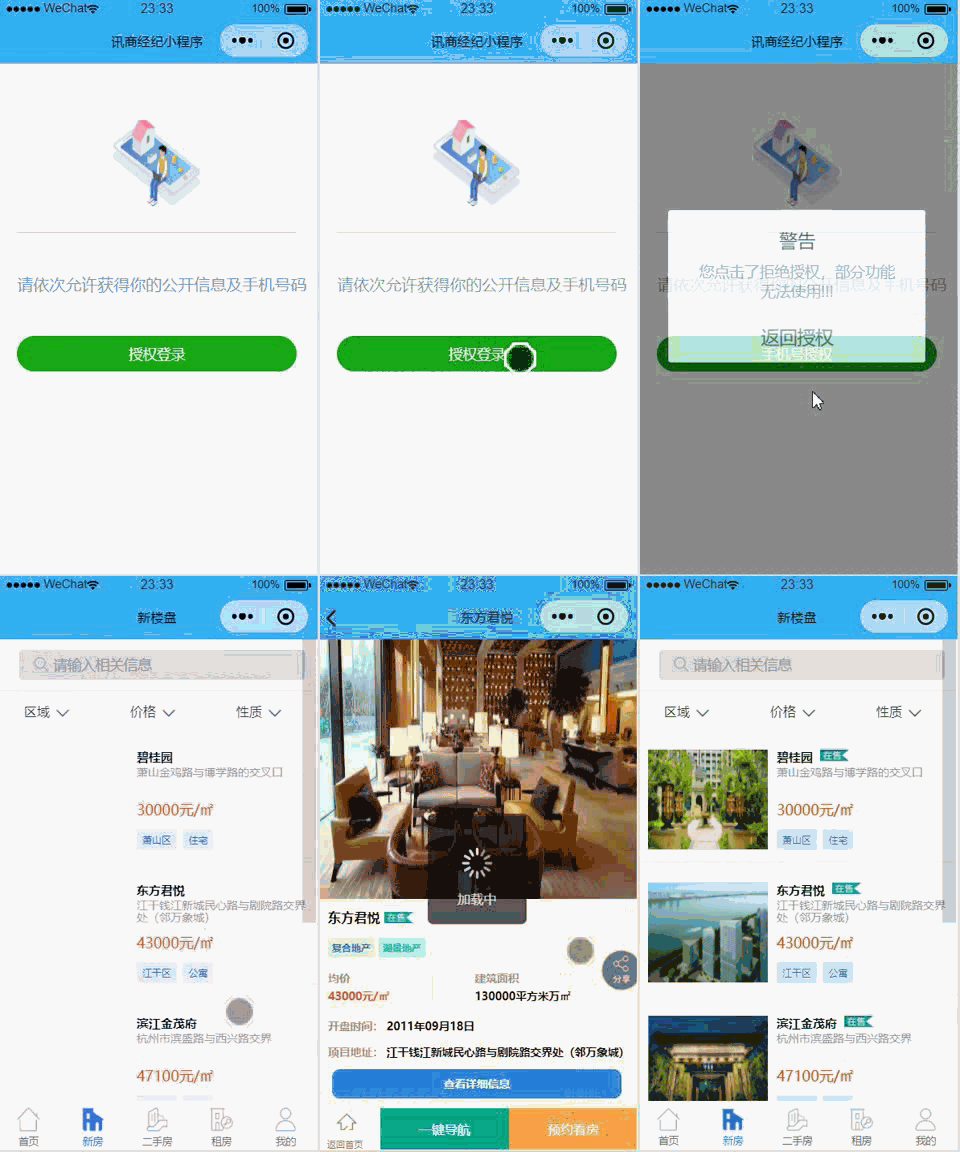
1. Global judgment
App({
  onLaunch: function () {
    //调用API从本地缓存中获取数据
    // 展示本地存储能力
    var logs = wx.getStorageSync('logs') || []
    logs.unshift(Date.now())
    wx.setStorageSync('logs', logs)
    var that = this;
    //获取用户本地是否是第一次进入新版本
    var versions = wx.getStorageSync('versions');
    console.log('versions:' + versions);
    //判断是不是需要授权
    if (versions == '1'){
      // 已经授权,可以直接调用 getUserInfo 获取头像昵称,不会弹框
      wx.getUserInfo({
        success: function (res) {
          that.globalData.userInfo = res.userInfo
          console.log(that.globalData.userInfo)
        },
        fail: function () {
          wx.redirectTo({
            url: '../wurui_house/pages/login/index',
          })
        }
      })
    }else{
      //未授权, 跳转登录页面
      wx.redirectTo({
        url: '../wurui_house/pages/login/index',
      })
    }
  },
  onShow: function () {
    //		console.log(getCurrentPages())
  },
  onHide: function () {
    //	console.log(getCurrentPages())
  },
  onError: function (msg) {
    //console.log(msg)
  },

  util: require('we7/resource/js/util.js'),
  tabBar: {
    "color": "#123",
    "selectedColor": "#1ba9ba",
    "borderStyle": "#1ba9ba",
    "backgroundColor": "#fff",
    "list": [

    ]
  },
  getLocationInfo: function (cb) {
    var that = this;
    if (this.globalData.locationInfo) {
      cb(this.globalData.locationInfo)
    } else {
      wx.getLocation({
        type: 'gcj02', // 默认为 wgs84 返回 gps 坐标,gcj02 返回可用于 wx.openLocation 的坐标
        success: function (res) {
          that.globalData.locationInfo = res;
          cb(that.globalData.locationInfo)
        },
        fail: function () {
          // fail
        },
        complete: function () {
          // complete
        }
      })
    }
  },
  globalData: {
    userInfo: null,
    appid: "",
    appsecret: "",
  },
  siteInfo: require('siteinfo.js')

});2.Login login page judgment
(1) index.wxml
<view wx:if="{{isHide}}">
<view wx:if="{{canIUse}}">
<view>
<image src='../../../we7/resource/images/login.png'></image>
</view>
<view>
<text>请依次允许获得你的公开信息及手机号码</text>
</view>
<view class="" >
<button class="{{flag?'show':'hide'}}" type="primary" open-type="getUserInfo" bindgetuserinfo="bindGetUserInfo">{{AuthorizedLogin}}</button>
<button class="{{flag?'hide':'show'}}" type="primary" open-type='getPhoneNumber' bindgetphonenumber="getPhoneNumber">{{UserPhone}}</button>
</view>
</view>
<view wx:else>请升级微信版本</view>
</view> (4) index.wxss
.header {
  margin: 90rpx 0 90rpx 50rpx;
  border-bottom: 1px solid #ccc;
  text-align: center;
  width: 650rpx;
  height: 300rpx;
  line-height: 450rpx;
}

.header image {
  width: 200rpx;
  height: 200rpx;
}

.content {
  margin-left: 50rpx;
  margin-bottom: 90rpx;
}

.content text {
  display: block;
  color: #9d9d9d;
  margin-top: 40rpx;
}
/* .operBtn{
  border-radius: 80rpx;
  margin: 70rpx 50rpx;
  font-size: 35rpx;
}
.operBtns{
  background: #eef0ed !important;
  border-radius: 80rpx;
  margin: 70rpx 50rpx;
  font-size: 35rpx;
  color: #000300 !important;
} */
.hide{
  border-radius: 80rpx;
  margin: 70rpx 50rpx;
  font-size: 35rpx;
  display: none;
}
.show{
  display: block;
  /* background: #eef0ed !important; */
  border-radius: 80rpx;
  margin: 70rpx 50rpx;
  font-size: 35rpx;
  /* color: #000300 !important; */
} (3) index.js
const app = getApp();
Page({
  data: {
    //判断小程序的API,回调,参数,组件等是否在当前版本可用。
    canIUse: wx.canIUse('button.open-type.getUserInfo'),
    isHide: false,
    AuthorizedLogin: '授权登录',
    UserPhone: '手机号授权',
    lee: "",
    flag: true
  },
  onLoad: function() {
    var that = this;
    // 查看是否授权
    //获取用户本地是否是第一次进入新版本
    var versions = wx.getStorageSync('versions');
    if (versions == '1') {
      wx.getSetting({
        success: function(res) {
          if (res.authSetting['scope.userInfo']) {
            //调用共通的登录方法
            app.util.getUserInfo(
              function(userinfo) {
                that.setData({
                  userinfo: userinfo
                })
              });
          } else {
            // 用户没有授权
            // 改变 isHide 的值,显示授权页面
            that.setData({
              isHide: true
            });
          }
        }
      });
    } else {
      // 用户没有授权
      // 改变 isHide 的值,显示授权页面
      that.setData({
        isHide: true
      });
    }

  },
  bindGetUserInfo: function(e) {
    if (e.detail.userInfo) {
      //用户按了允许授权按钮
      var that = this;
      let user = e.detail.userInfo;
      // 获取到用户的信息了,打印到控制台上看下
      console.log("用户的信息如下:");
      console.log(user);
      //授权成功后,通过改变 isHide 的值,让实现页面显示出来,把授权页面隐藏起来
      that.data.lee
      if (that.data.lee == '') {
        wx.showToast({
            icon: "none",
            title: '请继续点击获取手机号',
          }),
          that.setData({
            isHide: true,
            flag: (!that.data.flag),
            lee: true
          })
        that.wxlogin();
      } else if (!that.data.lee) {
        wx.switchTab({
          url: "/wurui_house/pages/index/index"
        })

      }
    } else {
      //用户按了拒绝按钮
      wx.showModal({
        title: '警告',
        content: '您点击了拒绝授权,将无法进入小程序,请授权之后再进入!!!',
        showCancel: false,
        confirmText: '返回授权',
        success: function(res) {
          // 用户没有授权成功,不需要改变 isHide 的值
          if (res.confirm) {
            console.log('用户点击了“返回授权”');
          }
        }
      });
    }
  },

  wxlogin: function() { //获取用户的openID

    var that = this;
    //调用共通的登录方法
    app.util.getUserInfo(
      function(userinfo) {
        that.setData({
          userinfo: userinfo
        })
      });

  },

  getPhoneNumber: function(e) { //点击获取手机号码按钮
    var that = this;
    that.data.lee
    if (that.data.lee == '') {
      wx.showToast({
        icon: "none",
        title: '请先点击获取用户信息',
      })
      return
    } else {
      wx.checkSession({
        success: function(res) {
          console.log(e.detail.errMsg)
          console.log(e.detail.iv)
          console.log(e.detail.encryptedData)
          var ency = e.detail.encryptedData;
          var iv = e.detail.iv;

          var sessionk = that.data.sessionKey;


          if (e.detail.errMsg == 'getPhoneNumber:fail user deny') {
            wx.showModal({
                title: '警告',
                content: '您点击了拒绝授权,部分功能无法使用!!!',
                showCancel: false,
                confirmText: '返回授权',
                success: function(res) {
                  // 用户没有授权成功,不需要改变 isHide 的值
                  if (res.confirm) {
                    wx.setStorageSync('enws', '1');
                    wx.switchTab({
                      url: "/wurui_house/pages/index/index"
                    })
                    console.log('用户点击了“返回授权”');
                  };
                }
              }),

              that.setData({

                modalstatus: true,

              });
          } else {
            that.setData({

              lee: false,

            });
            wx.switchTab({
              url: "/wurui_house/pages/index/index"
            })
            //同意授权
            var userinfo = wx.getStorageSync('userInfo');
            app.util.request({
              'url': 'entry/wxapp/saveusermobile',
              data: {
                sessionid: userinfo.sessionid,
                uid: userinfo.memberInfo.uid,
                iv: iv,
                encryptedData: ency
              },
              success: function(res) {
                if (res.data.data.error == 0) {
                  console.log('success' + res.data.data);
                  //用户已经进入新的版本,可以更新本地数据
                  wx.setStorageSync('versions', '1');
                  wx.setStorageSync('enws', '2');
                } else {
                  //用户保存手机号失败,下次进入继续授权手机号
                  wx.setStorageSync('enws', '1');
                  console.log('fail' + res.data.data);
                }
              },
              fail: function(res) {
                console.log('fail' + res);
              }
            });
          }
        },

        fail: function() {

          console.log("session_key 已经失效,需要重新执行登录流程");


          that.wxlogin(); //重新登录
        }

      });
    }

  }
})2. The mask layer writing method used to determine the mobile phone number authorization of a certain details page
(1) index.html
<code>
<!-- 受权弹框提醒 -->
<view class="container">
<view class="float" hidden='{{viewShowed}}'>
<view class='floatContent'>
<text>允许授权获取手机号</text>
<view class='floatText'>
<button bindtap='cancle' class='btn-cancle'>取消</button>
<button class='btn-cancle' open-type='getPhoneNumber' bindgetphonenumber="getPhoneNumber">确认</button>
</view>
</view>
</view>
</view>
</code> (2) index. wxss
/* 手机号授权 */
.float {
  height: 100%;
  width: 100%;
  position: fixed;
  background-color: rgba(0, 0, 0, 0.5);
  z-index: 2;
  top: 0;
  left: 0;
}
.floatContent {
  /* padding: 20rpx 0;   */
  width: 80%;
  background: #fff;
  margin: 40% auto;
  border-radius: 20rpx;
  display: flex;
  flex-direction: column;
  justify-content: space-around;
  align-items: center;
  position: relative;
  height: 255rpx;
}
.floatContent text {
  color: #000;
  font-size: 40rpx;
  display: block;
  margin: 0 auto;
  position: absolute;
  top: 50rpx;
  /* text-align: center;   */
  /* line-height: 60rpx;   */
  border-radius: 30rpx;
}
.floatText{
  width: 100%;
  height: 100rpx;
  display: flex;
  justify-content: flex-start;
  position: absolute;
  bottom: 0;
}
.btn-cancle{
  line-height: 100rpx;
  flex: 1;
  margin: 0;
  padding: 0;
  border-radius: none;
} (3) index.js
data: {
    viewShowed: true, //控制授权能否显示
  },
  cancle: function () {
    wx.setStorageSync('enws', '2');
    this.setData({
      viewShowed: true
    })
  },
   /**
   * 生命周期函数--监听页面显示
   */
  onShow: function () {
    var enws = wx.getStorageSync('enws');
    console.log("enws:", +enws);
    var that = this;
    if (enws != '2') { //判断能否授权
      that.setData({
        viewShowed: false,
      })
      console.log('判断能否授权');
    } else {

    }
  },

  getPhoneNumber: function (e) { //点击获取手机号码按钮
    var that = this;
    wx.checkSession({
      success: function (res) {
        console.log(e.detail.errMsg)
        console.log(e.detail.iv)
        console.log(e.detail.encryptedData)
        var ency = e.detail.encryptedData;
        var iv = e.detail.iv;

        var sessionk = that.data.sessionKey;

        that.setData({
          viewShowed: true,
        })
        wx.setStorageSync('enws', '2');
        if (e.detail.errMsg == 'getPhoneNumber:fail user deny') {

        } else {
          //同意授权
          var userinfo = wx.getStorageSync('userInfo');
          app.util.request({
            'url': 'entry/wxapp/saveusermobile',
            data: {
              sessionid: userinfo.sessionid,
              uid: userinfo.memberInfo.uid,
              iv: iv,
              encryptedData: ency
            },
            success: function (res) {
              console.log('success' + res);
              if (res.data.data.error == 0) {
                console.log('success' + res.data.data);
                //用户已经进入新的版本,可以更新本地数据
                wx.setStorageSync('versions', '1');
              } else {
                //用户保存手机号失败,下次进入继续授权手机号
              }
            },
            fail: function (res) {
              console.log('fail' + res);
            }
          });
        }
      }
    });
},Link: https://pan.baidu.com/s/1E7d33scSpk1tiq_Ndium2g
Extraction code: ll9i
After copying this content, open Baidu network disk and download util.js
For more programming-related knowledge, please visit: Programming getting Started! !
The above is the detailed content of A brief discussion on how to authorize login to the mini program and obtain information and mobile phone number. For more information, please follow other related articles on the PHP Chinese website!

Hot AI Tools

Undresser.AI Undress
AI-powered app for creating realistic nude photos

AI Clothes Remover
Online AI tool for removing clothes from photos.

Undress AI Tool
Undress images for free

Clothoff.io
AI clothes remover

Video Face Swap
Swap faces in any video effortlessly with our completely free AI face swap tool!

Hot Article
Hot Tools

Notepad++7.3.1
Easy-to-use and free code editor

SublimeText3 Chinese version
Chinese version, very easy to use

Zend Studio 13.0.1
Powerful PHP integrated development environment

Dreamweaver CS6
Visual web development tools

SublimeText3 Mac version
God-level code editing software (SublimeText3)
Hot Topics
 1386
1386
 52
52

 How to use Xiaohongshu account to find users? Can I find my mobile phone number?
Mar 22, 2024 am 08:40 AM
How to use Xiaohongshu account to find users? Can I find my mobile phone number?
Mar 22, 2024 am 08:40 AM
With the rapid development of social media, Xiaohongshu has become one of the most popular social platforms. Users can create a Xiaohongshu account to show their personal identity and communicate and interact with other users. If you need to find a user’s Xiaohongshu number, you can follow these simple steps. 1. How to use Xiaohongshu account to find users? 1. Open the Xiaohongshu APP, click the "Discover" button in the lower right corner, and then select the "Notes" option. 2. In the note list, find the note posted by the user you want to find. Click to enter the note details page. 3. On the note details page, click the "Follow" button below the user's avatar to enter the user's personal homepage. 4. In the upper right corner of the user's personal homepage, click the three-dot button and select "Personal Information"
 How to set up if WeChat does not allow adding by mobile phone number
Mar 12, 2024 pm 05:04 PM
How to set up if WeChat does not allow adding by mobile phone number
Mar 12, 2024 pm 05:04 PM
How to set up WeChat to disallow adding via mobile phone number? In WeChat APP, you can disallow adding WeChat via mobile phone number, but most users don’t know how to set it up to not allow WeChat to be added via mobile phone number. Next is WeChat brought by the editor to users It is not allowed to add setting method tutorials through mobile phone numbers. Interested users can come and take a look! Tutorial on how to use WeChat. How to set up WeChat when adding a mobile phone number is not allowed. 1. First open the WeChat APP, enter the main page, click [Me] in the lower right corner to enter, and select the [Settings] function; 2. Then enter the setting function page and find [Friend Permissions] ] Service function; 3. Then on the friend permissions interface, slide the button behind [Verification is required when adding me as a friend]; 4. Finally, on the page shown below, slide [Mobile Phone Number]
 What does the +86 in front of a mobile phone number mean?
Jan 12, 2021 pm 02:17 PM
What does the +86 in front of a mobile phone number mean?
Jan 12, 2021 pm 02:17 PM
The +86 in front of the mobile phone number refers to China's international dialing code. When dialing a domestic mobile phone in China, adding "+86" is the same as not adding it; and the international telephone area code is assigned by the International Telecommunications Union according to the "E.164" standard. Country codes; all numbers are prefix numbers, which means these numbers are used to "dial" the destination country.
 How to change the mobile phone number of Xiaohongshu account? Will there be any impact if I change my mobile phone number?
Mar 22, 2024 am 08:11 AM
How to change the mobile phone number of Xiaohongshu account? Will there be any impact if I change my mobile phone number?
Mar 22, 2024 am 08:11 AM
In the digital age, Xiaohongshu has become a platform for many people to share their lives and discover good things. Over time, we may need to change the mobile phone number on the account. So, how to change Xiaohongshu’s mobile phone number? 1. How to change the mobile phone number of Xiaohongshu account? 1. Log in to your Xiaohongshu account and enter the “My” page. 2. Click "..." in the upper right corner and select "Settings". 3. On the settings page, find the "Account and Security" option and click to enter. 4. On the Account and Security page, find the "Mobile Phone Number" option and click to enter. 5. At this time, the page will display the current mobile phone number, click "Change Mobile Number". 6. Enter the new mobile phone number, receive the verification code, and fill it out. 7. Set a new password to ensure account security. 8. After completing the above steps,
 Develop WeChat applet using Python
Jun 17, 2023 pm 06:34 PM
Develop WeChat applet using Python
Jun 17, 2023 pm 06:34 PM
With the popularity of mobile Internet technology and smartphones, WeChat has become an indispensable application in people's lives. WeChat mini programs allow people to directly use mini programs to solve some simple needs without downloading and installing applications. This article will introduce how to use Python to develop WeChat applet. 1. Preparation Before using Python to develop WeChat applet, you need to install the relevant Python library. It is recommended to use the two libraries wxpy and itchat here. wxpy is a WeChat machine
 Can small programs use react?
Dec 29, 2022 am 11:06 AM
Can small programs use react?
Dec 29, 2022 am 11:06 AM
Mini programs can use react. How to use it: 1. Implement a renderer based on "react-reconciler" and generate a DSL; 2. Create a mini program component to parse and render DSL; 3. Install npm and execute the developer Build npm in the tool; 4. Introduce the package into your own page, and then use the API to complete the development.
 How to register two B-site numbers with one mobile phone number? How does Station B unbind its mobile phone?
Mar 21, 2024 pm 10:10 PM
How to register two B-site numbers with one mobile phone number? How does Station B unbind its mobile phone?
Mar 21, 2024 pm 10:10 PM
Bilibili (Bilibili), as a video sharing website very popular among Chinese young people, has attracted a large number of users. Some users hope to have two Bilibili accounts so that they can be managed and used separately. So, how to register two B-site numbers with one mobile phone number? This article will focus on this issue and how to unbind the mobile phone. 1. How to register two B-site numbers with one mobile phone number? 1. Register a new account: First, open the Bilibili App on your mobile phone or log in to the official website, click the "Register" button, and select the registration method. You can use your mobile phone number, email or third-party account (such as WeChat, QQ, etc.) to register. 2. When registering an account, please fill in the necessary information according to the system prompts, including mobile phone number, verification code, and set password. Be sure to use different accounts
 What should I do if my railway 12306 mobile phone number has been changed and cannot be verified?
Feb 28, 2024 am 09:00 AM
What should I do if my railway 12306 mobile phone number has been changed and cannot be verified?
Feb 28, 2024 am 09:00 AM
In recent years, the various certification rules of Railway 12306 have been revised to make them more standardized. In the past, when you could buy tickets through other people's mobile phone numbers or old mobile phone numbers, now when buying tickets, you will be prompted for unauthenticated operations, which affects users' travel. So how to change the mobile phone number in 12306? This tutorial guide will bring you a detailed guide introduction, hoping to help everyone in need. Then the first choice is to click on the modify mobile phone number function when you have logged in to 12306app, then enter the modification page, click to bind a new mobile phone number, use the new mobile phone number to send a text message, then enter the text message editing page, follow the prompts to send the edit Please fill in the verification code received and enter it into 12306app to complete the modification.
