


 Operation and Maintenance
Windows Operation and Maintenance
What is the cmd command to check the java version?
Operation and Maintenance
Windows Operation and Maintenance
What is the cmd command to check the java version?
What is the cmd command to check the java version?

The command to check the java version is "java -version". The specific operation method: 1. Use the "Win R" key to open the "Run" window; 2. In the "Run" window, enter "cmd", Click "OK"; 3. In the cmd running window, enter the command "java -version" and press Enter to view.
The operating environment of this tutorial: windows7 system, java7, Dell G3 computer.
Enter the command [java -version] in the cmd window of the computer Windows 7 system to view the java version (JDK version). Please refer to the following steps for specific operations.
1. First, in the win7 system, press the shortcut key "Win R" to open the run window, as shown in the figure.
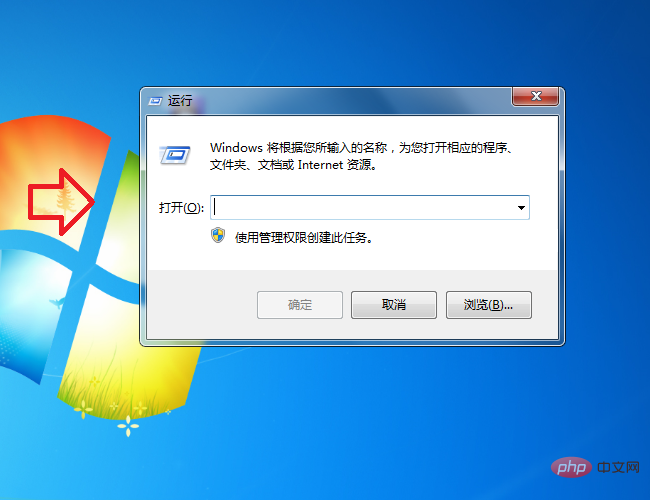
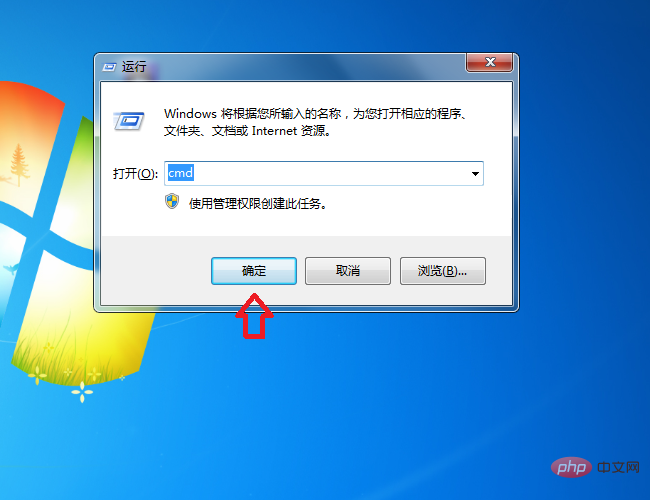
#2. Then enter "cmd" in the window and click the "OK" button.
#3. The system will pop up the cmd running window, enter the command [java -version], and then press the Enter key.
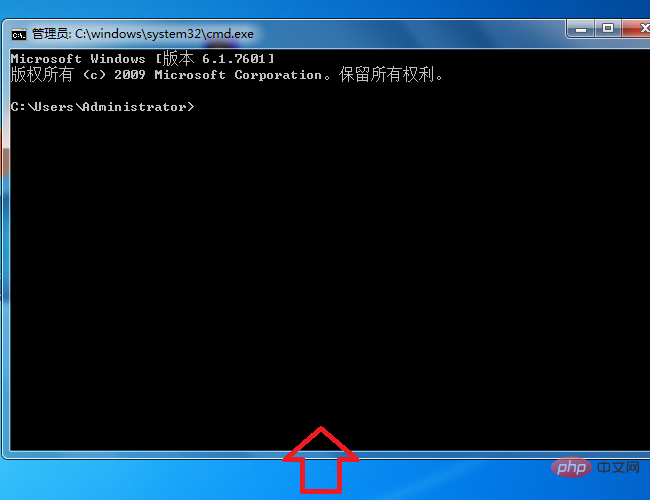
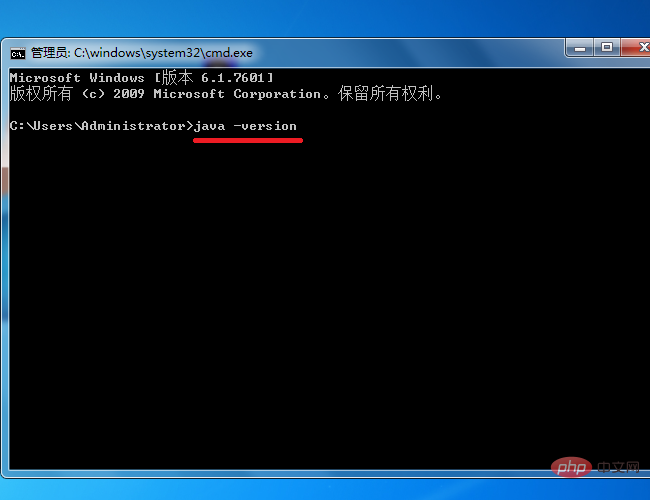
After completing the above settings, you can use the command line to view the java version (JDK version) in the Win7 system.
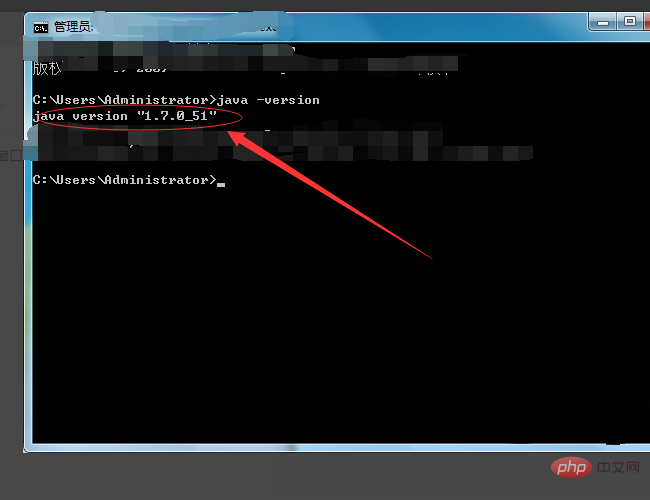
Recommended tutorial: "windows tutorial"
The above is the detailed content of What is the cmd command to check the java version?. For more information, please follow other related articles on the PHP Chinese website!

Hot AI Tools

Undresser.AI Undress
AI-powered app for creating realistic nude photos

AI Clothes Remover
Online AI tool for removing clothes from photos.

Undress AI Tool
Undress images for free

Clothoff.io
AI clothes remover

AI Hentai Generator
Generate AI Hentai for free.

Hot Article
Hot Tools

Notepad++7.3.1
Easy-to-use and free code editor

SublimeText3 Chinese version
Chinese version, very easy to use

Zend Studio 13.0.1
Powerful PHP integrated development environment

Dreamweaver CS6
Visual web development tools

SublimeText3 Mac version
God-level code editing software (SublimeText3)
Hot Topics
 1378
1378
 52
52

 How to view all IP addresses in LAN using cmd
Feb 20, 2023 pm 02:22 PM
How to view all IP addresses in LAN using cmd
Feb 20, 2023 pm 02:22 PM
How to view all IP addresses on the LAN using cmd: 1. Press the "Win+R" shortcut key to open the "Run" window; 2. After entering "CMD" in the "Run" window, press the Enter key; 3. In the open "Command" In the "Prompt" interface, enter the command "arp -a" and press the Enter key; 4. From the returned results, you can see the IP addresses of all computers in the local LAN that communicate with the machine.
 How to get BitLocker recovery key from CMD without Microsoft account
Feb 19, 2024 pm 09:00 PM
How to get BitLocker recovery key from CMD without Microsoft account
Feb 19, 2024 pm 09:00 PM
This guide will explain how to obtain a BitLocker recovery key to restore access to encrypted data if necessary. BitLocker is a security feature of Windows devices used to protect data from unauthorized access. Recovery keys are a backup method if you can't access your data through regular means. You can obtain a 48-digit BitLocker recovery key without a Microsoft account or via CMD, ensuring you are always able to access and recover your important data. How to get BitLocker recovery key from CMD without Microsoft account? Follow these suggestions to obtain a BitLocker recovery key: Using Command Prompt click Start, search for cmd and click to manage
 CMD close port command
Nov 21, 2023 am 09:45 AM
CMD close port command
Nov 21, 2023 am 09:45 AM
The command to use CMD to close a port: 1. Use CMD to close a specific port; 2. Use CMD to close all open ports; 3. Use CMD to open a specific port; 4. Use CMD to open all open ports.
 Open Task Manager using command line: Detailed steps
Dec 29, 2023 pm 10:59 PM
Open Task Manager using command line: Detailed steps
Dec 29, 2023 pm 10:59 PM
Many friends encounter certain software getting stuck when using their computers. If the computer cannot move, you need to call up the task manager to end the process. So how to use cmd to open the task manager command? Just enter tasksmgr and press enter. The specific solutions are discussed below. Take a look. Steps to use cmd to open the Task Manager command: 1. Press and hold the Win+R keys on the keyboard to open the run window, or click "Start - Run" in the lower left corner, enter cmd in the run window, and press the Enter key to open the cmd window. 2. Enter: C:\Windows\system32\taskmgr.exe, and then press the Enter key to open the task manager. 3. Open CMD
 How to turn off Bitlocker encryption using CMD at the command prompt
Jun 19, 2024 am 11:33 AM
How to turn off Bitlocker encryption using CMD at the command prompt
Jun 19, 2024 am 11:33 AM
Enter the following command in the administrator command prompt to turn off manage-bde-offC: But sometimes the following prompt appears: Error - This volume stores one or more external keys that can automatically unlock other volumes. This type of key must first be deleted before this volume can be unlocked. At this time, you need to execute the following command first: (If the system partition is not C, change the drive letter below) manage-bde-autounlock-ClearAllKeysc: Error 2: This operation cannot be performed because the volume is locked. manage-bde-unlockc:-rp123456789012345678901234567890123456789012345678 Note:
 What is the difference between powershell and cmd
Jan 11, 2023 pm 02:23 PM
What is the difference between powershell and cmd
Jan 11, 2023 pm 02:23 PM
Differences: 1. When running Cmd, it only takes up less than 1M of memory; when using PowerShell, it takes up about 20M of memory. 2. Cmd does not support syntax highlighting, but PowerShell does. 3. When using Cmd to run some more complex and time-consuming commands, when you drag the command line window at will, the content in the window can still remain the same; but PowerShell cannot. 4. Cmd can only use commands in the .net library, nor can it use Linux commands; PowerShell can.
 cmdtelnet command is not recognized as an internal or external command
Jan 03, 2024 am 08:05 AM
cmdtelnet command is not recognized as an internal or external command
Jan 03, 2024 am 08:05 AM
The cmd window prompts that telnet is not an internal or external command. This problem must have deeply troubled you. This problem does not appear because there is anything wrong with the user's operation. Users do not need to worry too much. All it takes is a few small steps. Operation settings can solve the problem of cmd window prompting telnet is not an internal or external command. Let’s take a look at the solution to the cmd window prompting telnet is not an internal or external command brought by the editor today. The cmd window prompts that telnet is not an internal or external command. Solution: 1. Open the computer's control panel. 2. Find programs and functions. 3. Find Turn Windows features on or off on the left. 4. Find “telnet client
 What to do if cmd php is garbled?
Nov 22, 2022 am 10:29 AM
What to do if cmd php is garbled?
Nov 22, 2022 am 10:29 AM
Solution to cmd php garbled characters: 1. In cmd or shellpower on the Windows platform, execute the php script and check whether it is garbled; 2. Modify the current page number characters by executing the "exec("CHCP 65001");" command in the php script Just set.
