


 Operation and Maintenance
Windows Operation and Maintenance
What are the browsers that come with win10?
Operation and Maintenance
Windows Operation and Maintenance
What are the browsers that come with win10?
What are the browsers that come with win10?

The browsers that come with win10 are: 1. Microsoft Edge browser, a web browser developed by Microsoft. This browser is the default browser of win10 system; 2. Internet Explorer browser, the default is not In the enabled state, the IE browser can be enabled in the program management.

The operating environment of this tutorial: windows10 system, Dell G3 computer, Microsoft Edge 90.0.818.39&&Internet Explorer11.
win10 comes with IE browser and edge browser. And the default is edge browser.
Microsoft Edge
Microsoft Edge is a web browser developed by Microsoft.
Click the start menu in the lower left corner of the screen, and you can directly find the edge browser in the expanded program list:
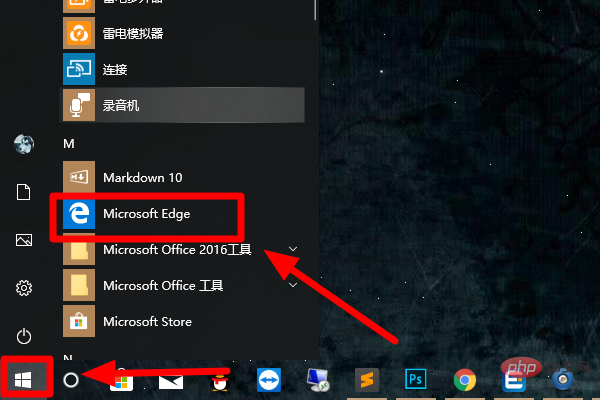
The early codename of Microsoft Edge was "Project Spartan" was officially named "Microsoft Edge" at the Microsoft Build 2015 conference. The official explanation for why it is named Edge is “Refers to being on the edge of consuming and creating.” It means that the new browser is both consumer-friendly and creative.
Some functional details of the Edge browser include: support for built-in Cortana (Microsoft Cortana) voice function; built-in reader (can open PDF files), note-taking and sharing functions; design focused on practicality and minimalism; The rendering engine is called EdgeHTML.
The main feature that differs from IE is that Edge will support modern browser features, such as extensions. Microsoft on Wednesday showed off extensions for its Edge browser for the first time, signaling to the outside world that its browser lags far behind rival browsers Chrome and Firefox.
But Belfiore claimed that Edge is very easy to build applications and extensions - a Chrome browser application "needs almost no modifications" and can be easily run on the Edge browser after just simple tweaks. superior.
Internet Explorer
Internet Explorer (referred to as: IE) is a web browser launched by Microsoft. Formerly known as Microsoft Internet Explorer (before version 6) and Windows Internet Explorer (versions 7, 8, 9, 10, and 11). Before IE7, the Chinese literal translation was "Internet Pathfinder", but after IE7, it was officially called "IE Browser".
Note:
In win10, IE browser is not enabled by default. You can enable IE browser in program management.
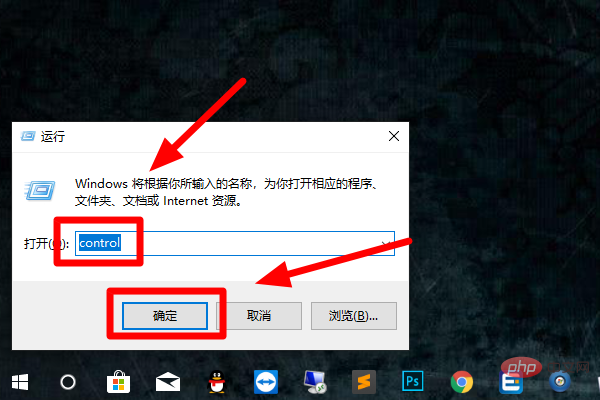
1. Press and hold the "win" key and "R" key on the keyboard at the same time to open the run window, enter "control" in the run window, and then click the "Start" button to open the control panel:
2. Click the "Programs and Features" button in the control panel to open the Programs and Features interface:
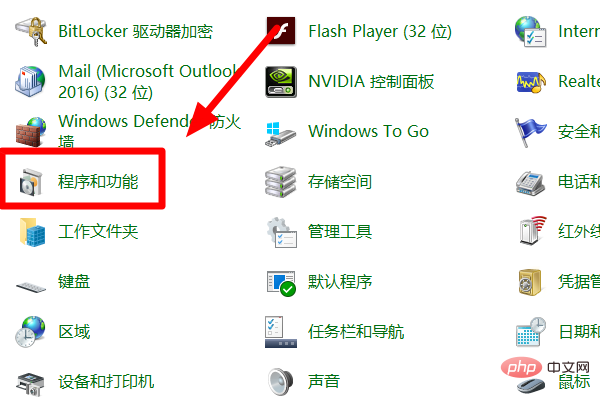
3. In Programs and Features In the interface, click the "Turn Windows features on or off" button on the left
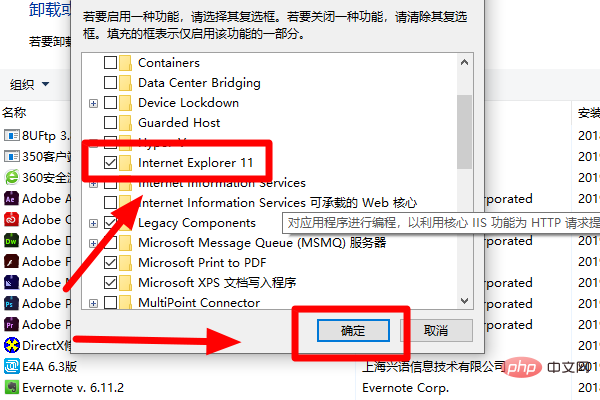
4. Select "Internet Explorer 11" in the pop-up window, and then click the "OK" button, so that the IE browser Enabled:
Recommended tutorial: "windows tutorial"
The above is the detailed content of What are the browsers that come with win10?. For more information, please follow other related articles on the PHP Chinese website!

Hot AI Tools

Undresser.AI Undress
AI-powered app for creating realistic nude photos

AI Clothes Remover
Online AI tool for removing clothes from photos.

Undress AI Tool
Undress images for free

Clothoff.io
AI clothes remover

AI Hentai Generator
Generate AI Hentai for free.

Hot Article
Hot Tools

Notepad++7.3.1
Easy-to-use and free code editor

SublimeText3 Chinese version
Chinese version, very easy to use

Zend Studio 13.0.1
Powerful PHP integrated development environment

Dreamweaver CS6
Visual web development tools

SublimeText3 Mac version
God-level code editing software (SublimeText3)
Hot Topics
 1381
1381
 52
52

 Can I install mysql on Windows 7
Apr 08, 2025 pm 03:21 PM
Can I install mysql on Windows 7
Apr 08, 2025 pm 03:21 PM
Yes, MySQL can be installed on Windows 7, and although Microsoft has stopped supporting Windows 7, MySQL is still compatible with it. However, the following points should be noted during the installation process: Download the MySQL installer for Windows. Select the appropriate version of MySQL (community or enterprise). Select the appropriate installation directory and character set during the installation process. Set the root user password and keep it properly. Connect to the database for testing. Note the compatibility and security issues on Windows 7, and it is recommended to upgrade to a supported operating system.
 Solutions to the errors reported by MySQL on a specific system version
Apr 08, 2025 am 11:54 AM
Solutions to the errors reported by MySQL on a specific system version
Apr 08, 2025 am 11:54 AM
The solution to MySQL installation error is: 1. Carefully check the system environment to ensure that the MySQL dependency library requirements are met. Different operating systems and version requirements are different; 2. Carefully read the error message and take corresponding measures according to prompts (such as missing library files or insufficient permissions), such as installing dependencies or using sudo commands; 3. If necessary, try to install the source code and carefully check the compilation log, but this requires a certain amount of Linux knowledge and experience. The key to ultimately solving the problem is to carefully check the system environment and error information, and refer to the official documents.
 Unable to access mysql from terminal
Apr 08, 2025 pm 04:57 PM
Unable to access mysql from terminal
Apr 08, 2025 pm 04:57 PM
Unable to access MySQL from the terminal may be due to: MySQL service not running; connection command error; insufficient permissions; firewall blocks connection; MySQL configuration file error.
 MySQL can't be installed after downloading
Apr 08, 2025 am 11:24 AM
MySQL can't be installed after downloading
Apr 08, 2025 am 11:24 AM
The main reasons for MySQL installation failure are: 1. Permission issues, you need to run as an administrator or use the sudo command; 2. Dependencies are missing, and you need to install relevant development packages; 3. Port conflicts, you need to close the program that occupies port 3306 or modify the configuration file; 4. The installation package is corrupt, you need to download and verify the integrity; 5. The environment variable is incorrectly configured, and the environment variables must be correctly configured according to the operating system. Solve these problems and carefully check each step to successfully install MySQL.
 How to solve mysql cannot connect to local host
Apr 08, 2025 pm 02:24 PM
How to solve mysql cannot connect to local host
Apr 08, 2025 pm 02:24 PM
The MySQL connection may be due to the following reasons: MySQL service is not started, the firewall intercepts the connection, the port number is incorrect, the user name or password is incorrect, the listening address in my.cnf is improperly configured, etc. The troubleshooting steps include: 1. Check whether the MySQL service is running; 2. Adjust the firewall settings to allow MySQL to listen to port 3306; 3. Confirm that the port number is consistent with the actual port number; 4. Check whether the user name and password are correct; 5. Make sure the bind-address settings in my.cnf are correct.
 How to solve the problem of missing dependencies when installing MySQL
Apr 08, 2025 pm 12:00 PM
How to solve the problem of missing dependencies when installing MySQL
Apr 08, 2025 pm 12:00 PM
MySQL installation failure is usually caused by the lack of dependencies. Solution: 1. Use system package manager (such as Linux apt, yum or dnf, Windows VisualC Redistributable) to install the missing dependency libraries, such as sudoaptinstalllibmysqlclient-dev; 2. Carefully check the error information and solve complex dependencies one by one; 3. Ensure that the package manager source is configured correctly and can access the network; 4. For Windows, download and install the necessary runtime libraries. Developing the habit of reading official documents and making good use of search engines can effectively solve problems.
 Solutions to the service that cannot be started after MySQL installation
Apr 08, 2025 am 11:18 AM
Solutions to the service that cannot be started after MySQL installation
Apr 08, 2025 am 11:18 AM
MySQL refused to start? Don’t panic, let’s check it out! Many friends found that the service could not be started after installing MySQL, and they were so anxious! Don’t worry, this article will take you to deal with it calmly and find out the mastermind behind it! After reading it, you can not only solve this problem, but also improve your understanding of MySQL services and your ideas for troubleshooting problems, and become a more powerful database administrator! The MySQL service failed to start, and there are many reasons, ranging from simple configuration errors to complex system problems. Let’s start with the most common aspects. Basic knowledge: A brief description of the service startup process MySQL service startup. Simply put, the operating system loads MySQL-related files and then starts the MySQL daemon. This involves configuration
 MySQL download prompts disk write errors how to deal with
Apr 08, 2025 am 11:51 AM
MySQL download prompts disk write errors how to deal with
Apr 08, 2025 am 11:51 AM
MySQL download prompts a disk write error. The solution is as follows: 1. Check whether the disk space is insufficient, clean up the space or replace a larger disk; 2. Use disk detection tools (such as chkdsk or fsck) to check and fix disk errors, and replace the hard disk if necessary; 3. Check the target directory permissions to ensure that the user account has write permissions; 4. Change the download tool or network environment, and use the download manager to restore interrupted download; 5. Temporarily close the anti-virus software or firewall, and re-enable it after the download is completed. By systematically troubleshooting these aspects, the problem can be solved.
