


webstorm turns on code completion


Please see the specific steps:
(Learning video sharing: Programming video)
1. file ->Settings
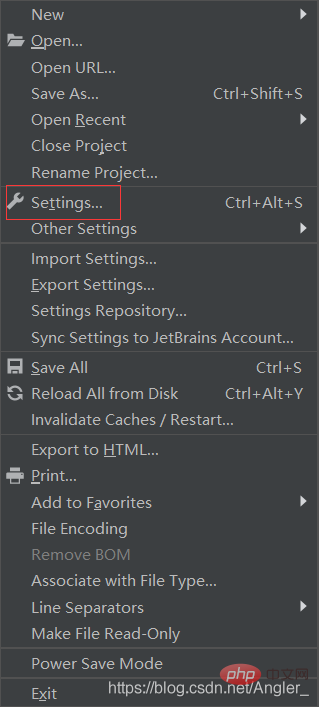
2. Search Libraries
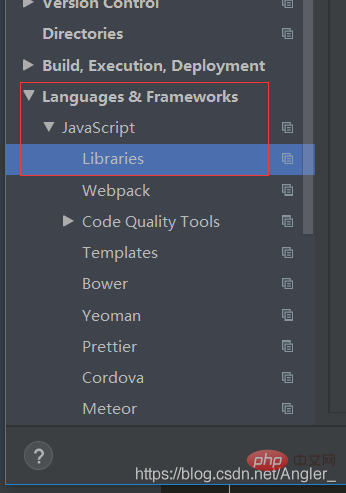
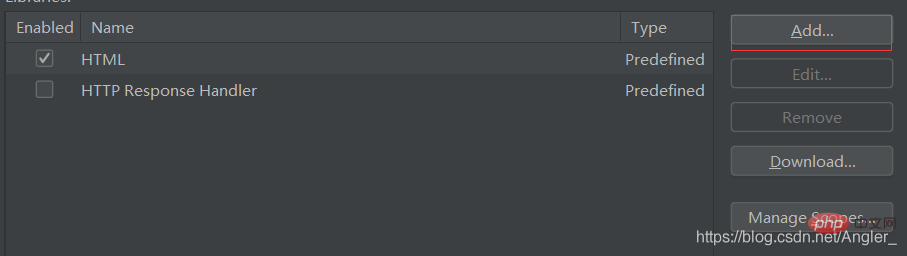
3. add
4. Add the package you need to complete
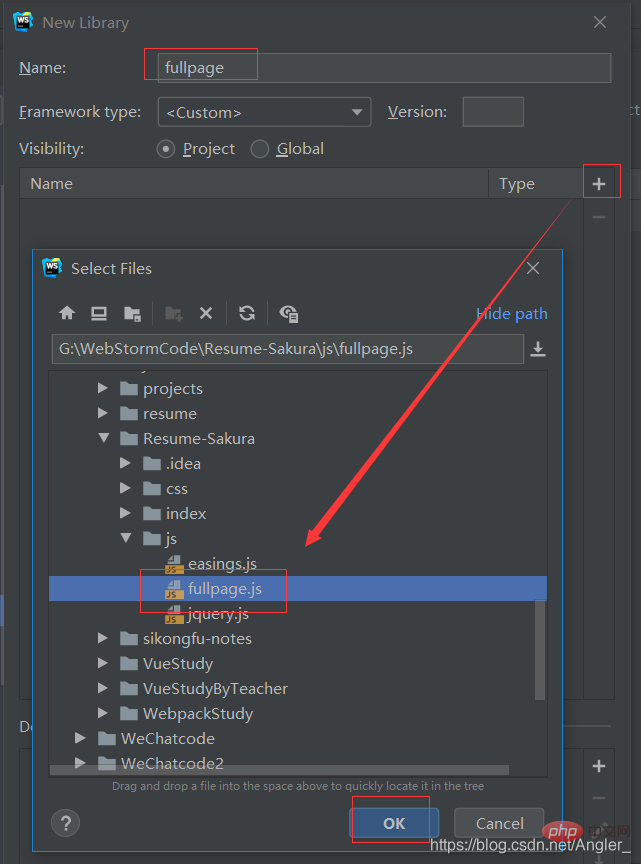
5. Then check OK and apply.
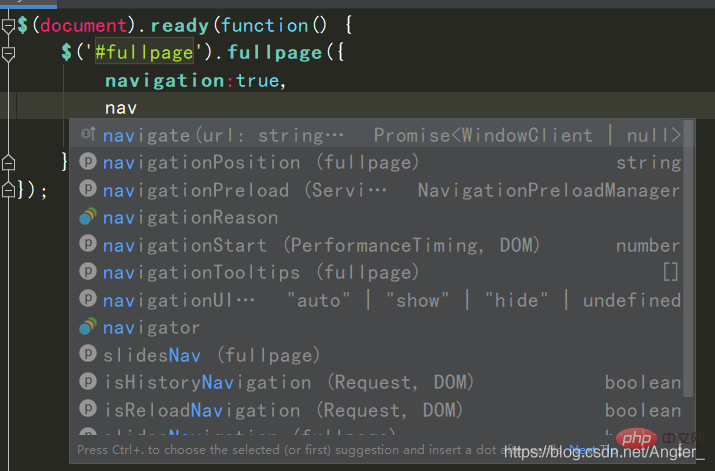
See the effect:
Related recommendations: webstorm tutorial
The above is the detailed content of webstorm turns on code completion. For more information, please follow other related articles on the PHP Chinese website!

Hot AI Tools

Undresser.AI Undress
AI-powered app for creating realistic nude photos

AI Clothes Remover
Online AI tool for removing clothes from photos.

Undress AI Tool
Undress images for free

Clothoff.io
AI clothes remover

Video Face Swap
Swap faces in any video effortlessly with our completely free AI face swap tool!

Hot Article
Hot Tools

Notepad++7.3.1
Easy-to-use and free code editor

SublimeText3 Chinese version
Chinese version, very easy to use

Zend Studio 13.0.1
Powerful PHP integrated development environment

Dreamweaver CS6
Visual web development tools

SublimeText3 Mac version
God-level code editing software (SublimeText3)
Hot Topics
 1386
1386
 52
52

 How to solve webstorm crash
Apr 08, 2024 pm 02:24 PM
How to solve webstorm crash
Apr 08, 2024 pm 02:24 PM
Steps to resolve WebStorm crash issues: Check for updates; Restart your computer; Disable plugins; Reset settings; Clear cache; Check firewall and antivirus software; Reinstall WebStorm; Contact support.
 How to run jsp project in webstorm
Apr 08, 2024 pm 03:39 PM
How to run jsp project in webstorm
Apr 08, 2024 pm 03:39 PM
You can run a JSP project in WebStorm by following these steps: Create a Java Web project. Configure the project and add Web and Java EE facets. Create the JSP file in the "src/main/webapp" directory. Write JSP code including HTML, Java and JSP tags. Deploy and run the project. Access the JSP page by entering the application context root in your browser.
 How to connect to the database in webstorm
Apr 08, 2024 pm 03:42 PM
How to connect to the database in webstorm
Apr 08, 2024 pm 03:42 PM
You can use WebStorm to connect to the database through the following steps: 1. Open the database tool window; 2. Create a data source; 3. Connect to the data source; 4. Query the database; 5. Browse tables and data; 6. Edit database objects; 7. Manage Users and permissions.
 Where is webstorm's automatic line wrapping?
Apr 08, 2024 pm 08:09 PM
Where is webstorm's automatic line wrapping?
Apr 08, 2024 pm 08:09 PM
Automatic line wrapping can be set in WebStorm by following these steps: Check the "Wrap lines" checkbox and set the maximum line width. Select automatic line wrapping rules: None, line wrapping at any position, or line wrapping after keywords. Optional settings: retain manual line wrapping and automatic line wrapping after carriage return. Apply the settings and close the settings window. Note: This setting applies to all file types and can be set individually for specific file types.
 How to restart webstorm
Apr 08, 2024 pm 07:15 PM
How to restart webstorm
Apr 08, 2024 pm 07:15 PM
To restart WebStorm, follow these steps: Use the shortcut keys: Windows/Linux: Ctrl + Shift + A, macOS: Cmd + Shift + A. Enter "restart" in the search field and select "Restart". Using the menu: Click the File menu and select Restart under Reload. Using Task Manager: In Task Manager or Force Quit the application window, select the WebStorm process and click Restart or Restart.
 How to automatically wrap lines in webstorm
Apr 08, 2024 pm 03:48 PM
How to automatically wrap lines in webstorm
Apr 08, 2024 pm 03:48 PM
WebStorm provides automatic line wrapping, which breaks code into separate lines to improve readability. Its rules include: 1. Branch long expressions and statements; 2. Branch method calls; 3. Branch functions and class definitions. User-customizable settings such as maximum line length, indentation type, and shortcut keys. However, word wrapping may not work with single-line comments or string literals and will affect code formatting, so careful review is recommended before application.
 Which one is easier to use, webstorm or vscode?
Apr 08, 2024 pm 07:33 PM
Which one is easier to use, webstorm or vscode?
Apr 08, 2024 pm 07:33 PM
For developers who focus on web development and pursue deep functionality, WebStorm is a better choice; while users who value customizability, lightweightness, and multi-language support are more suitable for VSCode.
 How to return to the login interface in webstorm
Apr 08, 2024 pm 02:12 PM
How to return to the login interface in webstorm
Apr 08, 2024 pm 02:12 PM
To return to the WebStorm login screen, follow these steps: Click the File menu and select Log Out. Confirm logout and enter login credentials.
