


 Web Front-end
JS Tutorial
Talk about Node.js hot update configuration and vscode breakpoint debugging
Web Front-end
JS Tutorial
Talk about Node.js hot update configuration and vscode breakpoint debugging
Talk about Node.js hot update configuration and vscode breakpoint debugging

本篇文章给大家介绍一下Node.js的热更新配置和vscode断点调试。有一定的参考价值,有需要的朋友可以参考一下,希望对大家有所帮助。

前言
我从今年5月份开始使用express 框架开发。现在项目一期结束,趁这个空闲期,我重新梳理一下nodejs 开发的一些配置,其中包括 热更新 和 vscode 里的断点调试。
相关教程推荐:《nodejs 教程 》、《vscode基础教程》
一、热更新 nodemon
nodemon 会监听项目文件的改动,并且自动重启项目。你只需要刷新浏览器就可以看到改动后的效果,省去了开发者重启应用的麻烦。
步骤:
- 安装nodemon
npm install -g nodemon
-
package.json 里使用 nodemon 命令
"scripts": {

        "start": "node ./bin/www",

        "nodemon": "nodemon ./bin/www"

    },
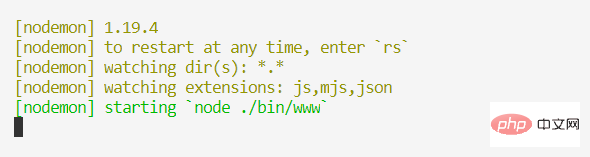
Copy after login启动效果图如下:
二、 vscode 断点调试
参考连接:https://code.visualstudio.com/docs/nodejs/...
nodejs 的debug 是vscode 内置的,不需要另外安装插件。
之前我使用vscode调试php项目时 ,就需要另外安装
php Debug扩展。
步骤:
- 生成
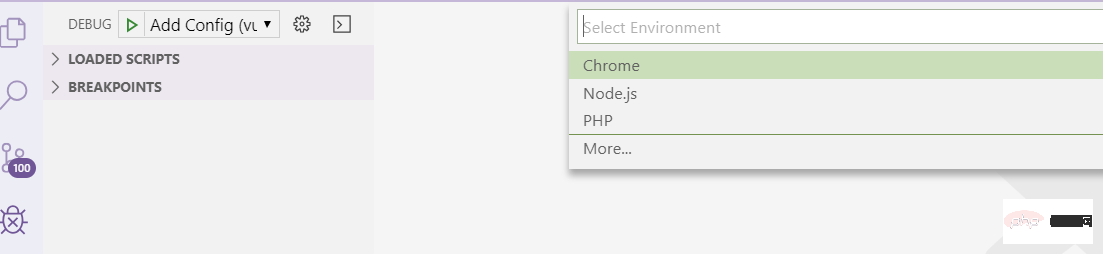
launch.json文件需要在Debug 模式下,选择nodejs类型 的配置, 如下图:
vscode 自动在项目根目录下生成 .vscode / launch.json 文件,vscode默认会选择 package.json中的
start命令启动应用命令。 路径为上面代码中program项的值。 内容如下:{ // Use IntelliSense to learn about possible attributes. // Hover to view descriptions of existing attributes. // For more information, visit: https://go.microsoft.com/fwlink/?linkid=830387 "version": "0.2.0", "configurations": [ { "type": "node", "request": "launch", "name": "Launch Program", "program": "${workspaceFolder}\\bin\\www" } ] }Copy after login
- 点击左侧绿色按钮 启动应用,效果图如下:

- 在
debug模式下打断点调试, 就可以了。
原文地址:https://learnku.com/articles/35458
作者:matteao
更多编程相关知识,可访问:编程入门!!
The above is the detailed content of Talk about Node.js hot update configuration and vscode breakpoint debugging. For more information, please follow other related articles on the PHP Chinese website!

Hot AI Tools

Undresser.AI Undress
AI-powered app for creating realistic nude photos

AI Clothes Remover
Online AI tool for removing clothes from photos.

Undress AI Tool
Undress images for free

Clothoff.io
AI clothes remover

Video Face Swap
Swap faces in any video effortlessly with our completely free AI face swap tool!

Hot Article
Hot Tools

Notepad++7.3.1
Easy-to-use and free code editor

SublimeText3 Chinese version
Chinese version, very easy to use

Zend Studio 13.0.1
Powerful PHP integrated development environment

Dreamweaver CS6
Visual web development tools

SublimeText3 Mac version
God-level code editing software (SublimeText3)
Hot Topics
 1389
1389
 52
52

 How to define header files for vscode
Apr 15, 2025 pm 09:09 PM
How to define header files for vscode
Apr 15, 2025 pm 09:09 PM
How to define header files using Visual Studio Code? Create a header file and declare symbols in the header file using the .h or .hpp suffix name (such as classes, functions, variables) Compile the program using the #include directive to include the header file in the source file. The header file will be included and the declared symbols are available.
 What computer configuration is required for vscode
Apr 15, 2025 pm 09:48 PM
What computer configuration is required for vscode
Apr 15, 2025 pm 09:48 PM
VS Code system requirements: Operating system: Windows 10 and above, macOS 10.12 and above, Linux distribution processor: minimum 1.6 GHz, recommended 2.0 GHz and above memory: minimum 512 MB, recommended 4 GB and above storage space: minimum 250 MB, recommended 1 GB and above other requirements: stable network connection, Xorg/Wayland (Linux)
 How to solve the problem of vscode Chinese annotations becoming question marks
Apr 15, 2025 pm 11:36 PM
How to solve the problem of vscode Chinese annotations becoming question marks
Apr 15, 2025 pm 11:36 PM
How to solve the problem that Chinese comments in Visual Studio Code become question marks: Check the file encoding and make sure it is "UTF-8 without BOM". Change the font to a font that supports Chinese characters, such as "Song Style" or "Microsoft Yahei". Reinstall the font. Enable Unicode support. Upgrade VSCode, restart the computer, and recreate the source file.
 Common commands for vscode terminal
Apr 15, 2025 pm 10:06 PM
Common commands for vscode terminal
Apr 15, 2025 pm 10:06 PM
Common commands for VS Code terminals include: Clear the terminal screen (clear), list the current directory file (ls), change the current working directory (cd), print the current working directory path (pwd), create a new directory (mkdir), delete empty directory (rmdir), create a new file (touch) delete a file or directory (rm), copy a file or directory (cp), move or rename a file or directory (mv) display file content (cat) view file content and scroll (less) view file content only scroll down (more) display the first few lines of the file (head)
 How to switch Chinese mode with vscode
Apr 15, 2025 pm 11:39 PM
How to switch Chinese mode with vscode
Apr 15, 2025 pm 11:39 PM
VS Code To switch Chinese mode: Open the settings interface (Windows/Linux: Ctrl, macOS: Cmd,) Search for "Editor: Language" settings Select "Chinese" in the drop-down menu Save settings and restart VS Code
 How to set vscode in Chinese
Apr 15, 2025 pm 09:27 PM
How to set vscode in Chinese
Apr 15, 2025 pm 09:27 PM
There are two ways to set up a Chinese language in Visual Studio Code: 1. Install the Chinese language package; 2. Modify the "locale" settings in the configuration file. Make sure Visual Studio Code version is 1.17 or higher.
 How to set vscode
Apr 15, 2025 pm 10:45 PM
How to set vscode
Apr 15, 2025 pm 10:45 PM
To enable and set VSCode, follow these steps: Install and start VSCode. Custom preferences including themes, fonts, spaces, and code formatting. Install extensions to enhance features such as plugins, themes, and tools. Create a project or open an existing project. Use IntelliSense to get code prompts and completions. Debug the code to step through the code, set breakpoints, and check variables. Connect the version control system to manage changes and commit code.
 vscode Previous Next Shortcut Key
Apr 15, 2025 pm 10:51 PM
vscode Previous Next Shortcut Key
Apr 15, 2025 pm 10:51 PM
VS Code One-step/Next step shortcut key usage: One-step (backward): Windows/Linux: Ctrl ←; macOS: Cmd ←Next step (forward): Windows/Linux: Ctrl →; macOS: Cmd →
