


Click the "File" tab-->"Options" menu

In the open "excel options" dialog window, select "Add-ins" in the left window and click on it
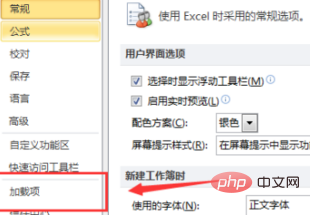
In "Management" under the "Add-ins" tab, click the drop-down menu and select "Excel Add-ins ", and then click the "Go" button

In the dialog window that goes to "Add-ins", check the "Solver Add-in", and then click " OK" button

#At this time, the "Solver Add-in" will be automatically loaded and installed, and it can be used after the installation is completed.
Recommended tutorial:excel tutorial
The above is the detailed content of What should I do if the Solver add-in in Excel cannot be used?. For more information, please follow other related articles on the PHP Chinese website!
 Compare the similarities and differences between two columns of data in excel
 excel duplicate item filter color
 How to copy an Excel table to make it the same size as the original
 Excel table slash divided into two
 Excel diagonal header is divided into two
 Absolute reference input method
 java export excel
 Excel input value is illegal





















![[Web front-end] Node.js quick start](https://img.php.cn/upload/course/000/000/067/662b5d34ba7c0227.png)



