



layui-tree beautifies the left menu
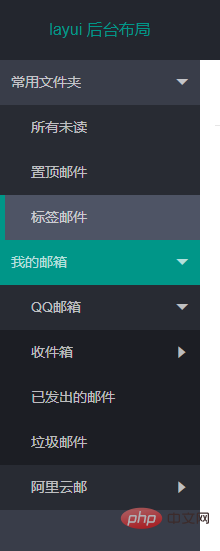
html
<div>
        <div>
            <div></div>
        </div>
</div>
css
/*左侧导航*/
.layui-tree-skin-sidebar li i{
    color: rgba(255,255,255,.7);
    display: none;
}
.layui-tree-skin-sidebar li a cite{
    color: rgba(255,255,255,.7)
}
.layui-tree-skin-sidebar li .layui-tree-spread{
    display: block;
    position: absolute;
    right: 30px;
}
.layui-tree-skin-sidebar li{
    line-height: 45px;
    position: relative;
}
.layui-tree-skin-sidebar li ul{
    margin-left: 0;
    background: rgba(0,0,0,.3);
}
.layui-tree-skin-sidebar li ul a{
    padding-left: 20px;
}
.layui-tree-skin-sidebar li a{
    height: 45px;
    border-left: 5px solid transparent;
    box-sizing: border-box;
    width: 100%;
}
.layui-tree-skin-sidebar li a:hover{
    background: #4E5465;
    color: #fff;
    border-left: 5px solid #009688;
}
.layui-tree-skin-sidebar li a.active{
    background: #009688;
}js
<!--layui.js文件必须放到HTML内容的最后-->
<script></script>
layui.use(['element','layer','jquery','tree'], function(){
    var element = layui.element;
    var layer = layui.layer;
    var $ = layui.jquery;
    var menuData =  [ //节点
            {
                name: '常用文件夹'
                ,id: '1'
                ,children: [
                {
                    name: '所有未读'
                    ,id: '11'
                    ,url: 'http://www.layui.com/'
                }, {
                    name: '置顶邮件'
                    ,id: '12'
                }, {
                    name: '标签邮件'
                    ,id: '13'
                }
            ]
            }, {
                name: '我的邮箱'
                ,id: '2'
                ,children: [
                    {
                        name: 'QQ邮箱'
                        ,id: '21'
                        ,spread: true
                        ,children: [
                        {
                            name: '收件箱'
                            ,id: '211'
                            ,children: [
                            {
                                name: '所有未读'
                                ,id: '2111'
                            }, {
                                name: '置顶邮件'
                                ,id: '2112'
                            }, {
                                name: '标签邮件'
                                ,id: '2113'
                            }
                        ]
                        }, {
                            name: '已发出的邮件'
                            ,id: '212'
                        }, {
                            name: '垃圾邮件'
                            ,id: '213'
                        }
                    ]
                    }, {
                        name: '阿里云邮'
                        ,id: '22'
                        ,children: [
                            {
                                name: '收件箱'
                                ,id: '221'
                            }, {
                                name: '已发出的邮件'
                                ,id: '222'
                            }, {
                                name: '垃圾邮件'
                                ,id: '223'
                            }
                        ]
                    }
                ]
            }
        ]
    layui.tree({
        elem: '#sidemenubar' //传入元素选择器
        ,skin: 'sidebar'  //自定义tree样式的类名
        ,nodes:menuData  //节点数据
        ,click: function(node,item){
            //node即为当前点击的节点数据,item就是被点击的a标签对象了
            //导航按钮选中当前
            $('#sidemenubar a').removeClass('active');
            $(item).addClass('active');
            $(item).siblings('.layui-tree-spread').click();
            //添加新tab
            activeTab.init(node.name,node.url,node.id);
        }
    });
    var activeTab = {
        tabTit : '', //tab titile标题
        tabUrl : '', //tab内容嵌套iframe的src
        tabId  : '', //tab 标签的lay-id
        tabCon : function(){
            var result;
            $.ajax({
                type: 'get',
                url: this.tabUrl,
                dataType: 'html',
                success: function(data){
                    result = data;
                }
            })
            return result;
        },
        addTab : function(){ //新增tab项
            element.tabAdd('demo', {
                title: this.tabTit
                ,content: '<iframe></iframe>' //支持传入html
                ,id: this.tabId
            })
        },
        changeTab: function(){ //选中tab项
            element.tabChange('demo', this.tabId);
        },
        ishasTab : function(){ //判断tab项中是否包含
            var _this = this;
            var dataId,isflag;
            var arrays = $('.layui-tab-title li');
            $.each(arrays,function(idx,ele){
                dataId = $(ele).attr('lay-id');
                if(dataId === _this.tabId){
                    isflag = true
                    return false
                }else{
                    isflag = false
                }
            })
            return isflag
        },
        init : function(tabtit,taburl,tabid){
            var _this = this;
            _this.tabUrl = taburl;
            _this.tabId = tabid;
            _this.tabTit = tabtit;
            if(taburl){
                if(!_this.ishasTab()){
                    _this.addTab();
                }
                _this.changeTab();
            }else{
                return false
            }
        }
    }
});New tab item logical idea
Click on the left navigation to get its data (url, id...)
If there is a url, determine its Whether the id is the same as the lay-id of the tab item. If it is the same, switch the selection. If it is not the same, add a new one.
Problems encountered
layui-tree Clicking a node only returns the current node data. Do not return the HTML object of the current node
Solution
Change the tree.js source code
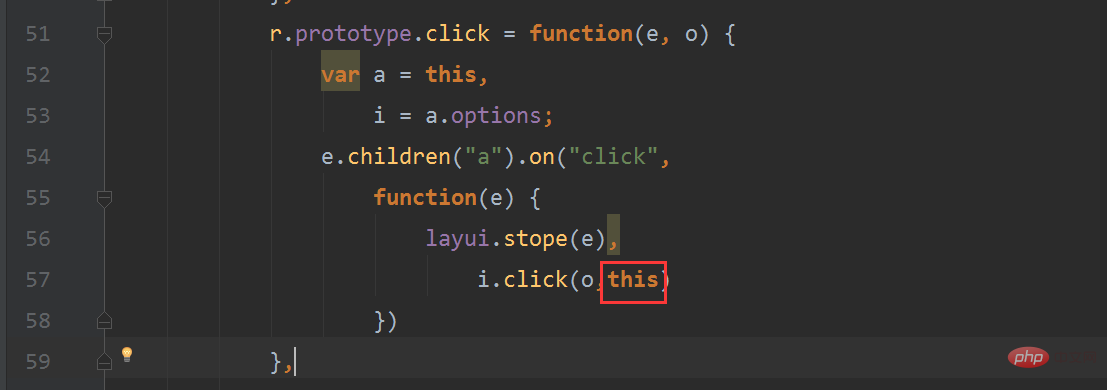
e.children("a").on("click",
                    function(e) {
                        layui.stope(e),
                            i.click(o,this)
                    })
i.click(o)改为 i.click(o,this)Use

The above is the detailed content of How to use layui-tree to beautify the left menu. For more information, please follow other related articles on the PHP Chinese website!
 How to distinguish whether two addresses are on the same site?
 What does full-width and half-width mean?
 How to convert lowercase to uppercase in c language
 What does Xiaohongshu do?
 Solution to the Invalid Partition Table prompt when Windows 10 starts up
 What is the difference between guid and mbr formats
 How to check the ftp server address
 How to trade virtual currency





















![[Web front-end] Node.js quick start](https://img.php.cn/upload/course/000/000/067/662b5d34ba7c0227.png)



