


Several tips for using layui data tables

Using table components can improve a lot of development efficiency. Currently, the mainstream data table components include bootstrap table, layui table, easyUI table, etc. This tutorial recommends using the layui framework to set up data tables.

Recommended: layui framework quick start
1. Three initial rendering methods
I Let’s start with the simplest initialization form. If I post all the code directly, you may feel dizzy
1, method rendering:
<table class="layui-table" id="layui_table_id" lay-filter="dataTable"></table>
var table = layui.table
            ,form = layui.form;
    layui.use('table', function () {  // 引入 table模块
        table.render({
            id:"dataTable",//
            elem: '#layui_table_id',//指定表格元素
            url: '/menu/menuList.ajax',  //请求路径
            cellMinWidth: 20 //全局定义常规单元格的最小宽度,layui 2.2.1 新增
            ,skin: 'line ' //表格风格 line (行边框风格)row (列边框风格)nob (无边框风格)
           //,even: true    //隔行换色
            ,page: true  //开启分页
            ,limits: [10,20,50]  //每页条数的选择项,默认:[10,20,30,40,50,60,70,80,90]。
            ,limit: 10 //每页默认显示的数量
            ,method:'post'  //提交方式
           ,cols: [[
                {type:'checkbox'}, //开启多选框
                {
                    field: 'menuId', //json对应的key
                    title: 'ID',   //列名
                    sort: true   // 默认为 false,true为开启排序
                }
            ]]
        });
});JSON data format returned by java background
{
code: 0,
count: 8,  //总行数
data: [,…], //表格数据
msg: ""
}2. Automatic rendering method (the following code is provided by the official, the automatic rendering method is suitable for complex line headers, it is generally recommended to use the above method for rendering)
<table class="layui-table" lay-data="{height:315, url:'/demo/table/user/', page:true, id:'test'}" lay-filter="test">
<thead>
<tr>
<th lay-data="{field:'id', width:80, sort: true}">ID</th>
<th lay-data="{field:'username', width:80}">用户名</th>
<th lay-data="{field:'sex', width:80, sort: true}">性别</th>
<th lay-data="{field:'city'}">城市</th>
<th lay-data="{field:'sign'}">签名</th>
<th lay-data="{field:'experience', sort: true}">积分</th>
<th lay-data="{field:'score', sort: true}">评分</th>
<th lay-data="{field:'classify'}">职业</th>
<th lay-data="{field:'wealth', sort: true}">财富</th>
</tr>
</thead>
</table>Second, how to add an edit button
var table = layui.table
            ,form = layui.form;
    layui.use('table', function () {  // 引入 table模块
        table.render({
            id:"dataTable",//
            elem: '#layui_table_id',//指定表格元素
            url: '/menu/menuList.ajax',  //请求路径
            cellMinWidth: 20 //全局定义常规单元格的最小宽度,layui 2.2.1 新增
            ,skin: 'line ' //表格风格 line (行边框风格)row (列边框风格)nob (无边框风格)
           //,even: true    //隔行换色
            ,page: true  //开启分页
            ,limits: [10,20,50]  //每页条数的选择项,默认:[10,20,30,40,50,60,70,80,90]。
            ,limit: 10 //每页默认显示的数量
            ,method:'post'  //提交方式
,done: function(res, curr, count) { //表格数据加载完后的事件
    //调用示例
    layer.photos({//点击图片弹出
        photos: '.layer-photos-demo'
        ,anim: 1 //0-6的选择,指定弹出图片动画类型,默认随机(请注意,3.0之前的版本用shift参数)
    });
    //如果是异步请求数据方式,res即为你接口返回的信息。
    //如果是直接赋值的方式,res即为:{data: [], count: 99} data为当前页数据、count为数据总长度
    console.log(res);

    //得到当前页码
    console.log(curr);

    //得到数据总量
    console.log(count);
}
    ,cols: [[ {type:'checkbox'}, //开启多选框  { field: 'menuId', //json对应的key title: 'ID', //列名 sort: true // 默认为 false,true为开启排序  },{ fixed: 'right', title: '操作', width: 215, align:'center', toolbar: '#barDemo' //绑定按钮组 } ]] }); });
//监听工具条
table.on('tool(dataTable)', function(obj){ //注:tool是工具条事件名,test是table原始容器的属性 lay-filter="对应的值"
    var data = obj.data //获得当前行数据
            ,layEvent = obj.event; //获得 lay-event 对应的值
    if(layEvent === 'detail'){
     layui.alert(JSON.stringifr(data)) ; //将编辑的行信息转为json字符串
        layer.msg(data.attrId);
    } else if(layEvent === 'del'){
        layer.msg('删除'+data.menuId);
        console.log(table)
    } else if(layEvent === 'edit'){

    });
    }
});<script type="text/html" id="barDemo"> // id和toolbar 属性绑定
<a class="layui-btn layui-btn-xs" lay-event="detail">查看</a>
<a class="layui-btn layui-btn-xs" lay-event="edit">编辑</a>
<a class="layui-btn layui-btn-danger layui-btn-xs" lay-event="del">删除</a>
</script>Three, how to add form components to the table (I will recommend 2 types below )
1, using the module engine method (this method is more troublesome, I personally recommend the second one)
<!-- 是否显示 -->
<script type="text/html" id="isShow"> // 请注意 id之间的关联
{{# if(d.menuDisplay === 'Y'){ }}
<input type="checkbox" name="menuDisplay" value="{{d.menuId}}" lay-skin="switch" lay-text="显示|隐藏" lay-filter="isShow" checked>
{{# } else { }}
<input type="checkbox" name="menuDisplay" value="{{d.menuId}}" lay-skin="switch" lay-text="显示|隐藏" lay-filter="isShow" >
{{# } }}
</script>{ //在表格对象cols属性中添加
field: 'menuDisplay', /
title: '是否显示',
templet: '#isShow', //模板关联以上定义的
unresize: true,
filter: "isShow",
sort: false
}2, using the function method
{
    field: 'menuDisplay',
    title: '是否显示',

    unresize: true,
    filter: "isShow",
    sort: false,
    templet: function (d) {
        if (d.menuDisplay == ‘Y’) {
            return` <input type = "checkbox"
            name = "menuDisplay"
            value = "`+d.menuId+`"
            lay - skin = "switch"
            lay - text = "显示|隐藏"
            lay - filter = "isShow" > `;
        } else {
            return` <input type = "checkbox"
            name = "menuDisplay"
            value = "`+d.menuId+`"
            lay - skin = "switch"
            lay - text = "显示|隐藏"
            lay - filter = "isShow"
            checked > `;
        }
    }
}4. Display pictures
{
                    field: 'img',
                    title: '图片',
                    unresize: true,
                    sort: false,
                    //style:'height:100px;',
                    templet:function (d) {
                        return `<div class="layer-photos-demo" onclick="img_click()" style="cursor:pointer;">
                                      <img src="/static/imghw/default1.png"  data-src="/images/bug-success-bg.jpg"  class="lazy"  layer-pid="图片id,可以不写"  layer-  alt="图片名">
                                    </div>`;
                    }
}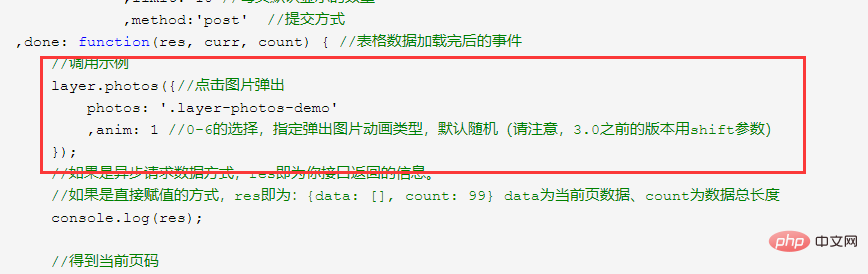 Bind attributes after the table data is loaded
Full code: https: //gitee.com/gezi441/layui-table
The above is the detailed content of Several tips for using layui data tables. For more information, please follow other related articles on the PHP Chinese website!

Hot AI Tools

Undresser.AI Undress
AI-powered app for creating realistic nude photos

AI Clothes Remover
Online AI tool for removing clothes from photos.

Undress AI Tool
Undress images for free

Clothoff.io
AI clothes remover

AI Hentai Generator
Generate AI Hentai for free.

Hot Article
Hot Tools

Notepad++7.3.1
Easy-to-use and free code editor

SublimeText3 Chinese version
Chinese version, very easy to use

Zend Studio 13.0.1
Powerful PHP integrated development environment

Dreamweaver CS6
Visual web development tools

SublimeText3 Mac version
God-level code editing software (SublimeText3)
Hot Topics
 1381
1381
 52
52

 How to set up jump on layui login page
Apr 04, 2024 am 03:12 AM
How to set up jump on layui login page
Apr 04, 2024 am 03:12 AM
Layui login page jump setting steps: Add jump code: Add judgment in the login form submit button click event, and jump to the specified page through window.location.href after successful login. Modify the form configuration: add a hidden input field to the form element of lay-filter="login", with the name "redirect" and the value being the target page address.
 How to get form data in layui
Apr 04, 2024 am 03:39 AM
How to get form data in layui
Apr 04, 2024 am 03:39 AM
layui provides a variety of methods for obtaining form data, including directly obtaining all field data of the form, obtaining the value of a single form element, using the formAPI.getVal() method to obtain the specified field value, serializing the form data and using it as an AJAX request parameter, and listening Form submission event gets data.
 How layui implements self-adaptation
Apr 26, 2024 am 03:00 AM
How layui implements self-adaptation
Apr 26, 2024 am 03:00 AM
Adaptive layout can be achieved by using the responsive layout function of the layui framework. The steps include: referencing the layui framework. Define an adaptive layout container and set the layui-container class. Use responsive breakpoints (xs/sm/md/lg) to hide elements under specific breakpoints. Specify element width using the grid system (layui-col-). Create spacing via offset (layui-offset-). Use responsive utilities (layui-invisible/show/block/inline) to control the visibility of elements and how they appear.
 How to transfer data in layui
Apr 26, 2024 am 03:39 AM
How to transfer data in layui
Apr 26, 2024 am 03:39 AM
The method of using layui to transmit data is as follows: Use Ajax: Create the request object, set the request parameters (URL, method, data), and process the response. Use built-in methods: Simplify data transfer using built-in methods such as $.post, $.get, $.postJSON, or $.getJSON.
 What is the difference between layui and vue?
Apr 04, 2024 am 03:54 AM
What is the difference between layui and vue?
Apr 04, 2024 am 03:54 AM
The difference between layui and Vue is mainly reflected in functions and concerns. Layui focuses on rapid development of UI elements and provides prefabricated components to simplify page construction; Vue is a full-stack framework that focuses on data binding, component development and state management, and is more suitable for building complex applications. Layui is easy to learn and suitable for quickly building pages; Vue has a steep learning curve but helps build scalable and easy-to-maintain applications. Depending on the project needs and developer skill level, the appropriate framework can be selected.
 How to run layui
Apr 04, 2024 am 03:42 AM
How to run layui
Apr 04, 2024 am 03:42 AM
To run layui, perform the following steps: 1. Import layui script; 2. Initialize layui; 3. Use layui components; 4. Import layui styles (optional); 5. Ensure script compatibility and pay attention to other considerations. With these steps, you can build web applications using the power of layui.
 What does layui mean?
Apr 04, 2024 am 04:33 AM
What does layui mean?
Apr 04, 2024 am 04:33 AM
layui is a front-end UI framework that provides a wealth of UI components, tools and functions to help developers quickly build modern, responsive and interactive web applications. Its features include: flexible and lightweight, modular design, rich components, Powerful tools and easy customization. It is widely used in the development of various web applications, including management systems, e-commerce platforms, content management systems, social networks and mobile applications.
 The difference between layui framework and vue framework
Apr 26, 2024 am 01:27 AM
The difference between layui framework and vue framework
Apr 26, 2024 am 01:27 AM
layui and vue are front-end frameworks. layui is a lightweight library that provides UI components and tools; vue is a comprehensive framework that provides UI components, state management, data binding, routing and other functions. layui is based on a modular architecture, and vue is based on a componentized architecture. layui has a smaller ecosystem, vue has a large and active ecosystem. The learning curve of layui is low, and the learning curve of vue is steep. Layui is suitable for small projects and rapid development of UI components, while vue is suitable for large projects and scenarios that require rich functions.
