


How to monitor nginx log data in real time

ngxtop is a python-based program that can be installed on Python. ngxtop parses nginx access logs in real time and outputs the results (useful indicators of the nginx server) to the terminal.

Main functions
Current valid requests
Summary of total request count (recommended learning: nginx tutorial)
Total number of requests served by status code (2xx, 3xx, 4xx, 5xx)
Average bytes sent
Top remote The address
can not only monitor access to Nginx logs in real time, but also troubleshoot and organize previous logs.
Install ngxtop on Linux
First, you need to install PIP (Python Package Management System)
Use root credentials to log in to your Server
Enable the EPEL repository by installing the following package
wget http://dl.fedoraproject.org/pub/epel/7/x86_64/e/epel-release-7-6.noarch.rpm
rpm -ivh epel-release-7-6.noarch.rpm

然后执行以下命令安装pip
yum install python-pip

最后使用下面安装ngxtop
pip install ngxtop
ngxtop usage details
Usage:
 ngxtop [选项]
 ngxtop [选项](print | top | avg | sum)<var>
 ngxtop info
Options:
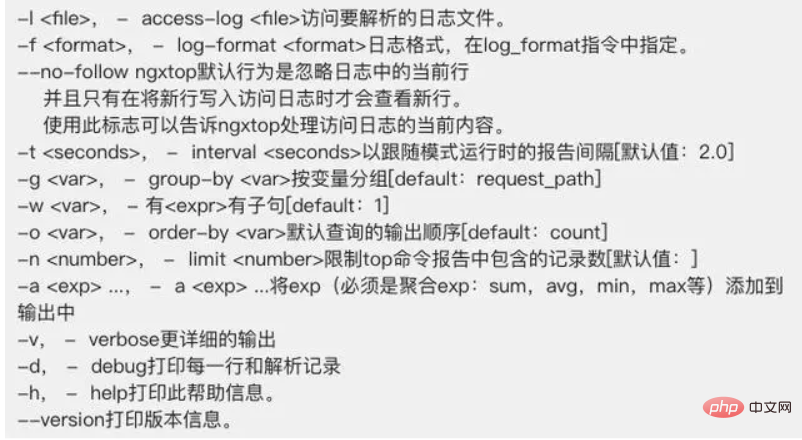
The above is the detailed content of How to monitor nginx log data in real time. For more information, please follow other related articles on the PHP Chinese website!

Hot AI Tools

Undress AI Tool
Undress images for free

Undresser.AI Undress
AI-powered app for creating realistic nude photos

AI Clothes Remover
Online AI tool for removing clothes from photos.

Clothoff.io
AI clothes remover

Video Face Swap
Swap faces in any video effortlessly with our completely free AI face swap tool!

Hot Article
Hot Tools

Notepad++7.3.1
Easy-to-use and free code editor

SublimeText3 Chinese version
Chinese version, very easy to use

Zend Studio 13.0.1
Powerful PHP integrated development environment

Dreamweaver CS6
Visual web development tools

SublimeText3 Mac version
God-level code editing software (SublimeText3)
Hot Topics


 How to start containers by docker
Apr 15, 2025 pm 12:27 PM
How to start containers by docker
Apr 15, 2025 pm 12:27 PM
Docker container startup steps: Pull the container image: Run "docker pull [mirror name]". Create a container: Use "docker create [options] [mirror name] [commands and parameters]". Start the container: Execute "docker start [Container name or ID]". Check container status: Verify that the container is running with "docker ps".
 How to check the name of the docker container
Apr 15, 2025 pm 12:21 PM
How to check the name of the docker container
Apr 15, 2025 pm 12:21 PM
You can query the Docker container name by following the steps: List all containers (docker ps). Filter the container list (using the grep command). Gets the container name (located in the "NAMES" column).
 How to create containers for docker
Apr 15, 2025 pm 12:18 PM
How to create containers for docker
Apr 15, 2025 pm 12:18 PM
Create a container in Docker: 1. Pull the image: docker pull [mirror name] 2. Create a container: docker run [Options] [mirror name] [Command] 3. Start the container: docker start [Container name]
 Choosing Between NGINX and Apache: The Right Fit for Your Needs
Apr 15, 2025 am 12:04 AM
Choosing Between NGINX and Apache: The Right Fit for Your Needs
Apr 15, 2025 am 12:04 AM
NGINX and Apache have their own advantages and disadvantages and are suitable for different scenarios. 1.NGINX is suitable for high concurrency and low resource consumption scenarios. 2. Apache is suitable for scenarios where complex configurations and rich modules are required. By comparing their core features, performance differences, and best practices, you can help you choose the server software that best suits your needs.
 NGINX vs. Apache: Performance, Scalability, and Efficiency
Apr 19, 2025 am 12:05 AM
NGINX vs. Apache: Performance, Scalability, and Efficiency
Apr 19, 2025 am 12:05 AM
NGINX and Apache are both powerful web servers, each with unique advantages and disadvantages in terms of performance, scalability and efficiency. 1) NGINX performs well when handling static content and reverse proxying, suitable for high concurrency scenarios. 2) Apache performs better when processing dynamic content and is suitable for projects that require rich module support. The selection of a server should be decided based on project requirements and scenarios.
 NGINX vs. Apache: A Comparative Analysis of Web Servers
Apr 21, 2025 am 12:08 AM
NGINX vs. Apache: A Comparative Analysis of Web Servers
Apr 21, 2025 am 12:08 AM
NGINX is more suitable for handling high concurrent connections, while Apache is more suitable for scenarios where complex configurations and module extensions are required. 1.NGINX is known for its high performance and low resource consumption, and is suitable for high concurrency. 2.Apache is known for its stability and rich module extensions, which are suitable for complex configuration needs.
 NGINX and Apache: Understanding the Key Differences
Apr 26, 2025 am 12:01 AM
NGINX and Apache: Understanding the Key Differences
Apr 26, 2025 am 12:01 AM
NGINX and Apache each have their own advantages and disadvantages, and the choice should be based on specific needs. 1.NGINX is suitable for high concurrency scenarios because of its asynchronous non-blocking architecture. 2. Apache is suitable for low-concurrency scenarios that require complex configurations, because of its modular design.
 How to execute php code after writing php code? Several common ways to execute php code
May 23, 2025 pm 08:33 PM
How to execute php code after writing php code? Several common ways to execute php code
May 23, 2025 pm 08:33 PM
PHP code can be executed in many ways: 1. Use the command line to directly enter the "php file name" to execute the script; 2. Put the file into the document root directory and access it through the browser through the web server; 3. Run it in the IDE and use the built-in debugging tool; 4. Use the online PHP sandbox or code execution platform for testing.
