


How to solve the problem of github submitting code without grid update

Today I found that the github submitted code suddenly had no grid update. Then I looked at the problem and it turned out to be an email problem. I would like to share the solution here.
I have changed my email address before, so look at the picture,
Check whether the email address you set is consistent with the email address submitted by local git, if not, change it
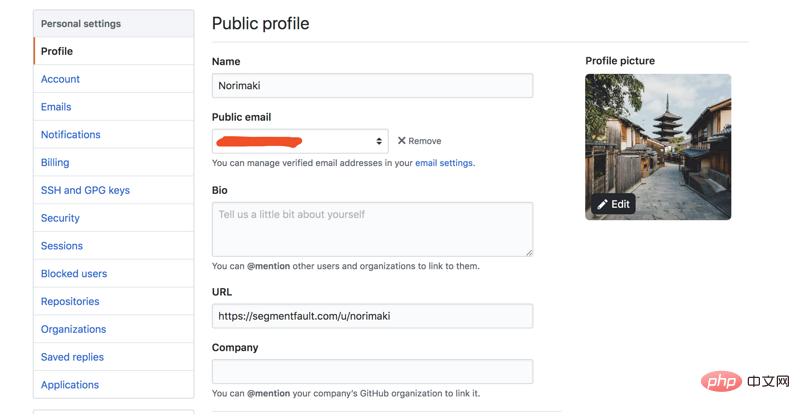
Or change your local email address
View the git log locally Command: git log
git config --global user.email "example@norimaki.cn"
Isn’t it super simple? Then go try it quickly!
Yes, one more thing, you can go to Git video tutorial to learn more about it!
The above is the detailed content of How to solve the problem of github submitting code without grid update. For more information, please follow other related articles on the PHP Chinese website!

Hot AI Tools

Undresser.AI Undress
AI-powered app for creating realistic nude photos

AI Clothes Remover
Online AI tool for removing clothes from photos.

Undress AI Tool
Undress images for free

Clothoff.io
AI clothes remover

AI Hentai Generator
Generate AI Hentai for free.

Hot Article
Hot Tools

Notepad++7.3.1
Easy-to-use and free code editor

SublimeText3 Chinese version
Chinese version, very easy to use

Zend Studio 13.0.1
Powerful PHP integrated development environment

Dreamweaver CS6
Visual web development tools

SublimeText3 Mac version
God-level code editing software (SublimeText3)
Hot Topics
 1386
1386
 52
52

 How to open a terminal for macos
Apr 12, 2025 pm 05:30 PM
How to open a terminal for macos
Apr 12, 2025 pm 05:30 PM
The following five methods can be used to open a macOS terminal: Use Spotlight Search through application folders Use Launchpad to use shortcut keys Command Shift U through terminal menus
 How to view the system name of macos
Apr 12, 2025 pm 05:24 PM
How to view the system name of macos
Apr 12, 2025 pm 05:24 PM
How to view system name in macOS: 1. Click the Apple menu; 2. Select "About Native"; 3. The "Device Name" field displayed in the "Overview" tab is the system name. System name usage: identify Mac, network settings, command line, backup. To change the system name: 1. Access About Native Machine; 2. Click the "Name" field; 3. Enter a new name; 4. Click "Save".
 How to delete more than server names of apache
Apr 13, 2025 pm 01:09 PM
How to delete more than server names of apache
Apr 13, 2025 pm 01:09 PM
To delete an extra ServerName directive from Apache, you can take the following steps: Identify and delete the extra ServerName directive. Restart Apache to make the changes take effect. Check the configuration file to verify changes. Test the server to make sure the problem is resolved.
 How to record macos screen
Apr 12, 2025 pm 05:33 PM
How to record macos screen
Apr 12, 2025 pm 05:33 PM
macOS has a built-in "Screen Recording" application that can be used to record screen videos. Steps: 1. Start the application; 2. Select the recording range (the entire screen or a specific application); 3. Enable/disable the microphone; 4. Click the "Record" button; 5. Click the "Stop" button to complete. Save the recording file in .mov format in the "Movies" folder.
 How to open macos terminal
Apr 12, 2025 pm 05:39 PM
How to open macos terminal
Apr 12, 2025 pm 05:39 PM
Open a file in a macOS terminal: Open the terminal to navigate to the file directory: cd ~/Desktop Use open command: open test.txtOther options: Use the -a option to specify that a specific application uses the -R option to display files only in Finder
 How to install fonts for macos
Apr 12, 2025 pm 05:21 PM
How to install fonts for macos
Apr 12, 2025 pm 05:21 PM
Steps to install fonts in macOS: Download the font file from a reliable source. Use the font preview program or terminal to install it into the system font folder (the sudo command is required to share it by users). Verify the installation in Font Book. Select the installed font to use in the application.
 Who invented the mac system
Apr 12, 2025 pm 05:12 PM
Who invented the mac system
Apr 12, 2025 pm 05:12 PM
The macOS operating system was invented by Apple. Its predecessor, System Software, was launched in 1984. After many iterations, it was updated to Mac OS X in 2001 and changed its name to macOS in 2012.
 How to take screenshots of macos
Apr 12, 2025 pm 05:36 PM
How to take screenshots of macos
Apr 12, 2025 pm 05:36 PM
There are four screenshot methods on macOS: shortcut keys, touch bars, preview apps, and third-party apps. After the screenshot, the image will be automatically saved to PNG format on the desktop, and you can adjust the format, delay, save position, and floating thumbnail settings through System Preferences.
